![[CTL] Calm The Leaks logo](https://media.forgecdn.net/avatars/thumbnails/1653/489/64/64/639054583531578399.png)
[CTL] Calm The Leaks
- By
This mod extends atl outputs, recognises leak trends, and then recommends fixes based of confidence levels after leveraging spark data. CTL doesn't hide real problems - it filters startup noise and false positives so you can focus on real leaks.
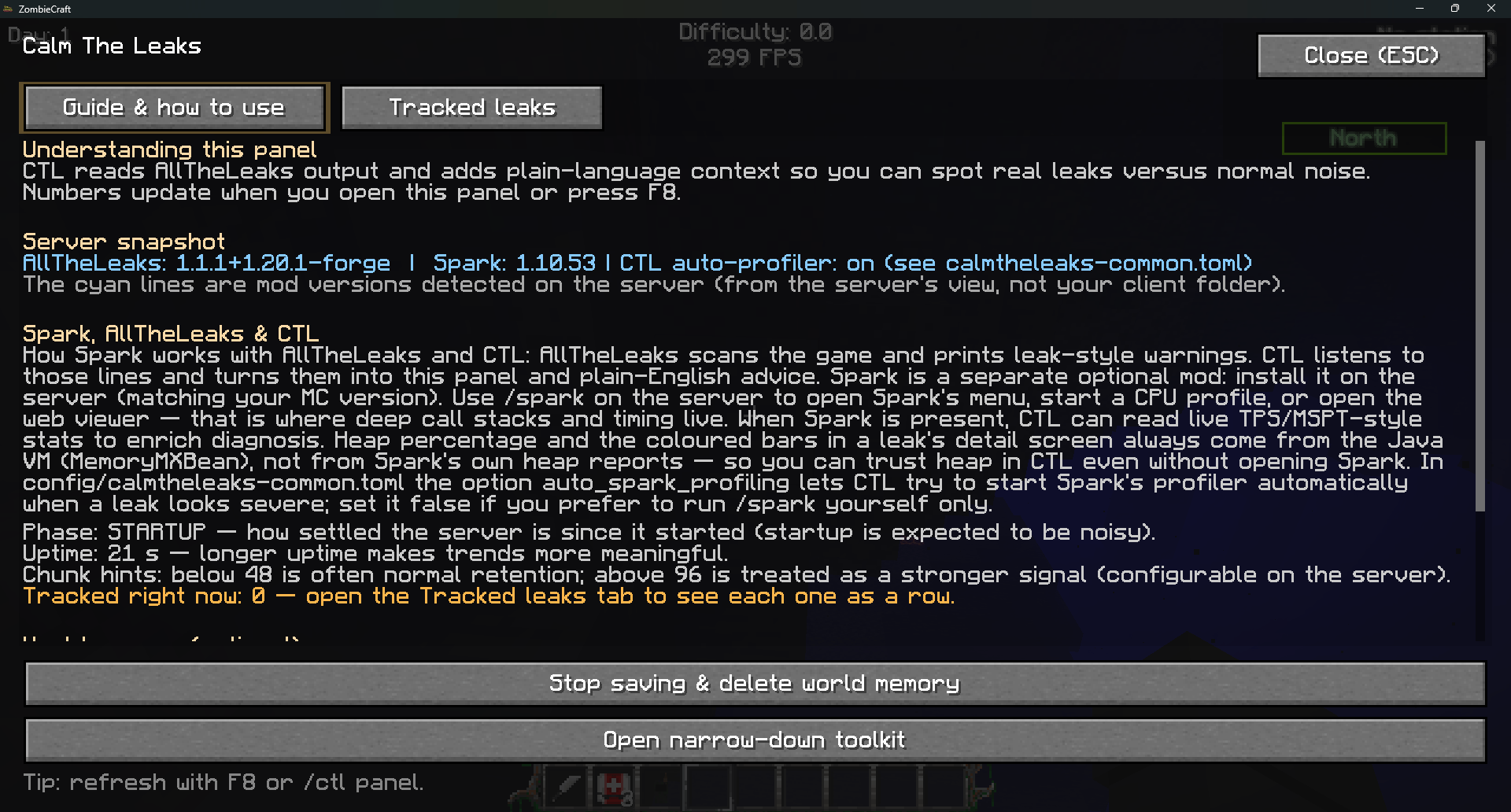
CTL 1.2 Showcase.png
Extra_Special_K | Calm The Leaks (...
Create a server, get 25% off your first month

Description
Calm The Leaks
Improved diagnosis with a full in-game diagnostics GUI - press F8 or run /ctl panel to open it.
Calm The Leaks is a companion mod for AllTheLeaks that filters out false alarms and provides intelligent leak analysis. It doesn't replace ATL - it works alongside it to make the output more human friendly and diagnosable.
What It Does:
CTL intercepts ATL's leak reports and evaluates them with context. It suppresses false alarms like stable chunk retention from claiming mods, startup noise, and transitional false positives. Real leaks still get through, but now they come with actual explanations about what's causing them and how to fix it.
The mod performs real-time analysis of your modpack to identify which mods are likely causing leaks. It builds confidence over time and only suggests fixes when it's reasonably certain of the cause. If you have Spark installed, CTL can trigger profiling when a leak looks severe (configurable); heap percentages shown in the GUI come from the JVM.
How It Works:
CTL tracks every leak ATL reports, but it doesn't immediately panic. Instead, it watches for patterns: is the leak growing? Is it stable? Does it correlate with specific mods? It accounts for server phases (startup, warmup, live) and only escalates when something is actually wrong.
When a leak is detected, CTL analyses your installed mods to identify likely culprits. It looks for mod conflicts, checks memory pressure, and monitors trends over time. The more data it gathers, the more confident its recommendations become.
How To Use It:
Just install it alongside AllTheLeaks. CTL automatically intercepts ATL's output and filters it.
Open the diagnostics GUI with F8 or /ctl panel. The Guide & how to use tab explains CTL and shows a server snapshot; the Tracked leaks tab lists leaks - click a row for the full diagnosis. Ops can optionally enable world leak memory from the guide tab, or open the narrow-down toolkit for snapshot/compare while you change mods (restart between tests; use /ctl narrow).
By default, /ctl status, /ctl leaks, and /ctl explain open that GUI instead of spamming chat. Set prefer_diagnostics_gui to false in config/calmtheleaks-common.toml if you prefer chat-only output.
You can also use these commands:
/ctl panel - Opens the diagnostics GUI
/ctl status - Shows current CTL status and a summary of tracked leaks (or opens the GUI by default)
/ctl leaks - Lists all tracked leaks grouped by mod (or opens the GUI by default)
/ctl explain - Provides detailed diagnosis for each leak with confidence levels and recommendations (or opens the GUI by default)
/ctl narrow - Narrow-down toolkit: snapshot, compare, mod list, etc. (restart the game between pack changes)
CTL is fully configurable:
You can adjust thresholds for baseline retention, grace periods, escalation levels, Spark behaviour, and GUI vs chat in config/calmtheleaks-common.toml.
Important:
This mod requires AllTheLeaks to function. It does not replace ATL - it extends it with context and intelligence. ATL still does all the detection work; CTL just makes the output more human friendly and diagnosable. If you use the GUI on a dedicated server, run the same CTL build on server and clients so the panel stays in sync.
[CTL] Calm The Leaks Team

Owner




![[ESN] Extra Special Network project image](https://media.forgecdn.net/avatars/thumbnails/2041/99/256/256/639247549925809388.png)