Cross Server Chat
- By
CrossServerChat is a simple yet powerful serverside networking tool that links chat, The mod is server-only, so players do not need to install anything. Discord acts as the shared mailbox. No proxy, Redis, or Velocity setup is required.
Description
Cross Server Chat:
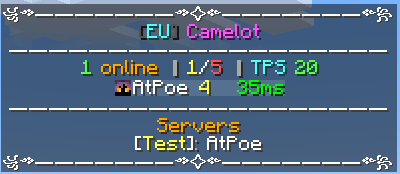
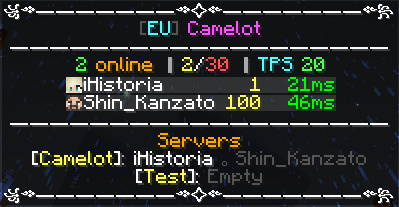
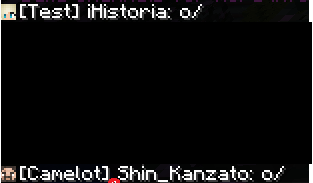
Cross Server Chat is a simple yet powerful serverside networking tool that links chat, TAB, and operator commands across multiple Minecraft worlds through one Discord channel. The mod is server-only, so players do not need to install anything. Each world keeps its own identity with a [ServerName] tag, while Discord acts as the shared mailbox. No proxy, Redis, or Velocity setup is required.
Cross-Server Chat:
- Share player chat across every linked world in the format [Camelot] Poe: hello
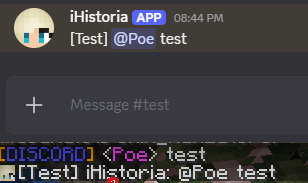
- Optional Discord webhook so messages use the player's name and skin
- Optional Discord-to-Minecraft chat as [Discord] name: message
- Optional join and leave broadcasts on every linked world
- Works beside Discord Integration when you use a different bot and a different channel
- Loop-safe identity so a world never echoes its own messages back to itself
Network TAB:
- Custom header and footer with Minecraft color codes
- Live network list with %worlds%, player counts, and TPS
- Per-viewer name colors: you can be gold while other players stay white
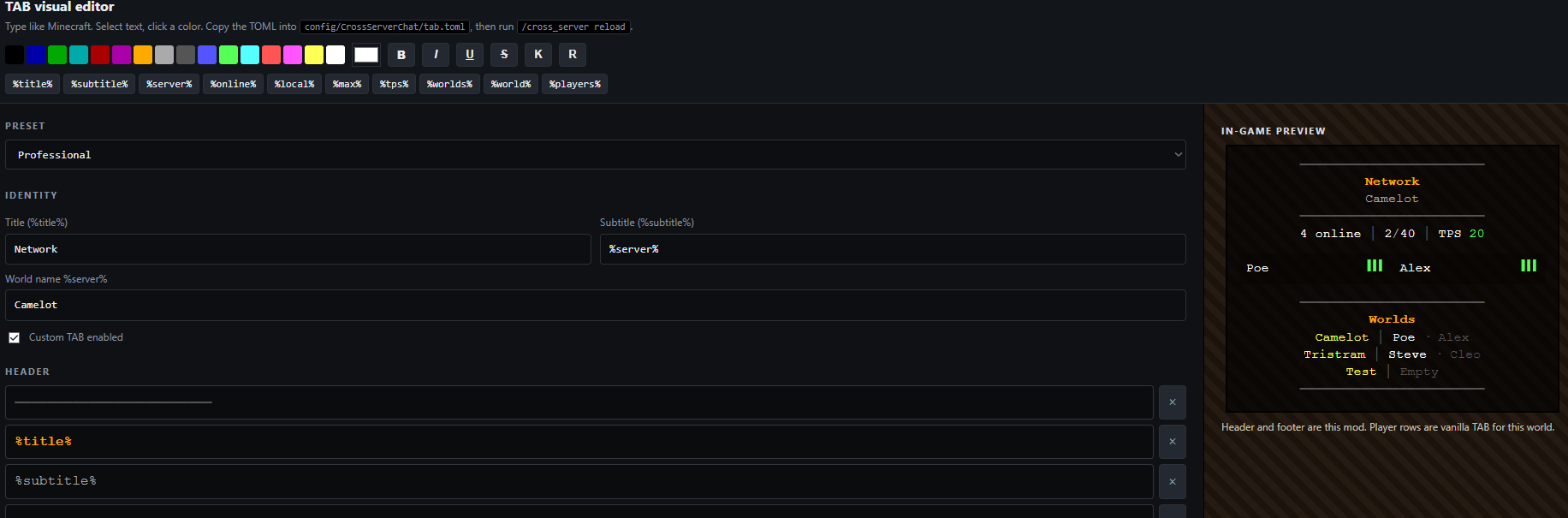
- Visual HTML editor written to config/CrossServerChat/tab-editor.html
- Instant apply with /cross_server reload, no server restart
- Optional ranks from ranks.toml, e.g. [Dev] Poe in chat and TAB
Network Commands:
- /server_all <command> plus /y confirmation to run an operator command on every linked world
- /cross_server reload and /csc reload to reload config.toml and tab.toml
- Command packets are removed from Discord after other worlds have read them
Setup Guide:
1. Create a Discord bot:
- Open the Discord Developer Portal and create a new application
- Open Bot, create the bot, and copy the token
- Enable Message Content Intent
- Invite the bot with View Channel, Send Messages, Read Message History, and Manage Messages
- Do not reuse the Discord Integration bot
2. Create a dedicated Discord channel:
- Make a channel only this mod will use
- Do not reuse the Discord Integration chat channel
- Enable Discord Developer Mode, right-click the channel, and copy the Channel ID
- Optional: create a webhook in that channel if you want player names and skins in Discord. The same webhook URL can be used on every world
3. Edit config/CrossServerChat/config.toml on every world:
- serverName must be unique per world, for example Camelot, Tristram, Test
- botToken, channelId, and webhookUrl must be the same on every world
- allowDiscordChat = true if people should be able to talk from Discord into Minecraft
- broadcastJoin and broadcastLeave default to false
- hideCommandMessages = true keeps /server_all packets from sitting in the Discord channel
- Run /cross_server reload or restart after saving you custom player list tab
4. Edit TAB:
- Open config/CrossServerChat/tab-editor.html in a browser
- Design the header, footer, world list, your TAB name color, and other players' TAB name color
- Copy or save the TOML into config/CrossServerChat/tab.toml
- Run /cross_server reload
5. Ranks:
- Edit config/CrossServerChat/ranks.toml
- Put player names (or UUIDs) on a rank list
- Prefixes such as &b[Dev]&r show in chat, TAB (%rank%)
- Copy the same ranks.toml to every linked world
- Run /cross_server reload
Placeholders:
- %title% %subtitle% %server% %online% %local% %max% %tps%
- %worlds% %world% %count% %players% %player% %rank% %level% %chapter% %more%
- %rank% is the prefix from ranks.toml (empty if the player is on no list)
- %level% is Mine and Slash combat level when mineAndSlash = true
- %chapter% is the current FTB Quests chapter when ftbQuests = true (completed quests, not readme ticks)
- Optional ftbChapterMarkers in tab.toml sets start:end quest IDs per chapter; ftbQuestIds is only a filter when markers are empty
Join my Discord server: Here
Terms of use:
 You are welcome to include this mod in any modpack
 You may not re-release this mod as your own
Cross Server Chat Team

Owner

![Cross Server Shops [LightmansCurrency] project image](https://media.forgecdn.net/avatars/thumbnails/2077/862/256/256/639262263740119933.png)