Create: Tractor Beams
- By
Pick up, carry and spin whole sable contraptions with a tractor beam
Screenshot 2026-10-10 000224.png
Screenshot 2026-10-10 000345.png
Screenshot 2026-10-10 000312.png
Description
Create: Tractor Beams
Pick up, carry and spin whole contraptions with a beam of light. Freeze runaway airships in mid-air. Steer it all from a desk with a real mouse and keyboard.
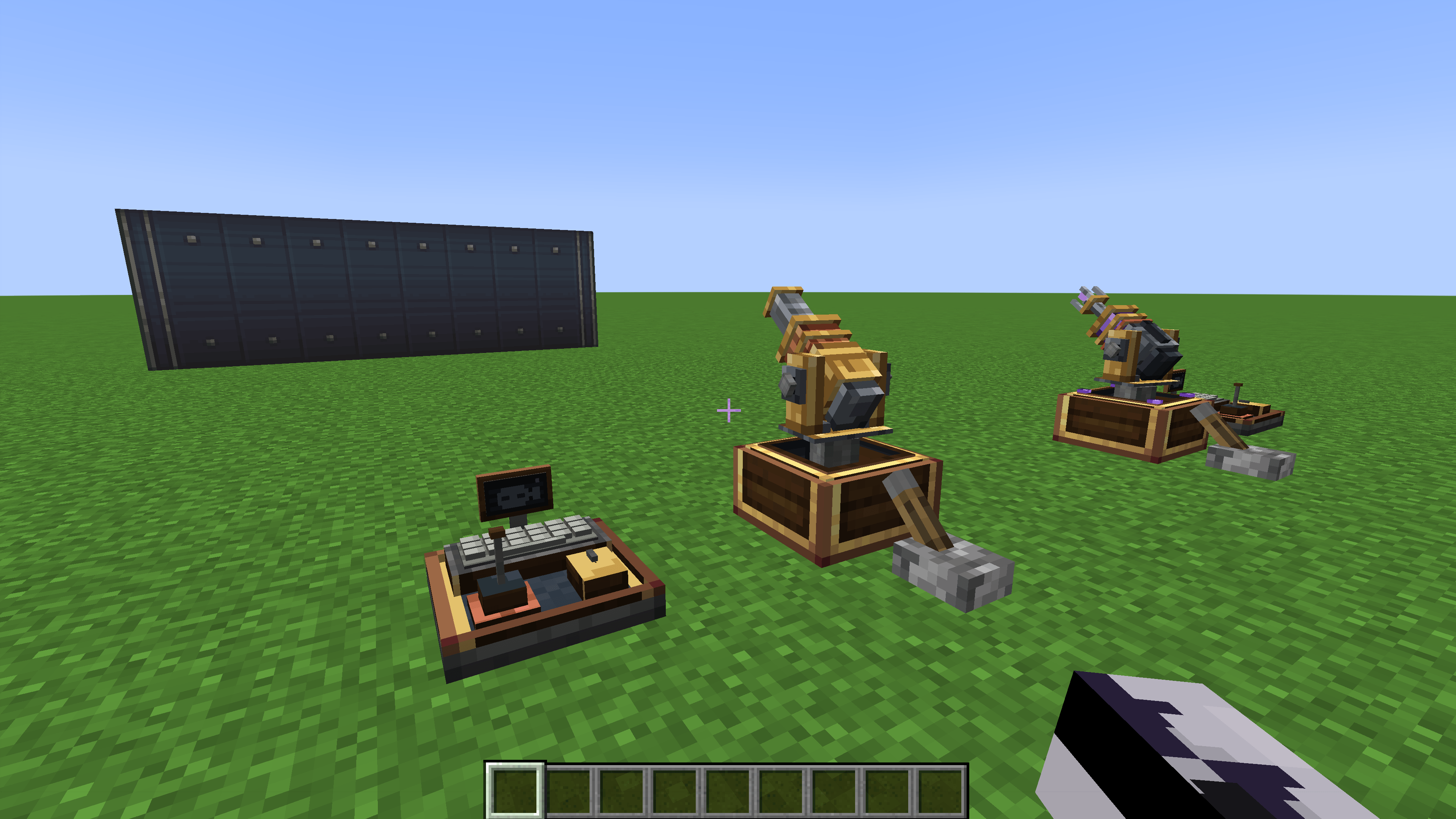
Create: Tractor Beams is an addon for Create Aeronautics. It adds gimbal-mounted tractor beam turrets that grab Aeronautics physics contraptions, mobs and players and haul them around. It also adds a stasis gun that locks them in place, and a Linked Mouse & Keyboard that turns your actual mouse and keyboard into Create link signals. Every control runs on ordinary Redstone Link frequencies, so it fits straight into the way you already build with Create.
Requirements
- Minecraft 1.21.1 with NeoForge 21.1+
- Create 6.0.10+
- Create Aeronautics (Simulated 1.3+)
- Sable 2.0+
Install it on both the client and the server.
What's in the mod
| Block | Survival? | What it does |
|---|---|---|
| Tractor Beam | Craftable | Kinetic turret that picks up, moves and rotates contraptions, mobs and players |
| Stasis Gun | Craftable | Same turret body, but it fires bolts of stasis plasma that freeze things in place |
| Linked Mouse & Keyboard | Craftable | Sit at it and your mouse, scroll wheel and keys become link signals |
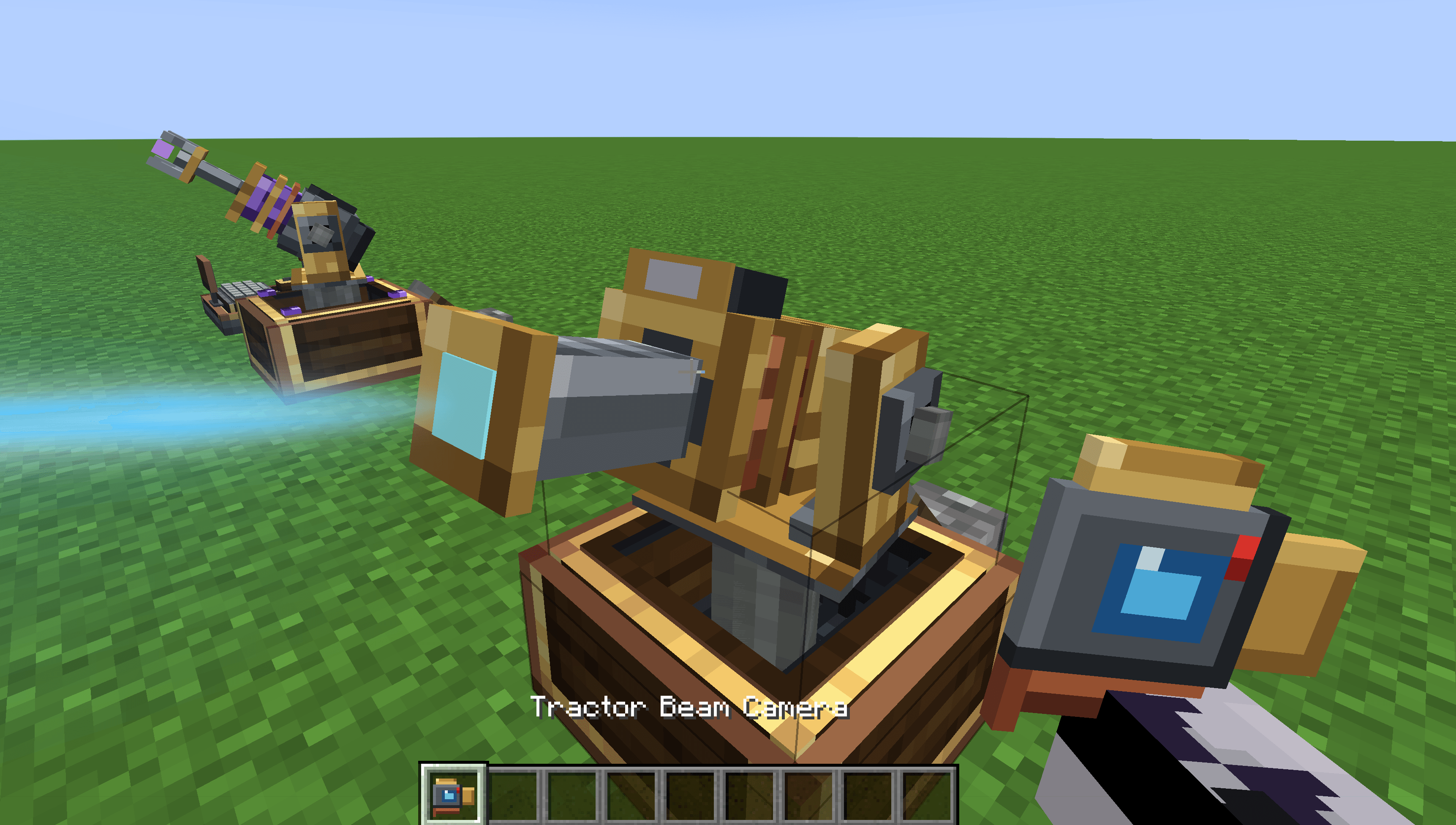
| Tractor Beam Camera | Craftable | Fits on a turret's barrel so you can look down the barrel |
| Creative Tractor Beam / Stasis Gun | Creative | Need no power. Unlimited lift / 5-minute freeze, with the camera already fitted |
| Creative Linked Mouse & Keyboard | Creative | One blank, plus two that come pre-linked to the creative beam and gun |
Every block has Ponder scenes: hold W over the item to see how it works. They're also grouped under a Tractor Beams tag in the Ponder index.
Recipes
- Tractor Beam: Eye of Ender (top), Electron Tube – Precision Mechanism – Electron Tube (middle), Brass Casing (bottom)
- Stasis Gun: Amethyst Shard – Eye of Ender – Amethyst Shard (top), Electron Tube – Precision Mechanism – Electron Tube (middle), Brass Casing (bottom)
- Linked Mouse & Keyboard: Wooden Button – Redstone Link – Wooden Button over 3 Brass Sheets
- Tractor Beam Camera: Spyglass over Brass Sheet – Electron Tube – Brass Sheet
The Tractor Beam
Powering it
It's a Create kinetic block. Run a shaft into the face it's mounted on. It needs 128 RPM or more and costs 8 stress units per RPM. With power, it unfolds over about three seconds:
The hatch slides open.
The walls telescope down.
The turret rises out on its shaft.
The barrel swings onto its aim and the nozzle extends.
Each step has its own sound. Losing power drops whatever it's holding and folds it all back up.
- Reach scales with speed: 30 blocks at 128 RPM, up to 50 blocks at 256 RPM.
- Mount it on any face: floor, wall, ceiling or the side of a ship. It aims anywhere in the half-sphere in front of its mount and can tilt a little below level. It never flips over or spins wildly when you aim straight out.
- Re-skin it: right-click with brass, andesite, copper or train casing, industrial iron, a brass, zinc or andesite alloy block, or refined radiance or shadow steel casing.
Controls
Right-click the beam to open its control panel. Each control takes a two-item frequency, exactly like a Redstone Link. Drive it from Redstone Links, Create's Linked Controller or the Linked Mouse & Keyboard. Signals are analog: strength 15 is full speed, lower is slower.
- Grab / Drop
- Aim left / right / up / down
- Pull In / Push Out
- Rotate the held object: turn, tilt and roll, each both ways
- Camera On/Off
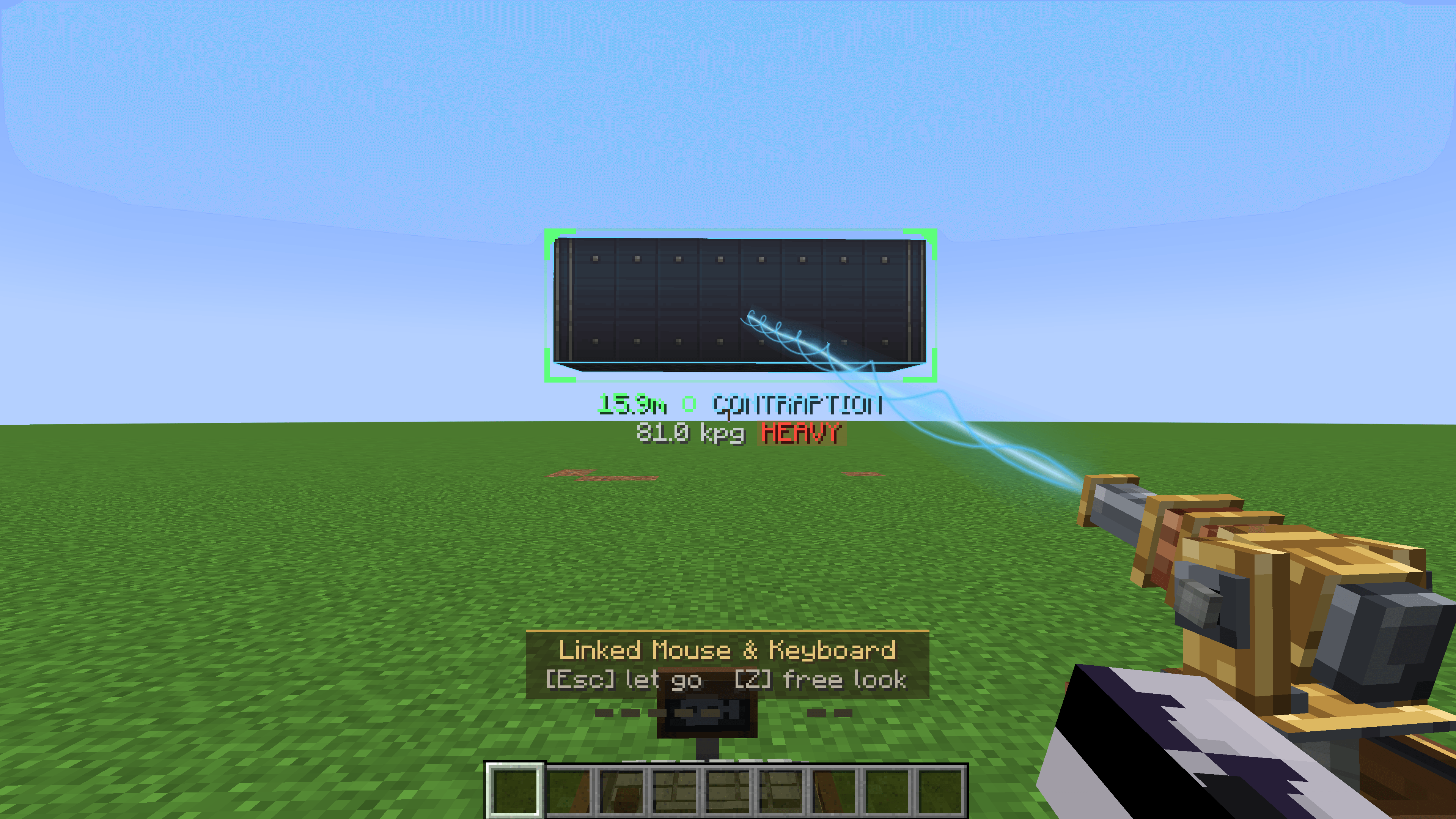
While you're steering, a dashed aim line shows where the beam points. It turns green and outlines the target when there's something to grab.
What it can pick up
- Contraptions: any Create Aeronautics physics contraption. By default the beam outlines the whole contraption and holds it by its centre of mass. A config option makes it latch onto the single block it hits instead, like the Physics Staff.
- Mobs and players: they're floated to the hold point with no fall damage. A held player can crouch to break free.
- If a held contraption breaks apart, the beam keeps hold of the biggest piece and re-centres on it.
- Grabbing a contraption that was locked with a Physics Staff, or frozen by a stasis gun, releases it.
Weight & teamwork
Each beam can lift 100 kpg, which is enough for a full 3×3×9 Create item vault. Loads fall into three weight classes:
- 🟢 LIGHT: follows the beam instantly.
- 🟡 NORMAL: a little momentum, still nimble.
- 🔴 HEAVY: slow to get going. Builds speed if you move it smoothly and lags behind if you yank it around. Turns and reels in more slowly too.
Too heavy for one beam? The beam still latches on, but the load won't budge. Point more beams at it and their lift capacity adds up.
- Every beam on a load shares the weight equally, so none of them is in charge.
- Turning the load with one beam turns it for all of them.
- More beams also make it handle lighter. An 81 kpg vault is HEAVY on one beam, NORMAL on two and LIGHT on three.
- Up to 10 beams can hold one object.
Mounted on a ship, a beam pulls between the two bodies, so a small ship lifting something heavy gets tugged too.
The tether
The beam needs a clear line to whatever it's holding.
- Blocked: if terrain or another contraption cuts the line, the beam turns amber (Tether Interrupted).
- Breaking: after a few seconds it flashes red (Tether Breaking), and then it snaps and drops the load.
- Strained: dragging a load too hard or too far off your aim strains the tether the same way. That includes trying to drag something too heavy to move.
- Recovering: clear the problem in time and it recovers.
Heavy loads that trail behind make the beam curve round to them.
Target readout
While you're steering a beam, the target gets a bracket box showing:
- its distance
- its name
- its mass and weight class
- how many beams share it and their combined lift
- the tether status with a countdown bar
The tether warning stays on screen even if the load drifts out of view.
The Stasis Gun
Built, powered, mounted and controlled just like the Tractor Beam, with its own violet-cored turret. Its panel has just Fire, Aim and Camera.
- Fire launches a bolt of stasis plasma, one shot every 4 seconds. The core dims and recharges between shots.
- Reach: 30–50 blocks depending on RPM.
- A hit freezes a contraption in place. Lighter things stay frozen longer:
- Light (up to 160 kpg): 3 minutes
- Normal (up to 400 kpg): 1 minute
- Heavy (around a light airship and up): 10 seconds
- Past 1000 kpg it can't hold them at all.
- Hitting something again tops the time up. Frozen contraptions glow with a pulsing violet outline, which blinks in the last few seconds.
- Mobs and players are held in place for 5 seconds (you can turn this off).
- Tractor beams and stasis cancel each other out: a beam grabbing a frozen contraption ends its stasis, and a stasis bolt hitting something a beam is holding cuts the beam loose.
- Engineer's Goggles: look straight at anything frozen to see how long it has left.
- Terrain is never affected, bedrock included.
- Stasis timers are saved with the world.
The Linked Mouse & Keyboard
A desk with a keyboard, a mouse, a joystick and a little camera monitor, all of which animate for everyone nearby.
- Right-click to sit at it. Your mouse and keys now drive whatever's linked. Esc lets go.
- Sneak + right-click opens the binding screen:
- Mouse: left, right and middle click, side buttons (Mouse 4–8), scroll up and down
- Movement: mouse movement becomes analog left / right / up / down signals, plus a second set used while a rotate button is held (right click by default)
- Keyboard: 30 rows of keys
- Free Look (default Z, hold or toggle): look around without moving anything bound to the mouse.
- Your movement keys are blocked while you're seated, so you won't wander off.
Camera
Fit a Tractor Beam Camera to a turret and bind its Camera On/Off control. When it's switched on from a Linked Mouse & Keyboard, you look down the barrel with a viewfinder HUD and keep steering it like a gun camera.
- You need Engineer's Goggles on to see through the camera.
- The camera only works from a Linked Mouse & Keyboard.
- The desk's monitor lights up when a linked beam has a camera, and glows bright while that camera is on.
Creative quick-start
Place a Creative Tractor Beam and the Creative Linked Mouse & Keyboard (Tractor Beam). They're already linked:
| Input | Action |
|---|---|
| Left click | Grab / drop |
| Mouse | Aim |
| Hold right click + mouse | Rotate the held object |
| Scroll or W / S | Push out / pull in |
| Q / E | Roll |
| C | Camera on / off |
The Creative Stasis Gun set works the same way: left click fires, the mouse aims and C toggles the camera. Need several independent sets? Right-click both creative blocks with the same dye to re-tune them.
Handy extras
- Clipboard copying: right-click a beam or controller with a Create Clipboard to copy its setup, then right-click others to paste it. Sneak-right-click a beam or controller to clear the clipboard.
- Wrench-friendly: sneak-wrench a beam to pick it up with its bindings intact.
- Shader friendly: only the beam's thin core glows, so it looks right with shader packs.
- Engineer's Goggles on a beam show its reach, lift capacity, what it's holding and how many beams share the load.
Configuration
Almost everything is configurable in create_tractor_beams-server.toml, including:
- reach and RPM requirements
- lift capacity and weight classes
- aim, turn and reel speeds
- tether timings and whether it can break
- hold-to-grab or toggle grab
- stasis durations, cooldown and creature freezing
- whether players and mobs can be grabbed at all
Operators can also change most number settings in game with /tractorbeam <setting> <value>.
The client config covers mouse sensitivity, free-look toggle, aim line thickness, the camera crosshair and tether sounds.
AI was used to assist with the creation of this mod
Found a bug or have an idea? Leave a comment or open an issue
Create: Tractor Beams Team