


Create : Tick Control
- By
Create Tick Control optimisation smart block entities ticks optimise create server and client
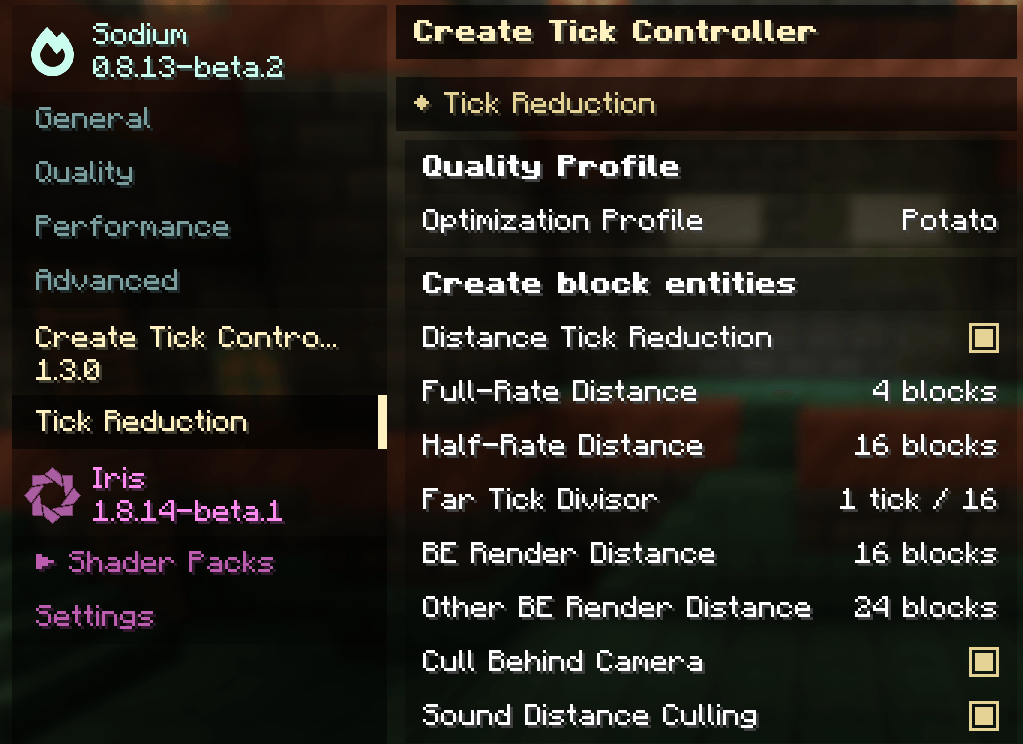
image.png
Description
Create Tick Controller
Server TPS + Client FPS optimization for Create — with field-measured gains
Create Tick Controller optimizes Create factories on both sides of the wire. On the server, it throttles idle machinery, backs off jammed logistics, and coalesces kinetic recalculations to protect TPS. On the client, it reduces the tick and render cost of distant machinery to recover FPS — field-measured on a production-scale base: 6–10 FPS → 60+ FPS.
Everything is opt-out, configurable in game, and honest about trade-offs: lossless optimizations are on by default, visible ones are behind sliders you control, and every option's tooltip carries its measured gain.
📊 Measured results
Client (spark-profiled, production-scale Create base — NeoForge 1.21.1, Sodium 0.8, Iris, Flywheel):
| Metric | Before | After |
|---|---|---|
| FPS in the base | 6–10 | 60+ |
| Drawing Create machines (share of frame) | 25.7% | 1.1% |
| Sound handling (share of frame) | ~16% | ~8% (rest is genuinely audible, capped) |
| Create client tick cost | baseline | −71% at defaults, −93% on Potato |
Server (controlled benchmarks, i7-10700K):
| Scenario | Without mod | With mod |
|---|---|---|
| 500-belt loop | 78.5 MSPT / 12.7 TPS | 38.1 MSPT / 20 TPS (global ÷4) |
| 50 millstones + 50 presses + 100 funnels | 89.2 MSPT / 11.2 TPS | 41.3 MSPT / 20 TPS (÷4) |
| Real mixed factory (belts, arms, trains) | 125.4 MSPT / 8 TPS | 38.7 MSPT / 20 TPS (per-type tuning) |
On top of the divisor system, the exponential backoffs (below) remove the cost of jammed logistics entirely — blocks stuck retrying against a full chest go from a full scan every tick to near zero, without slowing working machines at all.
🚀 Quick start
Server admins: drop the jar in mods/, done — safe defaults are active (emergency MSPT protection + all backoffs). Tune live with /tickcontrol, or open the web dashboard for a lag heatmap of your world.
Players chasing FPS: install the mod client-side too, then one command:
/ctcclient quality potato
That's the 6→60 FPS configuration. Profiles: ultra (max visuals, lossless only) · normal (imperceptible defaults) · light (aggressive) · potato (FPS above all). Also available as a selector in Sodium's Video Settings ("Tick Reduction" page) and in the Mods-list config screen.
🖥️ Client-side optimization suite
Every Create block entity also ticks and renders on the client — animation lerps, belt item simulation, dynamic renderers. In a big base that's thousands of ticks and draws per frame; the F3 profiler shows tick starving gameRenderer. Five independent systems fix this. All are local to each client, purely visual, and never affect server logic, item transport, or other players.
Distance-based tick reduction
Create block entities tick at full rate near the camera (default < 32 blocks), every 2nd tick in the mid band (32–64), every Nth beyond (default ÷4, up to ÷16). The loaded area grows with the square of distance — at 12 chunks render distance, ~97% of machinery sits beyond 32 blocks — so the defaults remove ~71% of the Create client tick cost (~93% on Potato) while everything you can see up close stays flawless.
The key reason this is invisible: kinetic rotation (shafts, wheels, fans) is computed at render time, not tick time — it stays perfectly smooth at any distance, even throttled. What actually slows beyond 32 blocks: belt items and flap animations advance in bigger steps (imperceptible at that range; any belt event re-snaps them). A per-position phase offset spreads the remaining work evenly, so the saving never bunches into a periodic stutter. Ponder scenes, contraptions (trains, elevators — they're entities), and ambient machine sounds (full-rate zone covers their range) are untouched.
Create BE render distance — the 6→60 FPS lever
Vanilla draws every visible block entity's dynamic renderer out to 64 blocks, every frame. On the reference base this was the single biggest frame cost: 25.7% of the render thread. This slider culls Create renderers beyond your chosen radius, on both the vanilla and Sodium render paths — and cost falls with the radius squared: 32 draws ~1/4 as many as 64, 8 draws ~1/64. Field-measured: 6–10 FPS at 64 → 60 FPS at 8.
Why the base still looks intact: with Flywheel's backend on (default), machine bodies are GPU-instanced outside this path and stay visible at any distance. What disappears beyond the radius is the dynamic layer — belt items, dial needles, text — illegible from that far anyway. (With /flywheel backend off, whole machines would vanish beyond the radius; keep the backend on.)
Behind-camera culling
Sodium frustum-culls whole 16³ sections, but standing inside a machine hall, the surrounding sections stay "visible" while half their machines are behind you. This culls block entities whose entire render bounding box is behind the view plane. Correctness details that matter: long machines (belts) are tested by their full box, so a belt whose controller is behind you but which extends ahead keeps rendering — nothing visible ever disappears; and the check auto-disables during Iris shadow passes, so machines behind you still cast shadows with shaders. Measured: combined with the render distance, near-machine rendering went from 19.6% to 1.1% of the frame.
Other-BE render distance
The same culling for non-Create block entities: vanilla chests, signs, banners, other mods' containers (measured ~4% of the frame combined). Off by default — unlike Create machines, these are entirely renderer-drawn and visibly disappear beyond the radius. 24–32 is the reasonable aggressive value.
Sound distance + spam culling
A hidden vanilla cost, found by decompiling: SoundEngine.play blocks the render thread on a CompletableFuture to create an audio channel for every sound received — and vanilla never culls sounds by distance, while servers broadcast them to 64 blocks when most are audible at 16. Measured at ~16% of the frame in a loud factory. Three filters: positional sound packets beyond 48 × max(1, volume) blocks are dropped before any processing (3× the audible radius — lossless); at most 6 starts of the same sound per tick; at most 16 total server-sound starts per tick (20 identical clanks are indistinguishable from 6). Measured after: ~8%, the remainder being din you can actually hear. Client-local sounds — your footsteps, UI, music — are untouched.
Where to control it
- Sodium Video Settings → "Tick Reduction" page: quality profile selector, sliders, toggles — every tooltip with its measured gain, localized (en/fr). Works with both Sodium generations on 1.21.1 (0.8+ via the official Config API, 0.6 via an optional hook), zero added dependencies; without Sodium the page simply doesn't exist.
/ctcclient— client command, works on any server:quality <profile>, tick presets,render <8-64>,set <full> <reduced> <divisor>, bare for status.- Mods list → Create Tick Controller → Config — NeoForge's built-in config UI.
config/createtickcontroller-client.toml— everything, including sound fine-tuning.
⚙️ Server-side optimization suite
Tick divisors (the core system)
Reduce how often Create block entities tick: globally, per machine type, with a blacklist for critical types. A divisor of 4 means each block entity processes every 4th tick (~75% cost reduction for that type); position-based offsets spread entities across frames so the load stays flat instead of spiking. Client animations sync automatically — gears visually rotate slower to match the real processing speed, so throttling is never confusing desync.
Game tick     1     2     3     4     5     6     7     8
Divisor 4:   TICK  skip  skip  skip  TICK  skip  skip  skip
4 belts:     A     B     C     D     A     B     C     D     ← offsets keep load flat
/tickcontrol global <1-200>·/tickcontrol type <TypeName> <1-200>·/tickcontrol blacklist add <TypeName>·/tickcontrol list·/tickcontrol status- Ships with a sensible default blacklist (train stations, signals, sequenced gearshifts, logistics packagers…).
- Works with Create addons: anything extending
SmartBlockEntityis covered.
Emergency MSPT protection
A reactive safety net: when MSPT crosses a threshold (default 55 ms), an emergency divisor overlay ramps up in steps; when MSPT recovers (below 45 ms), it steps back down. The overlay is max(manual, emergency) — it never fights your manual settings, and the threshold/recovery gap prevents oscillation. /tickcontrol dynamic pause|resume to override during maintenance.
Exponential backoff for jammed logistics
The divisor system slows everything a little; the backoffs remove the cost of blocks that are stuck entirely. Principle: every attempt that moves nothing doubles the wait (2, 4, 8… ticks, capped at 1–2 s); the first success or relevant change resets to full speed instantly. Working machines are never slowed — only ones grinding a retry loop against a full chest or jammed belt.
| Target | The every-tick waste it removes |
|---|---|
| Create belts | a backed-up belt ran its complete per-item transport loop every tick — no early-out in Create. Wakes instantly on insertion, machine access, speed change |
| Create funnels | Create only starts the extraction cooldown on success; a funnel facing a jammed belt re-ran its full activation path every tick |
| Factory gauge panels | every gauge polls the logistics network every tick even while satisfied or promise-covered; a wall of gauges multiplies that by hundreds. Request timing and promise expiry stay exact |
| Vanilla hoppers | a blocked hopper repeats a full slots×slots scan + item sweep every tick, forever. Hopper-to-hopper wake-ups preserved; hopper-clock users can disable |
| Sophisticated Storage hopper upgrades | the pattern that started it all: ~1 ms/tick per blocked upgrade on large chests, measured in production |
Engine fixes and compensations
- Kinetic network update coalescing: Create recalculates a network's stress/capacity — a full member sweep plus a sync wave — on every member change; placing one block on a mega-network triggered dozens of sweeps in one tick. Now exactly one recalculation per dirty network per tick. Biggest wins: schematicannon builds, connecting large networks, ship assembly.
- Fluid throughput compensation: throttled fluid networks transfer proportionally more per tick (
transferSpeed × divisor, capped) — identical mB/s, so throttling fluid types is free. Auto-disabled with Create: LazyTick. - Compat fixes: Create Ornithopter Glider's
Thread.sleep(400)on the server thread (8-tick freeze per boost) replaced with a non-blocking scheduler; Create Diesel Generators' pumpjack per-contraption-tick biome recomputation cached per chunk.
Web dashboard & lag map
An embedded admin dashboard (/tickcontrol panel): live lag heatmap of every block entity, per-type and per-block profiling (near-zero overhead, strictly zero when closed), remote divisor control, and a ships panel for Sable/Create Aeronautics sub-levels (including deleting off-map ships that crash players). Players can get a read-only visualizer link with /lagmap (permission-gated). Keep it bound to 127.0.0.1 or set a token — see the config comments.
🔬 The method — measure, don't guess
Every optimization in this mod traces to a profiler capture. Do the same on your setup:
- Client: install spark, run
/sparkc profiler start --timeout 30in your base, read the render-thread tree. Or the 10-second A/B:/ctcclient quality ultra→ note FPS →/ctcclient quality potato→ compare. - Server: the built-in dashboard profiler ranks every block entity type and position by ms/tick.
- Findings from our reference base that were not this mod's job — check if they apply to yours: animated GeckoLib gun icons (e.g. Scorched Guns) cost 11% of the frame just sitting in the hotbar (install GeckolibBetterFPS, keep guns out of visible slots); HUD overlay mods can eat several percent.
Installation
- Minecraft 1.21.1, NeoForge 21.1.x, Create 6.0+
- Server: required — all TPS features. Client: optional but recommended — FPS suite + synced animations. Each side works without the other.
- Optional integrations, all auto-detected: Sodium (0.6 or 0.8+, settings page), Iris (shadow-pass safety), Sophisticated Storage, Create: LazyTick, Sable/Create Aeronautics, Ornithopter, Diesel Generators.
Commands
| Command | What |
|---|---|
/tickcontrol status |
divisors, blacklist, emergency state, TPS/MSPT |
/tickcontrol global <1-200> / sync <1-200> / reset |
global control |
/tickcontrol type <TypeName> <1-200> / type <TypeName> reset |
per-type divisors |
/tickcontrol blacklist add/remove/list/clear |
protect critical types |
/tickcontrol list [dimension] |
find type names of loaded block entities |
/tickcontrol dynamic pause/resume |
override the emergency system |
/tickcontrol panel / /lagmap |
admin dashboard / player lag map link |
/ctcclient (client) |
quality profiles, tick presets, render distances, status |
Configuration
config/createtickcontroller-server.toml— sections:emergency,blacklist,backoff,kinetics,fluids,compat,web,permissions. Every option carries a detailed comment.config/createtickcontroller-client.toml— sectionclientTicks: tick bands, render distances, camera/sound culling, sound caps.
Per-type starting points (server): belts/funnels/arms ÷2–4, millstones/mixers/pumps ÷4–8, crushing wheels ÷4–8. Blacklist (already default): train stations, signals, tracks, sequenced gearshifts, diodes, packagers, stock tickers.
FAQ
Will this break my contraptions? No — contraptions are entities and are never throttled or culled, on either side.
Do items get lost on belts? No. Server-side, throttled belts process less often but never drop items; jammed belts in backoff resume within 2 s of being unblocked.
Machines disappeared at distance! Check /flywheel backend — with the backend on, machine bodies stay visible at any render-distance setting; only far dynamic details (belt items, dials) are culled. Non-Create chests/signs only disappear if you lowered the Other BE slider (off by default).
Will sound culling mute my base? No — it only drops sounds too far to hear (3× the audible radius) and caps identical-sound spam per tick. Your own footsteps, UI and music never pass through the filter.
Why do gears look slow when the server throttles? Intentional: client animations sync to the real tick rate, so what you see matches what the machine actually does.
Does it work with shaders? Yes — behind-camera culling detects Iris shadow passes and stands down, so shadows stay correct.
Does it work with Create addons? Yes — anything extending SmartBlockEntity is throttled/culled like Create's own machines, and you can set per-type divisors for addon machines.
Client-only install on a vanilla-ish server? The client FPS suite works everywhere (it's local). The TPS features need the mod on the server.
Dynamic vs Emergency? The formula-based dynamic system was replaced by the simpler, more predictable emergency MSPT overlay: reactive, threshold-based, max(manual, emergency), with an anti-oscillation gap.
Create Tick Controller is not affiliated with the Create team. Create is developed by simibubi and contributors.
Create : Tick Control Team


Owner




![CBC Enchanced Shells [Create Big Cannons] project image](https://media.forgecdn.net/avatars/thumbnails/1780/649/256/256/639129825340227932.png)