promotional bannermobile promotional banner

Create: Simulated Missiles | Create Aeronautics | Create Big Cannons Compat | Create: Radars Compat

Compact sable missiles with guidance systems. Adds missile fins, thrusters, and targeting interface

Every missile mount can hold 2 missiles/rockets (One on each side rail)

When a redstone signal powers the missile mount, it will assemble the missiles on either side as sable objects and drop them. If you choose to use a rocket motor on the missile, it will simultaneously fire.

Payload casings and aircraft proximity fuzes can hold CBC shells inside
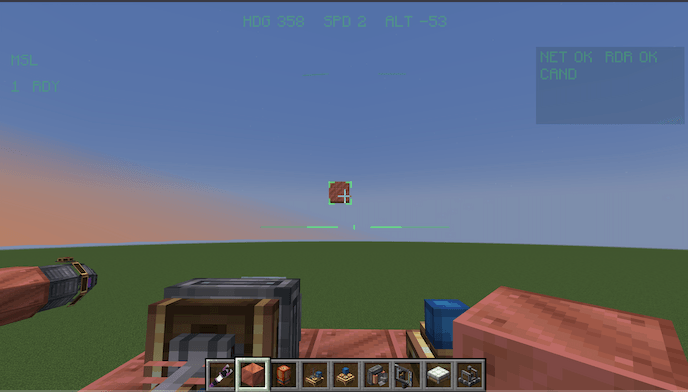
To make a guided missile:

  1. Put down a Create: Radars tracking system of your choice
  2. Take a connected data link and put it on the missile mount
  3. Take a targeting interface and shift-right-click the network controller (from Create: Radars)
  4. Put the targeting interface on a seat
  5. Build your missile attached to the missile mount, but you must add the guidance computer, aircraft proximity fuze, rocket motors, and actuator fins too
  6. Add in powder charges to the rocket motor
  7. Sit down in the seat and the targeting interface will show your connected missiles on the top left
  8. Click a number to select the corresponding missile
  9. Right click on a sable target in range of your radar and in front of the missile (this will fire the missile)

The Create: Simulated Missiles | Create Aeronautics | Create Big Cannons Compat | Create: Radars Compat Team

Forgeborn tier frameprofile avatar
  • 8
    Followers
  • 13
    Projects
  • 358.7K
    Downloads

More from fluffy_squishyView all