Create : Garage
- By
Star Citizen-like spaceports for Sable / Create Aeronautics: auto hangar doors, landing guidance, whole-ship storage and calling.
Create : Garage
Star Citizen-style spaceports, garages and docks for Sable and Create Aeronautics. Land, get off, and your ship is stored whole. Call it back later from a terminal. Built for survival and multiplayer servers.
Requires: Create 6 and Sable. Recommended: Create Aeronautics. Optional: Create Deep Seas (boats and submarines).
Version française plus bas.
How it works
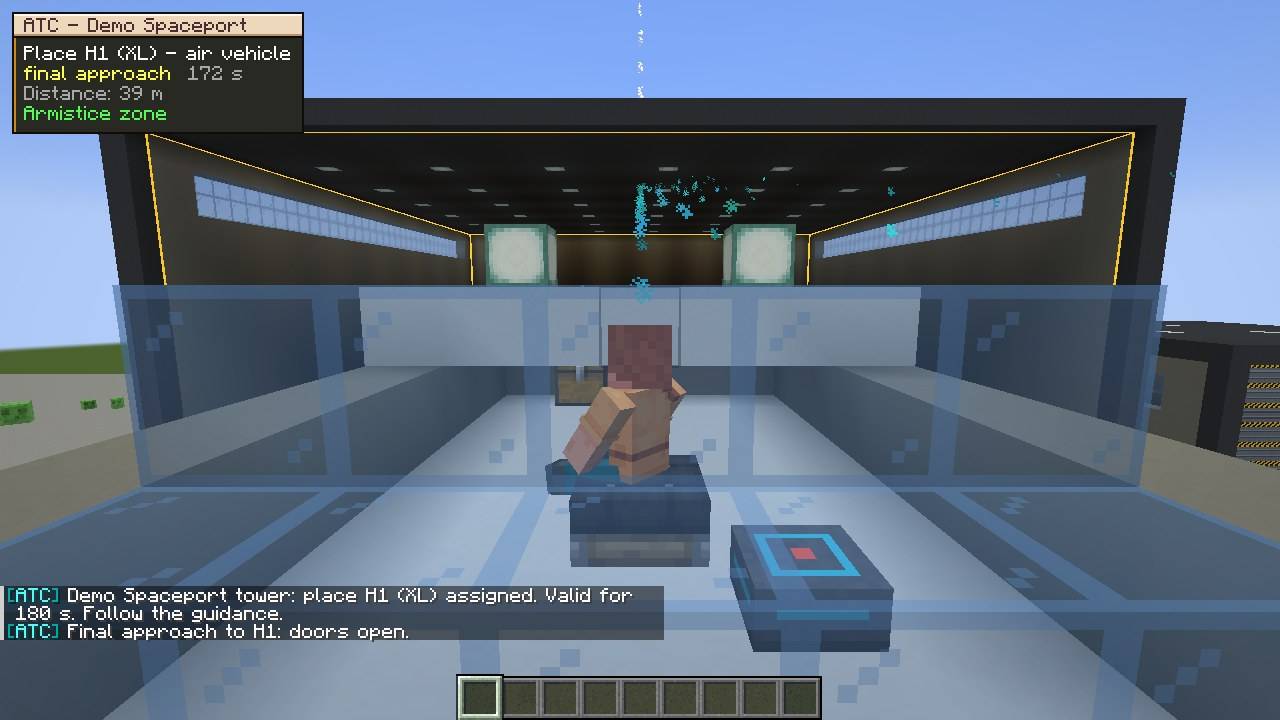
- Arrive. Fly slowly toward a free hangar that fits your ship: the tower assigns it to you and the door opens by itself. From farther away, press L to call the tower and follow the light beam.
- Land and get off. Once everybody is off, the whole ship is stored after 20 seconds and the hangar is freed. It is never taken apart and never turned into an item, so it cannot be duplicated.
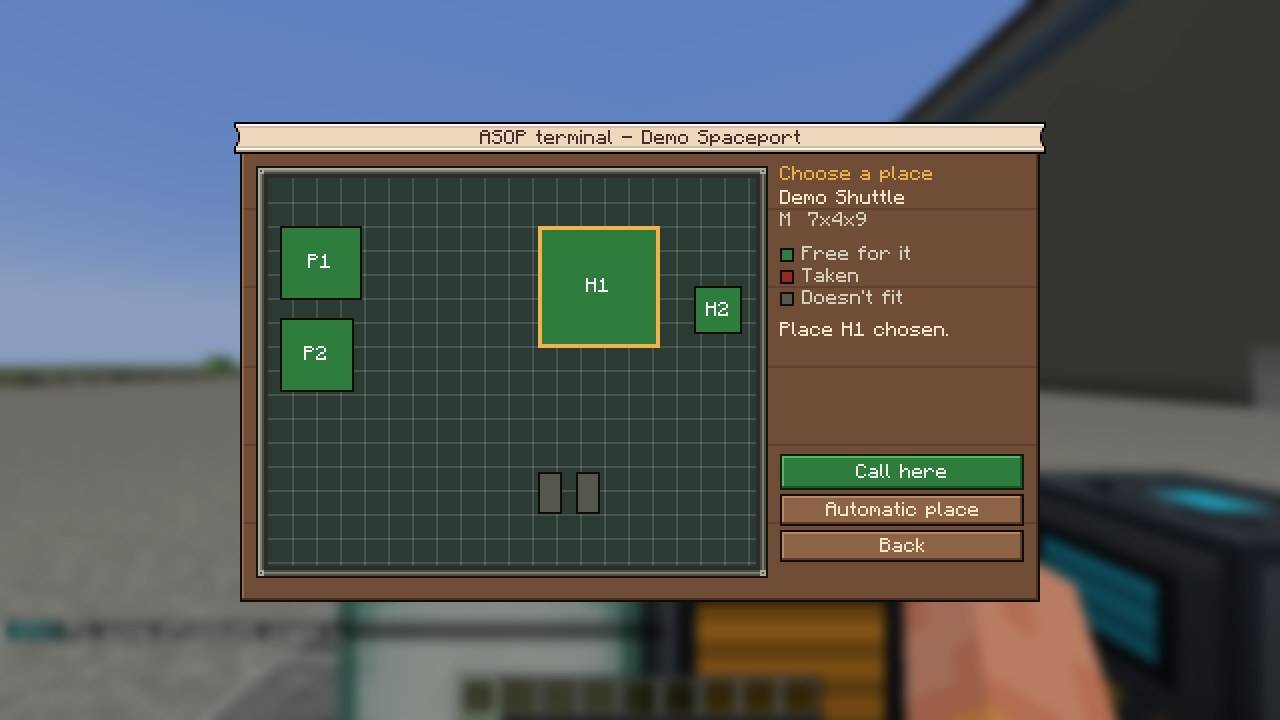
- Call it back. At an ASOP Terminal, click Call, or Map to pick the exact place. Your ship appears in a free hangar; you have 5 minutes to board.
- Take off. Take the controls: the doors open for you.
Set up a spaceport in survival
- Build a hangar with walls, a roof and an opening. Close the opening with Hangar Doors, or with your own Create door and a Door Signal.
- Put a Place inside. It finds the room, its door and its size by itself.
- Put an ASOP Terminal somewhere on the site. That's it.
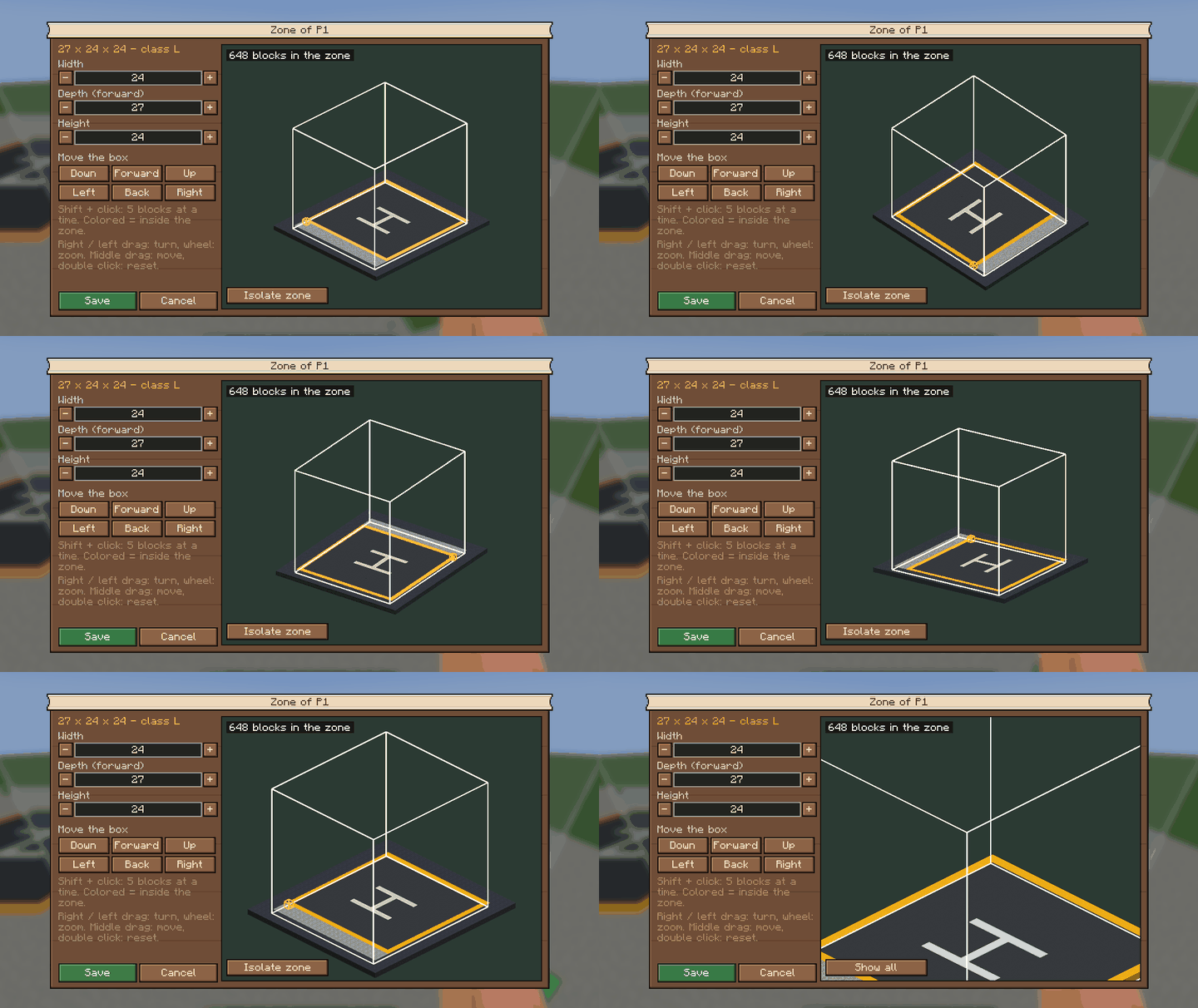
For an open-air car park or an odd shape, open the Place and click Adjust zone: set the width, depth and height next to a 3D view of the real blocks of the zone (inside in colour, around darkened). Turn it with the right button and zoom with the wheel, like in Blockbench.
To copy a place, the zone stays in the Place block: a Create schematic, the Create Clipboard or a creative pick carry it along. Only the name is reset.
The blocks
Every block has a recipe made of Create parts, works with the Create wrench, and has a Ponder scene (hold W).
- Place: a hangar, landing pad, garage, parking spot or dock. Sizes S, M, L and XL. Accepts air, ground, both, or boats. Public, private or personal.
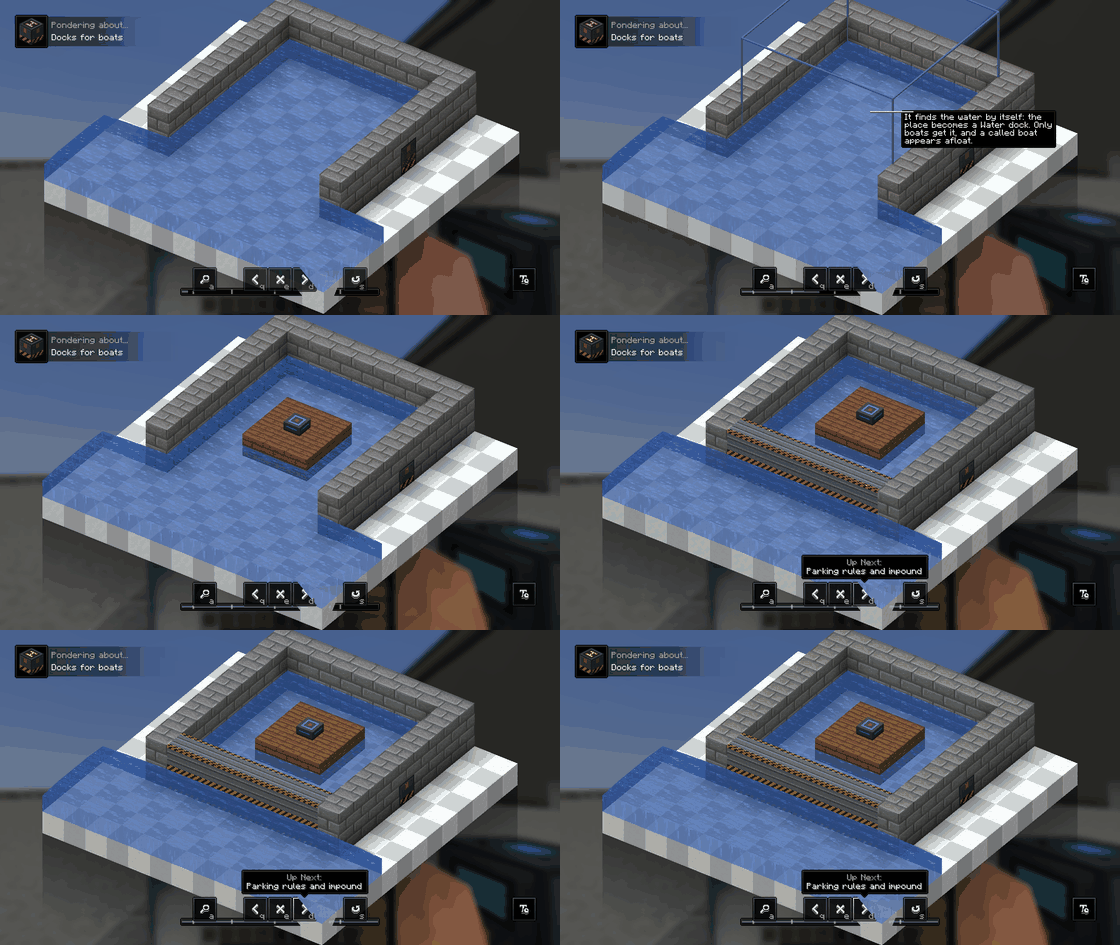
- Hangar Door: an animated rolling door. Panels that touch form one door. It also works in water, as a sea gate.
- Door Signal: a redstone output to drive doors you build with Create (bearing, piston, pulley, gantry…). The tower waits until the opening is clear.
- Hangar Lift (optional): called ships rise from a shaft through a hatch, like in Star Citizen.
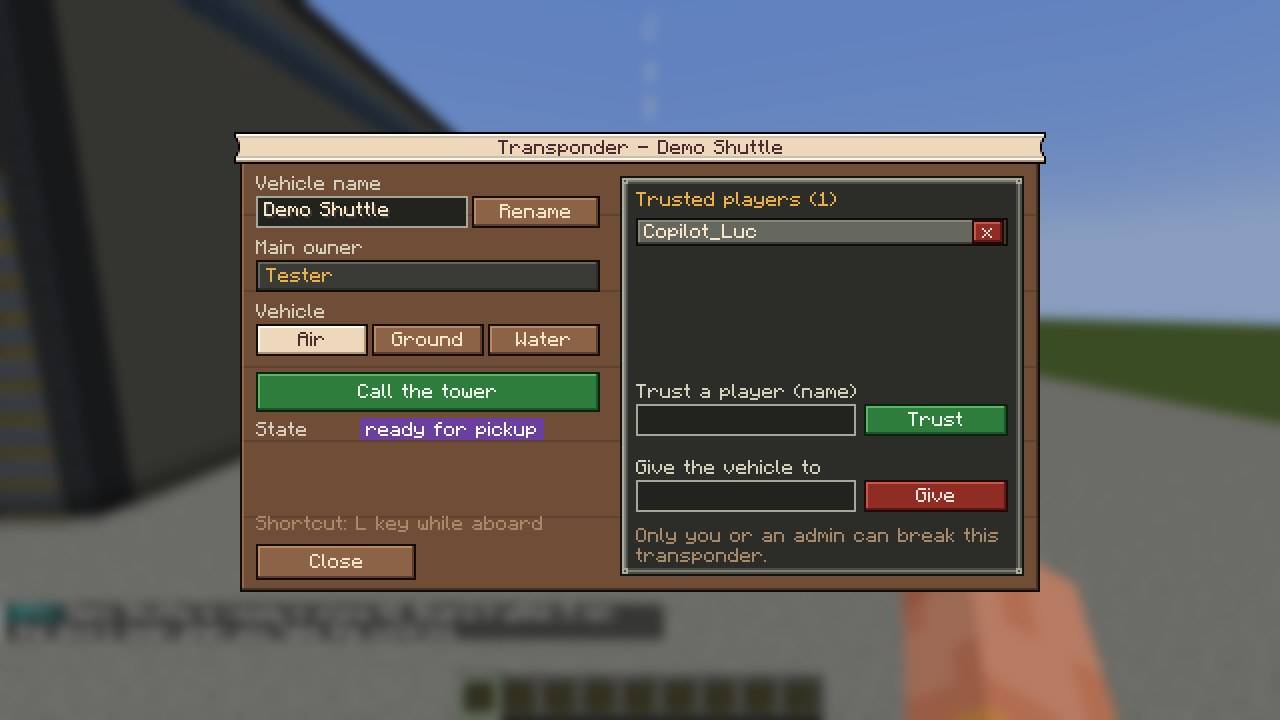
- Transponder: the vehicle's registration card, built on it. Air, ground or water.
- ASOP Terminal: your stored vehicles. Call, choose the place on a map, transfer from another spaceport.
- Entry Kiosk: stop in front of it with a car or a boat, it gives you a free garage or dock and opens the barrier.
- Site Control (optional): names the spaceport and sets its range, armistice zone and strict Star Citizen mode.
Your vehicle, your rules
- Ownership: whoever places the Transponder owns the vehicle. Type a player's name to trust them: they become co-owners. You can also give the vehicle away.
- Protected: only the owner or an admin can break the Transponder. Explosions, Create drills and saws can't either.
- No stealing: if someone else lands your ship, it goes to your storage, and they can neither take off with it nor call it.
- Personal hangar: your ship stays parked inside instead of being stored, and ships you call arrive there first.
- Private places and a limit of places per player.
Between spaceports
A ship stays at the spaceport where it was stored. At another spaceport, its card says where it is and offers Transfer here: it travels in storage (never in the world) and arrives after a while (60 seconds per 500 blocks by default). Servers can switch to global storage instead.
Boats and submarines
For Create Deep Seas and any Sable boat. Build a basin with quays and put a Place in the quay, next to the water: it finds the water by itself and becomes a dock. Only boats get docks, and boats never get hangars. A called boat appears afloat. Hangar Doors work as sea gates, and the Entry Kiosk works for boats too.
Parking rules
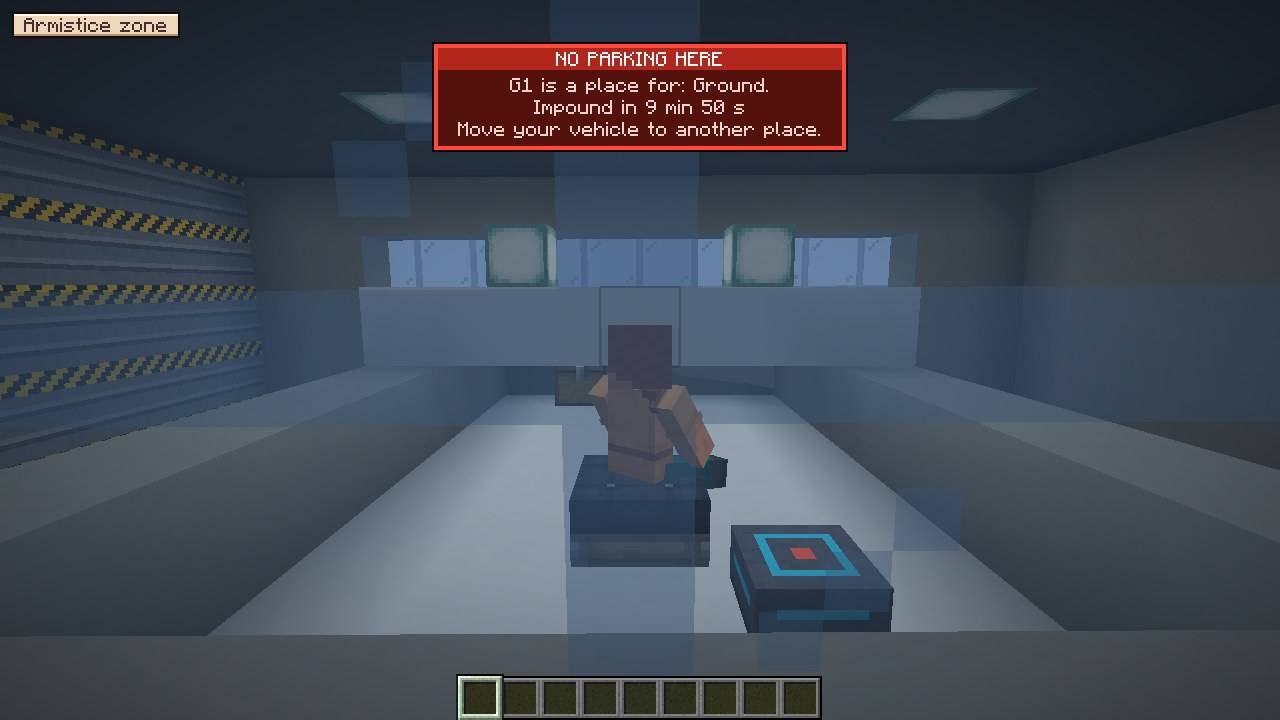
- No more "I hadn't seen it": a vehicle stopped where it may not be gets a red NO PARKING banner on screen with the exact reason (no reservation, private place, wrong type, too big…), the countdown before the impound and what to do.
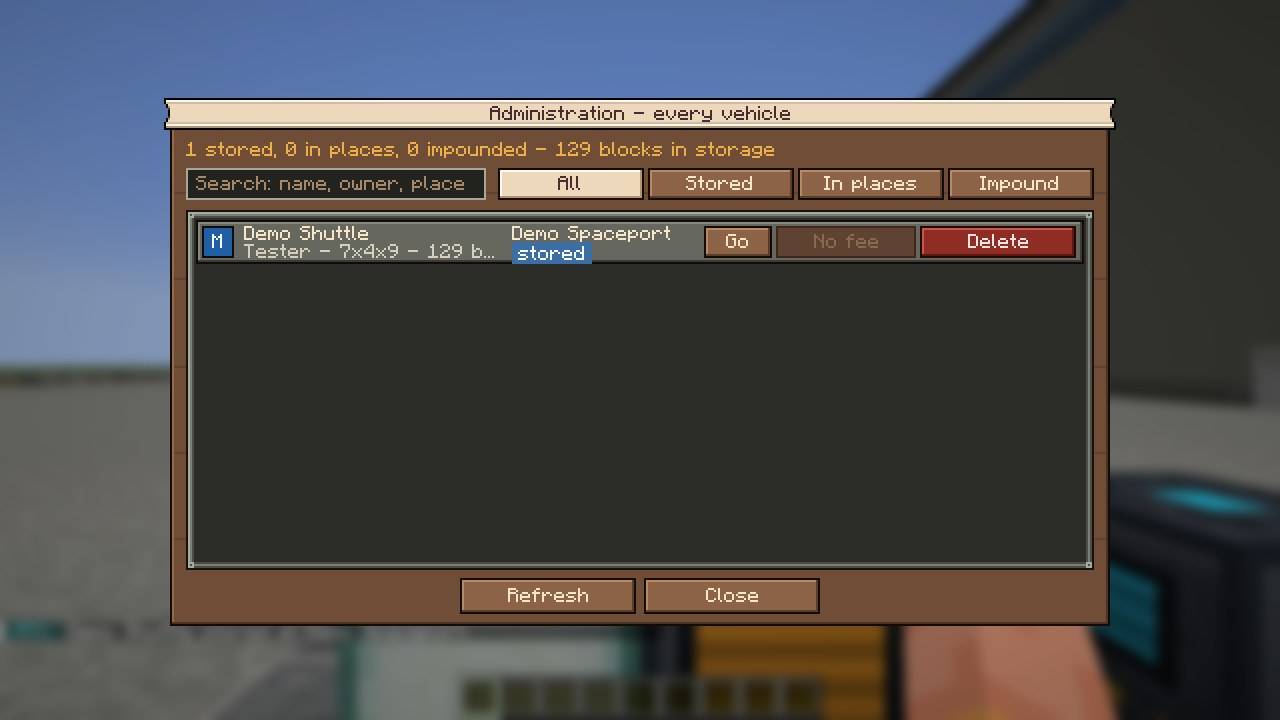
- Impound: the vehicle is stored whole, and its owner gets it back at the ASOP Terminal, with a fee set by the server (free by default).
- Armistice zone around the spaceport: no PvP, explosions don't break blocks. A HUD shows your reservation.
For server owners
- Admin panel (/skyport admin): every vehicle of the map, stored or parked, with search, filters and actions (go there, impound, free the place, cancel the fee, delete).
- Commands (level 2): /skyport list, stored, free (place), impound (place), waive (id), recover (id).
- Config in config/create_garage-server.toml: storage delay, pickup time, places per player, personal hangars, transfer time, lift speed, impound rules and fee, and more.
- Big ships: tested with a 69 x 36 x 218 ship of 57,902 blocks, stored and called back in 0.4 s.
Good to know: Create Deep Seas 2.2.2 together with Copycats+ stops a dedicated server at startup. This is a Create Deep Seas issue, not a Create : Garage one.
Version française
Des spatioports, garages et ports façon Star Citizen pour Sable et Create Aeronautics. Tu te poses, tu descends, et ton vaisseau est rangé entier. Tu le rappelles plus tard depuis un terminal. Pensé pour la survie et les serveurs multijoueurs.
Nécessite : Create 6 et Sable. Conseillé : Create Aeronautics. Facultatif : Create Deep Seas (bateaux et sous-marins).
Comment ça marche
- Tu arrives. Approche lentement d'un hangar libre à la taille de ton vaisseau : la tour te l'attribue et la porte s'ouvre toute seule. De plus loin, appuie sur L pour appeler la tour et suis le faisceau lumineux.
- Tu te poses et tu descends. Quand tout le monde est descendu, le vaisseau entier est rangé au bout de 20 secondes et le hangar est libéré. Il n'est jamais démonté ni transformé en objet : impossible de le dupliquer.
- Tu le rappelles. Au Terminal ASOP, clique sur Appeler, ou sur Plan pour choisir ta place. Ton vaisseau apparaît dans un hangar libre ; tu as 5 minutes pour monter.
- Tu décolles. Prends les commandes : les portes s'ouvrent pour toi.
Monter un spatioport en survie
- Construis un hangar avec des murs, un toit et une ouverture. Ferme l'ouverture avec des Portes de hangar, ou avec ta propre porte Create et un Signal de porte.
- Pose une Place à l'intérieur. Elle trouve toute seule la pièce, sa porte et sa taille.
- Pose un Terminal ASOP quelque part sur le site. C'est tout.
Pour un parking à l'air libre ou une forme particulière, ouvre la Place et clique sur Régler la zone : tu règles la largeur, la profondeur et la hauteur à côté d'une vue 3D des vrais blocs de la zone (dedans en couleur, autour assombris). Tu la tournes au clic droit et tu zoomes à la molette, comme dans Blockbench.
Pour copier une place, la zone reste dans le bloc Place : un schematic Create, le Presse-papiers Create ou une copie en créatif l'emportent avec eux. Seul le nom repart à zéro.
Les blocs
Chaque bloc a une recette en pièces Create, marche avec la clé Create et a une scène Ponder (maintiens W).
- Place : un hangar, une piste, un garage, une place de parking ou un bassin. Tailles S, M, L et XL. Accepte l'aérien, le terrestre, les deux ou les bateaux. Publique, privée ou personnelle.
- Porte de hangar : un rideau métallique animé. Les panneaux qui se touchent forment une seule porte. Elle marche aussi dans l'eau, comme porte d'écluse.
- Signal de porte : une sortie redstone pour piloter les portes que tu construis avec Create (roulement, piston, poulie, portique…). La tour attend que l'ouverture soit dégagée.
- Ascenseur de hangar (facultatif) : les vaisseaux appelés montent d'un puits par une trappe, comme dans Star Citizen.
- Transpondeur : la carte grise du véhicule, construite dessus. Aérien, terrestre ou naval.
- Terminal ASOP : tes véhicules rangés. Appeler, choisir la place sur un plan, transférer depuis un autre spatioport.
- Borne d'entrée : arrête-toi devant avec une voiture ou un bateau, elle te donne un garage ou un bassin libre et ouvre la barrière.
- Contrôle de site (facultatif) : donne un nom au spatioport et règle sa portée, sa zone d'armistice et le mode Star Citizen strict.
Ton véhicule, tes règles
- Propriété : celui qui pose le Transpondeur est propriétaire du véhicule. Tape le pseudo d'un joueur pour lui faire confiance : il devient copropriétaire. Tu peux aussi céder le véhicule.
- Protégé : seul le propriétaire ou un admin peut casser le Transpondeur. Ni les explosions, ni les foreuses et les scies de Create.
- Pas de vol : si quelqu'un d'autre pose ton vaisseau, il part dans ton stock, et cette personne ne peut ni redécoller ni l'appeler.
- Hangar personnel : ton vaisseau reste garé dedans au lieu d'être rangé, et les vaisseaux que tu appelles y arrivent en premier.
- Places privées et limite de places par joueur.
D'un spatioport à l'autre
Un vaisseau reste au spatioport où il a été rangé. Dans un autre spatioport, sa carte indique où il est et propose Transférer ici : il voyage dans le stock (jamais dans le monde) et arrive au bout d'un moment (60 secondes par 500 blocs par défaut). Les serveurs peuvent passer en stock global.
Bateaux et sous-marins
Pour Create Deep Seas et tout bateau Sable. Construis un bassin avec des quais et pose une Place dans le quai, contre l'eau : elle trouve l'eau toute seule et devient un bassin. Seuls les bateaux obtiennent un bassin, et un bateau n'obtient jamais un hangar. Un bateau appelé apparaît à flot. Les Portes de hangar servent de porte d'écluse, et la Borne d'entrée marche aussi pour les bateaux.
Règles de stationnement
- Fini les « j'avais pas vu » : un véhicule arrêté là où il ne doit pas être reçoit un bandeau rouge STATIONNEMENT INTERDIT à l'écran, avec la raison exacte (pas de réservation, place privée, mauvais type, trop grand…), le compte à rebours avant la fourrière et quoi faire.
- Fourrière : le véhicule est rangé entier, et son propriétaire le récupère au Terminal ASOP, avec des frais fixés par le serveur (gratuit par défaut).
- Zone d'armistice autour du spatioport : pas de PvP, les explosions ne cassent pas de blocs. Un HUD affiche ta réservation.
Pour les admins de serveur
- Panneau admin (/skyport admin) : tous les véhicules de la carte, rangés ou garés, avec recherche, filtres et actions (aller sur place, fourrière, libérer la place, annuler les frais, supprimer).
- Commandes (niveau 2) : /skyport list, stored, free (place), impound (place), waive (id), recover (id).
- Configuration dans config/create_garage-server.toml : délai de rangement, temps pour monter, places par joueur, hangars personnels, durée des transferts, vitesse de l'ascenseur, règles et frais de fourrière, et plus.
- Gros vaisseaux : testé avec un vaisseau de 69 x 36 x 218 et 57 902 blocs, rangé et rappelé en 0,4 s.
À savoir : Create Deep Seas 2.2.2 avec Copycats+ arrête un serveur dédié au démarrage. C'est un problème de Create Deep Seas, pas de Create : Garage.
Create : Garage Team