Create: Copycat Expansion
- By
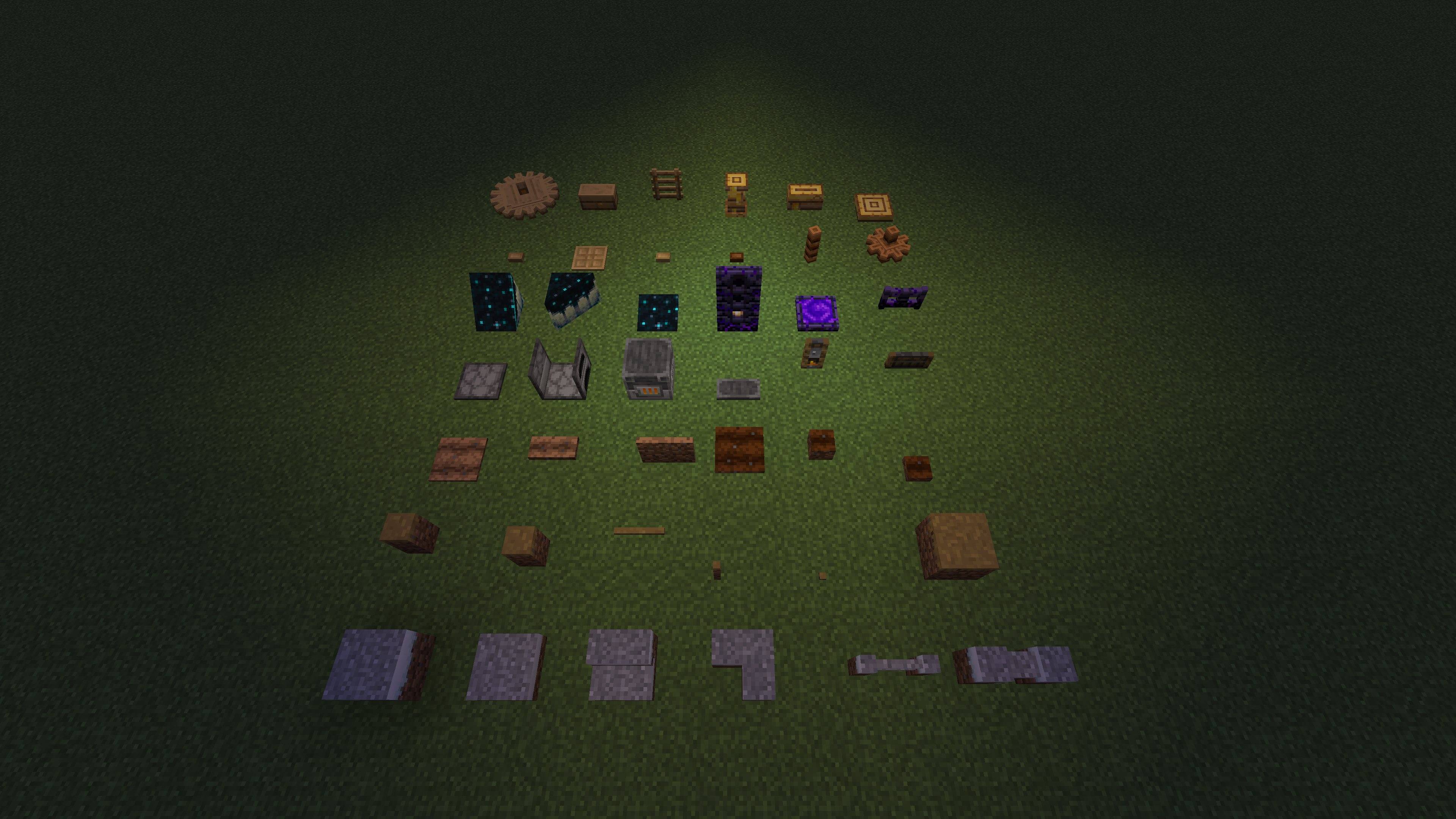
copycat-expansion-gallery-overview.jpg
Description
Create: Copycat Expansion
Create: Copycat Expansion adds material behaviors and visual states that Create's copycat blocks do not normally support. Version 0.1.17 focuses on terrain appearances, selectable geometry controlled by Create's Brass Hand, connected Dirt Path/Farmland profiles on Copycat Stairs and Slopes, and a conservative set of static block-entity appearances. It also refreshes newly extended Copycats+ blocks after their appearance data arrives and maps snowy ground continuously across both halves of Copycat Doors.
Requirements
- Minecraft
1.21.1 - NeoForge
21.1.249or newer in the 21.1 series - Create
6.0.10 - Java
21 - Copycats+
3.0.8is optional
First-release features
Terrain tool interactions
Fill a Create or Copycats+ copycat with a terrain block, then use the normal tool on the filled copycat:
- A shovel turns Dirt, Grass Block, Coarse Dirt, Podzol, Mycelium, or Rooted Dirt into a Dirt Path appearance.
- A hoe turns Grass Block, Dirt, or a Dirt Path appearance into a Farmland appearance.
- Hoeing Coarse Dirt or Rooted Dirt first changes the appearance to Dirt, matching the useful part of vanilla's two-step behavior.
- Copycat terrain transformations do not require air directly above the wrapper, so a partial copycat such as a Step can sit over the transformed block.
- The original consumed block remains the refund item. Changing an appearance never creates a free Dirt Path or Farmland item.
You can also pick Dirt Path and Farmland directly from the Natural Blocks creative tab and right-click them onto an empty copycat or empty multipart section. Other static appearances listed below already use their normal block items directly.
Dirt Path and Farmland have two visual geometry modes:
- Copycat shape uses an internal full-cube carrier, letting sloped, stepped, pane-like, and multipart copycats cut the texture to their own geometry.
- Material profile uses the vanilla 15/16-height Dirt Path or Farmland model.
Direct Dirt Path or Farmland application starts in Material profile mode. Tool transformations keep the full Copycat shape mode. On the simple full Copycats+ Copycat Block, the Material profile also supplies the 15/16 outline, collision, support, face occlusion, and ambient shade; this exposes neighbouring faces instead of a transparent gap. Copycats+ Copycat Stairs use a connected 7/16-and-15/16 terrain profile, while Copycat Slopes and Slope Layers use a continuous 15/16-scaled profile. Rendering, outline, collision, support, and occlusion all follow the selected profile. Other shaped and multipart wrappers continue to own their physical geometry.
Brass Hand state controls
Hold Create's existing Brass Hand in either hand and target a filled copycat whose material has states handled by this addon. Normal Minecraft hand priority applies: the offhand Brass Hand acts only when the main hand and targeted block did not already consume the click. The Brass Hand is an inert Create component with no native right-click action, so it provides an explicit edit mode without a held-use animation. No additional selector item is required. Its inputs always represent the same change category:
- Right-click cycles a visual state, such as Farmland moisture, furnace lighting, honey level, or bookshelf pattern.
- Sneak-right-click changes geometry, such as switching Dirt Path or Farmland between Copycat shape and the vanilla 15/16-height material profile.
If the selected material has no change in that category, the Brass Hand action reports that without changing the other category.
These two Brass Hand clicks are intercepted only for materials handled by this addon. Ordinary blocks and unsupported copycat materials retain their normal interactions. On a supported filled Copycat, holding the Brass Hand deliberately enters edit mode; switch to an empty hand or another item to operate a functional door, gate, button, or similar shape. Minecraft's Brush remains completely vanilla. Create's Wrench also remains completely native: right-click removes and refunds the copied material, while sneak-right-click dismantles the Copycat.
Supported state groups are:
- Dry and moist Farmland
- Snowy Grass Block, Podzol, and Mycelium
- Respawn Anchor charge level
- Composter fill level
- Lit Furnace, Blast Furnace, and Smoker
- Empty and full Bee Nest or Beehive
- All Chiseled Bookshelf slot patterns
- Suspicious Sand and Suspicious Gravel brushing stages
- Sculk Catalyst bloom
Safe static appearances
The addon allows these normally rejected blocks as visual-only copycat materials:
- Furnace, Blast Furnace, and Smoker
- Bee Nest and Beehive
- Chiseled Bookshelf
- Suspicious Sand and Suspicious Gravel
- Sculk Catalyst
These are appearances only: they do not gain inventories, bees, loot, cooking, or other block-entity behavior. Items carrying stored component data are refused, including during automatic offhand application, so copycats cannot erase or duplicate that data.
Installation
Place the built JAR in the mods folder alongside NeoForge and Create. Copycats+ may be installed for its additional shapes, but is not required.
Building from source
Use Java 21, then run:
.\gradlew.bat buildThe release JAR is written to build/libs/.
For development-only loading checks:
.\gradlew.bat runData
.\gradlew.bat runData -PwithoutCopycats
Deliberately deferred
Snow layers and Powder Snow are not part of 0.1.17. They need geometry and collision rules rather than a simple material-state substitution, so they are better handled as a separate follow-up feature.
License
The addon source is All Rights Reserved. NeoForged MDK template portions retain their original MIT license; see TEMPLATE_LICENSE.txt.
Behind the scenes
Curious how I made the mod? See the free preview on Patreon, with screenshots and a look at the development notes and source files available to paid members. Supporting is optional; the mod stays free.
Create: Copycat Expansion Team