Create Coaster : Kart controller
- By
Operate your roller coasters from a realistic control panel! Manage departures, brakes, safety restraints, trains, and attraction maps with Create and Simulated Coasters. No electricity required!
Create Coaster : Kart co...
Create a server, get 25% off your first month

Description
Create Coaster Kart Controller
Create Coaster Kart Controller allows you to operate your roller coasters from a realistic operator control panel in Minecraft!
Designed for Create and Simulated Coasters, this mod brings together station controls, safety restraint management, and an interactive map display for your attractions.
Main Features
The mod introduces three new items, each with its own crafting recipe, along with a dedicated Creative Mode tab.
-
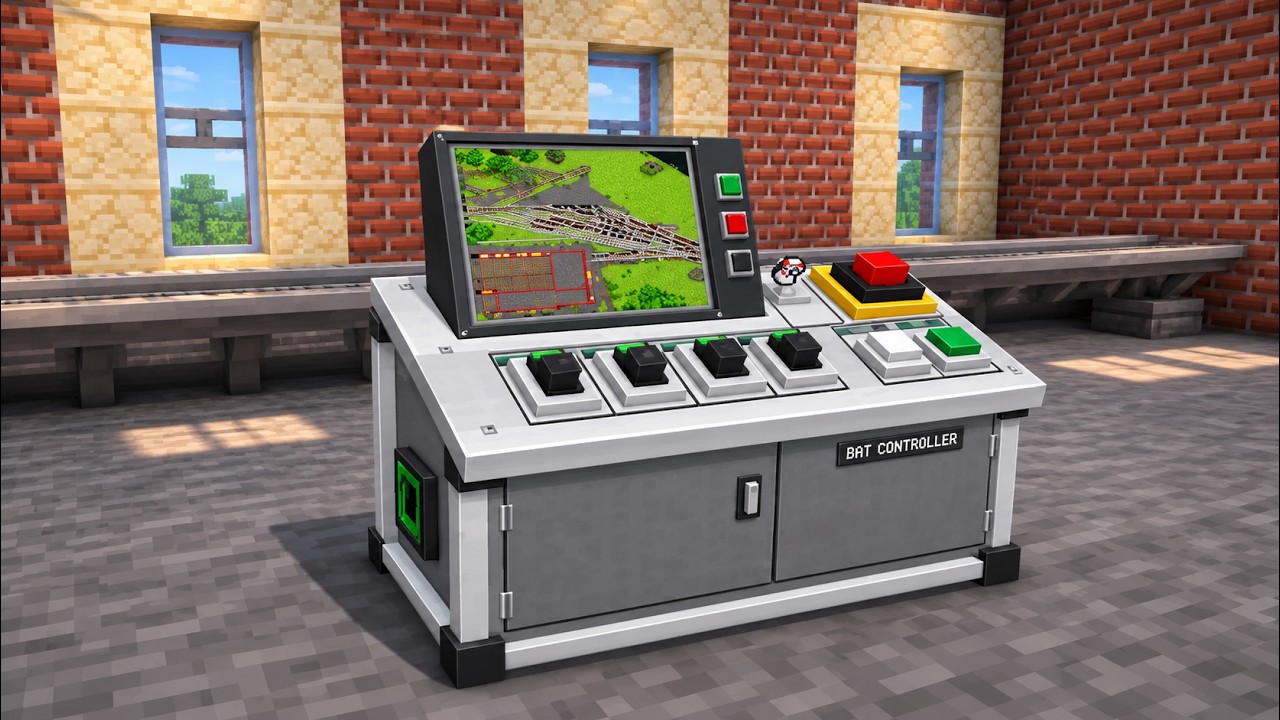
Bat Controller: A realistic control panel featuring a functional screen, an interactive control interface, and customizable attraction names.
-
Operator Key: Used to select station rails and map areas, as well as activate the control panel when inserted into the console.
-
Safety Harness Seat: A red seat featuring an animated safety restraint that opens and closes.
Station Control
Take full control of your roller coaster station!
Select a section of Simulated Coasters rails and link it to your controller.
The console manages braking, keeps trains stationary inside the station, and provides propulsion when dispatching them.
The order in which you select the rails determines the departure direction and chain movement.
Through the control interface, you can:
-
Open and close safety restraints.
-
Dispatch your roller coaster trains.
-
Monitor the number of connected carts.
-
View the number of detected seats.
-
Track the current ride cycle: Boarding, Closing, Ready for Dispatch, Departure, Ride in Progress, and Return to Station.
The system automatically checks whether the train is completely stopped, fully inside the station, properly attached to the rails, and whether the safety restraints are in the correct position.
Automatic Cart Detection
Easily detect and manage your roller coaster trains!
The Scan Wagons button searches for stationary carts on the rails assigned to your station and links them to the controller.
The system supports:
-
Multiple independent carts.
-
Connected carts forming a train.
-
Automatic detection of carts within the assigned station.
Nearby tracks are excluded from detection, and carts already assigned to another controller remain protected.
Seat Compatibility
Connect your seats to the controller with ease!
Simply Sneak + Right-Click with an empty hand on a seat to link it to the station controller.
The system prioritizes the station rail located beneath the seat. If no assigned rail is found, it searches for the nearest loaded controller within a 64-block radius.
Seats can be linked before assembling the train.
Seats built on a cart positioned above assigned station rails can also be linked automatically.
Seats installed on rivets are supported, including structures using multiple layers of rivets.
Supported Seats
-
Safety Harness Seats added by this mod.
-
Standard Create Seats, without adding visual restraints.
-
Create Coasters Simulated Additions Seats, including restraint controls when the optional addon is installed. (But is recommended)
Entering and exiting controlled seats is restricted whenever boarding is not authorized.
Creative Mode players can exit locked seats.
Standalone safety harness seats can also be opened or closed manually using the Operator Key.
Automatic Safety Restraints
Customize your boarding and restraint sequences!
Configure automatic restraint behavior directly from the controller.
You can adjust:
-
The delay before restraints open after the train returns and comes to a complete stop.
-
The boarding duration before restraints automatically close.
-
Countdown timers displayed during these operations.
Train departures remain manually controlled by the operator.
Interactive Attraction Map
Display your roller coaster directly on the controller screen!
Insert an existing Minecraft map or select two corners of an area to generate a custom attraction map.
The map is displayed both on the physical controller screen and inside its interface.
Generated maps include:
-
Cyan lines: Roller coaster tracks.
-
Golden highlights: The assigned station area.
Use the Create / Refresh button to update the map.
Unlocked Minecraft maps can also be explored while the operator remains near the console.
Operator Key System
A realistic control system activated by an operator key!
The Operator Key has its own dedicated slot inside the controller interface.
When inserted, the key appears as a 3D model inside the console's keyhole.
Removing the key automatically:
-
Disables the control commands.
-
Disables train propulsion.
-
Keeps station braking active.
-
Prevents unauthorized ride operation.
The interface remains accessible using Sneak + Right-Click, even without holding the key.
Previously inserted maps remain visible on the screen even when the key is removed, while all control commands remain locked.
In-Game Tutorials
Learn how to operate your attractions directly in Minecraft!
The mod includes Ponder tutorials explaining how to use the controller and safety harness seats.
Available languages:
-
English
-
French
Getting Started
1. Configure your station
Hold the Operator Key and Sneak + Right-Click the beginning and end of your station rail section. Then use the key on the controller to assign the rails.
2. Activate the controller
Open the interface and insert the Operator Key into its dedicated slot.
3. Prepare your trains
Place and assemble your carts equipped with seats, then use Scan Wagons while the train is stationary.
4. Dispatch your attraction
Wait until the train is completely stopped inside the station, close the safety restraints, and dispatch the ride when the controller indicates that everything is ready.
Compatibility & Requirements
Reference configuration:
All required dependencies must also be installed.
Optional Addon:
Multiplayer Support:
For multiplayer servers, install the mod and its dependencies on both the client and server.
Future Updates
More updates and improvements are coming!
Stay tuned for future additions to Create Coaster Kart Controller!
Create Coaster : Kart controller Team