
V2.0.0 Major Update!
I've successfully ported Bloody Bits to Neoforge 1.21.1! With it comes a host of new changes:
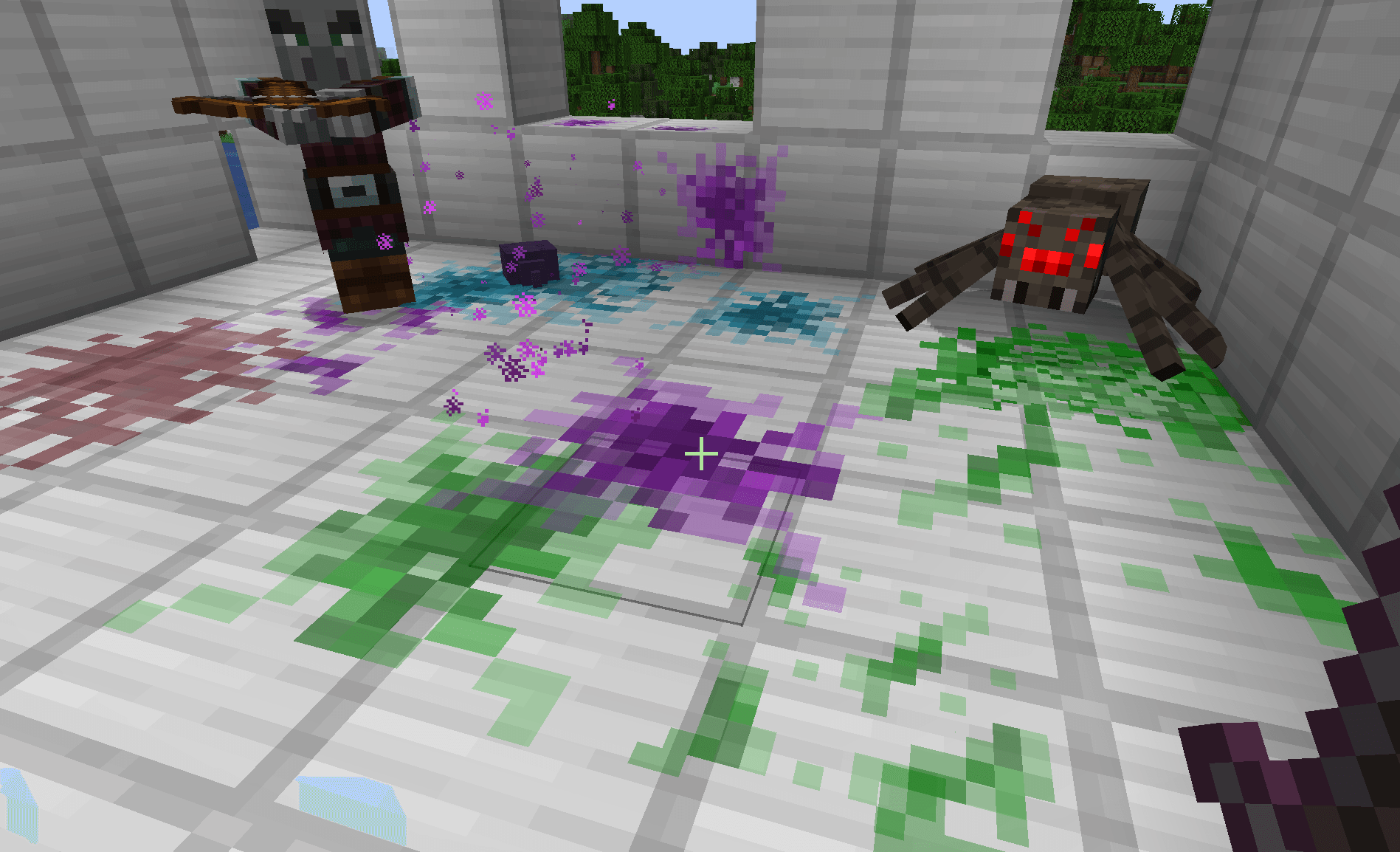
- The mod has been completely refactored! Blood sprays and spatters are now particles instead of entities, which means a massive improvement on performance.
- Blood spatters are now a LOT more accurate with where they are placed on blocks. Special thanks to Iron431 and his mod Iron's Simple Blood. I was able to implement some of his code to get my particles to properly render on the blocks.
- Entity bleed colors are now modified via datapacks, and a tag system, which means a much more organized way of adding custom modded entity bleed colors. As well, using the entity tag system has another hidden benefit of being more performant.
- The configs now use Neoforge's built-in menu! No more needing to open up the config files in the folders.
- Some features such as blood sliding down walls have not been implemented yet. Getting the math to work for them is a bit tricky and will likely take some more time. However, blood still drips from the ceiling!
The mod should be way less prone to crashing errors now as particles are less troublesome to work with compared to entities (the old blood sprays), but there still may be some kinks to work out in the new version. If you encounter any issues, feel free to open up a bug report.
Blood Sprays & Spatters

When an entity is attacked, it will produce a certain amount blood spray particles at a certain velocity depending on attack damage. These particles will spatter onto almost all surfaces regardless of shape.
Blood Mist
When an entity is hit by a certain damage type (By default, this is arrows with mod support for TACZ and Scorched Guns), they will produce a blood mist. The size of the mist is configurable, and if the killing blow is dealt with a blood mist damage type then the mist produced will be double the size. I was looking into some more realistic war movies, and how BlockFront implements their blood, and wanted to emulate something similar. 
 Most of the (1.20.1 - Forge) mods used in the above gifs:
Blood Drip
 The blood spatters will also drip at random intervals if on a ceiling.
Data Driven Blood Color Types

Datapacks can dictate what color entities bleed (or if they bleed at all) based on a hex code value. This website can help with determining a custom blood color.

In Game Configs
Using Neoforge's in-game config menu system, you're now able to edit config values without having to open up the actual file in the config directory.

In the Client Config you can set things like the Blood Spatter Lifetime and the Blood Spatter Sound Volume.
In the Common Config you can blacklist certain damage sources from causing bleed damage to any entities. I've already included most sources that wouldn't make sense to cause bleeding such as onFire and starve, but if I missed any, then players can easily add the source to the list if they desire.
Editing Blood Color Types
To edit the blood color types, simply add a custom datapack to override the mod's existing one (I will provide a copy of the existing datapack for players to download). The datapack consists of two folders: blood_colors and tags.

The blood_colors folder contains a list of JSON files. The names of these files don't matter. Each file simply contains a JSON object that has two properties: entity_tag and color. The entity_tag will references the desired JSON file in the tags/entity_type directory. The color property will reference the desired hex code color value that you want the entities to bleed.

The tags folder contains a subfolder entity_type. This is a built-in Minecraft structure that allows us to add certain tags to entities for reference. Here, we simply create the JSON file that will act as the tag's name, and populate it with a list of entities that we want this tag to apply to.

Above is an example of the JSON file bleeds_green.json, which you will notice is the one that is referenced in the blood_colors/green.json file's entity_tag property. In this file, there are only two properties, but a lot of content since this is where the list of entities will be set.
- The
replace property simply tells the game that this datapack will, or will not, be replacing any preexisting data with this data. Since this is an entirely new tag that I am adding to these entities, I set this value to false, but if a datapack were made to override this one, then it would be set to true.
- The
values property will contain a list of all the entities that this tag should apply to. As well, JSON objects can be added to this list. These are denoted by the opening and closing curly braces {}. In here there the property required property determines if this object ID is required for the tag to load successfully. I'm using these objects as optional references to mod entities, so I set those properties as false. The id property references another file location that will contain the modded entities that I want this tag to apply to.

Above is an example of a mod's entity that a tag should apply to.
Supported Mods By Default
Default Datapack Downloads
NOTE:
With future updates I will add more mod compats to the base datapack of Bloody Bits. If you have a specific mod that you would like added, just let me know, and I'll see if I can get it added in! If I can't, then it's fully possible to add them in yourself via a custom datapack.




![[ARCHIVED] Better Paragliders project image](https://media.forgecdn.net/avatars/thumbnails/856/522/256/256/638260257359421647.jpeg)
![[ARCHIVED] Epic Paragliders project image](https://media.forgecdn.net/avatars/thumbnails/848/255/256/256/638248191124643103.jpeg)