


CoreProtectGUI
- By
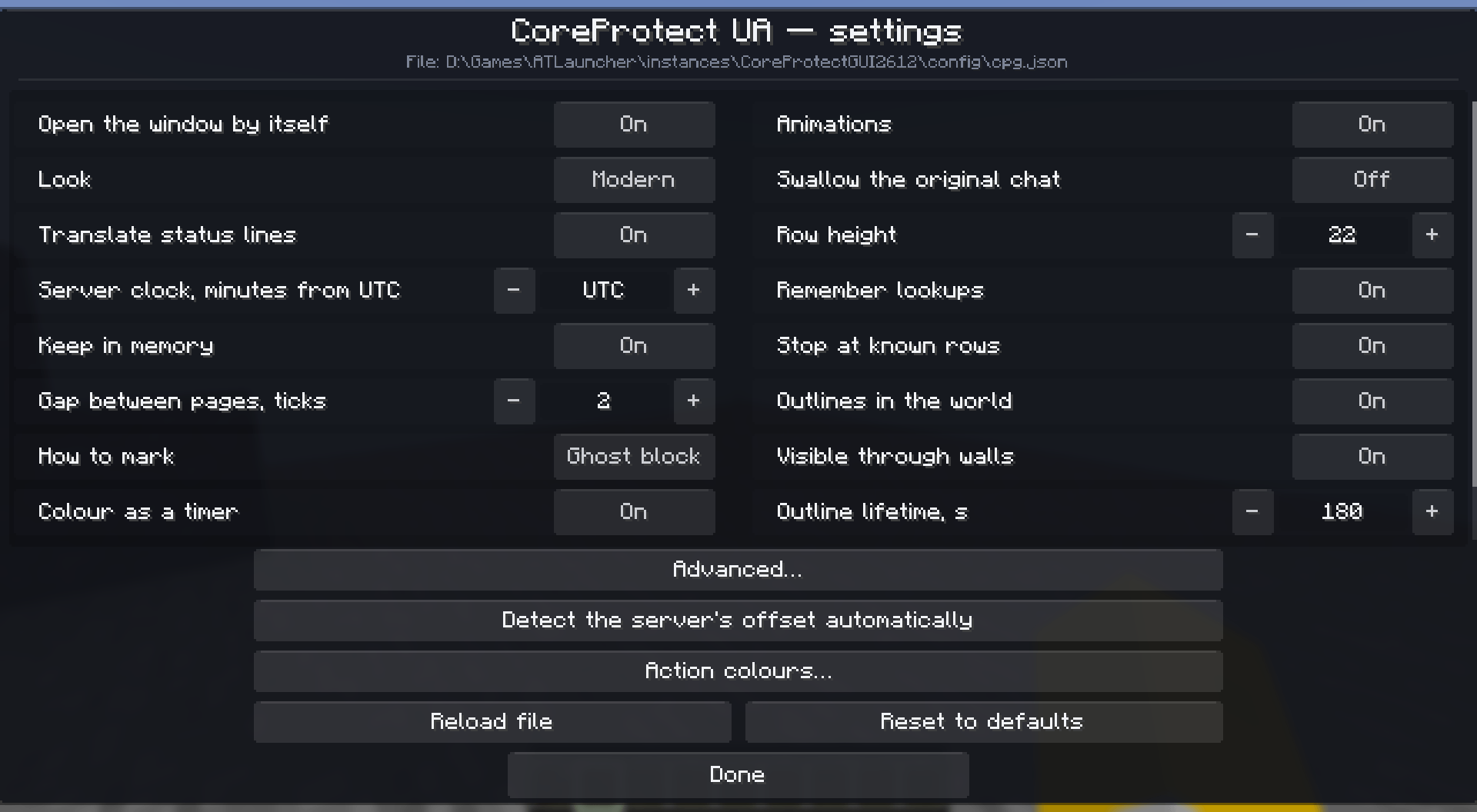
Two columns, and every change applies the moment you make it. · Дві колонки, і кожна зміна діє одразу.
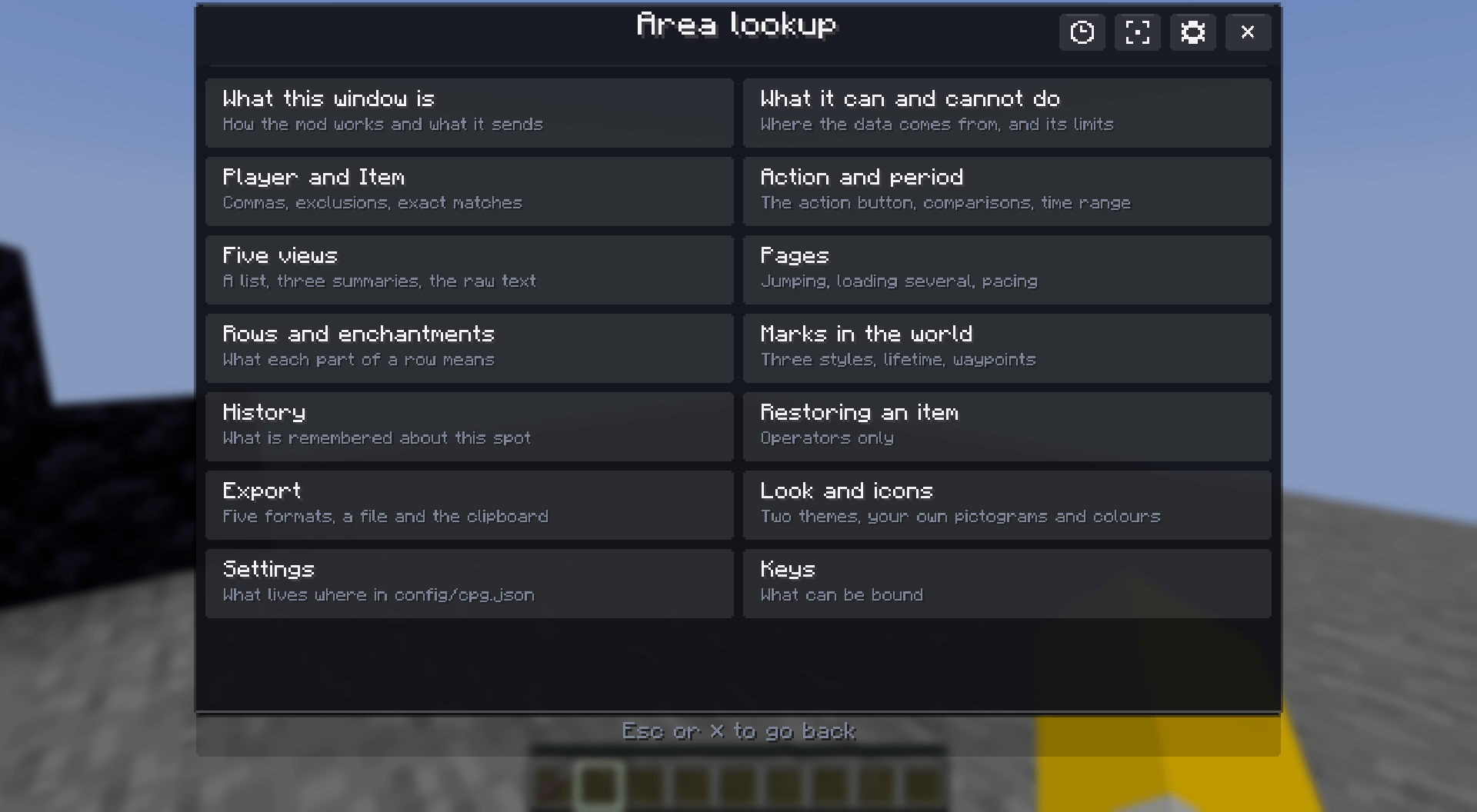
Fourteen pages, including one on what the mod cannot do. · Чотирнадцять сторінок, і одна з них — про те, чого мод не може.
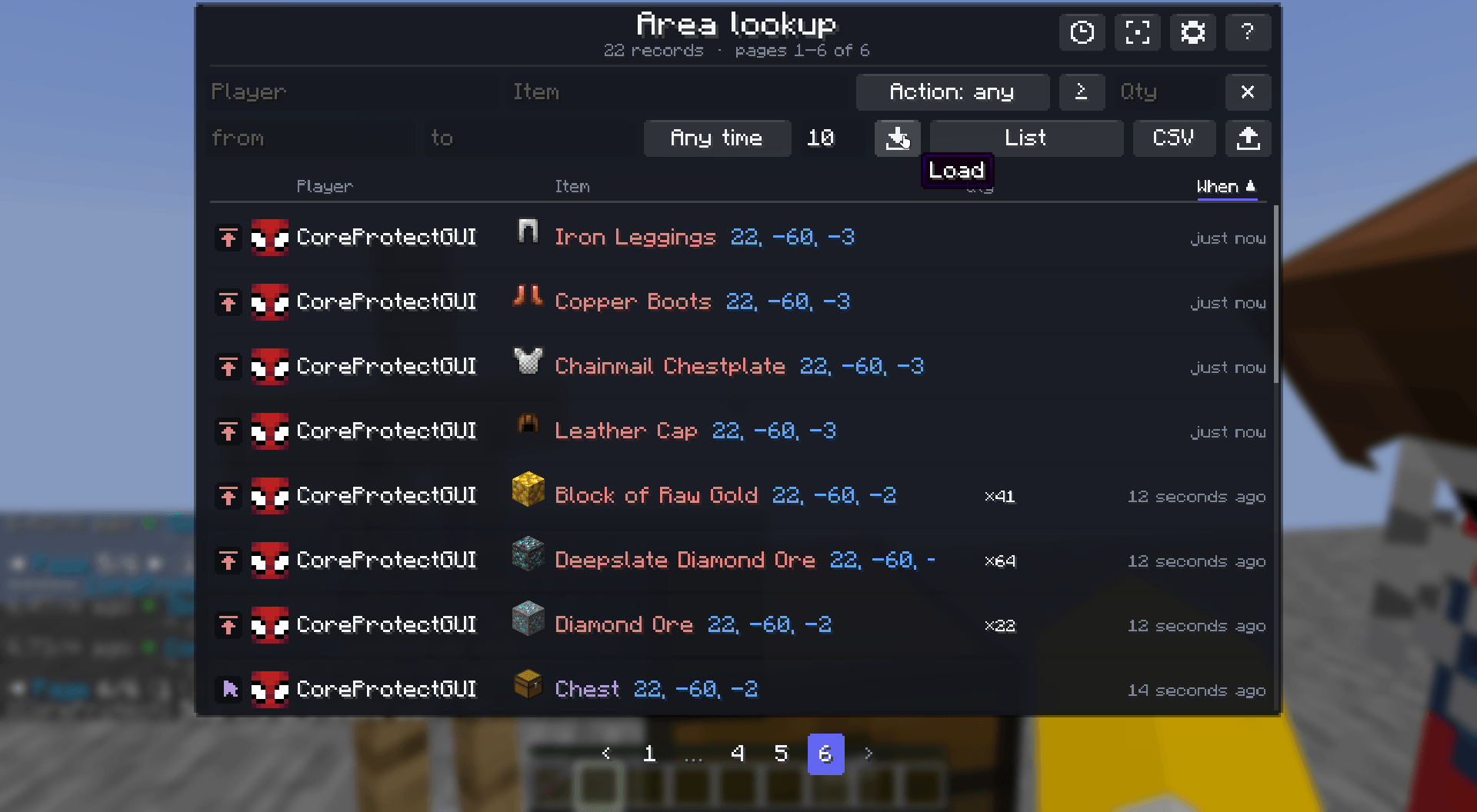
They merge into one table, so filters and summaries cover all of them. · Вони зливаються в одну таблицю, тож фільтри й підсумки працюють по всіх.
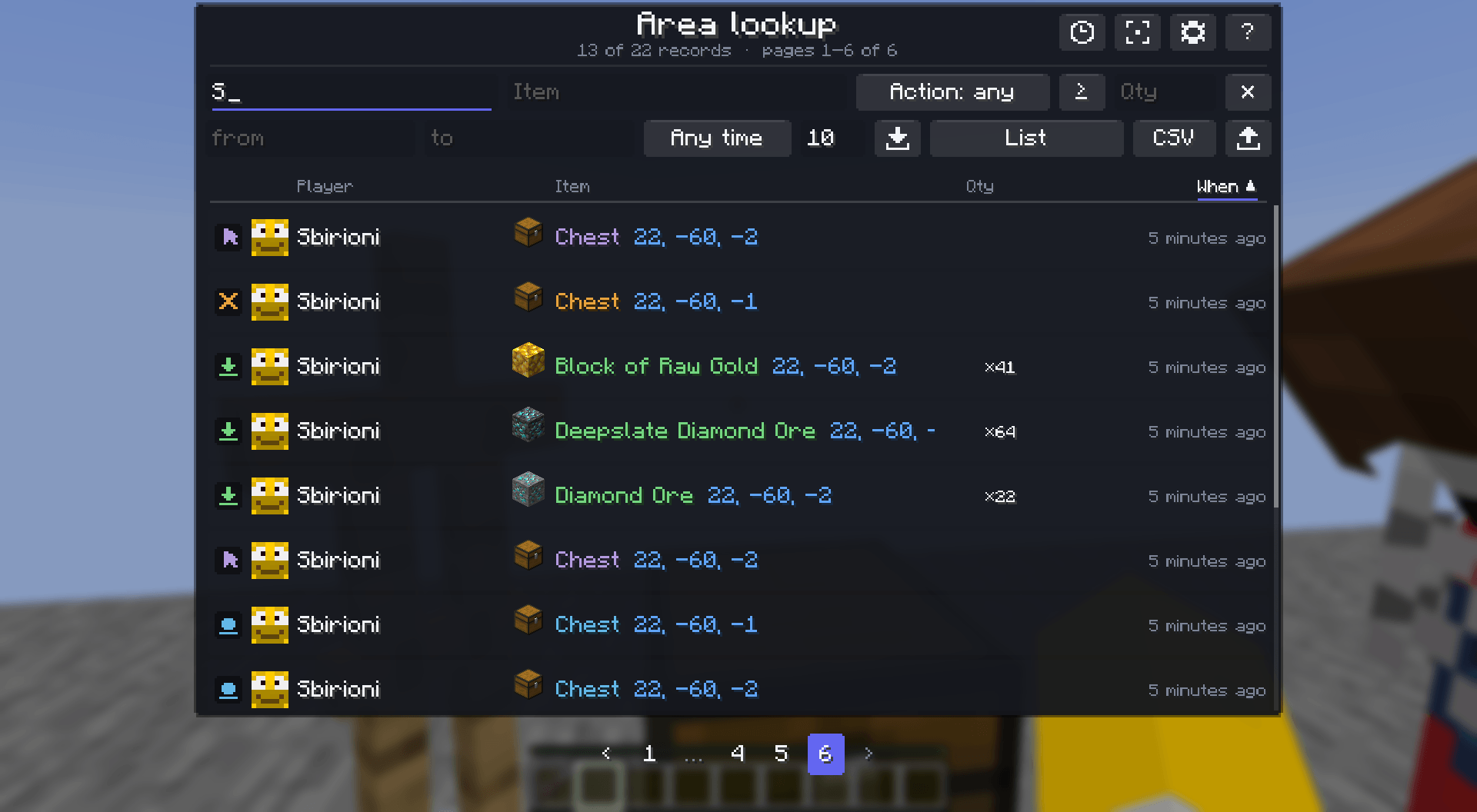
Two characters typed, and 13 of 22 rows are left. · Два введені символи — і лишається 13 з 22 рядків.
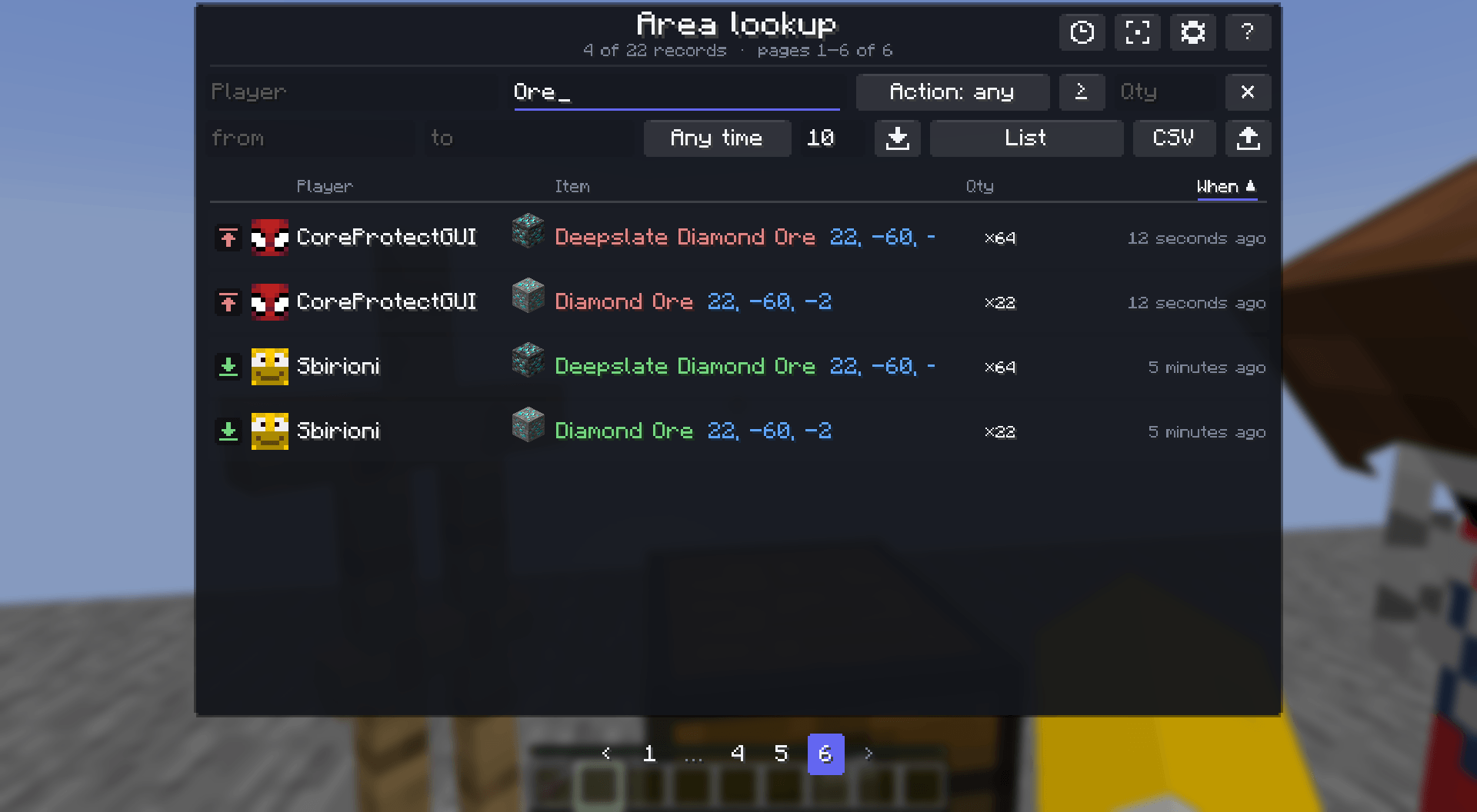
Matches the translated name, the raw id, and the text on a sign. · Шукає за перекладеною назвою, сирим id і текстом на табличці.
Description

The GUI CoreProtect always needed. Hundreds of rows of text become a clean, sortable, filterable window with player heads and item icons, and its commands become forms. Reads the plugin in 14 languages, speaks 12. Client-side.
Інтерфейс, якого CoreProtect бракувало завжди. Сотні рядків тексту стають зручним вікном із сортуванням і фільтрами — з головами гравців та іконками предметів, — а його команди стають формою. Читає плагін 14 мовами, говорить 12. Лише клієнт.
The problem
You click a chest with /co i and seven hundred lines scroll past:
2.53/h ago - Steve added x53 stripped_spruce_wood.
2.54/h ago - Steve removed x12 diamond.
You cannot sort it. You cannot filter it. You cannot tell at a glance which of the four players did the most, and by the time you have scrolled back the top is gone.
Проблема
Ви клікаєте по скрині з /co i — і повз пролітає сімсот рядків:
2.53/h тому - Steve поклав x53 stripped_spruce_wood.
2.54/h тому - Steve забрав x12 diamond.
Це не відсортувати. Не відфільтрувати. Не сказати з першого погляду, хто з чотирьох гравців зробив найбільше, — а поки прогорнеш назад, початок уже зник.
A readable table
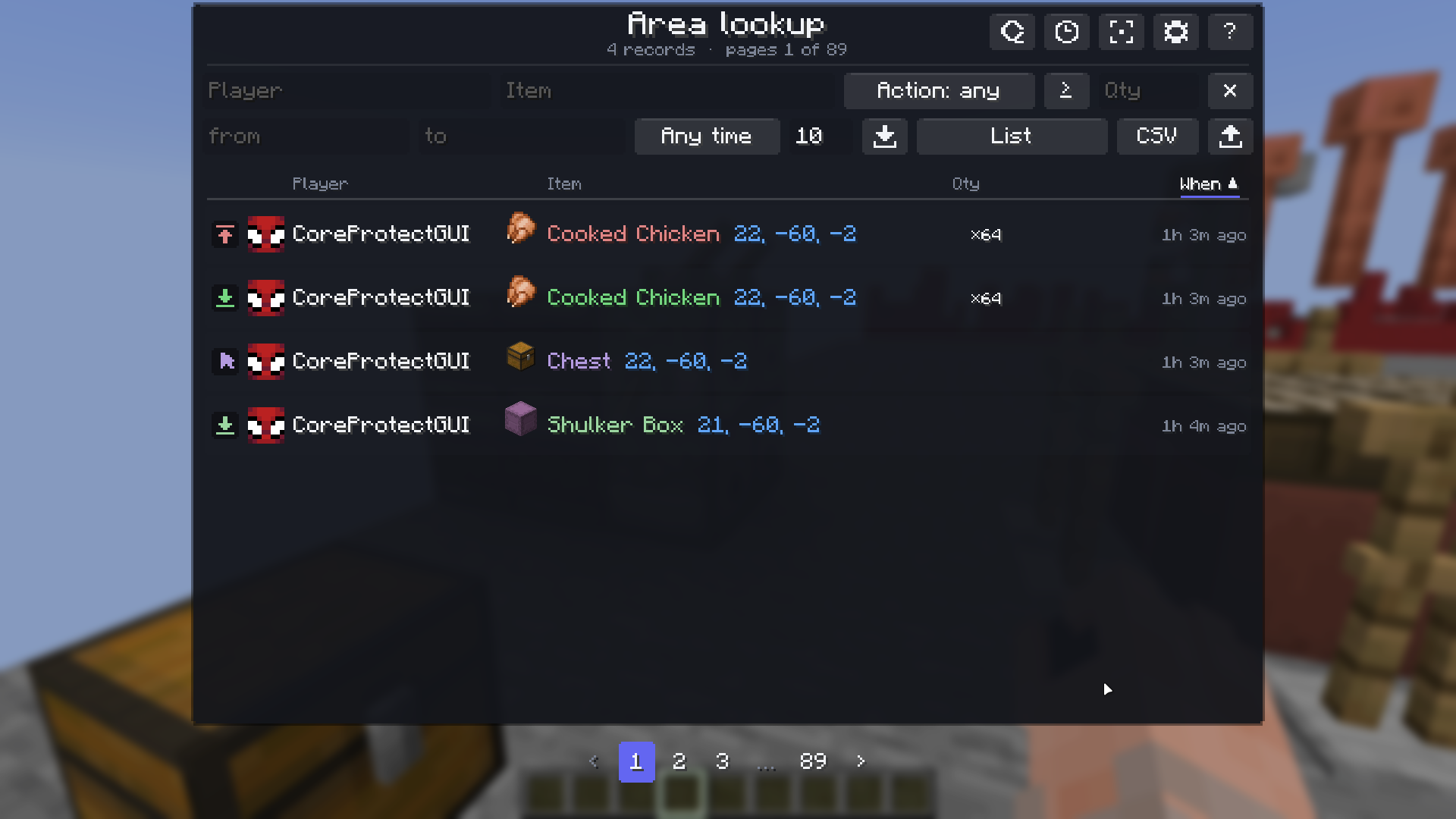
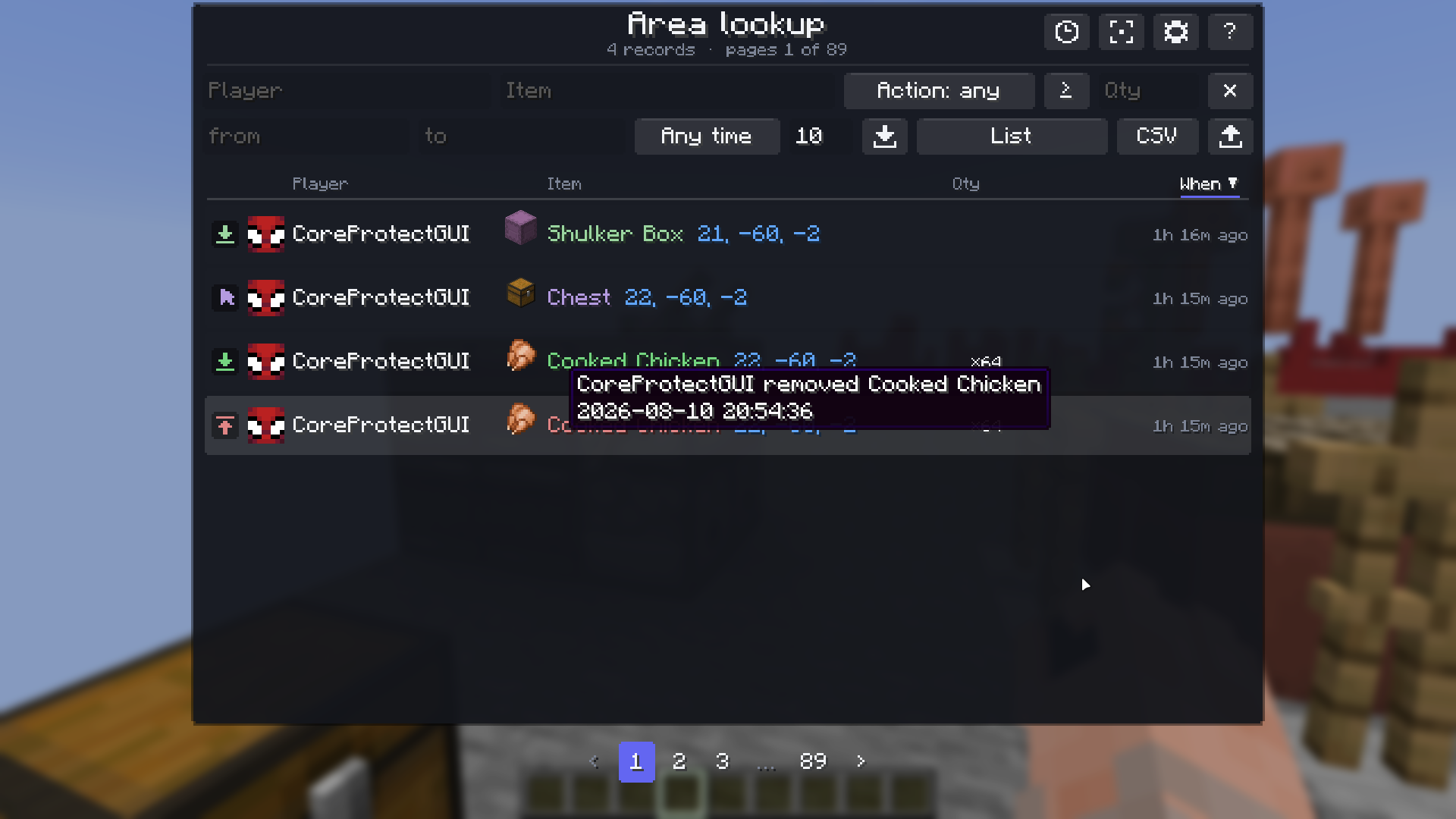
Every row gets the player's head, pulled from the tab list, and the item's real icon. Names come out in your own Minecraft language, and the time reads "2 hours 32 min ago" instead of 2.53/h. Actions are colour-coded, so taken and placed are told apart before you read a word.
Entities get their spawn-egg icon and proper name. Hoppers and dispensers show the container that moved the items rather than a blank head. Blocks the game has no picture for fall back to their initials instead of an empty square.
Click a column caption to sort by it. Click again to reverse.
Зрозуміла таблиця
Кожен рядок отримує голову гравця зі списку гравців і справжню іконку предмета. Назви виходять вашою мовою Minecraft, а час читається як «2 години 32 хв тому» замість 2.53/h. Дії розрізняються кольором, тож «забрав» і «поклав» видно ще до того, як прочитаєш слово.
Сутності отримують іконку яйця призову й нормальну назву. Лійки та роздавачі показують сховище, що перемістило предмети, а не порожню голову. Те, для чого в грі картинки немає взагалі, показує ініціали замість порожнього квадрата.
Клік по заголовку стовпця сортує за ним. Ще клік — у зворотному порядку.
Filters that answer real questions
Search by player, item, action or quantity. The syntax is small on purpose:
-Steve              everyone except Steve
Steve,Alex          either of them
"oak_log"           exactly that, not stripped_oak_log
>64                 more than a stack
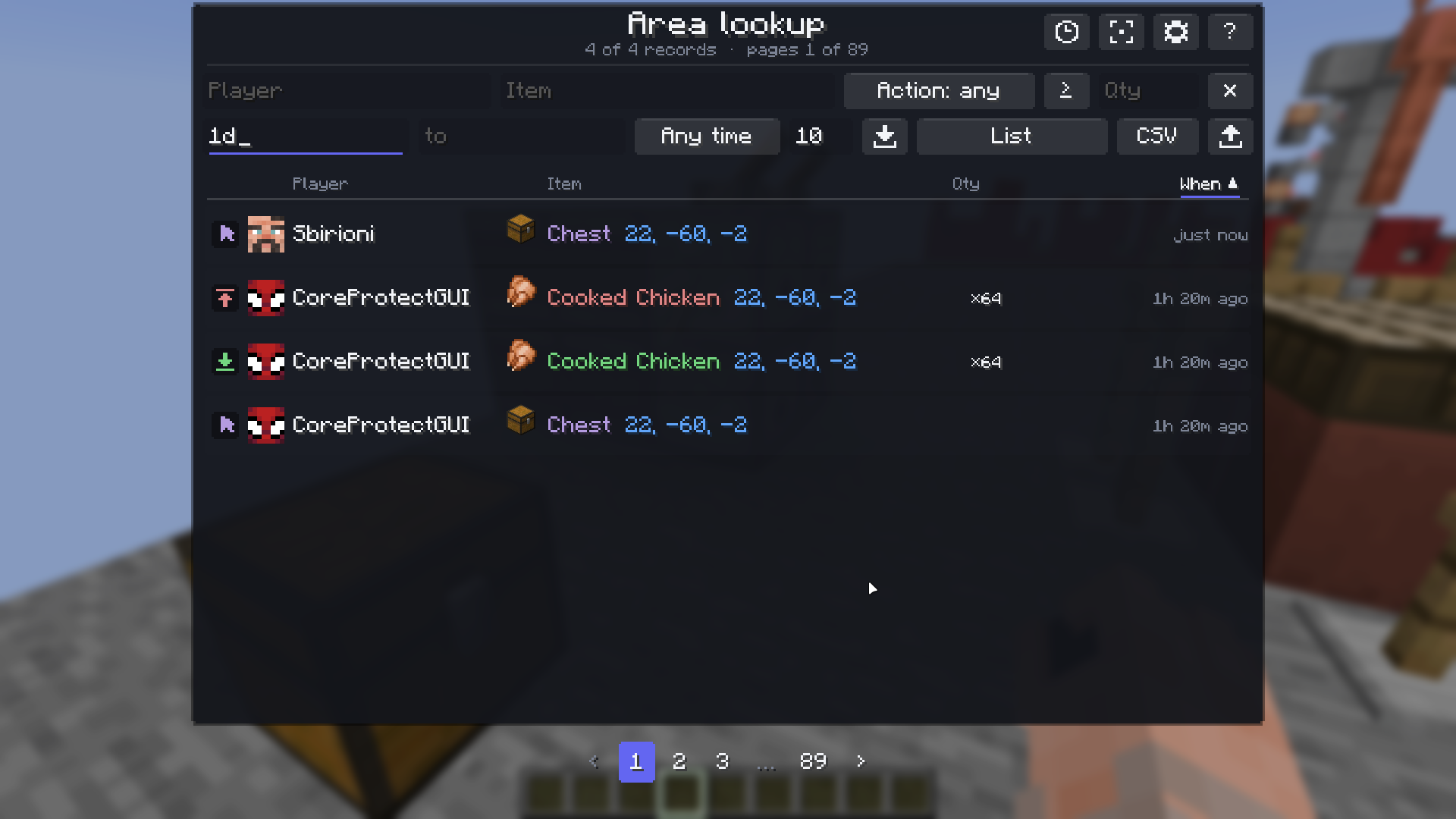
Set a period with a preset — last hour, day, three days, week, month — or type an exact moment: 11:55:22, and a date if it was not today. The mod works out how long ago that was.
Фільтри, що відповідають на справжні питання
Пошук за гравцем, предметом, дією чи кількістю. Синтаксис навмисно маленький:
-Steve              усі, крім Steve
Steve,Alex          будь-хто з двох
"oak_log"           саме це, а не stripped_oak_log
>64                 більше за стак
Період задається готовим варіантом — година, доба, три дні, тиждень, місяць — або точним моментом: 11:55:22 і дата, якщо це було не сьогодні. Скільки часу минуло, мод порахує сам.

Summaries instead of scrolling
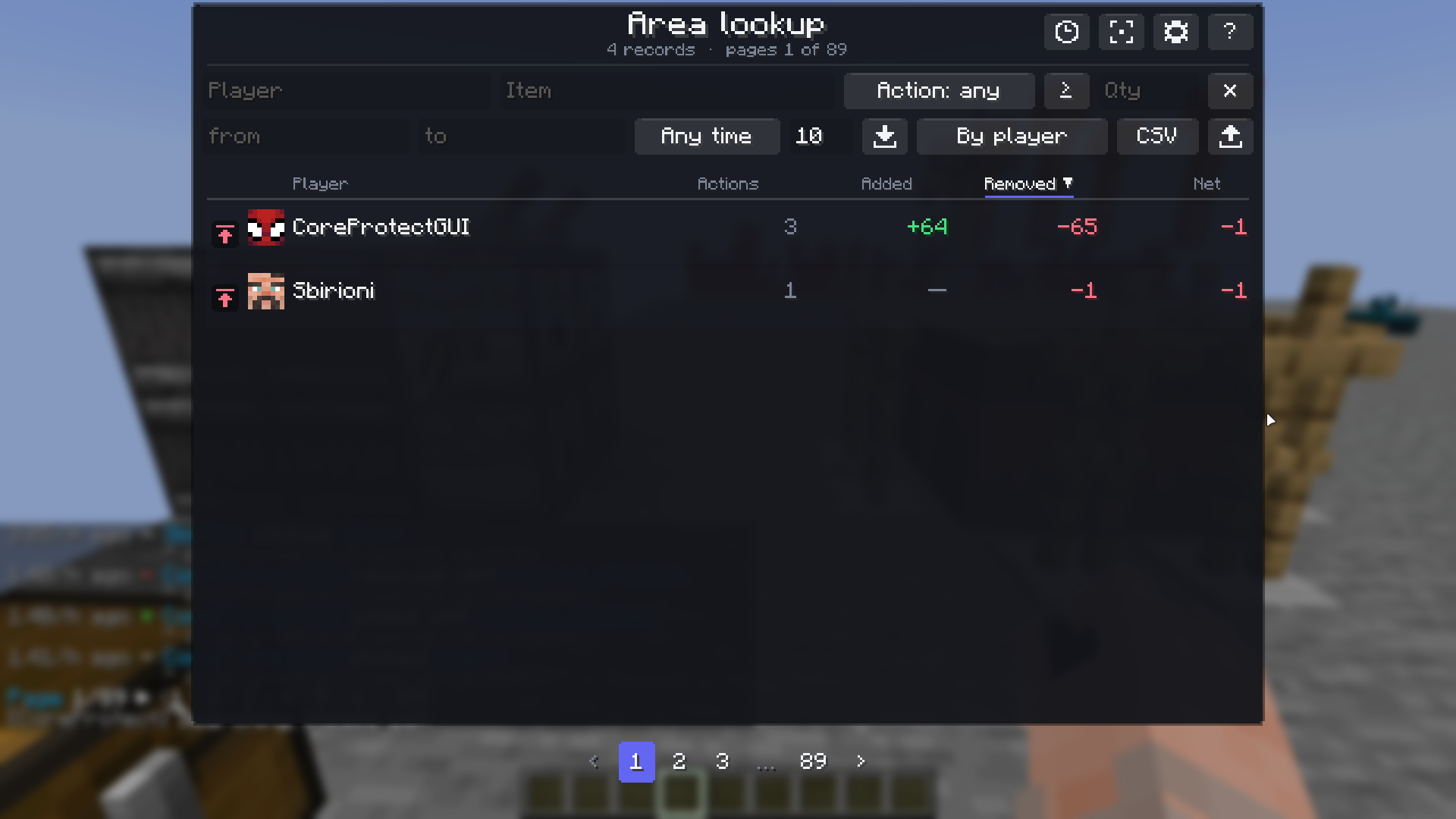
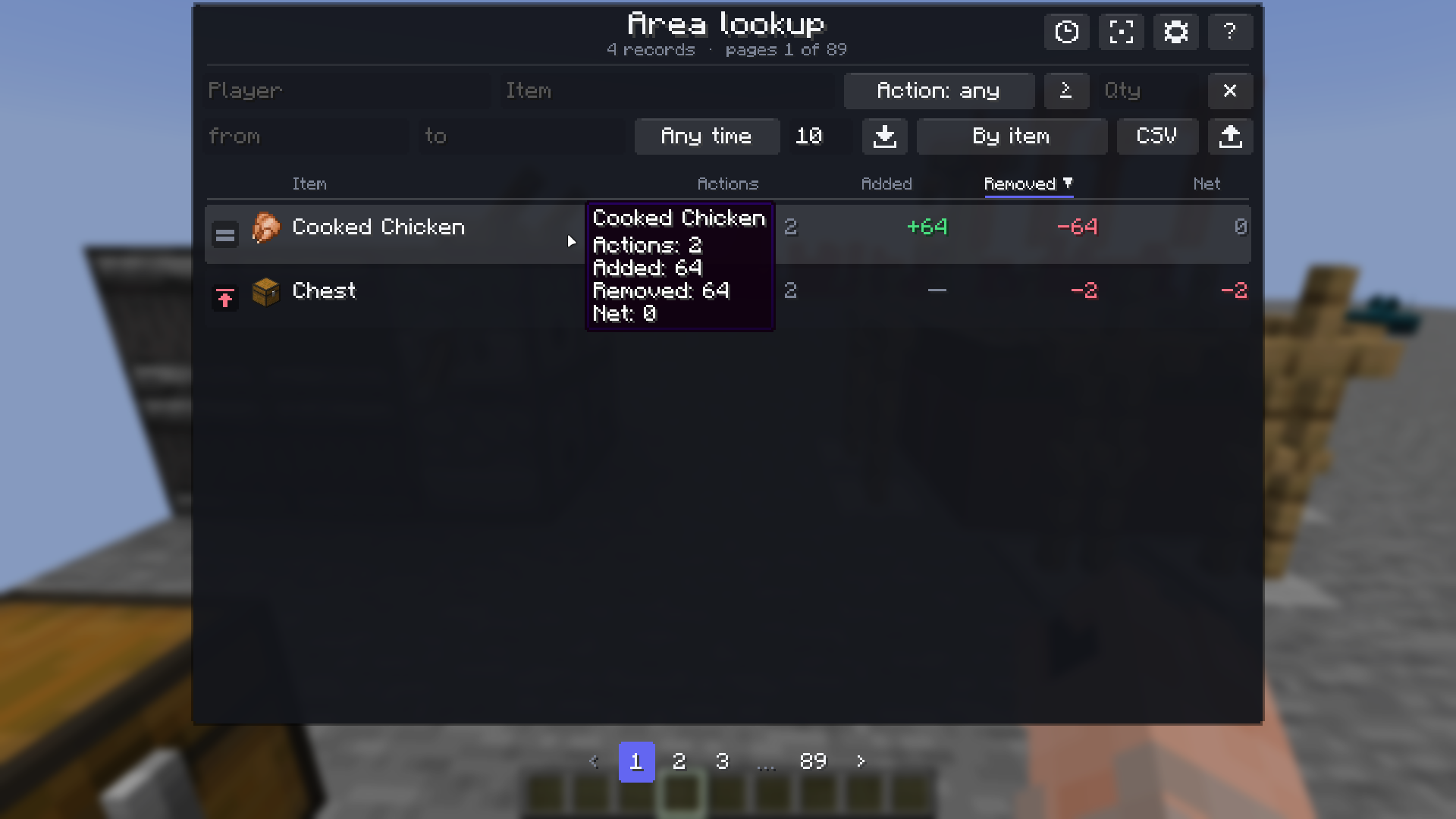
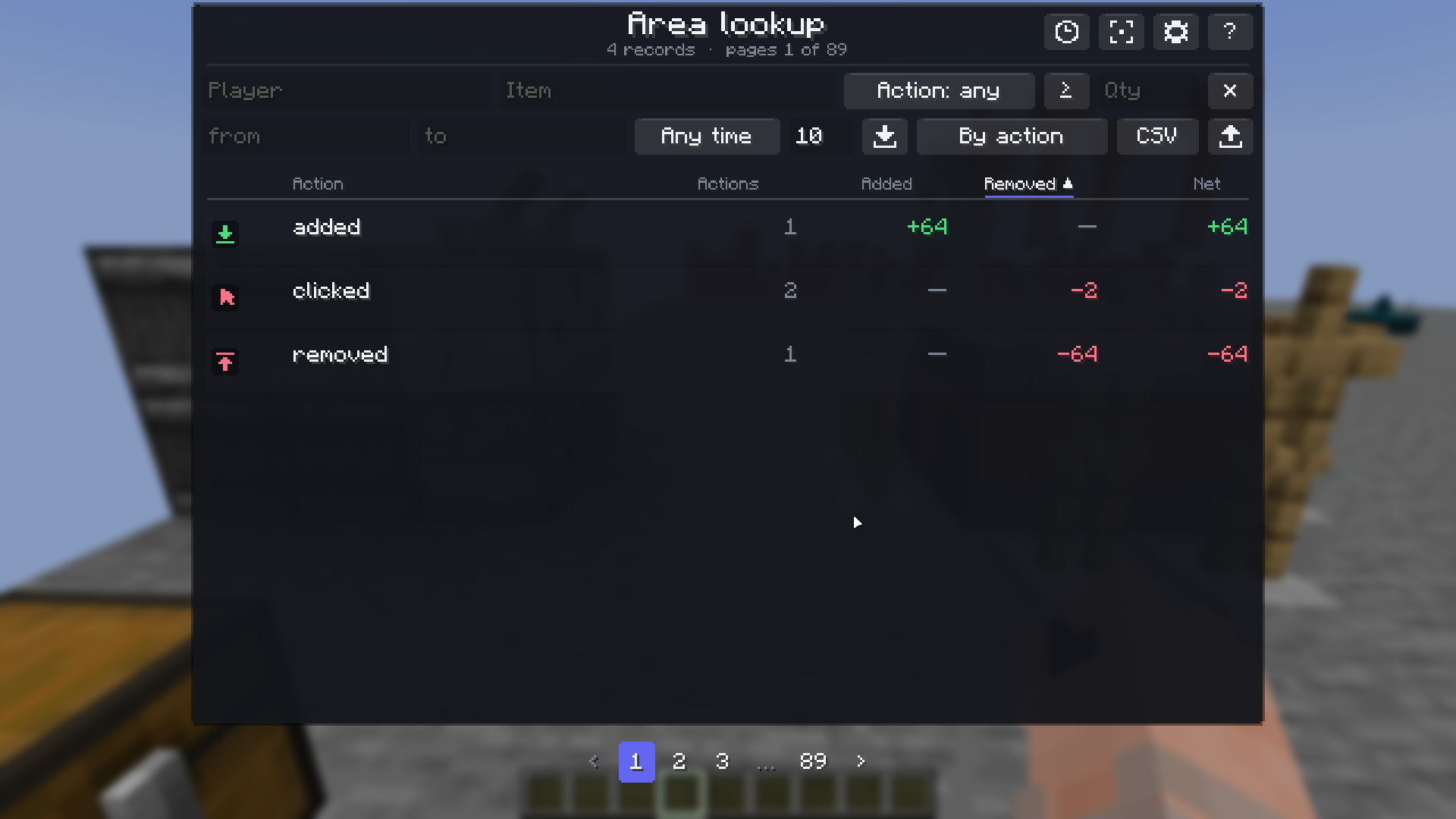
Switch the view and the same rows become a summary: per player, per item, or per action. Four hundred lines turn into four, and the question "who took the most" answers itself.
Зведення замість гортання
Перемикніть вигляд — і ті самі рядки стають зведенням: за гравцями, за предметами або за діями. Чотириста рядків перетворюються на чотири, і питання «хто взяв найбільше» відповідає на себе саме.
Commands as a form, not a line to type
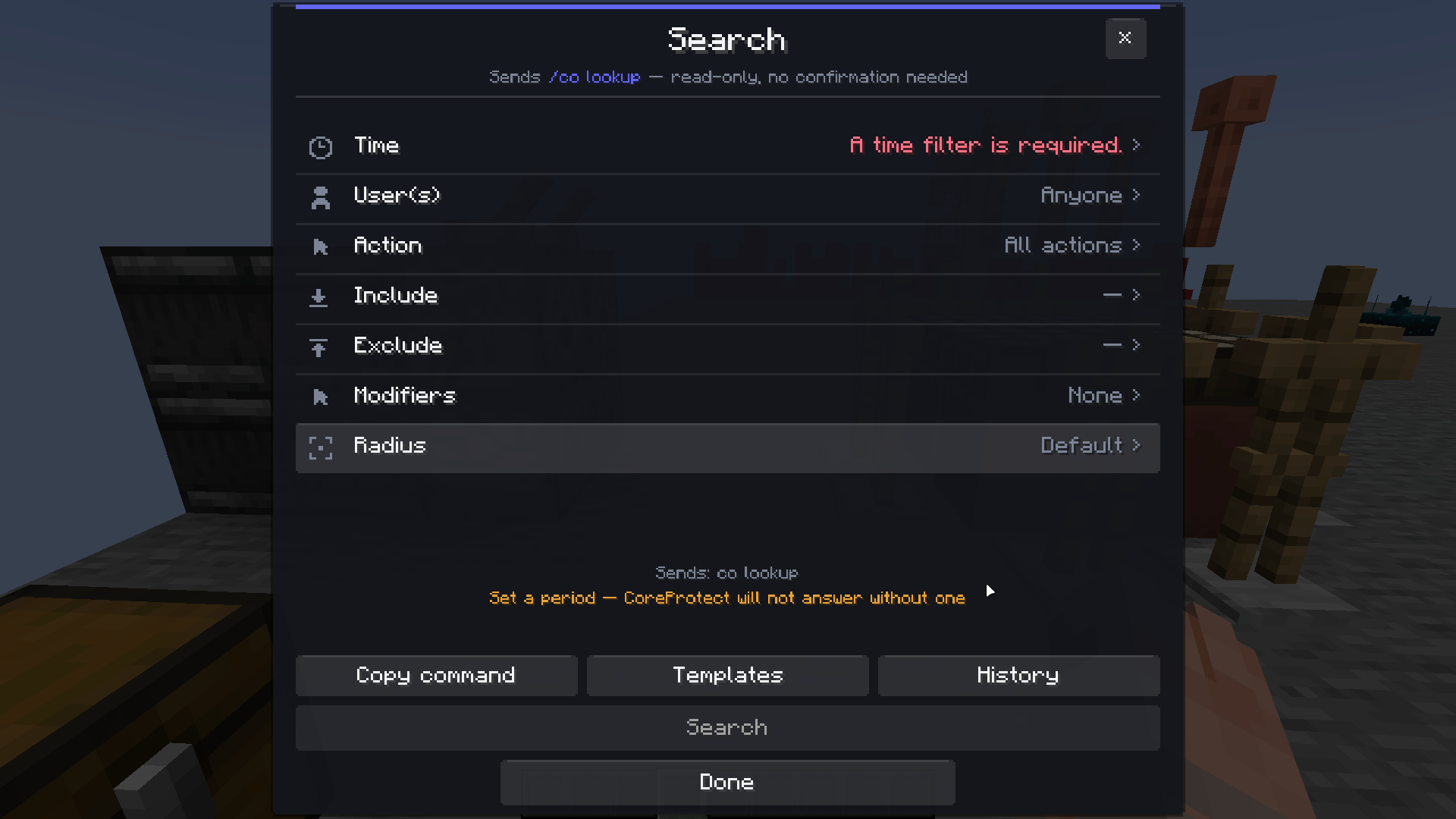
Lookup, rollback, restore and purge each get a form: period, players, action, include, exclude, radius. Every row opens a window of its own, so there is no text box to type into. The command being assembled is shown underneath, character for character, exactly as it will be sent.
The plugin's own rules are checked before anything goes out. A lookup naming neither a player nor a radius is refused by CoreProtect. #global is not a radius, so a whole-world lookup needs a player or a block named as well. a:inventory always needs a player. The form says which of these is missing, in the plugin's own terms, and the send button stays inactive until none is — so you find out before the command, not after an empty answer.
Команди формою, а не рядком для набору
Пошук, відкат, відновлення та очищення отримали форму: період, гравці, дія, включити, виключити, радіус. Кожен рядок відкриває власне вікно, тож набирати нічого не треба. Команда, яка збирається, показана внизу — символ у символ, рівно такою, якою піде.
Правила самого плагіна перевіряються до надсилання. Пошук, що не називає ні гравця, ні радіуса, CoreProtect відхиляє. #global — не радіус, тож пошуку по всьому світу потрібен ще гравець або блок. a:inventory завжди потребує гравця. Форма пише, чого саме бракує, словами плагіна, і кнопка надсилання лишається сірою, доки бракує хоч чогось, — тобто ви дізнаєтесь про це до команди, а не після порожньої відповіді.
Templates, history and groups
Nineteen ready-made templates, kept separately for each command, plus whatever you save yourself. History remembers the last twenty commands each form actually sent — load one and its filters come back.
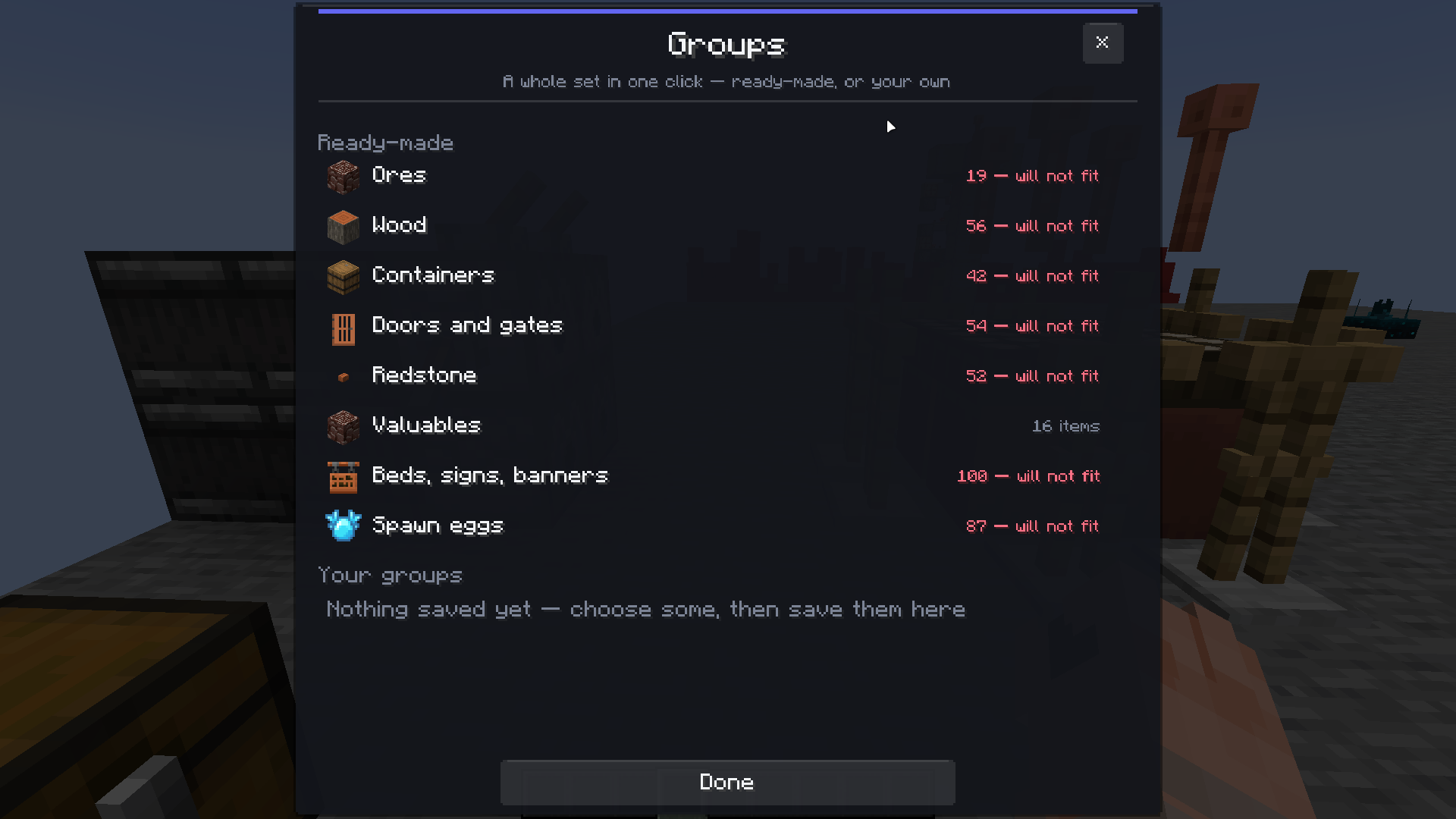
Groups of blocks put twenty ids into a filter with one click: ores, wood, containers, doors, redstone, valuables, furnishings, spawn eggs. Membership comes from the game's own tags, so wood added by another mod lands in the group without this mod ever hearing of that mod.
Non-player causes are where CoreProtect keeps them — in the player picker. A creeper's crater is logged under #creeper, so #creeper, #lava, #piston and forty-three others sit alongside the players, each with an icon.
Шаблони, історія та групи
Дев'ятнадцять готових шаблонів, окремо для кожної команди, плюс ваші власні. Історія пам'ятає останні двадцять команд, які кожна форма справді надіслала, — завантажуєте одну, і фільтри повертаються.
Групи блоків кладуть двадцять ідентифікаторів у фільтр одним кліком: руди, деревина, сховища, двері, редстоун, цінності, оздоблення, яйця призову. Склад береться з тегів самої гри, тож деревина з іншого моду потрапляє в групу, хоч цей мод про той нічого не знає.
Причини, що не є гравцями, лежать там, де їх тримає CoreProtect, — у виборі гравців. Вирва від кріпера значиться під #creeper, тож #creeper, #lava, #piston і ще сорок три стоять поруч із гравцями, кожна з іконкою.


Marks in the world
Choosing a radius draws it in particles for three seconds, so you see what the command will cover before you send it. And the blocks a lookup mentions can be marked where they actually are — an outline, a filled box, or the block's own model as a translucent ghost, which shows what was broken rather than only where it stood. Marks fade on their own timer, with the colour counting down.
Available in the Fabric build. Forge has no hook for drawing in the world.
Позначки у світі
Обраний радіус малюється частинками на три секунди, тож ви бачите, що захопить команда, ще до надсилання. А блоки, які називає пошук, можна позначити там, де вони справді є, — контуром, залитим кубом або власною моделлю блока у вигляді напівпрозорого привида, який показує, що саме зламали, а не лише де воно стояло. Позначки згасають самі, а колір відлічує час.
Є у збірці під Fabric. У Forge немає події для малювання у світі.
Getting items back
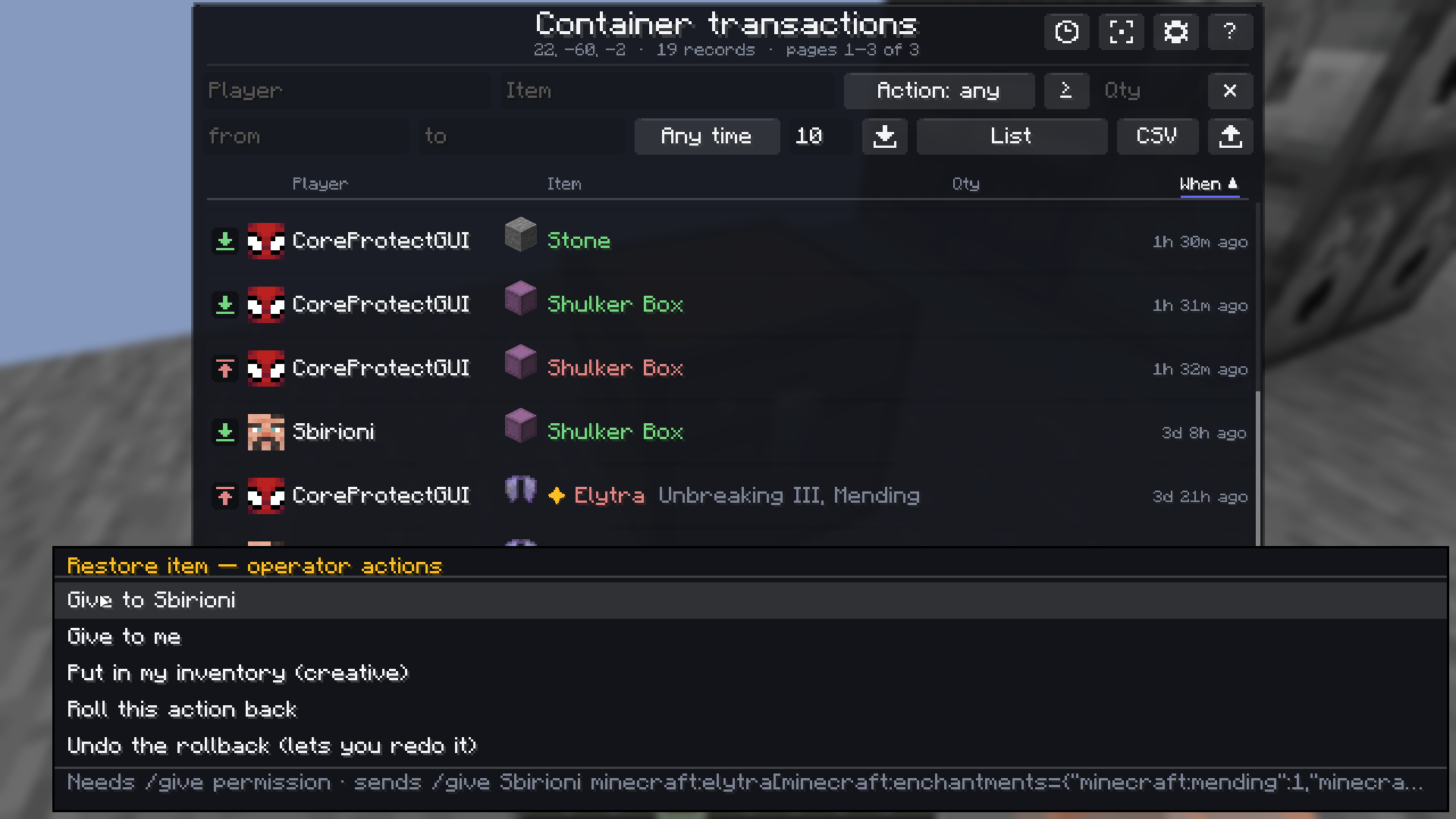
When a lookup shows what someone lost, the restore menu turns it into an action: a /give, a CoreProtect rollback of that one row, or laying the stack out through the creative inventory. Enchantments and custom names carry over where the server described them.
Each of those needs exactly the permission it would need if you did it by hand. The mod grants nothing.
Повернення предметів
Коли пошук показує, що хтось втратив, меню відновлення перетворює це на дію: /give, відкат CoreProtect саме цього рядка або викладання стака через креативний інвентар. Чари та власні назви переносяться там, де сервер їх описав.
Кожна з цих дій потребує рівно того права, що й якби ви зробили її вручну. Мод не дає жодних прав.
Remembered, and exportable
Rows are filed per block as you look them up, so checking the same chest next week shows what changed since — and a batch can stop as soon as it reaches rows already known, rather than asking the server for another fifty pages of the same thing.
What is on screen exports to TXT, CSV or JSON, filters and sorting included, into a folder beside your game.
Запам'ятовується і вивантажується
Рядки складаються по блоках у міру перевірок, тож той самий сундук наступного тижня показує, що змінилося відтоді, — а пакетне завантаження може спинитись, щойно дійде до вже відомих рядків, замість просити в сервера ще п'ятдесят сторінок того самого.
Те, що на екрані, вивантажується у TXT, CSV або JSON — разом із фільтрами й сортуванням — у теку поруч із грою.
Twelve languages, fourteen understood
The interface is complete in English, Ukrainian, German, Spanish, French, Polish, Turkish, Japanese, Korean, Vietnamese and both Chinese scripts — every window, every picker, every refusal message.
Separately from that, the mod reads CoreProtect in all fourteen languages the plugin itself ships. This matters more than it sounds: a server configured in Japanese answers in Japanese, and the table still fills in — with the names of items and blocks in your Minecraft language, not the server's.
Дванадцять мов, чотирнадцять зрозумілих
Інтерфейс повний англійською, українською, німецькою, іспанською, французькою, польською, турецькою, японською, корейською, в'єтнамською та обома варіантами китайської — кожне вікно, кожен підбирач, кожне повідомлення про відмову.
Окремо від цього мод читає CoreProtect усіма чотирнадцятьма мовами, якими плагін говорить сам. Це важливіше, ніж звучить: сервер, налаштований японською, відповідає японською — а таблиця однаково заповнюється, і назви предметів та блоків у ній вашою мовою Minecraft, а не серверною.
Two looks, and the details
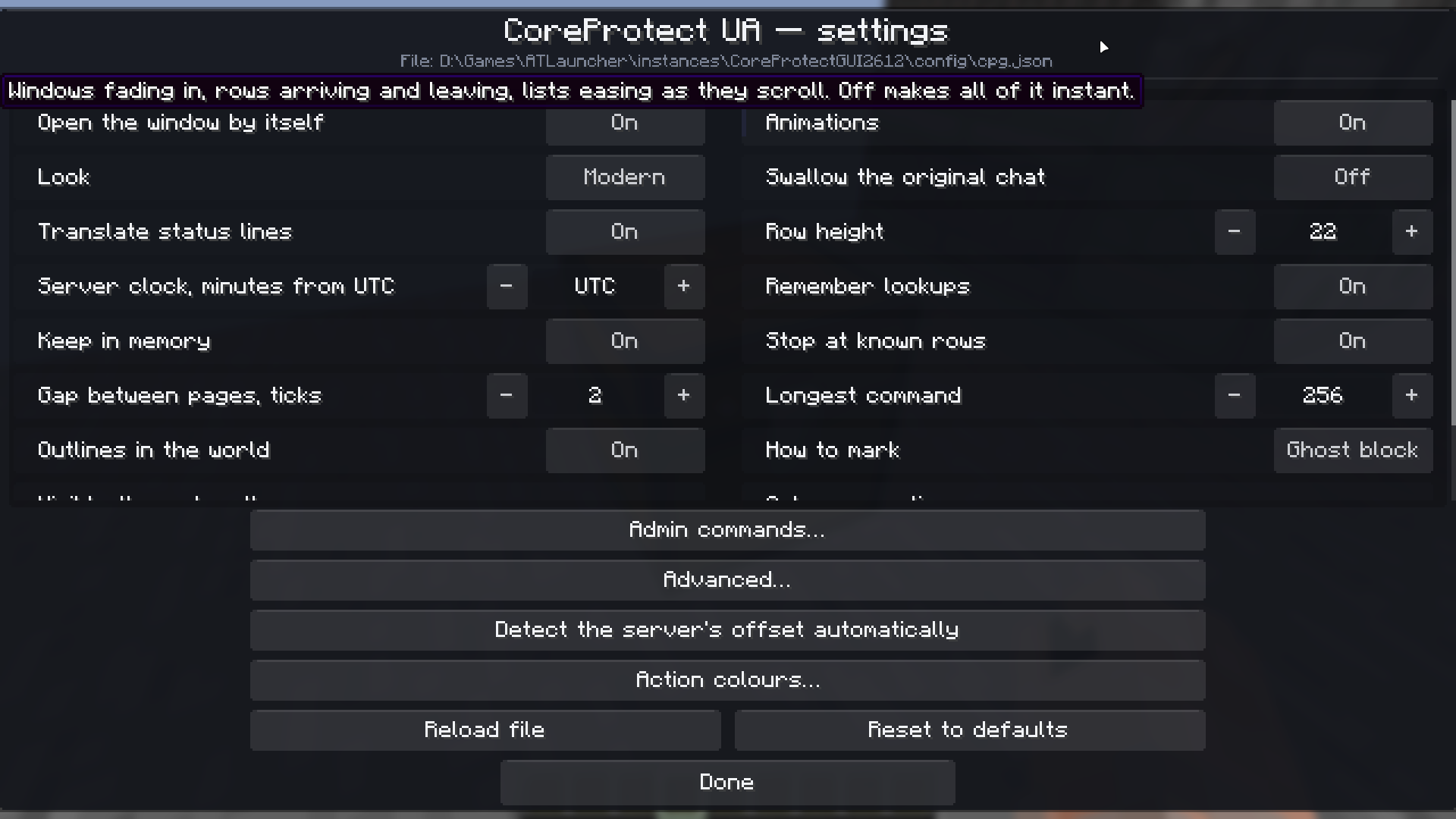
Modern or Classic, switched in the settings at any moment. Row height, animations, colours per action — all adjustable, and the colour picker has presets if you would rather not choose twelve of them by hand.
Два вигляди й дрібниці
Сучасний або класичний, перемикаються в налаштуваннях будь-коли. Висота рядка, анімації, кольори для кожної дії — усе налаштовується, а в підбирачі кольорів є готові набори, якщо не хочеться обирати дванадцять штук руками.
Keys
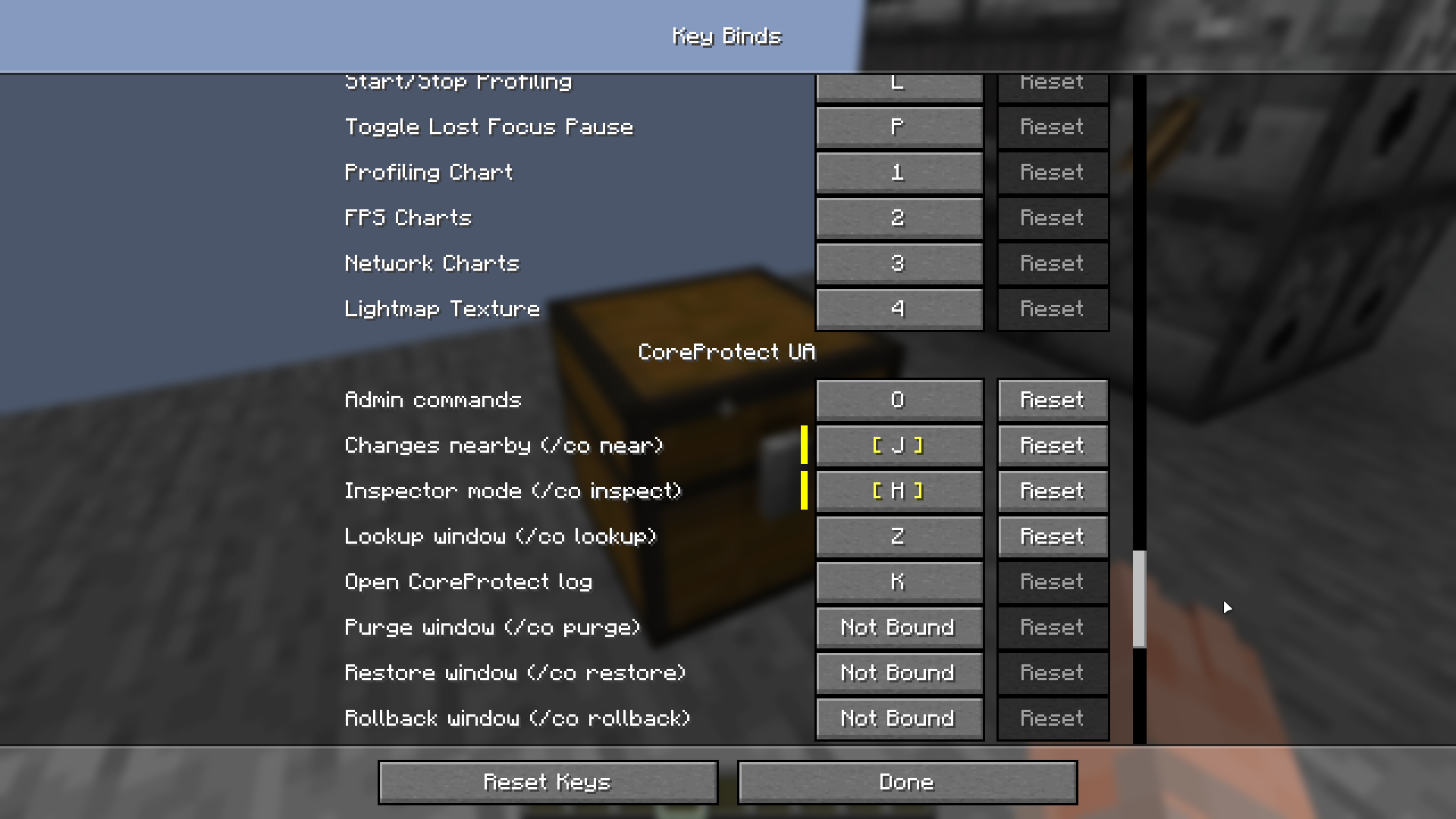
K reopens the last result without asking the server again. Seven more can be bound: /co inspect, /co near, the admin menu, and each of the four command forms. All unbound by default — a key that sends a command to a server is not something to hand out on a default anyone might press by accident.
Клавіші
K відкриває останній результат, не питаючи сервер знову. Ще сім можна призначити: /co inspect, /co near, адмінське меню й кожна з чотирьох форм. Усі порожні за замовчуванням — клавішу, що надсилає команду на сервер, не роздають типовим значенням, на яке хтось випадково натисне.
Requirements
- Minecraft 26.1.x or 26.2, Java 25
- Fabric (and Quilt, which runs the Fabric build), Forge, or NeoForge
- Fabric API — Fabric and Quilt builds only
- The CoreProtect plugin on the server, and permission to use it
The mod gives you no access you do not already have. If you cannot run /co i, it has nothing to show.
Optional: Mod Menu for the settings entry on Fabric — Forge and NeoForge open it from their own mod list. JourneyMap for waypoints, on the 26.2 builds.
Вимоги
- Minecraft 26.1.x або 26.2, Java 25
- Fabric (і Quilt, який запускає збірку під Fabric), Forge або NeoForge
- Fabric API — лише для збірок під Fabric і Quilt
- Плагін CoreProtect на сервері й право ним користуватися
Мод не дає вам жодного доступу, якого у вас і так немає. Якщо ви не можете виконати /co i, йому нема чого показувати.
Необов'язково: Mod Menu для пункту налаштувань на Fabric — Forge і NeoForge відкривають його зі свого списку модів. JourneyMap для дорожніх точок, у збірках під 26.2.
What it sends, and when
Everything happens on your client, and nothing is installed on the server. The mod sends something only when you click something:
- the page jumps CoreProtect put on its own links;
- from the item-restoring menu, a
/give, a rollback, or a creative placement; - from the admin menu, the command you assembled there.
Loading many pages is visible to the server. Thirty pages is thirty commands. They go out one at a time with a pause you can tune, but it is your account sending them.
Що надсилає і коли
Усе відбувається на вашому клієнті, на сервер нічого не встановлюється. Мод надсилає щось лише тоді, коли ви щось натискаєте:
- переходи між сторінками, які CoreProtect повісив на власні посилання;
- з меню відновлення предметів —
/give, відкат або викладання через креатив; - з адмінського меню — ту команду, яку ви там зібрали.
Завантаження багатьох сторінок видно серверу. Тридцять сторінок — це тридцять команд. Вони йдуть по одній із паузою, яку можна налаштувати, але надсилає їх ваш акаунт.
Warnings
A rollback changes the world. Everything in the menu that does asks twice. Use the preview first — it shows the result without touching anything, and "apply" then runs it for real.
A purge deletes log entries for good and cannot be undone. CoreProtect will not purge anything from the last thirty days when the command comes from in game.
Commands are limited to 256 characters, and that limit is the server's. Paper disconnects you for going over. Raise it in the settings only if you know your own server takes more. A group too big to fit says so before you use it.
Enchantments depend on your server. CoreProtect only describes items that have something to describe, and some setups send nothing at all. Where it sends nothing, no client-side mod can invent it.
Попередження
Відкат змінює світ. Усе в меню, що це робить, перепитує двічі. Спершу скористайтесь переглядом — він показує результат, нічого не чіпаючи, а «застосувати» потім виконує його по-справжньому.
Очищення видаляє записи журналу назавжди, і скасувати це неможливо. CoreProtect не чистить нічого за останні тридцять днів, коли команда йде з гри.
Команди обмежені 256 символами, і це обмеження сервера. Paper вибиває за перевищення. Піднімайте його в налаштуваннях, лише якщо знаєте, що ваш сервер приймає більше. Група, яка не влізе, каже про це заздалегідь.
Чари залежать від сервера. CoreProtect описує лише ті предмети, у яких є що описувати, а деякі конфігурації не надсилають нічого. Там, де він не надсилає нічого, жоден клієнтський мод цього не вигадає.
Support
Questions, bug reports and suggestions go on Discord — in English or in Ukrainian, there is a channel for each.
Підтримка
Питання, звіти про помилки та пропозиції — у Discord, англійською або українською: для кожної є свій канал.
The CoreProtectGUI Team
