Companion Call
- By
Call your companions and mounts to your side and choose them through a card interface.
è½®æ¤ (2).gif
QQ20261101-223301-HD.gif
Description
Introduction
Accidentally left a companion at home while travelling? No need to worry! Companion Call lets you choose a pet or mount and call it to your side wherever you are, so it can travel and fight alongside you! You can request a recall when your companion is nearby, in an unloaded area, or in another dimension.
Calling and choosing
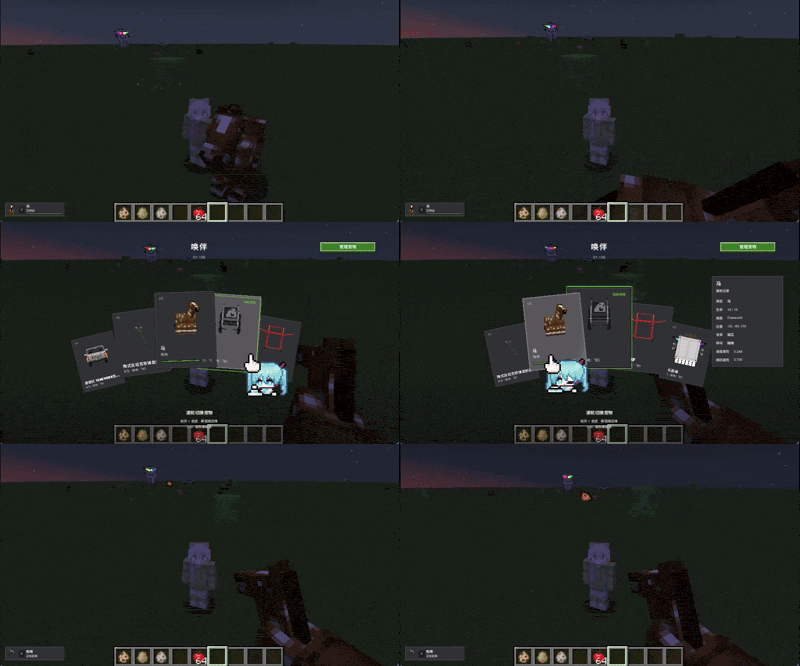
Tap V to call your current companion. Hold V to open the card selector, then scroll or use the mouse to choose a companion. Release the key to confirm the pet on the front card, or press Esc to cancel. The recall key can be changed in Minecraft's control settings.
The HUD displays your current companion and recall status. Cards show the companion's appearance and available information; if it is unloaded, the information comes from its last recorded state.
Managing companions
Tamed companions are registered as they are discovered. The management interface lets you hide entries and restore them later without harming the entity. You can also add any entity you are currently riding through the management interface or with the default N key, including non-living entities such as boats and minecarts. Note: adding an entity that already has an owner requires administrator permission.
How recall works
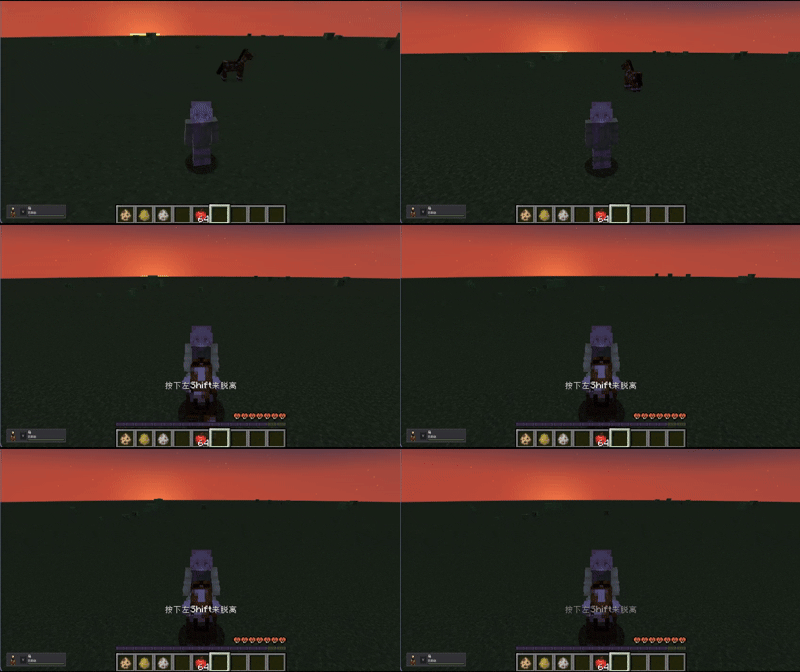
Eligible companions near the player move toward the player's position. In special cases, such as recall across dimensions or from an unloaded area, the system locates and transfers the original entity. Eligible mounts can carry the player after reaching a suitable boarding position. Note: recall does not revive dead companions.
Configuration
The recall and add keys can be changed in Minecraft's control settings. Client configuration includes the HUD, selector, model previews, management entry, add key and HUD position; common configuration includes the hold threshold and recall recovery wait time. Commands are documented in the README.
Similar project: Callable Horses
Companion Call Team

Owner