Colored Nicknames
- By
A client-side Fabric mod that allows custom player nickname styling (solid colors, gradients, rainbow) and group sorting
.png
Description
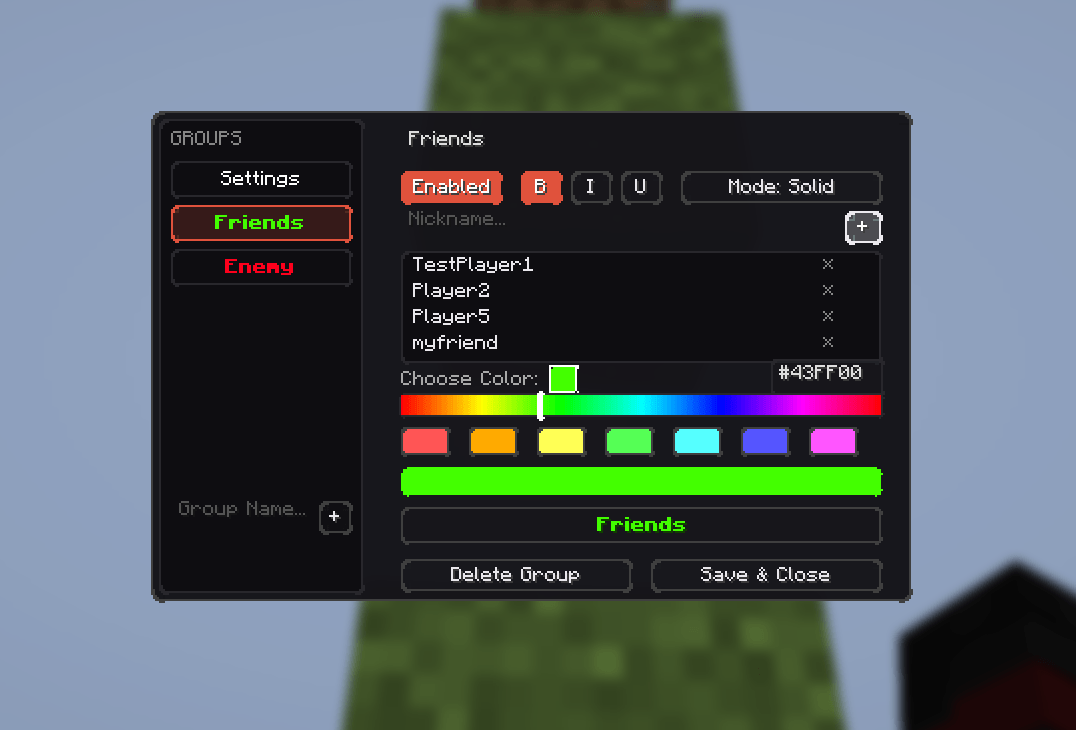
A client-side Fabric mod for Minecraft that lets you customize player nicknames with solid colors, gradients, or rainbow animations. All configurations are managed via an in-game interface.
Features
- Nickname Customization: Apply solid colors, linear gradients, or rainbow effects to player nicknames.
- Text Formatting: Supports bold, italic, and underline styles.
- Preserve Team Prefixes: Keeps server-side team prefixes and suffixes intact while applying custom colors only to the player name.
- Overhead Name Tag Hiding: Option to hide overhead name tags for players who are not assigned to any of your custom groups.
- Tab List Sorting: Automatically groups and prioritizes configured players at the top of the tab list.
- Groups in Locator: Hides players who are not in any of your custom groups from the Locator Bar HUD.
- In-Game Editor: A simple and clean GUI to manage all groups, players, and formatting settings. The default keybind to open the editor is
N.
How to Install
- Install Fabric Loader (https://fabricmc.net/wiki/install)
- Download Colored Nicknames
- Put the downloaded Colored Nicknames JAR and Fabric API into your mods folder (
.minecraft/mods) - Run the game
Configuration
All data is saved locally on your client. No server-side setup is required.
- Configuration file path:
.minecraft/config/colored_nicknames.json
Colored Nicknames Team