![[Cobblemon] CobbleRadar — Spawn Alerts & Discord logo](https://media.forgecdn.net/avatars/thumbnails/2036/404/64/64/639245520652295840.jpg)
[Cobblemon] CobbleRadar — Spawn Alerts & Discord
- By

Captura de tela 2026-09-09 081707.png
Captura de tela 2026-09-09 081723.png
Captura de tela 2026-09-09 081811.png
Captura de tela 2026-09-09 081851.png
Captura de tela 2026-09-09 082120.png
Description
CobbleRadar — Spawn Alerts & Discord
Keep track of special Pokémon encounters in Cobblemon 1.8 with customizable in-game notifications, Discord alerts, and optional waypoints.
CobbleRadar announces when special Pokémon spawn, are captured, or are defeated, helping everyone stay informed while exploring together.
Pokémon notifications
Enable or disable notifications for each category:
- Legendary
- Mythical
- Paradox
- Ultra Beast
- Alpha
- Shiny
Supports natural spawns and Pokémon created through Cobblemon’s spawning commands, including /pokespawn.
Pokémon matching multiple special categories produce a single notification with the relevant category badges.
Keep shiny encounters a surprise
Ordinary shiny Pokémon receive a Shiny notification. However, when a shiny Pokémon also belongs to another special category, its shiny status stays hidden.
For example, a shiny legendary is announced as Legendary, without revealing that it is shiny. This behavior applies to both in-game and Discord notifications.
Customize your notifications
Open the graphical settings panel to personalize your alerts:
- Enable or disable individual Pokémon categories.
- Configure spawn, capture, and defeat notifications separately.
- Toggle chat messages and notification sounds.
- Choose colors from a palette or fine-tune them with RGB sliders.
- Select category symbols or paste a custom Unicode symbol.
- Preview your selected color and symbol.
- Enable or disable bold category names.
- Choose a Minecraft sound and adjust its volume.
- Listen to a sound preview before saving.
- Set a font identifier from Minecraft or an installed resource pack.
- Restrict notifications to your current dimension.
- Preview the notification format in chat.
The default sound is a short, quiet chime. Unicode symbols and emoji appearance depend on the font available in Minecraft; not every Windows emoji is supported.
Personal notification preferences are stored locally, allowing each player to customize their own experience.
In-game configuration panel
Press K to open CobbleRadar.
The shortcut can be reassigned through:
Options → Controls → Key Binds → CobbleRadar
You can also open the settings through Mod Menu, when installed.
The panel uses a translucent background, keeping the world visible without pausing gameplay. Color and symbol changes are applied to your settings draft first—use Save to keep your preferences.
Discord integration
Send notifications directly to a Discord channel using a webhook.
The Discord settings tab provides:
- A field for pasting the destination webhook URL.
- An independent language selector for Discord messages.
- Separate switches for spawn, capture, and defeat alerts.
- Individual Pokémon category filters.
- An Enable & test button that saves the settings, enables automatic delivery, and sends a test message.
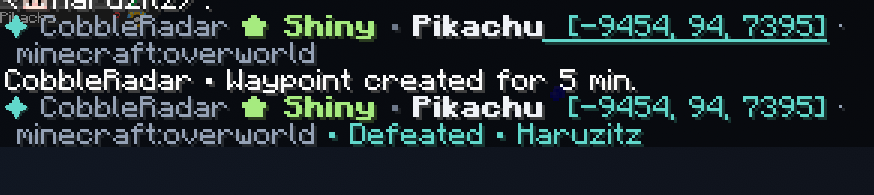
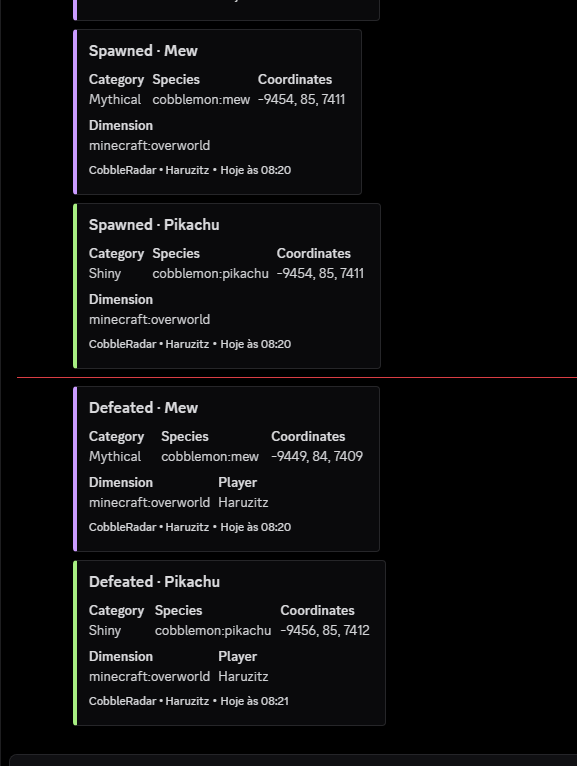
Notifications use colored embeds with the Pokémon’s name, category, species identifier, coordinates, and dimension. Capture or defeat messages include the responsible player when that information is available.
Discord notifications are sent centrally by the server, rather than separately by every connected player. In singleplayer, the integrated server handles delivery.
Only the world host or authorized server administrators can configure Discord. The webhook URL is private and should never be shared in screenshots or public configuration files.
User and role mentions are disabled.
Connecting your channel
- In Discord, open the destination channel’s settings.
- Go to Integrations → Webhooks and create a webhook.
- Copy its URL.
- Open CobbleRadar’s Discord tab and paste the URL.
- Choose your language, events, and categories.
- Click Enable & test.
Automatic notifications require both the relevant event and category filters to be enabled.
Optional Xaero waypoints
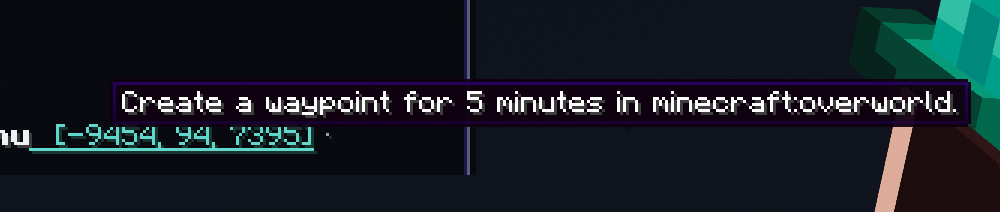
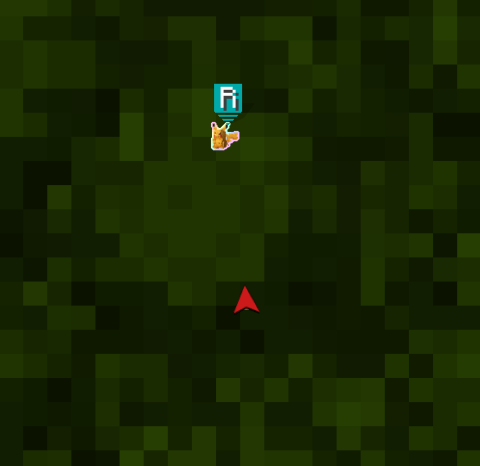
With Xaero’s Minimap installed, notification coordinates can be clicked to create a temporary waypoint.
- Choose how long temporary waypoints remain active.
- Locate the coordinates of a reported encounter.
- Remove associated waypoints when a capture or defeat is reported.
- Automatically clear temporary markers when they expire or you disconnect.
Xaero’s World Map alone does not provide this integration. Xaero’s Minimap is required; World Map can be installed alongside it.
CobbleRadar does not require a minimap to display notifications.
Supported languages
The in-game interface automatically follows your Minecraft language setting.
Available translations:
- English
- Portuguese
- French
- Italian
- Spanish
- Russian
- German
- Japanese
- Korean
- Simplified Chinese
Portuguese and Spanish resources also cover the Portuguese (Portugal) and Spanish (Mexico) language selections. Unsupported languages fall back to English.
Discord has its own language setting, independent of each player’s Minecraft language.
Cobblemon and datapacks
CobbleRadar reads Pokémon categories from Cobblemon’s loaded species data and uses Cobblemon’s own alpha and shiny properties.
This allows appropriately classified Pokémon supplied or modified by datapacks, such as AllTheMons, to use the same notification system. Recognition depends on the category information provided by those packs.
Requirements
- Cobblemon 1.8.x
Optional integrations:
- Mod Menu — access the configuration panel from the mod list.
- Xaero’s Minimap — create temporary encounter waypoints.
For the complete experience in multiplayer, install CobbleRadar on both the server and clients. In singleplayer, install it in your Fabric modpack.
Notes
- Captures and defeats are separate events; ordinary despawning or chunk unloading is not treated as a defeat.
- Notification filters can suppress alerts intentionally.
- Discord delivery requires an internet connection from the server and is subject to Discord’s availability and rate limits.
- This release targets Fabric and Cobblemon 1.8.x.
Credits
Project creator and maintainer: Haruzitz.
Radar artwork used in the logo: PNG image from Pngtree.
Pikachu minimap icon: AZOTH Cobblemon Minimap Icons.
Minecraft, Pokémon, Cobblemon, and third-party assets belong to their respective owners. CobbleRadar is an independent addon.
License: All Rights Reserved. Modifications and unauthorized redistribution of CobbleRadar are prohibited under its included license. Third-party assets remain subject to their respective licenses
[Cobblemon] CobbleRadar — Spawn Alerts & Discord Team