Cobblemon Scanner Details
- By
Extra labels on Cobblemon's Pokédex scanner: shiny, regional and special forms, color patterns, colored type names and a level color that compares with your party.
Description
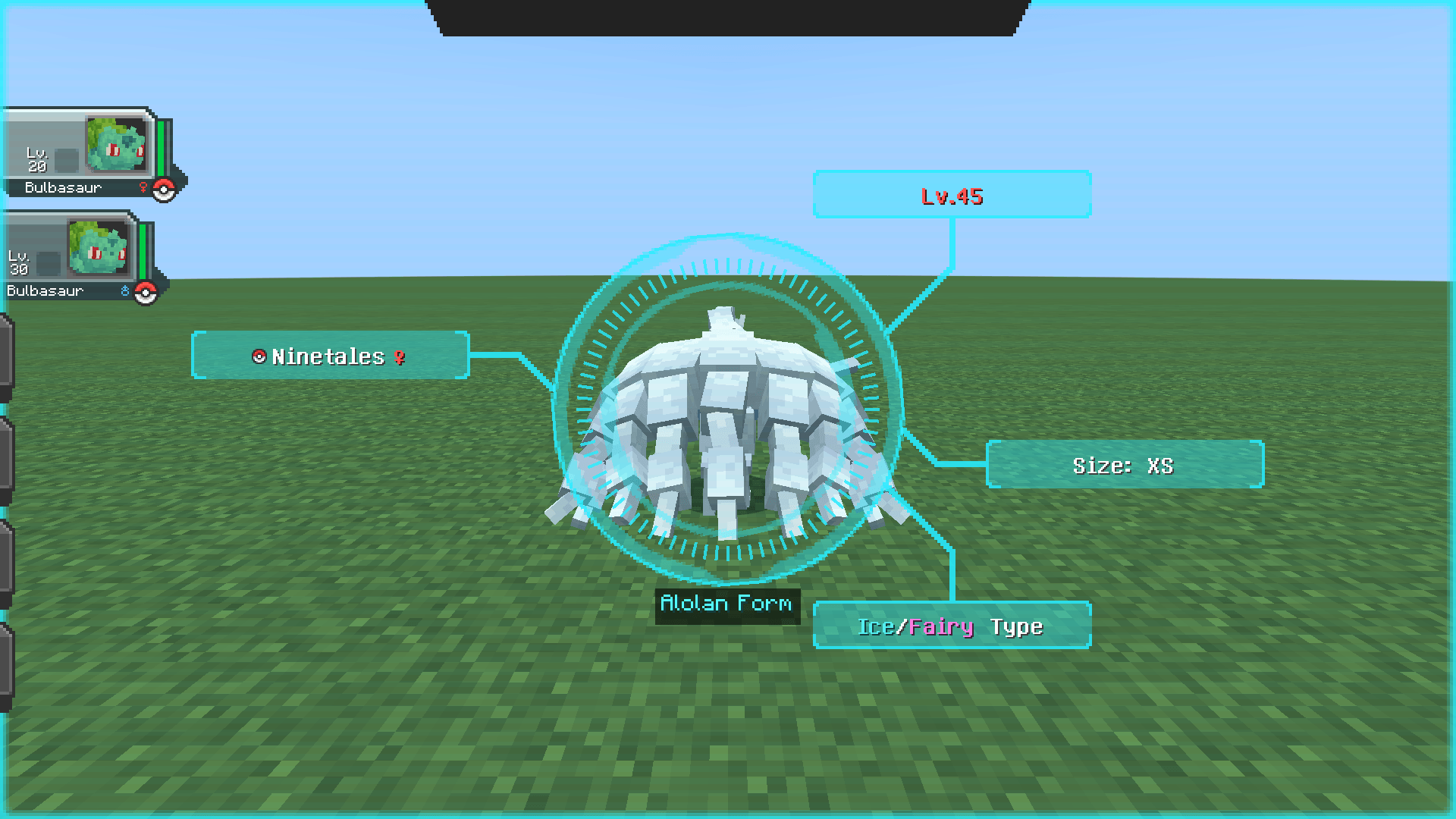
Scan a Pokémon with Cobblemon's Pokédex and see more at a glance. Cobblemon's own scanner frames stay where they are and keep their text; Scanner Details adds a small label box, colors the type names and colors the level.
What it adds
- Shiny: a gold label when the Pokémon you are scanning is shiny
- Regional forms: Alolan, Galarian, Hisuian or Paldean Form
- Other special forms: Mega, Gigantamax, White-Striped and more, using Cobblemon's own form names where it has one
- Color and pattern labels, for example Color: Pink on a pink Wooloo
- Colored types: each type name in the types frame has its own type color
- Level color: the level is green when it is below your whole party, yellow when it is inside your party's range, red when it is above your strongest Pokémon. With an empty party the level keeps Cobblemon's color.
The small label box is placed next to Cobblemon's frames (not on top of them) on a dark background. The type colors appear only where Cobblemon itself shows the types.
Install
- Minecraft 1.21.1
- Cobblemon 1.8.1 and 1.8.2 (tested); the file accepts 1.8.1 up to but not including 1.9
- Fabric (needs Fabric Loader 0.17.2 or newer and Cobblemon's own requirements) or NeoForge 21.1.x
- Client-side mod: put it in your own game. Servers do not need it; a server that has it still starts normally, and players with or without it can join.
Tested with
Fabric Loader 0.17.2 and 0.19.5 and NeoForge 21.1.1 and 21.1.257, with Cobblemon 1.8.1 on all four and Cobblemon 1.8.2 on the two newer loaders (six game installs), singleplayer; and on local dedicated servers (Fabric Loader 0.19.5 and NeoForge 21.1.257, Cobblemon 1.8.1 and 1.8.2): a player with it joins a server without it, a player without it joins a server with it, and both sides with it.
Good to know
- English only.
- The box shows at most five lines (when there are more, the fifth one says "+N more"), long lines are shortened with dots, and if there is no free room the box is left out.
- It declares Cobblemon 1.8.1 up to but not including 1.9, so the game will not load it with Cobblemon 1.9 or newer until it has been tested there.
- Not tested with other mods that change the scanner screen.
Credit
Inspired by Better Pokedex Scanner by Joshiki (https://www.curseforge.com/minecraft/mc-mods/cobblemon-better-pokedex-scanner), made for Cobblemon 1.7.3; this is our own code for Cobblemon 1.8, no code copied.
Screenshots show Cobblemon's own scanner, HUD and Pokémon models; Cobblemon and its art belong to the Cobblemon team.
Modpacks
You may include it by linking to it on CurseForge. Please don't re-upload the file elsewhere.
Not affiliated with Cobblemon, Nintendo, Game Freak or The Pokémon Company.
Support
Enjoying it? Support KingdomForge on Ko-fi: https://ko-fi.com/kingdomforge
Cobblemon Scanner Details Team