Cobblemon PC Plus
- By
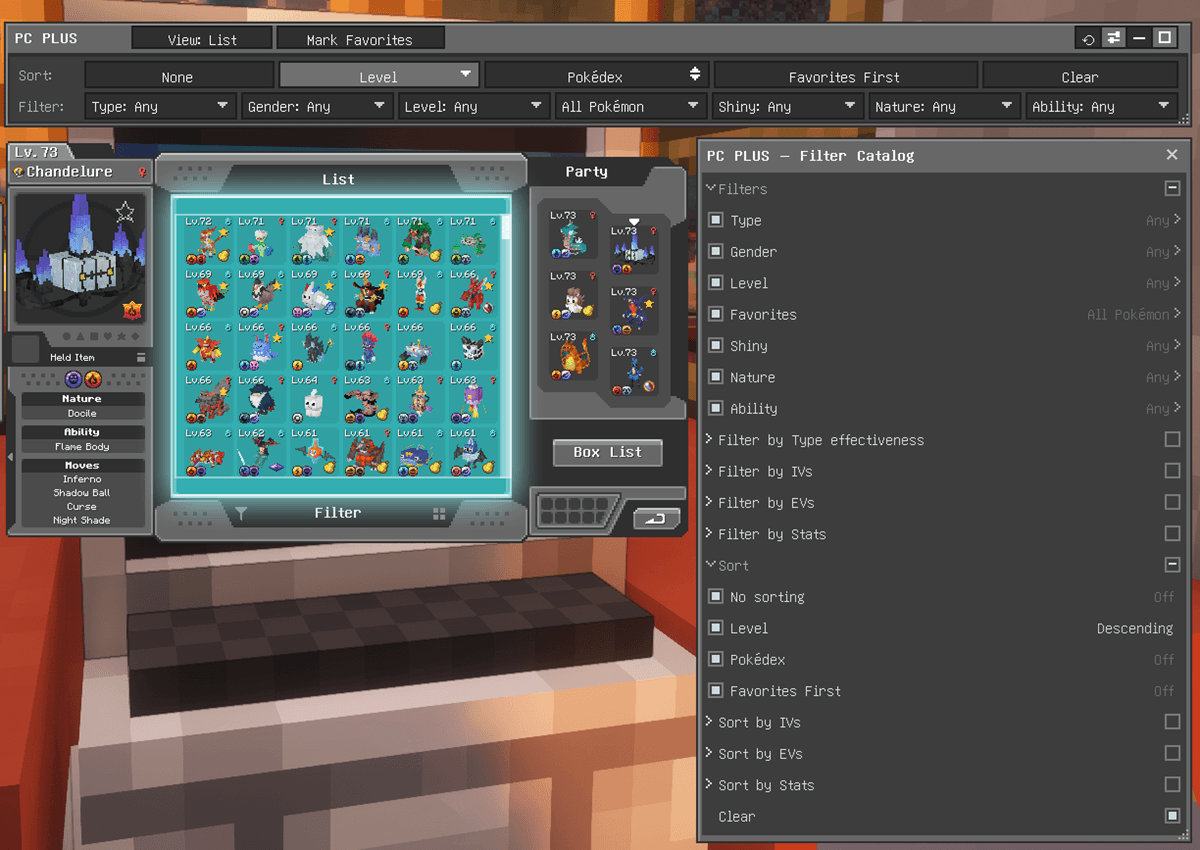
PC Interface with PC Plus Terminal & Filter Catalog
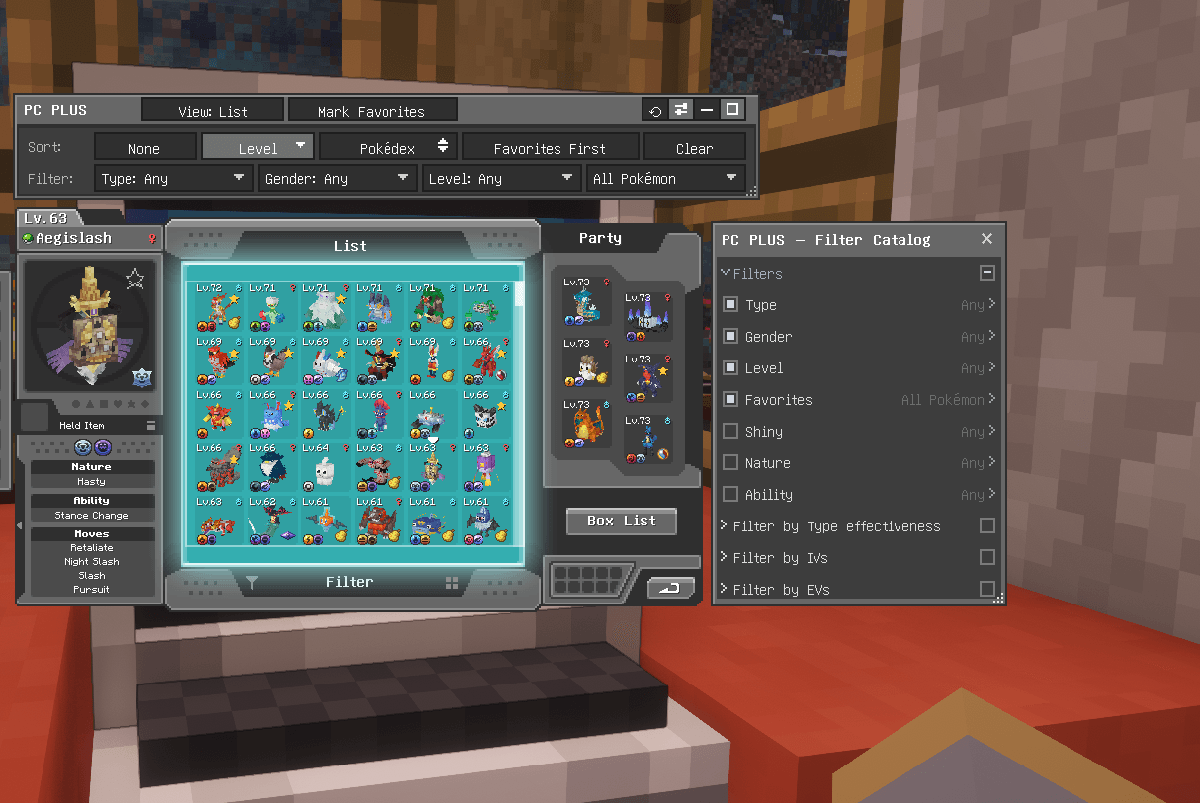
Customize PC Plus: pin/unpin, drag, resize, fold sections, and remember your layout
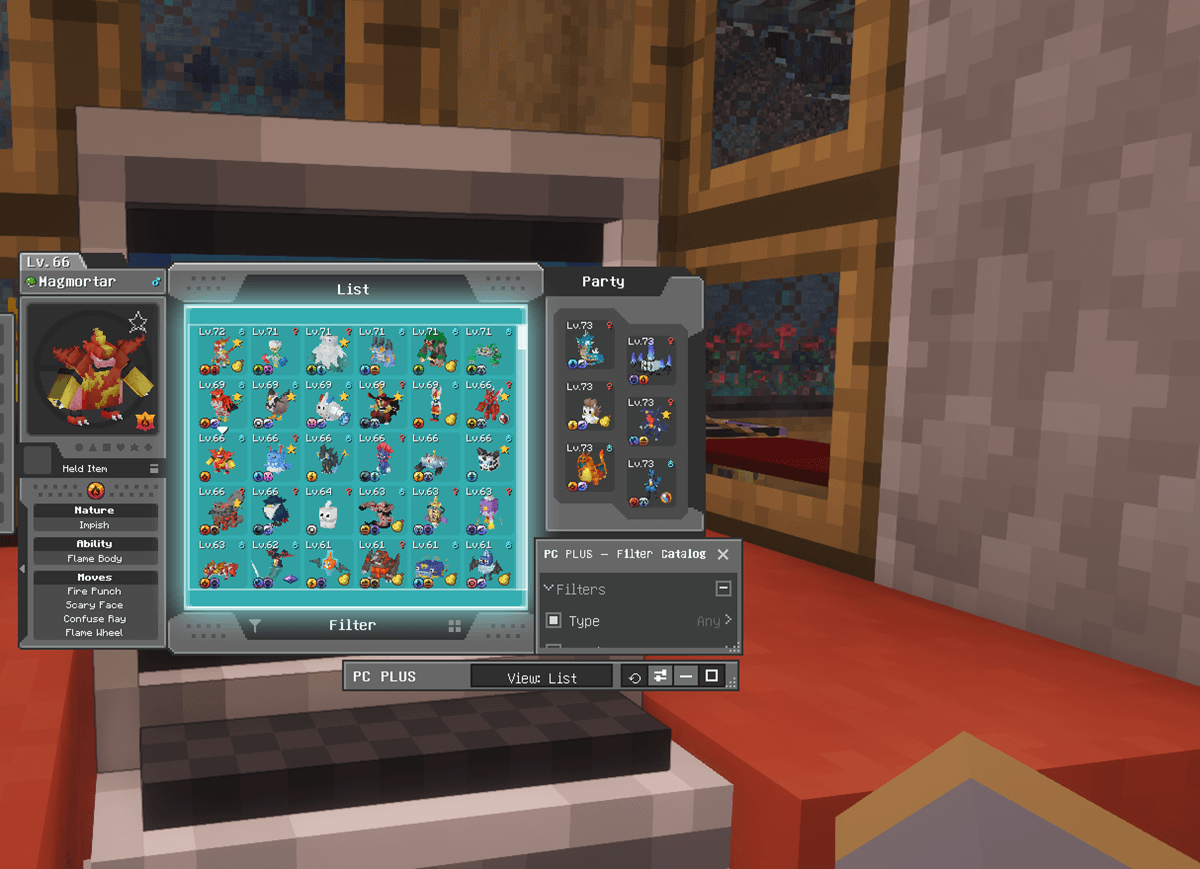
Movable & Resizable "PC PLUS" windows, Minimize/Maximize or Reset to Default Position
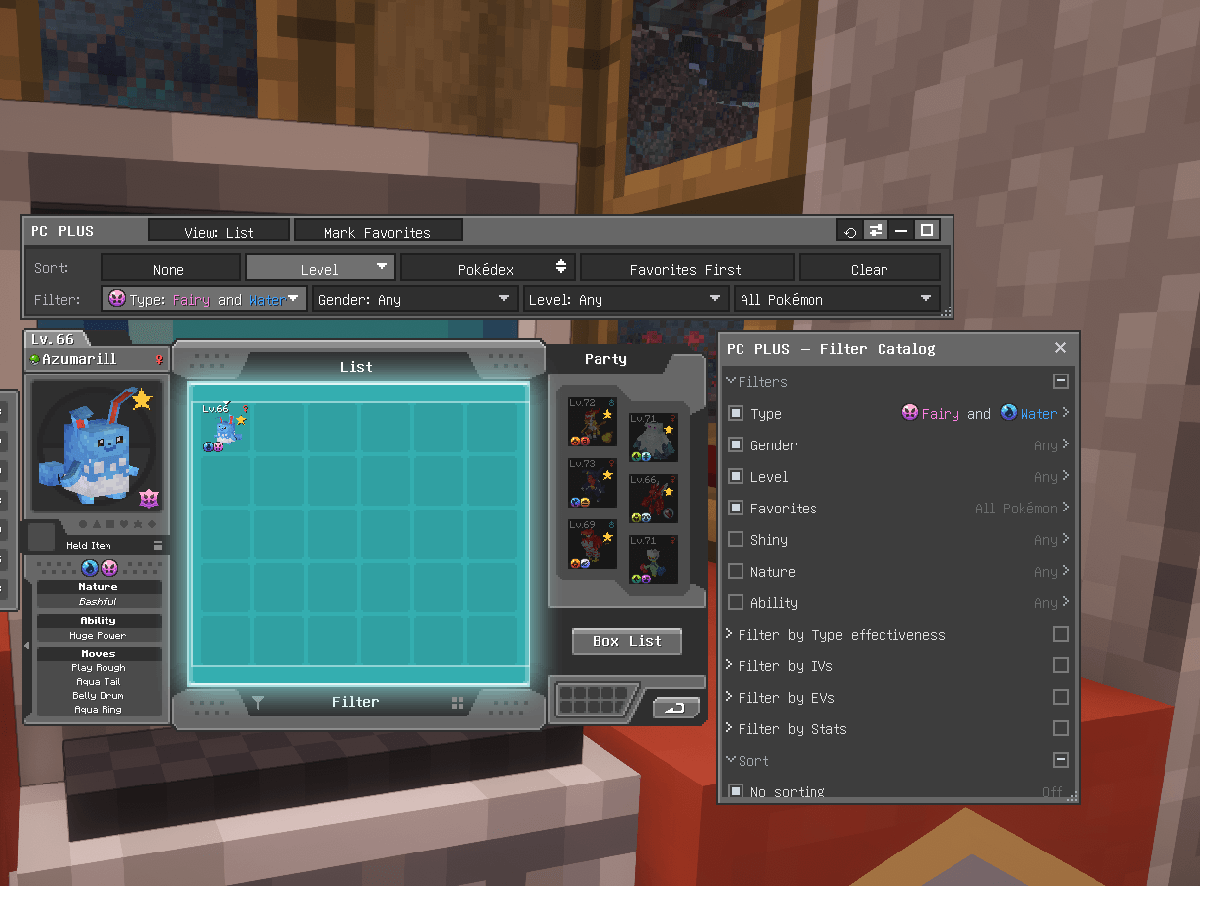
Advanced Type search: pick two types to find dual type
Description
Cobblemon PC Plus turns the Cobblemon PC into a proper collection manager. Browse every box in one scrollable List view, and filter by type, level, matchup, IVs, EVs and more. Favorite your Pokémon and sort them by level, Pokédex number or any stat. It also adds type icons to your PC, a customizable layout, and plenty of configuration.
Client-side · NeoForge & Fabric · works on any server (no server install) · plays nicely with other Cobblemon addons
What's New in 1.3.0
- Type matchup filter: find what resists a type, or takes heavy damage from it.
- IV, EV and stat filters: find Pokémon by their numbers, with preset brackets or a typed range.
- Stat sorts: sort the List view by any IV, EV or stat.
- Foldable catalog sections: fold a section away, or pin a whole section at once.
- Pinnable Clear: pin Clear to the terminal. In the catalog it asks before clearing.
- Dimmed Type picks: types that would find nothing in your PC are dimmed.
- Better-optimized terminal layout: the terminal widens to the screen edge and wraps onto more lines.
- Safer favorites: a damaged favorites file no longer wipes your favorites.
- Works on Cobblemon 1.7.x and 1.8.x from the same file.
What's New in 1.2.0
- Filter catalog: every filter and sort in one panel. Pin the ones you use to the terminal, unpin the rest.
- Three new filters: Shiny, Nature, and Ability.
- Multi-select: Shift+click to filter by several values at once.
- Type combinations: pick Fire, then Flying, to find your Fire/Flying Pokémon.
- Searchable dropdowns: type to filter the long lists (Ability has ~300 entries).
- Resizable terminal: drag the corner to widen it, or collapse it a row at a time.
- Languages: Spanish (Spain), French (France), Portuguese (Brazil) and Chinese Simplified (China) are available, and now cover the new interface too.
What's New in 1.1.0
- Movable PC Plus window: drag the panel anywhere, minimize it, or reset it.
- Medium PC size: a new 1.5× zoom step between Normal and Large.
- Gender symbols in the Gender filter drop down, matching the Cobblemon PC symbols.
See the changelog for full version history.
Features
List view: your whole collection at once
Toggle the PC between the classic single-box view and a combined List view that merges every box into one continuous list. Scroll with the mouse wheel, a draggable scrollbar, or the keyboard (Page Up/Down, Home/End). The scrollbar and its frame are optional. The PC remembers whichever view you last used.
Smart filters
A terminal panel above the PC adds dropdown filters for Type, Gender, Level, Favorites, Shiny, Nature, and Ability. They combine (AND) with each other and with Cobblemon's built-in search box. You decide how non-matches are shown while filtering: the List view can collapse to just the matches or fade them in place, and the party panel can be hidden or kept visible. The Gender filter shows the ♂ / ♀ symbols beside each option, matching the PC's own preview.
Filter by several values at once. Shift+click to pick more than one option — Adamant or Jolly, Male or Female. A plain click still picks one and closes the menu. Long lists (Nature, and the ~300-entry Ability list) have a type-to-filter search box and a scrollbar, so you never hunt through them.
Level takes a custom range too: type 20-45 for exactly that band, instead of using the preset brackets.
Type combinations
The Type filter does something the others don't, because a Pokémon can have two types.
Pick one type — Fire — and you get everything Fire, single-type or dual. Now pick Flying as well, and you get your Fire/Flying Pokémon: the first type you picked is the one a Pokémon must have, and the second narrows it to that combination.
Keep going and it does what you'd hope. Fire, then Flying and Fighting, finds your Fire/Flying and your Fire/Fighting — every Fire dual of the kinds you asked for, in one list. Handy when you're building a team and want to see your options rather than one exact pairing.
The first type you pick is highlighted, so you can always see which one is anchoring the search.
Type matchup
Find what in your boxes stands up to a type, or what would fall to it. Pick an attacking type in any of five bands:
- Takes 0×: immune. The type has no effect at all.
- Takes 0.5× or less: the type is not very effective, including 0.25× and immunities.
- Takes 1×: full damage, neither resisted nor super effective.
- Takes 1× or less: anything the type is never super effective against.
- Takes 2× or more: the type is super effective, including 4× weaknesses.
Pick more than one type in a band and an AND / OR switch decides how they combine. AND needs a Pokémon to match against every type you picked, and OR needs only one. So in Takes 0.5× or less, AND with Fire and Water finds what resists both, and OR finds what resists either. Abilities that grant an immunity are aligned with Cobblemon.
IV, EV and stat filters
Find Pokémon by their numbers, like the ones you haven't trained yet or the ones with a perfect Attack IV. IVs, EVs and computed stats each get a filter for the total and one for each of the six stats.
- Per-stat IVs: 0, 1-15, 16-25, 26-29, 30 and Perfect (31).
- Per-stat EVs: Untrained (0), 1-251 and Maxed (252).
- Totals have brackets of their own, and the EV total counts Fully trained from 508.
- Computed stats take a typed range only.
Any of them takes a typed range like 20-45 instead of a bracket. They start in the Filter Catalog, with their sections folded, so pin the ones you want.
The Filter Catalog
Not everyone wants every filter crowding the panel. The Filter Catalog (the sliders button on the terminal's titlebar) lists every filter and sort in one place: pin the ones you use to the terminal, and unpin the rest to get them out of the way. Out of the box the terminal carries Type, Gender, Level and Favorites, the Level and Pokédex # sorts, and Clear. Everything else starts in the catalog.
Each row shows what it's currently set to, and you can change a filter or apply a sort straight from the catalog without pinning it at all. The panel is draggable, resizable in both directions, and stays open while you use the PC. With Remember Terminal Layout on, it reopens where you left it.
Sections fold away. Click a heading to fold its section, or use its checkbox to pin or unpin everything in it. The IV, EV and stat sections start folded, so the list opens short.
Clear takes two clicks in the catalog. It sits at the end of the list, outside every section, so folding one never hides it. The first click asks you to confirm, and if you pause, move away or click something else, it goes back to normal without clearing. On the terminal, Clear always clears in one click.
Movable terminal window
The filter panel is a draggable window: grab its "PC PLUS" titlebar and move it anywhere on screen (it works expanded or collapsed, at every PC size, and always stays on-screen). Minimize it to just the titlebar to reclaim space, or reset it back to the default spot. It can optionally remember where you put it between sessions.
Dragged it somewhere awkward? Click the ⟲ reset button on the titlebar, or set
rememberTerminalPositionto OFF, then close and reopen the PC.
Resizable terminal window
Drag the corner grip to resize it: stretch it wider for more room, or collapse it a row at a time (the full panel, the sort row only, or just the titlebar). Remember Terminal Layout remembers the layout of the PC Plus windows: where you moved them, their size, how expanded or collapsed they are, and which catalog sections you folded.
The terminal also sizes itself to the language you play in, and fits whatever you pin: it widens as far as the screen allows, and a row that runs past it carries on to the next line, so every filter stays at full size. Unpin something and it narrows back.
Favorites
Mark Pokémon as favorites with a Mark Favorites mode or the star on the preview portrait. Favorites get a gold star on their slot; you can also filter to show only favorites or pin favorites to the top. No new keybinds to clash with other mods.
Sorting
Sort the List view by Level or Pokédex #, or by any IV, EV or computed stat, ascending or descending (click the active sort again to flip it), optionally keeping favorites first. The stat sorts start in the Filter Catalog, one for each stat filter, so pin the ones you use. One sort is active at a time, and the List view reopens with the one you last used. Sorting only changes the display order; it never moves your Pokémon in storage.
Type icons & dropdown styling
A small type icon on each Pokémon slot (toggleable). The Type filter dropdown can also color type names by their type and show each type's icon. Types that would find nothing in your PC, like a type you have none of or a second type that never pairs with the one you picked, are dimmed, in the terminal and the catalog. You can still click them, and Dim Impossible Types turns this off.
Adjustable PC size
Scale the whole PC interface up — Normal / Medium / Large / Extra Large (1× / 1.5× / 2× / 3×) — when the default is too small to read comfortably.
Upcoming Features
More advanced features are planned for future updates. If there is a specific feature you would like to see, let us know!
Configuration
Options include the default view, type icons, Type-dropdown color/icons, whether impossible Type picks are dimmed, favorites & sort defaults, how non-matches are shown while filtering (collapse/fade and party hide/show), the List-view scrollbar and frame, PC size, whether the terminal and filter catalog remember their layout, whether catalog sections start folded, and whether the catalog's Clear asks for a second click. Your view, sort, and filter choices persist between sessions.
- NeoForge — open Mods → Cobblemon PC Plus → Config in-game.
- Fabric — edit
config/cobblemonpcplus.json
Fabric — config/cobblemonpcplus.json options
Launch the game once and the file is created with every option at its default. Values must match exactly (case-sensitive); the bold value is the default.
| Option | Values (default bold) | What it does |
|---|---|---|
showTypeIcons |
true / false |
Type icon on each Pokémon slot |
colorTypeNames |
true / false |
Color type names in the Type dropdown |
showTypeFilterIcons |
true / false |
Show type icons in the Type dropdown |
dimImpossibleTypes |
true / false |
Dim Type picks that can't match anything in your PC |
defaultView |
LIST_VIEW /BOX_VIEW |
View the PC opens in |
showListScrollbar |
true / false |
Draggable scrollbar in List view |
showListFrame |
true / false |
Frame around the List grid |
startFiltersCollapsed |
true / false |
Open with the filter panel collapsed |
rememberTerminalPosition |
true / false |
Remember the terminal and filter catalog layout (position, size, collapse, folded sections) between sessions |
startCatalogSectionsCollapsed |
true / false |
Open the filter catalog with its IV / EV / stat sections folded |
showFavoriteStars |
true / false |
Gold star on favorited slots |
defaultSort |
NONE /LEVEL /DEX /STAT |
Default sort mode |
defaultSortStat |
blank / a stat filter's name, e.g. iv.atk, ev.hp, stat.speed |
The stat sort used while defaultSort is STAT; filled in for you |
defaultSortDescending |
true / false |
Sort descending instead of ascending |
defaultFavoritesFirst |
true / false |
Pin favorites to the top |
confirmClear |
true / false |
Clear in the filter catalog asks for a second click |
filterDisplay |
COLLAPSE_PC_HIDE_PARTY /COLLAPSE_PC_FADE_PARTY /FADE_PC_HIDE_PARTY /FADE_PC_FADE_PARTY |
How non-matches show while filtering |
pcSize |
NORMAL /MEDIUM /LARGE /EXTRA_LARGE |
PC interface scale (1× / 1.5× / 2× / 3×) |
Languages
Cobblemon PC Plus is available in English, Español (España), Français (France), Português (Brasil), and 简体中文(中国大陆).
Spot a translation that isn't right? Let us know.
Requirements
- Minecraft 1.21.1 on NeoForge or Fabric
- Cobblemon 1.7.x or 1.8.x (1.21.1)
- NeoForge: Kotlin for Forge
- Fabric: Fabric API (Cobblemon already bundles Fabric Language Kotlin)
Installation
Download the file that matches your loader — the -neoforge- jar for NeoForge or the -fabric- jar for Fabric — and drop it into your client's mods folder alongside Cobblemon (and Kotlin for Forge on NeoForge, or Fabric API on Fabric). No server-side install needed — it's purely client-side.
Compatibility
Works standalone with Cobblemon, alongside Cobblemon add-ons, or as part of large Cobblemon modpacks.
Cobblemon PC Plus 1.3.0 is tested on Cobblemon 1.7.3 and 1.8.1, and works on Cobblemon 1.7.x and 1.8.x from the same file.
Support
Found a bug or have a suggestion? Leave a comment on this page. Feedback is welcome!
License & Modpacks
This project is protected under an All Rights Reserved license. However, you have explicit permission to include the unaltered mod jar in any public or private modpack, collection, or server environment.
Cobblemon PC Plus Team