Cobblemon Multi Battle
- By
Player-made gyms and Elo ranked battles for Cobblemon servers, with clone trainers, rewards, editable bans, admin tools, and full server-side control.
mulitbattle.jpg
Description
Cobblemon Multi Battle
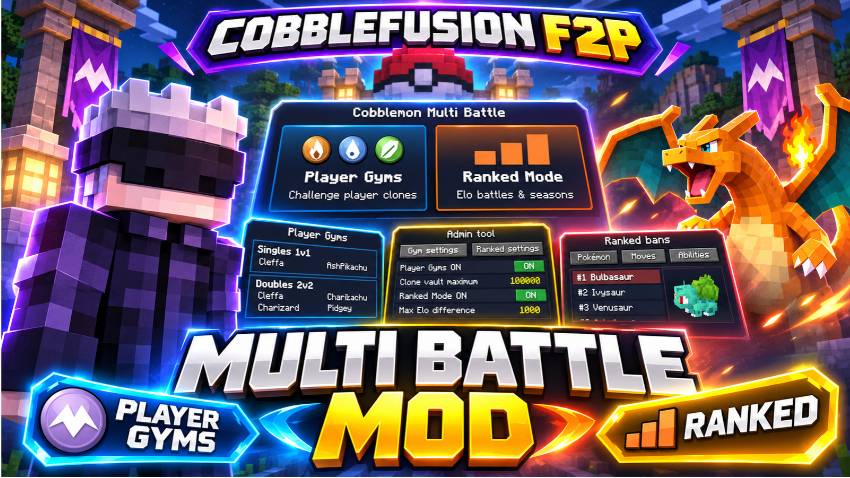
Two battle modes in one mod: Player Gyms and Ranked. Build your own gym with a clone trainer, or compete in Elo-based singles and doubles. Servers can enable either mode on its own or run both together.
What is this mod?
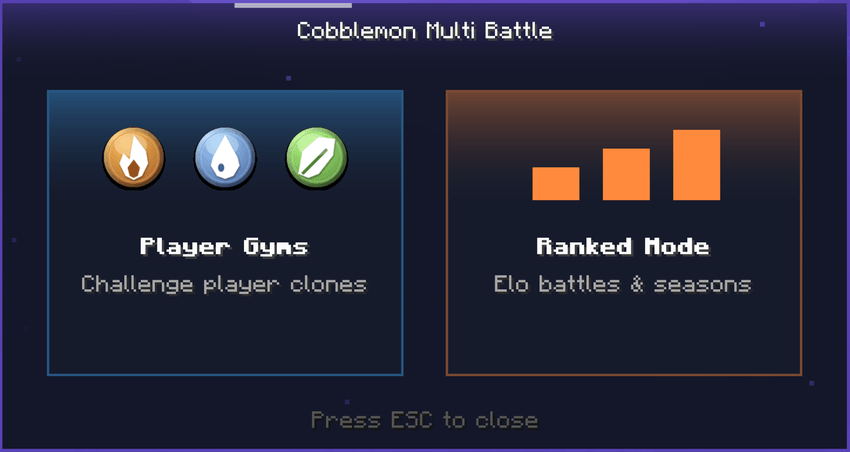
Cobblemon Multi Battle is a 2-in-1 mod for Cobblemon servers. Player Gyms lets players build gyms with saved Pokémon teams and challenge each other’s clone trainers. Ranked adds Elo matchmaking, 1v1 singles, 2v2 doubles, seasons and configurable battle rules. Each mode has its own settings and emergency switch, so servers can use one mode or both.
Features at a glance
- Two modes in one mod: Player Gyms and Ranked, independently enabled or disabled.
- Player-owned gyms with 18 types, saved teams, player-skin clones, challenges and vault rewards.
- Ranked singles and doubles with Elo, matchmaking, leagues, seasons and battle history.
- Cinematic ranked intro, turn timer and animated battle results.
- Automatic win rewards and manually claimed end-of-season rewards.
- Ranked penalties for disconnects and forfeits, plus an editable banlist.
- In-game Admin tool for gyms, ranked settings, player Elo and emergency controls.
- Separate gym and ranked battle music, 3D Pokémon cards and optional Mega Showdown support.
For players
1. Get your Gym Mirror
Open Player Gyms from the main menu. The first time you do this, you can receive one free Gym Mirror, provided you have a free inventory slot. The free mirror is available only once per player. The mirror cannot be crafted. Operators can give out additional mirrors.
2. Choose a gym type
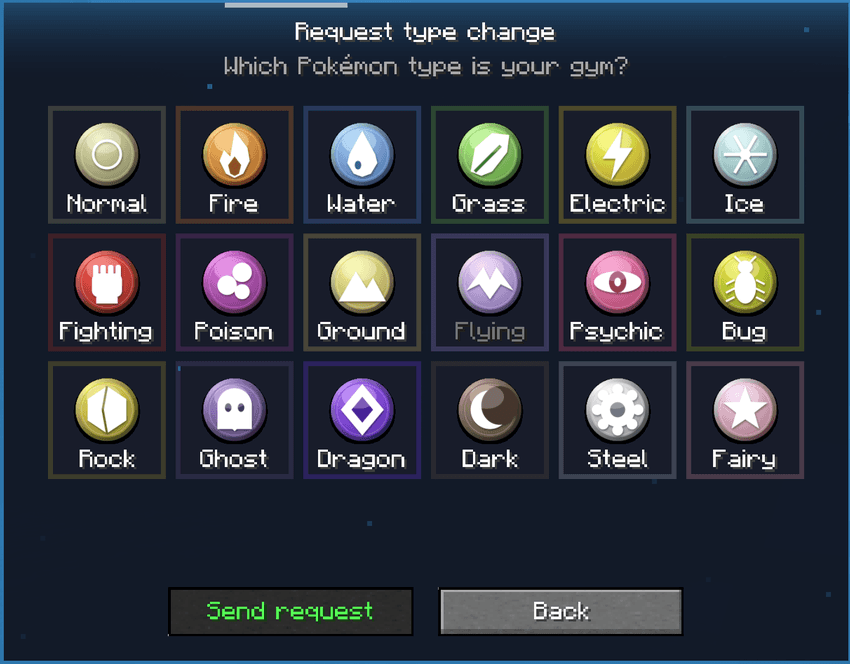
Right-click your Gym Mirror in the air to open the setup menu. Choose one of the 18 Pokémon types. Only an operator can change your gym type later; you can send a type-change request.
3. Build your team
Add up to six Pokémon from your party or PC, or copy your party with one click. Each Pokémon must have your gym's type as either its primary or secondary type. The gym uses saved battle copies, including copies of held items. Your actual Pokémon are not duplicated into your inventory.
4. Place and manage your clone
Right-click a block with your mirror to place a clone trainer. The clone uses your real player skin and the team you saved. Placing it consumes the mirror. You can take the clone back after a cooldown (2 hours by default) and move it somewhere else.
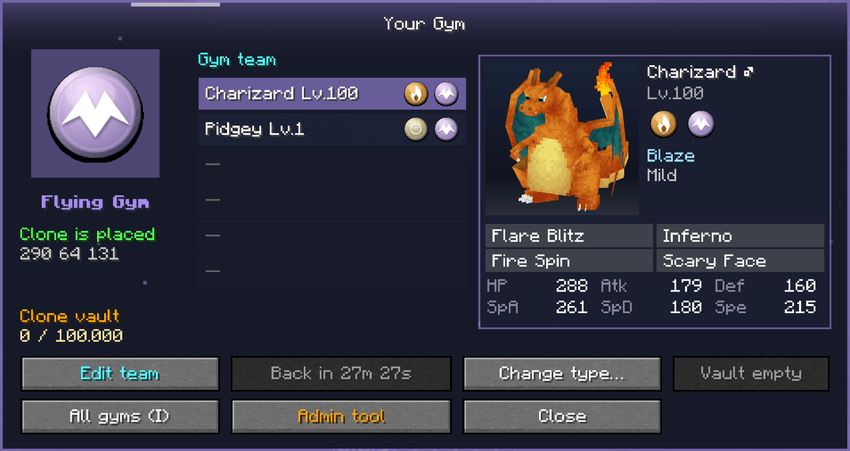
Your Gym menu shows the saved team, clone status, location, vault balance and management buttons. Pokémon cards show a 3D model, types, ability, nature, held item, moves and stats.
5. Find and challenge other gyms
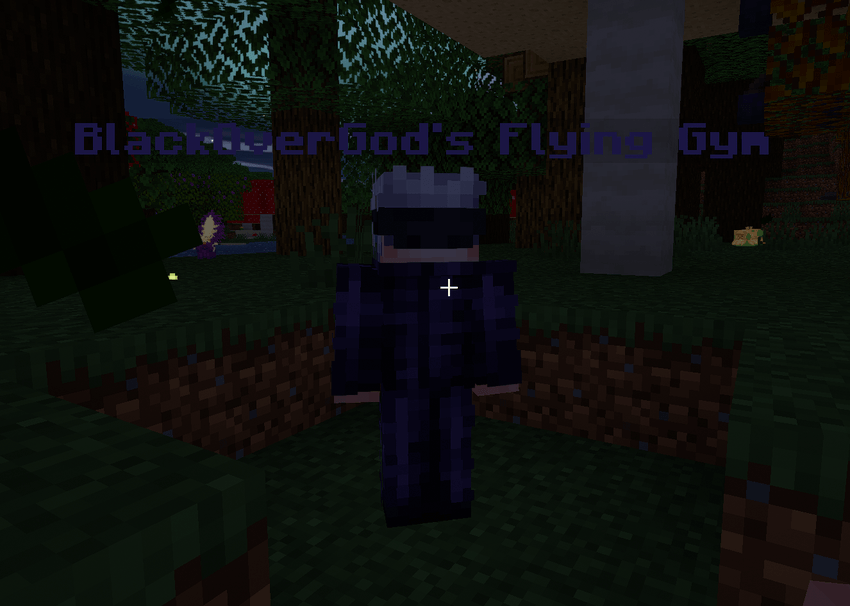
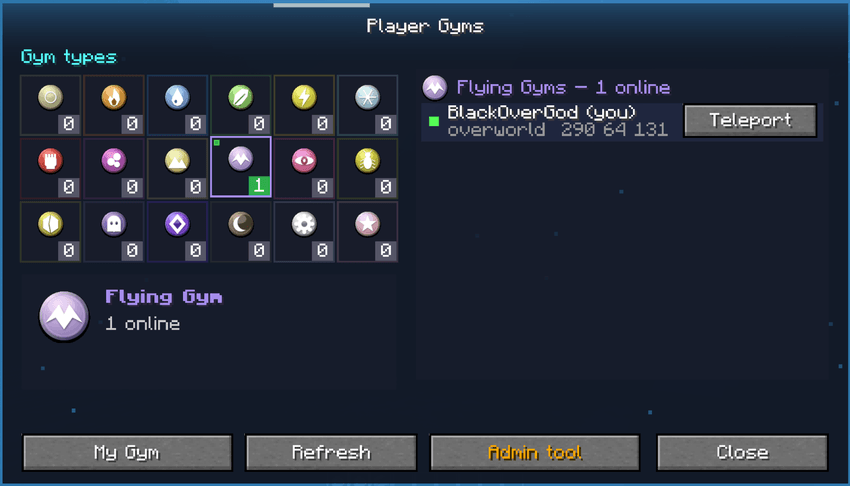
Press I (the default gym-list key) to open All Gyms. Browse gyms by type, view owners and online status, and teleport to a gym when the server allows it. Right-click a placed clone to challenge it.
The challenge cooldown is 2 hours per player and gym by default. Servers can require the gym owner to be online and can decide whether owners may battle their own gyms.
6. Earn rewards and use your vault
An operator can assign a one-time reward to each gym using an item in hand or a command. You receive that reward once per gym, but you can still challenge the gym again for fun.
With CobbleDollars rewards configured, the default economy settings are:
| Event | Default |
|---|---|
| Your clone defeats a challenger | 5,000 added to your gym vault |
| A challenger defeats a clone | 10,000 paid to the challenger |
| Gym vault maximum | 100,000 |
| Vault collection cooldown | 3 days |
| Challenger win-money cooldown | 2 hours across all gyms |
The last cooldown is global. Winning at several gyms in quick succession does not pay the challenger win-money reward each time. Server owners can change these numbers.
7. Play Ranked
Open Ranked Mode, select your team and join a queue:
- Singles 1v1: 3 Pokémon by default.
- Doubles 2v2: 4 Pokémon by default.
Ranked uses Elo-based matchmaking and configured server arenas. All Pokémon battle at level 100 in Ranked. The default ranked cooldown is 10 minutes, and the server controls team sizes, arena positions, the allowed Elo gap and queue time limits.
Before a ranked battle begins, a cinematic intro shows the ranks and starts the battle music. During each turn, a 60-second timer appears at the top of the screen. The last 10 seconds have a warning tick. When time runs out, the turn is skipped. This does not count as a forfeit.
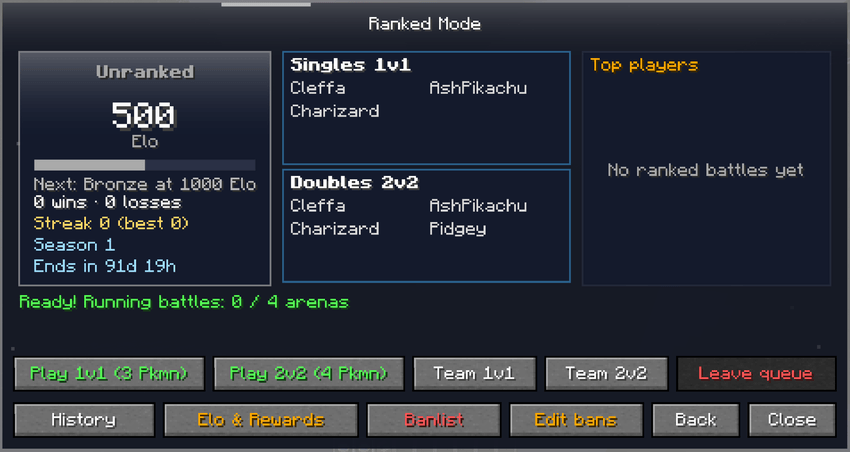
The Ranked menu shows your Elo, rank, wins, losses, streak, season timer and leaderboard. You can also view both teams in battle history, select your team, read the banlist and see the Elo and reward overview.
Ranked results, rewards and penalties
At the end of a ranked match, the result screen shows the winner and loser. Elo animates up or down, rank changes are displayed, and the winner sees their rank reward. Ranked win rewards are paid automatically, with no claim button. The loser sees who beat whom, both teams and the result sound. A server broadcast announces who won and the Elo involved.
Forfeiting or disconnecting during a ranked battle causes an Elo penalty and a configurable ranked ban. If someone disconnects, their opponent receives no Elo and no rewards. The GUI warns players about penalties, and operators are notified starting with the third forfeit.
Ranks are Unranked, Bronze, Silver, Gold, Platin, Diamond, Master and Champion. Champion requires a streak at the top rank (10 wins by default). Ranked can award money and Arceus wishes per win. Elo calculations also support a configurable minimum win gain and a win-streak bonus.
Ranked seasons and archive
Seasons end automatically after a configurable number of months or days, or when an operator ends them manually. At the end of a season, the mod announces the result in a window and resets players for the next season. Season rewards are claimed manually in the rewards menu, unlike ranked win rewards.
Open History → Seasons to view the final standings of completed seasons, including rank, Elo, wins and losses.
8. Check the rules before queueing
Everyone can open a read-only ranked banlist. Servers can restrict Pokémon, individual forms, moves, abilities, held items, Mega, Tera, Z-Moves, Dynamax and all fusion Pokémon. Healing and revive items from the bag are blocked during ranked battles by default, but the server can disable that rule. Held items stay with Pokémon during ranked battles instead of dropping as loot.
For server owners
Install and check dependencies first
Install Cobblemon Multi Battle on both the server and every connecting client. Both sides need the mod. Use the following versions:
| Component | Requirement |
|---|---|
| Minecraft | 1.21.1 |
| Mod loader | Fabric |
| Fabric Loader | 0.17.2 or newer |
| Fabric API | Required |
| Cobblemon | 1.8.x |
| Java | 21 |
| Mega Showdown | Optional, supported |
Do not mark unrelated Minecraft versions or mod loaders as supported without testing them. Cobblemon 1.8.x support does not by itself guarantee compatibility with every other mod combination.
Set up the modes
- Install the required mods on the server and every connecting client, then start the server.
- Open the mod's main menu as an operator and select Admin tool.
- Open Gym settings and Ranked settings separately. Enable either mode or both.
- For gyms, review mirror access, clone rules, vault amounts, challenge cooldowns, teleport and reward commands.
- For ranked, configure arenas and player positions, bans, teams, Elo rules, season length and reward commands before enabling the queue.
- Test both modes, ranked disconnect penalties and reward claims with test players.
Admin tool
Operators with permission level 2 can open Admin tool from the main menu. The tool has controls for both systems without needing to edit configs for everyday changes.
| Control | What it does |
|---|---|
| Gyms | Enable or disable individual gyms, remove clones and set per-gym rewards and cooldowns. |
| Requests | Approve or deny gym type-change requests. |
| Give mirror | Give additional Gym Mirrors. |
| Gym settings | Gym rules, clone strength, vault economy, teleport, cooldowns and gym emergency switch. |
| Ranked settings | Elo, matchmaking, penalties, seasons, rewards and ranked emergency switch. |
| Perms | Give trusted players permission to edit ranked bans. |
| Player controls | Set a player's Elo (rank updates immediately), clear bans and cooldowns, and manually end a season. |
Admin settings: two separate panels
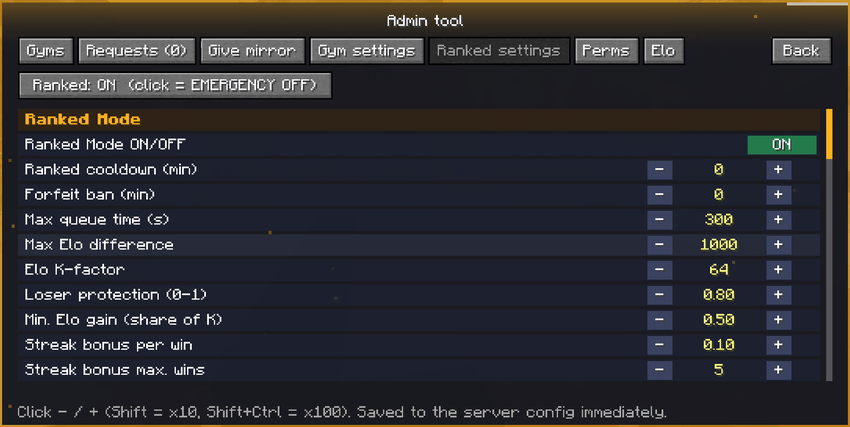
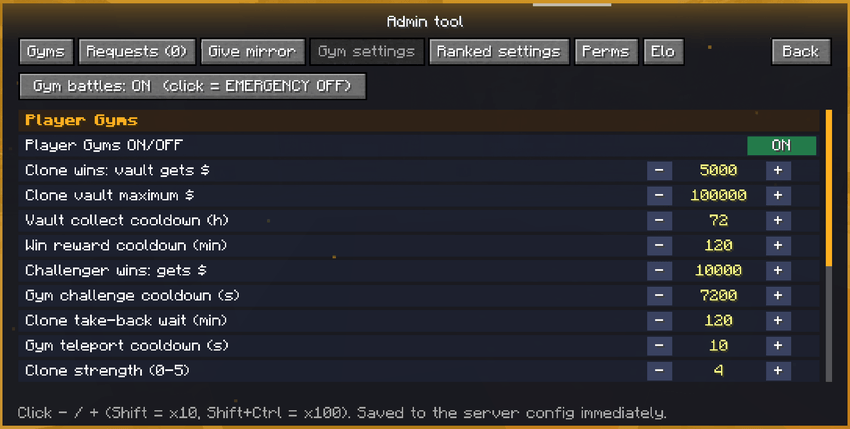
The two modes have separate settings screens and separate emergency OFF switches. Changes are saved to the server configuration immediately. Use the minus and plus buttons to adjust values in game.
Player Gyms settings
The Admin tool includes:
- Player Gyms ON/OFF and emergency OFF.
- Individual gym ON/OFF, removal, one-time rewards and per-gym cooldowns.
- Gym challenge cooldown and clone take-back cooldown.
- Require the gym owner to be online; allow or prevent self-challenges.
- Gym teleport ON/OFF.
- Clone AI strength 0 to 5 and optional forced battle level.
- Individual switches for Mega, Tera, Z-Moves and Dynamax on clones.
- Vault payment for clone wins, challenger win payment, vault maximum, vault collection cooldown and the global challenger win-reward cooldown.
Ranked settings
Ranked has its own Settings page and emergency OFF switch. Admin controls include:
- Ranked ON/OFF and emergency OFF.
- Starting Elo, K-factor, loser protection and maximum Elo difference for matchmaking.
- Minimum Elo gain on a win and an Elo bonus for win streaks.
- Ranked queue time limit, configured arena player coordinates and team sizes.
- Ranked cooldown (10 minutes by default). When changed in Admin tool, currently running cooldowns restart with the new value.
- Fixed level 100 for all Pokémon in ranked battles.
- Season length configured in days or months, and Champion streak requirement (10 by default).
- Win-reward money and Arceus wishes per rank; end-of-season RP and other configured command rewards.
- Configurable ranked bans following forfeits and disconnects, including Elo penalties.
- Rank suffix commands, spacing through
suffixSpacer, and automatic suffix reapplication when a player joins. - Switch to block or allow healing and revive items from the bag in ranked.
Win rewards are paid automatically when a ranked match finishes. When a season ends, Elo is reset, the season is recorded in the archive, and season rewards wait for players to claim them in the rewards menu.
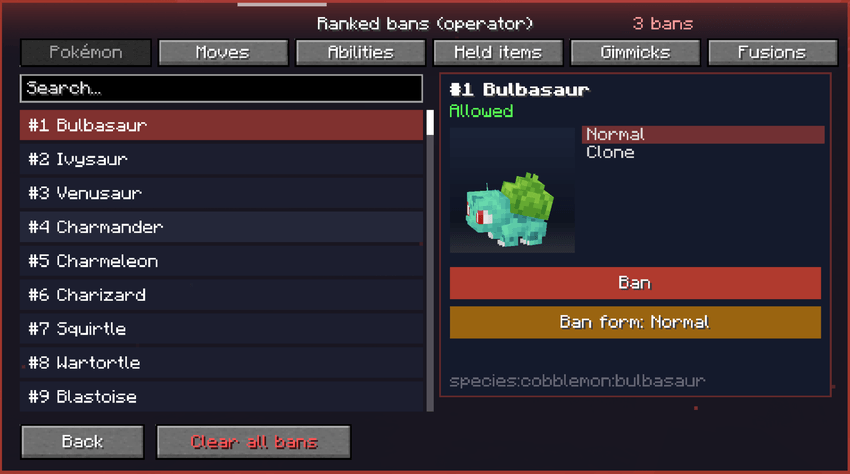
Ranked bans
Ranked bans are edited in game. You do not have to edit the config for normal ban changes. Operators can ban:
- Pokémon species and individual forms.
- Moves and abilities.
- Held items, including datapack or custom items via Item in hand.
- Mega, Tera, Z-Moves and Dynamax.
- All fusion Pokémon.
All players can view the banlist without editing it. Clear all bans requires confirmation. Through Admin tool → Perms, you can authorize individual non-operator players to manage the ranked bans.
Economy and reward commands
Rewards run through server commands. Configure every command to match the economy, reward and permission mods installed on your server.
- Gym one-time rewards: Operators can set an item held in hand or a command for each gym. Each player receives that reward once per gym.
- Gym money: Configure
dollarCommandfor CobbleDollars integration. Clone wins add to the vault; challenger wins can pay the challenger under the global reward cooldown. - Ranked win rewards: Per-rank money and Arceus-wish commands run automatically when a ranked winner is confirmed. No collect button is required.
- Season rewards: Configured RP, market points and other rewards are claimed manually through the ranked rewards menu after the season finishes.
- Rank suffixes: Configure your permission plugin's suffix command.
suffixSpacercontrols the visible gap between the player's name and tag. Suffixes are reapplied on join.
The default commands are examples, not universal economy commands. Test them before enabling large payouts. Keep forfeits and disconnect penalties configured to discourage queue abuse.
Config files and commands
| Path | Purpose |
|---|---|
config/cobblemon-multi-battle.json |
Player Gyms settings, including commented options. |
config/cobblemon-multi-battle-ranked.json |
Ranked ranks, rewards, arenas and player coordinates, season length, music, commands and suffix settings. |
Both files are server configuration files. Admin tool changes are saved immediately, and manual config edits can be loaded without restarting the server.
Available commands:
/multibattle give— Give Gym Mirrors (operator command)./multibattle reload— Reload the configuration./multibattle season end— End the ranked season manually.
The old /mirrortrainers command still works as an alias. Ending a season resets Elo and makes its configured season rewards available to claim from the rewards menu.
Music and menus
Ranked battles start with a cinematic intro that reveals player ranks and plays the battle music. Player Gyms and Ranked each have their own battle music track, replacing Cobblemon's normal theme during those battles. Playback supports fade-in, fade-out and crossfade.
Pokémon cards show a 3D model, types, ability, nature, held item, moves and stats. Ranked menus include result animations, a visible turn timer, match history, season archive and a read-only banlist.
Performance and safe setup
- No server-side tick loops are used by the mod.
- Data is written when it changes, not continuously.
- Lists are sent to clients when the relevant menu opens.
- Clone skins load on a background thread, are cached on disk and do not block the server thread.
- 3D models in menus render only when hovered or viewed, not all at once when the menu opens.
Configure ranked arenas, matchmaking and rewards before enabling the queue. Test winner and loser screens, disconnect penalties, timeouts, vault withdrawals, seasonal resets and manual reward claims. Back up server configuration and data before major changes. Use the separate emergency switches if one mode needs to be stopped.
Requirements and compatibility
Minecraft 1.21.1 · Fabric · Cobblemon 1.8.x · Fabric API · Fabric Loader 0.17.2+ · Java 21. Install the mod on both server and clients. Mega Showdown is optional. Player Gyms and Ranked are independent modes and can each be disabled by the server.
Languages
English, German, Spanish, Portuguese (Brazil) and Simplified Chinese. The interface follows the player's Minecraft language setting.
FAQ
Do clients need the mod too?
Yes. Both the server and clients must have Cobblemon Multi Battle installed.
Can I use only Player Gyms or only Ranked?
Yes. It is a 2-in-1 mod with two independently controlled modes.
How do I get another Gym Mirror?
The free mirror is available once when first opening Player Gyms with a free inventory slot. Further mirrors must come from operators.
Do I lose or duplicate my Pokémon when saving a gym team?
No. Gyms use saved battle copies, including held items. Nothing extra is placed into your inventory.
What happens when the ranked turn timer runs out?
After 60 seconds, the current turn is skipped. The warning tick starts during the final 10 seconds. It is not a forfeit.
What happens if I disconnect or forfeit in Ranked?
You lose Elo and receive a configurable ranked ban. A disconnecting player's opponent receives neither Elo nor rewards.
Do I have to claim ranked rewards?
Win rewards are paid automatically. Season rewards must be claimed manually in the rewards menu after a season ends.
Where can I view earlier ranked seasons?
Open Ranked History → Seasons to view final rank, Elo, wins and losses for completed seasons.
How do I change a player's Elo or reset penalties?
Operators can use the relevant Admin tool controls to set Elo, clear bans or cooldowns and end the season.
Can I use another economy or Mega Showdown?
Reward commands can be configured for your server's economy. Mega Showdown is supported but optional.
License
All Rights Reserved. Copyright BlackOverGod.
You may play the mod, link to its official download in modpacks or on servers, and show it in videos or livestreams. You may not modify, reupload, redistribute or host copies of the mod files without permission. Linking to the official download is allowed; bundling and redistributing the mod JAR is not covered by that permission.
Made by BlackOverGod.
Cobblemon Multi Battle Team