✦ Clarity: Your Own Blockbench Models on Any Item
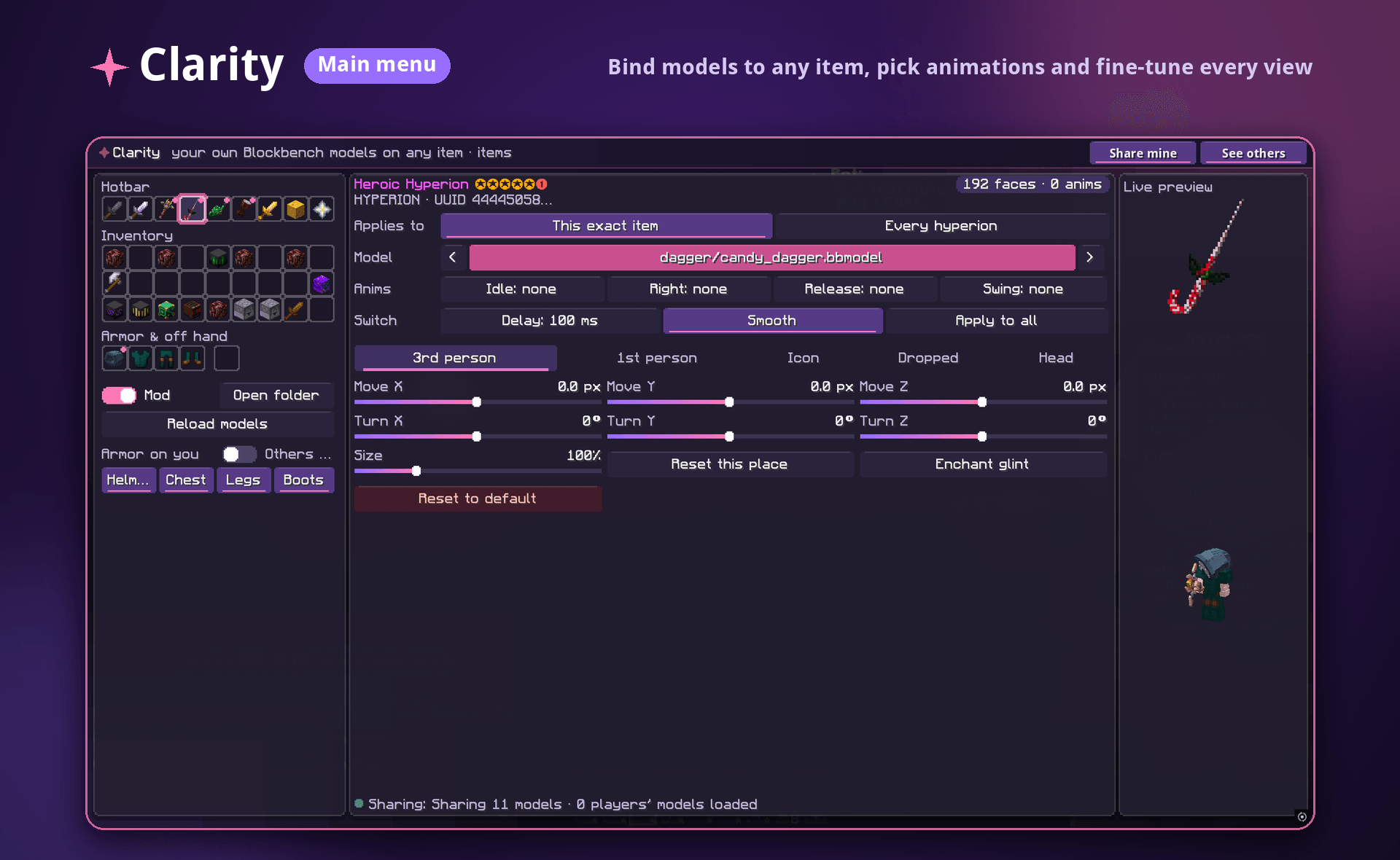
Clarity lets you replace the look of any item in Minecraft with your own Blockbench models (.bbmodel). Drop a model into the folder, pick an item in your inventory, bind them, and see the result in a live preview. You can fine-tune how it looks in every view: in your hand, in first person, as an icon, on the ground and on your head.
No resource pack editing, no JSON files, no restarting the game. Everything is done in one in-game menu.
🎨 What the mod does
Bind a model to any item
- Select any item straight from your hotbar, inventory, armor slots or off hand.
- Choose a
.bbmodel file from your models folder with the model picker (use the arrows to flip through models fast).
- Decide what the model applies to:
- This exact item. Only this one copy gets the model, matched by its unique ID. Your favourite sword can look special while other swords of the same type stay vanilla.
- Every item of this type. All items of that kind get the new model at once.
Animations from Blockbench
Give your model animations for different actions:
- Idle, while you just hold the item
- Right, on right click / use
- Release, when you let go of the use button
- Swing, when you attack or swing
Set how fast animations switch with Switch delay (in ms). Turn on Smooth for soft transitions, and use Apply to all to copy the settings to all your bound models.
Adjust every view separately
A model often needs different positioning in different situations. Clarity has separate settings for each view:
- 3rd person
- 1st person
- Icon (in inventory and hotbar)
- Dropped (on the ground)
- Head
Each view has sliders for:
- Move X / Y / Z, the offset in pixels
- Turn X / Y / Z, the rotation in degrees
- Size, the scale in percent
Plus quick buttons: Reset this place (reset just the current view), Reset to default (reset everything), and an Enchant glint toggle to show or hide the enchantment shine on your model.
Live preview
Every change shows up right away in the Live preview window: the item model itself, plus your character holding or wearing it. You see the result before you close the menu.
Custom armor models
Clarity works on armor too: Helmet, Chestplate, Leggings and Boots. Separate toggles control whether custom armor models show on you and on other players.
Share your models with other players
- Share mine: share your bound models so other Clarity users can see your custom items.
- See others: see the custom models of other players.
- The status bar shows how many models you are sharing and how many players' models are loaded.
Handy tools
- Mod on/off switch: turn all custom models off instantly and go back to vanilla visuals.
- Open folder: opens your models folder in one click.
- Reload models: picks up new or edited
.bbmodel files without restarting the game. Edit in Blockbench, hit reload, see the result.
🎮 How it changes your game
- Your items look the way you want. Turn a plain sword into a candy-cane dagger, a pickaxe into a futuristic drill, or a helmet into a knight's visor.
- Unique items stay unique. Binding to an exact item means your "main" weapon looks one of a kind, and identical copies stay untouched.
- Animated weapons and tools. Items come alive with idle, use and swing animations.
- A fast workflow for model makers. Make a model in Blockbench, drop it in the folder, reload, bind, tweak with sliders. You can iterate in seconds.
- Show off your style. With sharing on, other Clarity users see your custom models in game.
🛠 Quick start
- Put your
.bbmodel files into the Clarity models folder (Open folder in the menu).
- Open the Clarity menu and pick an item from your inventory.
- Choose a model and set whether it applies to this exact item or every item of this type.
- Optionally assign animations and adjust position, rotation and size for each view.
- Enjoy, and share your models with friends!