Cinematic Black Hole
- By
A cinematic black hole - up to sky-filling size - swallows the land around you, stretched into a glowing spiral or torn apart block by block; it grows by eating and evaporates, or forms naturally in survival.
Cinematic Black Hole
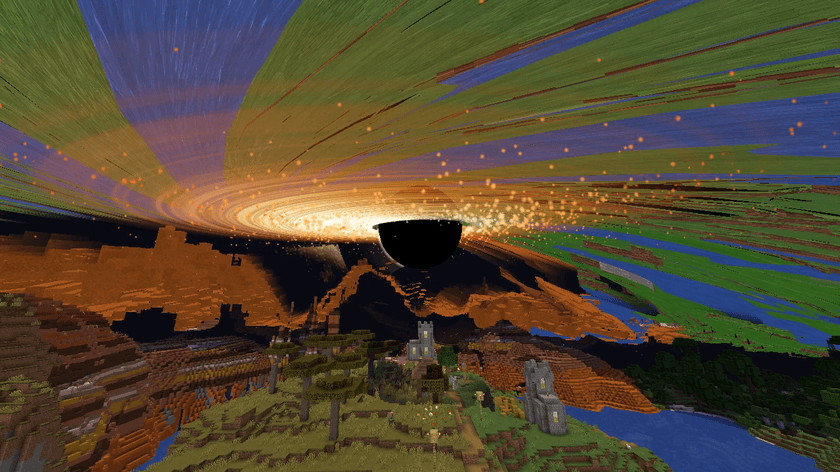
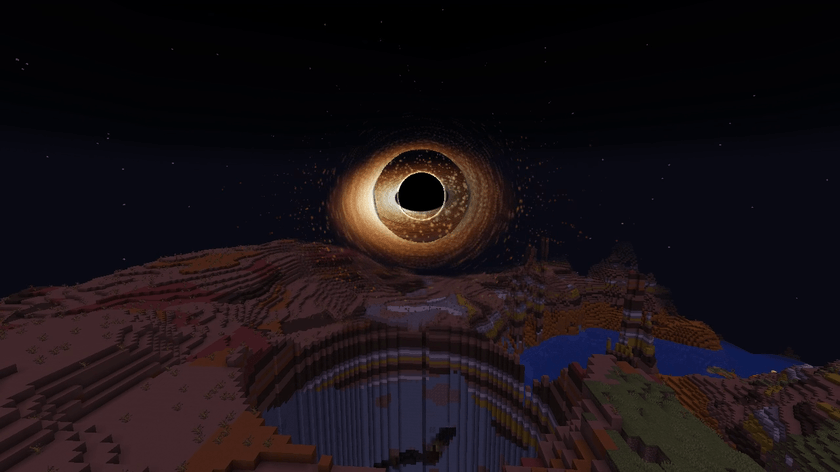
A black hole appears in the sky and swallows the world around you. Light bends around the black shadow, a glowing disk spirals around it, the sky turns to stars — and mountains, forests, villages and your house fall in. Two ways to swallow: Whole land (the ground stretches like rubber and spirals in) and Tear apart (real blocks are torn off one by one and fly in). Sizes from small to colossal (radius 1024, a hole that fills the sky). By default it has a realistic life: it grows by eating, then evaporates in a flash. There is also an optional natural black hole mode for survival (off by default). When it's done, spit everything back exactly — or keep it eaten.
🎬 Made for this YouTube Short
This is a playable, cleaned-up release of the mod made for my YouTube Short (in Japanese): I let a black hole swallow the world (The camera work, subtitles, voices and the house-spitting gag in the video are not part of the mod.)
⚠️ Please read
- This mod was made for my videos. It has been reworked to be easy to use, but it started as a video-making tool.
- No updates are planned. I will only fix serious bugs (world corruption, crashes). No new features or other Minecraft versions are planned.
- Not tested with other mods. Anything can happen — be careful with mods that change world generation, chunks or rendering (performance mods, shaders, etc.).
- Back up your world first. Whole land changes nothing while it eats, but Tear apart and "Finish (keep it eaten)" really remove blocks (an undo file is kept, but just in case).
- Using it in your videos is completely free. Monetized videos are fine, no permission needed.
- A link to this CurseForge page in your video description would make me happy — but it's not required.
- Modpacks are welcome — feel free to include it, no need to ask.
- Please don't re-upload the jar by itself to other sites; link to this page instead.
📦 Requirements
Minecraft 1.21.1 · NeoForge 21.1 (tested on 21.1.264) · Singleplayer, LAN and dedicated servers (install on the server and every client) · English / Japanese
🌀 Two modes
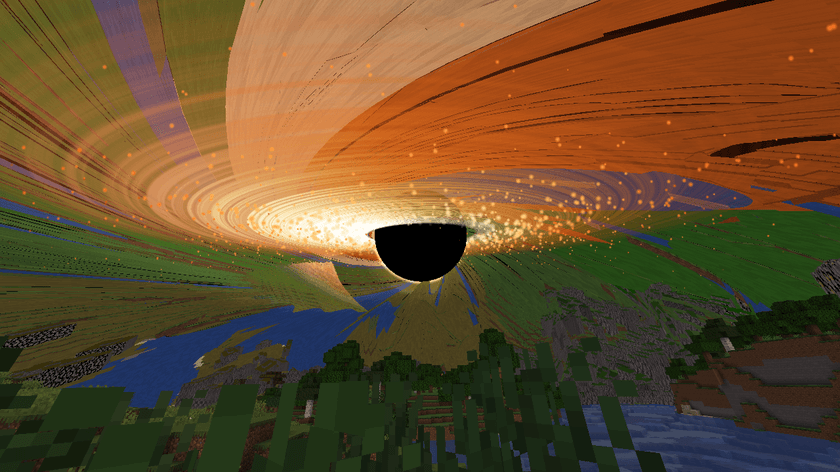
- Whole land — the land is peeled from the edge inward, stretched like rubber and spiralled into the hole. No server block changes while it eats (only what you see). Radius 16–1024.
- Tear apart — real blocks are torn off one at a time, outermost and highest first, tumbling and stretching (spaghettified) as they spiral in and glowing hot near the hole. The ground becomes a deep bowl-shaped crater. The blocks are really removed — an undo file is written before the first one goes, and Spit everything back flies every block home and rebuilds it (chest contents too). Radius 16–96. Operators only by default.
📏 Sizes
Small, medium, large (radius up to 192), giant (512) and colossal (1024). The look of the hole and disk (x0.5–x16) is separate from the swallowed radius, so even a small area can come with a sky-filling hole. Big holes draw far land as coarse tiles (every 2, 4 or 8 blocks), built even beyond your view distance from the world's own terrain, so the horizon itself peels away and it stays light. Holes bigger than 192 can only be given back (not kept eaten). Optional faint relativistic jets.
🔭 Realistic life
This is the default. With "Life: realistic" it behaves like a real black hole, in kid-friendly form: the more it eats, the bigger it gets (mass = what it ate, harder blocks weigh more; the horizon grows with the mass, like the real Schwarzschild radius). Its mass can only grow so fast (an Eddington-like limit), so a big meal makes the disk blaze; a starving hole has a dim, thin disk. With nothing left to eat it slowly evaporates (like Hawking radiation: the smaller, the faster), turns blue-white and flickers, and ends in a brilliant flash and shockwave (no block damage) — then it gives everything back or keeps it eaten, your choice. A small readout shows mass, horizon size and evaporation (toggle it in the panel). With the default settings a radius 96 hole is gone in about 2 minutes and a radius 1024 hole in about 5 (a slower appetite makes it longer). Switch to "Life: timed" and it swallows in the seconds you chose, then stays until you press a button in the control panel.
🌋 Natural black holes (survival, off by default)
Turn them on per world with /gamerule blackholeNatural true. Now and then (on average every 5 in-game days, never in the first 3) one forms in the sky 150–300 blocks from a player — never near the world spawn, beds, respawn anchors, villages or anything players built (planks, glass, wool, bricks, chests…). Warning signs first: a low rumble, the sky flickering, "Something is wrong with gravity…", spinning compasses, particles drifting to one point. Then a small hole tears the land apart, grows by eating and finally evaporates, leaving a crater (or, with restoreAfterNatural, slowly putting it back). Close to it you are pulled in (sprint, elytra or pearls get you out), stretched (others see you spaghettified; your view stretches), hurt more and more, with a pounding heartbeat and slow motion; crossing the horizon kills you — "was spaghettified by a black hole". Loose items and creatures are pulled in too. It leaves a Singularity Shard, which crafts a Black Hole Seed (4 crying obsidian, 2 eyes of ender, 2 shards, a nether star). Operators can call one now with /blackhole natural (giant for a giant one).
🧭 How to use
- Black Hole Seed (creative tab "Black Hole"): an orange ring shows the size where you aim. Right-click the ground (up to 256 blocks away) to choose the centre.
- The create screen opens on the left: mode, radius (orange ring), island (none–24, green ring), where the hole sits (ahead/N/E/S/W/overhead and how far out), its height (purple circle), how fast it eats (5–300 s), night sky, creatures, quality → Create.
- Watch: a tiny dot grows into a black hole with a glowing disk, the sky darkens to stars, and the land is swallowed. Creatures stretch too. When it's all eaten — burp — only the island floats among the stars. With the default life it then evaporates and the land comes back (or stays eaten, if you chose that).
Control panel: press B (or right-click the sky with the seed):
- Pause / speed (x0.25–x4)
- Spit everything back — plays it all backwards; every block comes back exactly, creatures go home.
- Finish (keep it eaten) (whole land) — really removes the swallowed blocks, down to the bottom of the world (the island stays). It asks twice, is for operators only by default, works a little at a time so the game doesn't freeze, and writes an undo file first (
/blackhole undo). - Finish here (tear apart) — close the hole and leave the crater (the undo file stays).
- Cancel — restore everything at once.
- Quality / camera shake — your own screen only.
✨ Visuals and quality
Screen-space gravitational lensing (the world and stars behind bend into an Einstein ring), a black shadow with a thin photon ring, a turbulent accretion disk (white-hot inside to orange and deep red, the side turning towards you brighter and bluer — Doppler beaming — and its far side bent into thin arcs over the top and under the bottom), heat haze, star streaks, dust spiralling in, a sky that darkens to a full star field as the hole grows, camera shake and a slight FOV pull nearby (can be turned off), and sounds: a deep rumble that grows, tearing, swallowing, a burp and a spit.
Quality (create screen or control panel; client config config/blackhole-client.toml): Low (no lensing, up to 1,500 flying blocks), Medium (lensing, 4,000), High (default; + heat haze, star streaks, dust; 10,000), Ultra (+ bloom; most dust; 20,000). The heavy work runs on the GPU in shaders — the moving land and the flying blocks are not computed on the CPU every frame. With an Iris / Oculus shader pack in use, the lensing and the glowing-disk shaders switch off by themselves and a simple look is drawn instead: the swallowed land as coarse tiles and the torn blocks as cubes, lit by the pack (checked with Iris 1.8.12 + Sodium 0.6.13 + Complementary Reimagined r5.9.3; other combinations untested).
Details
- With holes made with the seed, creatures and players are carried in without taking damage (natural black holes are really dangerous); players can look around and are spat out onto safe ground outside the circle, with 10 seconds of safety.
- Holes survive world reloads, server restarts and logouts. Late joiners see the same thing.
- The control panel uses the B key, and so does my World Cube mod. If you use both, change one of them in Options → Controls → Key Binds (right-clicking the sky with the seed also opens the panel).
Server
Config: config/blackhole-server.toml — permissionLevel (2 = OP; 0 = everyone), maxRadius (1024; tear apart up to 96), maxDeleteRadius (192), maxHoles (4), allowRealDelete (true; keep it eaten and tear apart), realDeletePermissionLevel (2); [natural]: averageDays (5), graceDays (3), minDistanceFromSpawn (512), minDistanceFromBeds (128), minDistanceFromBuilds (48), maxRadius (24), dimensions (overworld, the end), restoreAfterNatural (false), giantChance (0.03). Game rule: blackholeNatural (false). Commands: /blackhole list, /blackhole cancelall (OP), /blackhole undo (OP), /blackhole natural [giant] (OP).
日本語の説明は下にあります。
Cinematic Black Hole(ブラックホール)
空にブラックホールが現れて、まわりの世界をまるごと吸いこむ MOD です。 光が曲がる黒い穴、渦を巻いて光る円盤、星空。山・森・村・自分の家が、穴へ吸いこまれていきます。 吸いこみ方は2つ。地面がゴムのように伸びて渦を巻く「地面ごと」 と、本物のブロックが1つずつはがれて飛んでいく「ブロックをはがす」。 大きさは 小さな穴から、空いっぱいの超巨大な穴(半径 1024)まで。初めの設定は 「本物みたいに」 で、食べるほど大きくなり、最後は蒸発して光って消えます。 サバイバル用に、自然にブラックホールがあらわれるモード(初めはオフ)もあります。 最後は ブロック1つまで元どおりに吐き出す か、食べたまま終わる かを選べます。
🎬 このMODを使ったショート動画
この MOD は、YouTube ショート「世界をブラックホールに吸わせたら」のために作った MOD を、だれでも遊べるように作り直した配布版です。
※ 動画の中のカメラの動き・字幕・声・家を吐き出す演出などは、この MOD には入っていません。ブラックホールが世界を吸いこむ部分だけです。
⚠️ はじめに読んでください
- 動画のために作った MOD です。 遊びやすく作り直してありますが、もともとはショート動画を撮るために作ったものです。
- アップデートの予定はありません。 重大な不具合(ワールドが壊れる・ゲームが落ちる など)が見つかった時だけ直します。新しい機能の追加や、ほかのバージョンへの対応は予定していません。
- ほかの MOD といっしょに使った時のテストはしていません。 何が起きるかわかりません。特に、地形・チャンク・描画を変える MOD(軽量化 MOD・影 MOD など)と組み合わせる時は気をつけてください。
- 使う前に、ワールドのバックアップをとってください。 「地面ごと」は吸いこんでいる間ブロックを変えませんが、「ブロックをはがす」と「食べたまま終わる」は本当にブロックを消します(元に戻すファイルは残りますが、念のため)。
- 動画で使うのは完全に自由です。 収益化した動画でも、改造して撮っても、ことわりなく使って大丈夫です。
- 動画の概要欄などに、この CurseForge ページのリンクを貼ってもらえるとうれしいです。でも、貼らなくても大丈夫です。
- モッドパックに入れるのは OK です。 ことわりなく自由に入れてください。
- jar ファイルだけを、ほかのサイトに上げ直す(再配布)のはやめてください。紹介する時は、このページのリンクでお願いします。
📦 必要なもの
| Minecraft | 1.21.1 |
| MOD ローダー | NeoForge 21.1(21.1.264 で確かめています) |
| 遊び方 | 一人用・LAN・マルチプレイ(専用サーバー)すべて OK |
| 言葉 | 日本語 / English |
📥 入れ方
- NeoForge 1.21.1 を入れます。
blackhole-1.0.0.jarをmodsフォルダに入れます。- マルチプレイの時は、サーバーと、遊ぶ人全員の
modsに入れてください。(版はそろえてください)
道具は、クリエイティブの 「ブラックホール」タブ(または「道具と実用品」タブ)にあります。
🌀 2つの吸いこみ方
| 地面ごと | ブロックをはがす | |
|---|---|---|
| 見え方 | 地面がゴムのように伸びて、渦を巻いて穴へ | 本物のブロックが、外側・上から1つずつはがれて、回りながら飛んでいく |
| ブロック | 吸いこんでいる間は 1つも変わらない(見た目だけ) | 本当に消える(先に元に戻すファイルを書きます) |
| 吐き出す | 逆回しで全部もどる | はがれたブロックが飛んで帰ってきて、元どおりに積み上がる |
| 大きさ | 半径 16〜1024 | 半径 16〜96(深いおわん形のクレーターができます) |
| 使える人 | 初めは OP(一人用ならワールドの持ち主) | 初めは OP。サーバーの設定で使えなくすることもできます |
📏 大きさ
| 大きさ | 吸いこむ半径 | 見た目 |
|---|---|---|
| 小・中・大 | 〜192 | ふつうの大きさ |
| 巨大 | 〜512 | 大きな穴とジェット |
| 超巨大 | 〜1024 | 空いっぱいの穴。地平線まで地面がはがれていく |
- 穴と円盤の 見た目の大きさ は、吸いこむ範囲とは別に変えられます(×0.5〜×16)。小さな範囲でも、空いっぱいの穴にできます。
- 大きな穴は、遠くの地面を 粗いタイル で描きます(2・4・8 ブロックおき)。見えないほど遠くの地面も、ワールドの地形から作って吸いこみます。だから重くなりません。
- 半径 192 より大きい穴は、吐き出して元に戻す専用です(食べたままにはできません)。
🔭 本物みたいに(ブラックホールの一生)
初めの設定はこの進み方です。 本物のブラックホールのように、食べるほど大きく なり、食べる物がなくなると少しずつ蒸発して、最後に光って消えます。
できてから消えるまでは、初めの設定で半径 96 が約 2 分、半径 1024 が約 5 分です(「食べる速さ」を遅くすると、そのぶん長くなります)。
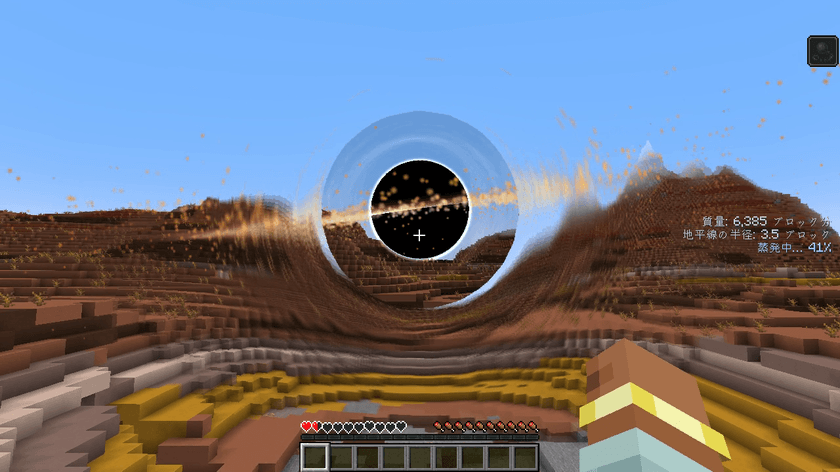
- 重さ(質量)=食べた物:かたいブロックほど重く数えます。穴の大きさ(地平線)は質量に比例して大きくなります(本物と同じ「質量に比例」)。
- 食べすぎるとまぶしく燃える:質量がふえる速さには上限があるので(エディントン限界のまね)、ごちそうが多いと円盤がまぶしく光ります。食べる物がないと円盤はうすく暗くなります。
- 蒸発(ホーキング放射のまね):食べる物がなくなると少しずつ小さくなり、小さくなるほど速く縮みます。最後は青白くちらつき、強い光と衝撃波を出して消えます(ブロックはこわしません)。そのあと、食べた物を吐き出すか、食べたままにするかを作る画面で選べます。
- 画面の右に、質量・地平線の大きさ・蒸発の進み具合 が出ます(操作画面の「表示」で消せます)。
- 「進み方」のボタンで「決めた時間で」にすると、決めた秒数で吸いこみます。こちらは食べ終わっても消えず、操作画面のボタンを押すまで残ります(吐き出すか、食べたままにするかを自分で選びます)。
🌋 自然のブラックホール(サバイバル・初めはオフ)
/gamerule blackholeNatural true で、そのワールドで ブラックホールが自然にあらわれる ようになります。
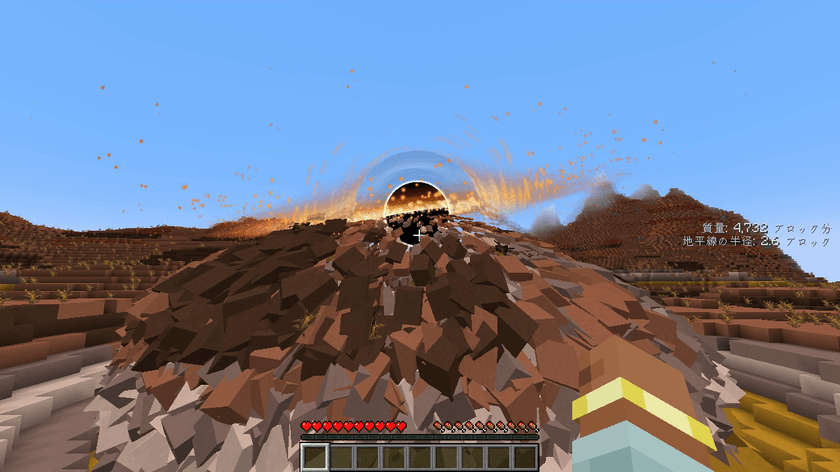
- ときどき、プレイヤーから 150〜300 ブロックほどはなれた空にできます(平均 5 日に1回。最初の 3 日はできません)。
- ワールドのスポーン地点・ベッド・リスポーンアンカー・村・プレイヤーが建てた物の近くにはできません(板材・ガラス・羊毛・レンガ・チェストなどを見て判断します)。
- 前ぶれ:低いうなり、空のちらつき、「重力がおかしい…」のメッセージ、方位磁針がくるくる回る、粒が一点へ流れていく。
- 小さな穴が本当にブロックをはがして食べながら育ち、やがて蒸発します。食べた所はクレーターのまま です(サーバー設定で、あとからゆっくり元に戻すこともできます)。
- 近づくと危険:引っぱられ(走る・エリトラ・エンダーパールで逃げられます)、近いほど体が引き伸ばされてダメージを受け、心臓の音とスローモーション。地平線をこえると「ブラックホールに引き伸ばされた」で死にます。落ちているアイテムや生き物も吸いこまれます。
- 蒸発したあとに 特異点のかけら が残ります。これで ブラックホールの種 を作れます(作業台:泣く黒曜石×4・エンダーアイ×2・特異点のかけら×2・ネザースター)。
- OP は
/blackhole natural(giantで巨大)で、今すぐ近くに作れます(場所のルールは同じ)。
🧭 使い方(3ステップ)
ステップ1 ブラックホールの種で、中心を選ぶ
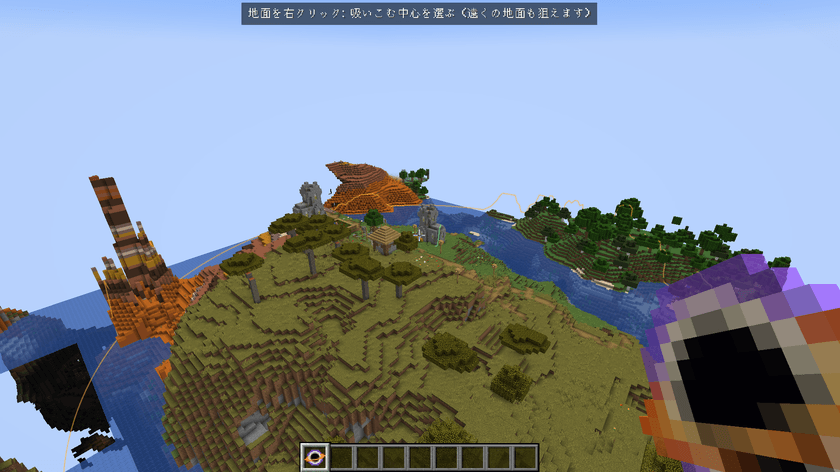
- ブラックホールの種 を持つと、狙っている地面に オレンジの輪(吸いこむ大きさ)が出ます
- 地面を 右クリック → そこが中心になります(遠くの地面も狙えます。256 ブロック先まで)
ステップ2 作る画面で決めて「作る」
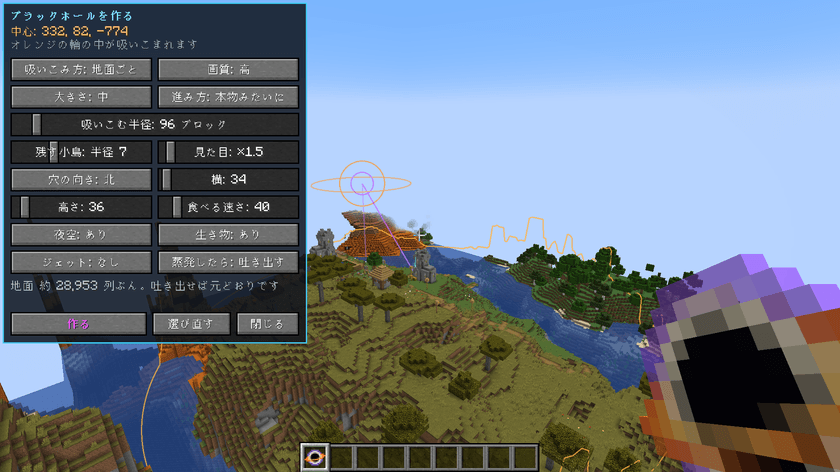
中心を選ぶと、画面の左に設定が開きます(世界は止まらないので、輪を見ながら決められます)。
| 項目 | 内容 |
|---|---|
| 吸いこみ方 | 地面ごと/ブロックをはがす |
| 大きさ | 小・中・大・巨大・超巨大(半径・見た目・穴の場所・時間をまとめて決めます) |
| 進み方 | 本物みたいに(初めの設定。食べて育ち、蒸発して消える)/決めた時間で(決めた秒数で吸いこみ、ボタンを押すまで残る) |
| 吸いこむ半径 | 16〜1024 ブロック(ブロックをはがす は 96 まで。オレンジの輪) |
| 見た目 | 穴と円盤の見た目の大きさ ×0.5〜×16 |
| 残す小島 | 中心のまわりを、星空に浮かぶ小島として残す(緑の輪)。なし〜半径 24 |
| 穴の向き・横 | 穴が空のどこに出るか(前=見ている方・北・東・南・西・真上)と、中心からの距離 |
| 穴の高さ | 穴が浮かぶ高さ(紫の丸 が穴の場所) |
| 食べる速さ/吸いこむ時間 | 本物みたいに:大きく育った穴が全部食べるのにかかる秒数の目安。決めた時間で:全部吸いこむまでの秒数(どちらも 5〜300 秒。あとから速さも変えられます) |
| 夜空 | 吸いこむ間、空を星空にする(自分の画面だけ。サーバーの時刻は変わりません) |
| 生き物 | 村人・動物なども一緒に吸いこむ(最後に無事に吐き出します)/その場に残す |
| 画質 | 低・中・高・最高(下の「見た目と画質」) |
| ジェット | 円盤の軸にそって光るジェット(巨大・超巨大向け) |
| 蒸発したら | 本物みたいに:吐き出す(初めの設定)/食べたまま |
決めたら 「作る」 を押します。
ステップ3 見る
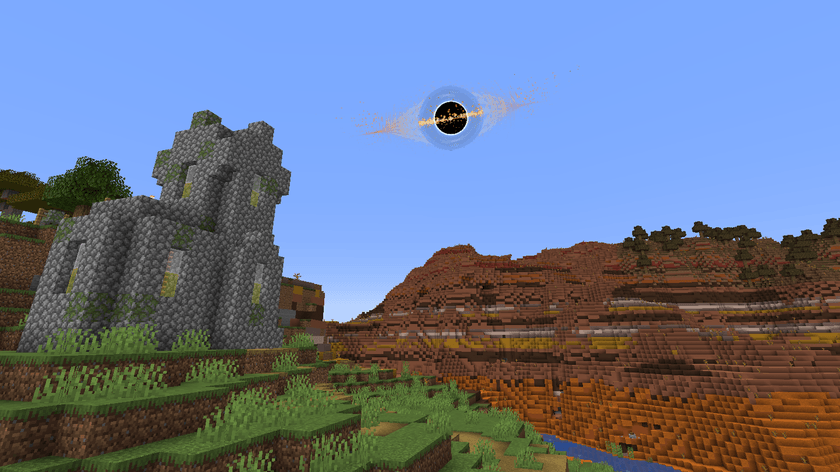
- 空に小さな黒い点が現れて、光る円盤をまといながら大きくなります。空はだんだん暗くなって、星空になります
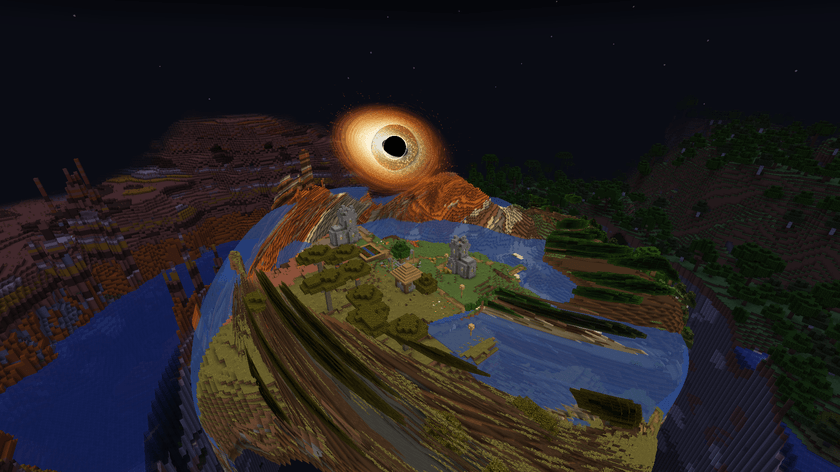
- 「地面ごと」では、遠くの地面から順にはがれて、ゴムのように伸びながら 渦を巻いて穴へ吸いこまれます
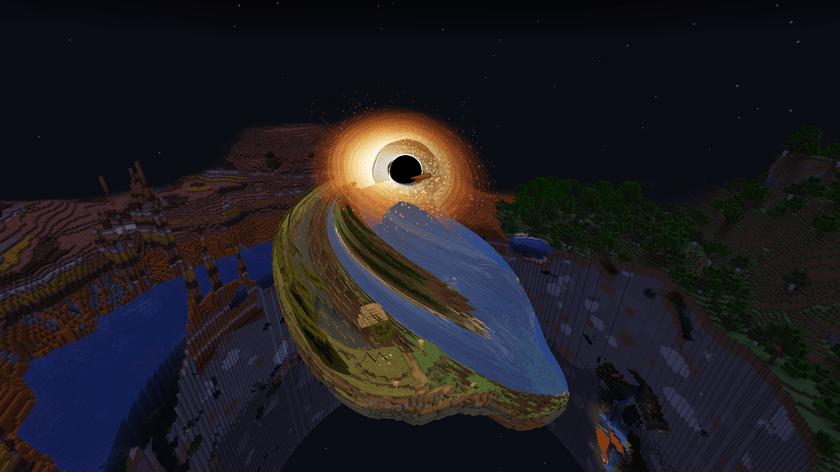
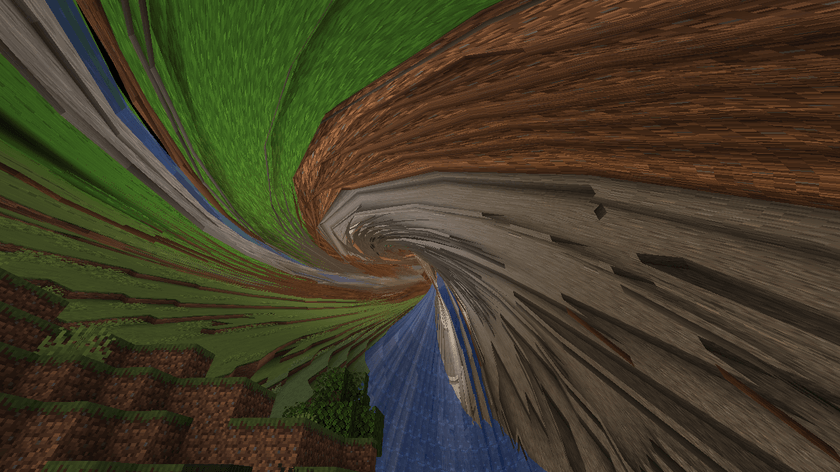
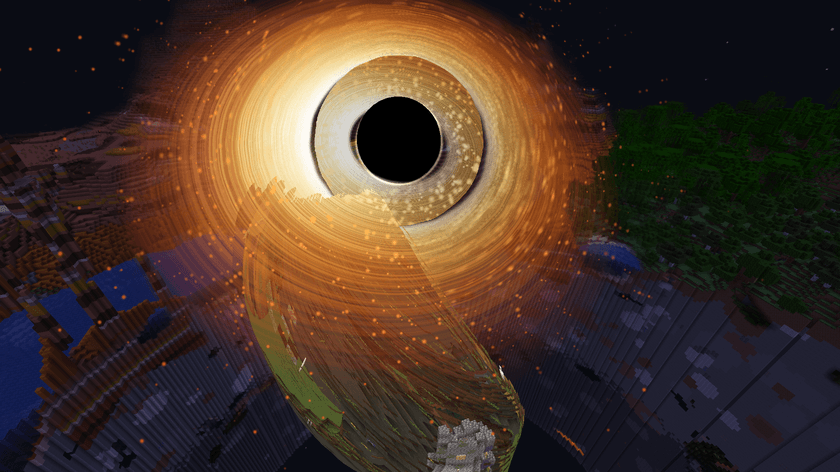
- 村人・動物も細長く伸びて(スパゲッティ化)一緒に吸いこまれます
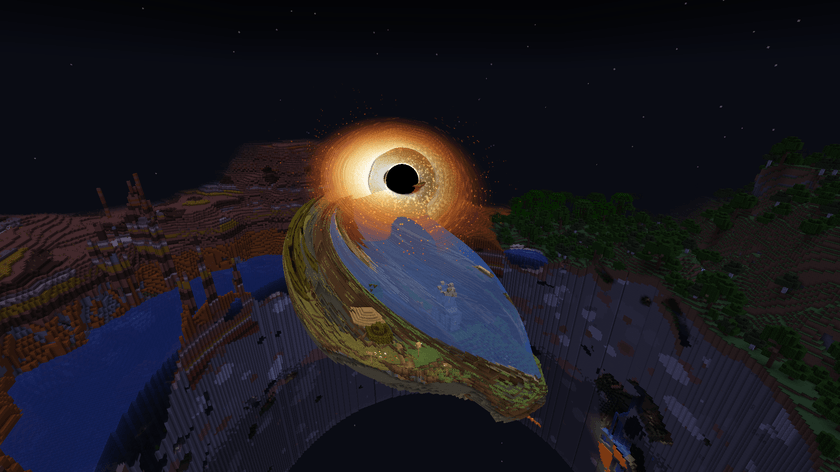
- 全部食べ終わると「ゲップ」。足もとの小島だけが星空に浮かびます
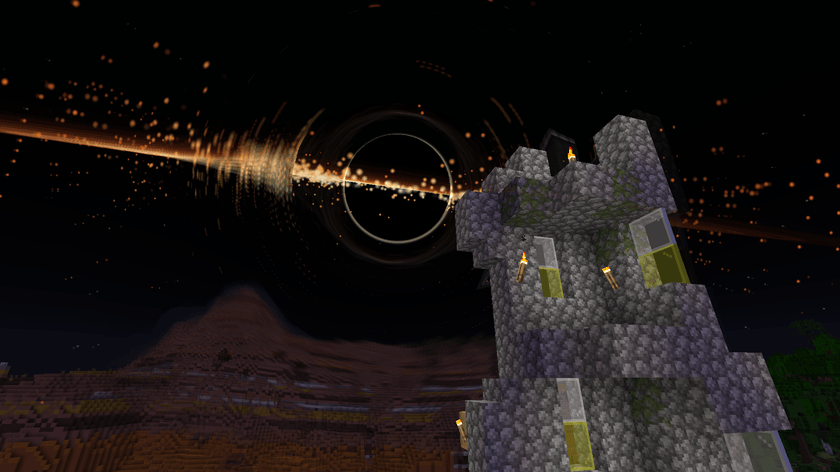
- 「本物みたいに」では、このあと蒸発して光って消え、地面が吐き出されて元どおりになります(作る画面で「食べたまま」も選べます)
ブロックをはがす
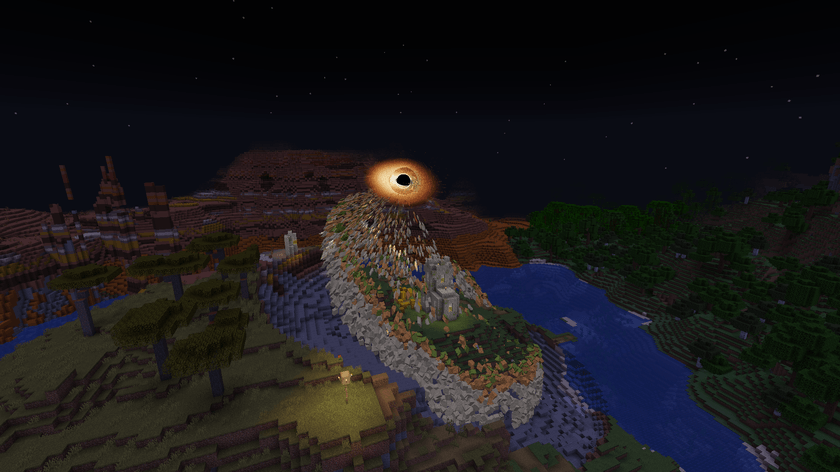
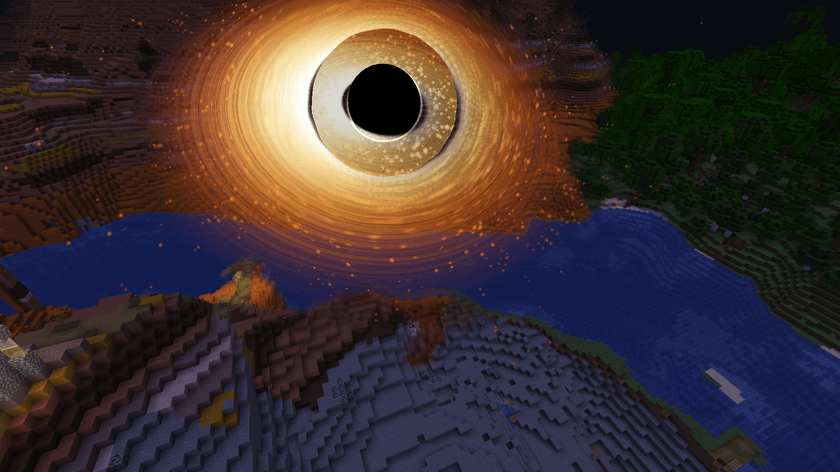
- 外側・上のブロックから順に1つずつはがれて、回りながら穴へ飛んでいきます。穴に近づくほど細長く伸びて、熱で赤く光ります
- 地面は深いおわん形のクレーターになります。「吐き出して元に戻す」で、ブロックが飛んで帰ってきて元どおりに積み上がります(チェストの中身も)
✨ 見た目と画質
- 重力レンズ:穴の後ろの景色や星が、穴のまわりで曲がって見えます(アインシュタイン・リング)
- 黒い影と光子リング:まっ黒な影のふちに、細く明るい光の輪
- 降着円盤:白く熱い内側からオレンジ・赤へ。こちらへ回ってくる側が明るく青白く見えます(ドップラー効果)。円盤の向こう側は、曲がって影の上と下に細い弧として見えます
- 熱のゆらぎ・星の流れ・ちり、穴が大きくなるほど暗くなる空と星空
- 画面の揺れ と、少し引きこまれる視野(近くにいる時だけ。オフにできます)
- 音:大きくなるほど低くなるうなり、はがれる音、吸いこむ音、ゲップ、吐き出す音
画質(作る画面・操作画面で変えられます。自分の画面だけの設定です)
| 画質 | 内容 |
|---|---|
| 低 | 光の曲がりなし。飛ぶブロックは 1500 個まで |
| 中 | 光の曲がりあり。飛ぶブロックは 4000 個まで |
| 高(初め) | +熱のゆらぎ・星の流れ・ちり。飛ぶブロックは 10000 個まで |
| 最高 | +光のにじみ。ちりと飛ぶブロックが最多(20000 個まで) |
設定は config/blackhole-client.toml(graphicsQuality、cameraShake)にも残ります。
- 重い計算は、ほとんどグラフィックボード(シェーダー)でしています。地面も飛ぶブロックも、毎フレーム CPU で計算しません。
- 影 MOD(Iris / Oculus)のシェーダーパックを使っている時 は、光の曲がりと光る円盤のシェーダーを自動で止めて、簡単な見た目にします。吸いこまれる地面は粗いタイルに、はがれるブロックは立方体になって、シェーダーパックの光で描かれます(Iris 1.8.12 + Sodium 0.6.13 + Complementary Reimagined r5.9.3 で確かめました)。
🎛️ 操作画面(B キー)
B キー(または、種を持って空を右クリック)で開きます。
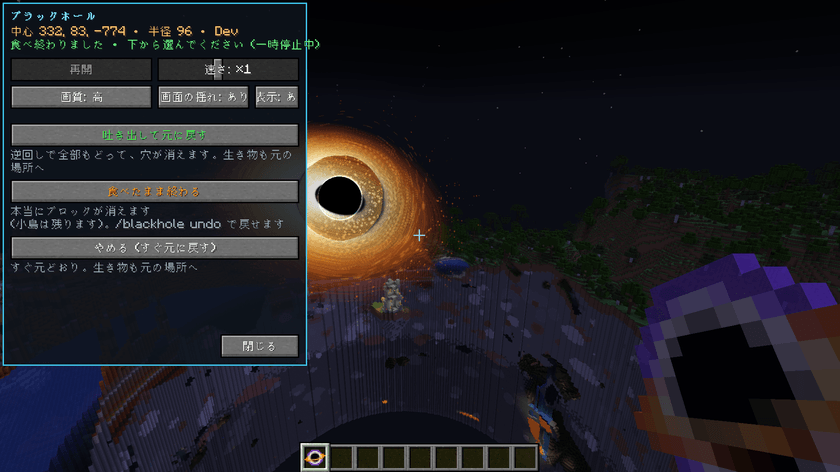
| ボタン | できること |
|---|---|
| 一時停止/再開・速さ | 止める・続ける。速さは ×0.25〜×4 |
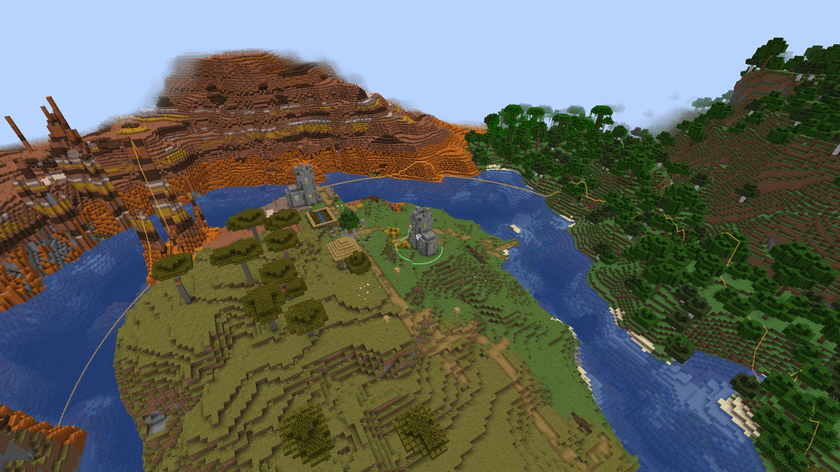
| 吐き出して元に戻す | 逆回しで全部吐き出して、ブロック1つまで元どおり。生き物も元の場所へ |
| 食べたまま終わる(地面ごと) | 吸いこんだブロックを 本当に消して 終わる(全部食べ終わってから。2回確かめます) |
| このまま終わる(ブロックをはがす) | はがれた所はクレーターのまま、穴を閉じる(2回確かめます) |
| やめる(すぐ元に戻す) | 動きを見せずに、すぐ全部元に戻す |
| 画質・画面の揺れ | 自分の画面の見た目を変える |
🕳️ 食べたまま終わる
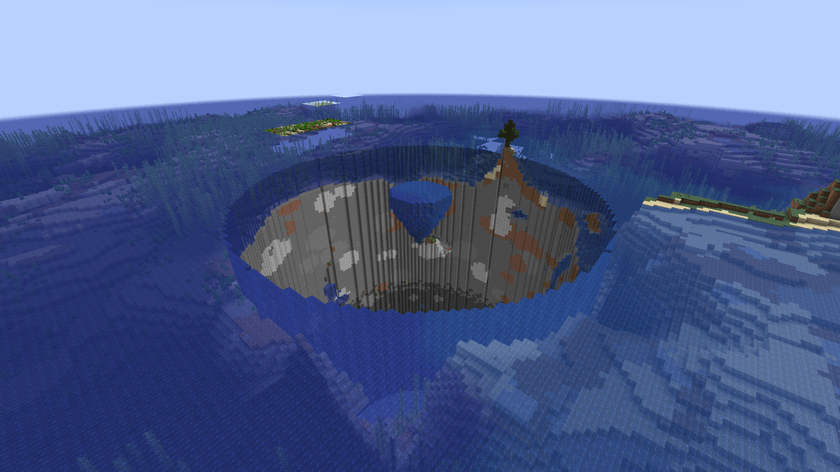
- 「地面ごと」では、円の中の地面を 世界の底まで本当に消します(小島は残ります)。少しずつ消すので、ゲームは止まりません。
- 消す前に 元に戻すファイル を書きます(
ワールドのフォルダ/blackhole_undo/)。/blackhole undoで元に戻せます。「ブロックをはがす」で終わった時も同じです。 - 初めは OP だけ が使えます(一人用ならワールドの持ち主)。サーバーの設定で、使えなくすることもできます。
🌀 吸いこまれた生き物・プレイヤー
- 種で作ったブラックホールでは、吸いこまれている間は ダメージを受けません(自然のブラックホールは別で、本当に危険です)。プレイヤーは まわりを自由に見回せます。
- プレイヤーは穴にたどり着くと「ペッ」と 吐き出されて、円の外の安全な地面に着地 します。そのあと 10 秒間は無敵です。
- 生き物は「吐き出して元に戻す」「やめる」で元の場所へ、「食べたまま終わる」では円の外の地面へ吐き出されます。
🛡️ 安心のしくみ
- 「地面ごと」で吸いこんでいる間、サーバーのブロックは1つも変わりません(見えないようにしているのは、それぞれの画面だけ)。
- 「ブロックをはがす」は、ブロックを1つも消す前に、元に戻すファイルを書き終えます。
- ワールドを閉じても、サーバーを止めても、続きから始まります。
- 吸いこまれている途中でログアウトしても、安全な場所に下ろしてから保存します。
🖥️ サーバーの人へ
設定ファイル:config/blackhole-server.toml(サーバーのフォルダの中)
| 設定 | 初め | 内容 |
|---|---|---|
permissionLevel |
2 | 作る・操作するのに必要な権限(0 = 全員、2 = OP)。一人用・LAN の持ち主はいつでも使えます |
maxRadius |
1024 | 吸いこめる半径の最大(ブロックをはがす は 96 まで) |
maxDeleteRadius |
192 | 食べたままにできる半径の最大 |
maxHoles |
4 | 1つの次元に同時に作れる数 |
allowRealDelete |
true | ブロックを本当に消すこと(「食べたまま終わる」「ブロックをはがす」)を使えるようにする |
realDeletePermissionLevel |
2 | ブロックを本当に消すことと /blackhole undo に必要な権限 |
自然のブラックホール([natural] の所):averageDays(5・平均何日に1回)、graceDays(3)、minDistanceFromSpawn(512)、minDistanceFromBeds(128)、minDistanceFromBuilds(48)、maxRadius(24)、dimensions(オーバーワールドとエンド)、restoreAfterNatural(false)、giantChance(0.03)。オン・オフはゲームルール blackholeNatural です。
| コマンド | 内容 |
|---|---|
/blackhole list |
今あるブラックホールの一覧 |
/blackhole natural |
自然のブラックホールを今すぐ近くに作る(OP。giant で巨大) |
/blackhole cancelall |
全部やめて、すぐ元に戻す(OP) |
/blackhole undo |
ブロックを消して終わった地面を元に戻す(いちばん新しいもの。OP) |
❓ よくある質問
Q. ブラックホールが消えない A. 進み方が「決めた時間で」の時は、食べ終わったあと、操作画面(B キー)のボタンを押すまで残ります。自然に消えるのは「本物みたいに」です。
Q. World Cube(同じ作者の MOD)と一緒に使いたい A. どちらも操作画面を B キーで開くので、キーがぶつかります。「設定 → 操作設定 → キー設定」で片方を別のキーにしてください。ブラックホールの操作画面は、種を持って空を右クリックしても開けます。
Q. 遠くの地面が、伸びずにパッと消えた A. 「地面ごと」で動きを見せるのは、作った時にサーバーが読みこんでいた範囲です。それより遠い所は伸びずに消えます(元に戻す時は、ちゃんと元どおりです)。
Q. チェスト・ベッド・看板が、伸びずに消えた A. 特別な描き方のブロックなので、「地面ごと」で吸いこまれる間は見えません。元に戻すと、中身ごと元どおりです。
Q. 「食べたまま終わる」や /blackhole undo に時間がかかる A. ゲームを止めないように、明かりの計算を待ちながら少しずつ書き換えています。半径 192 だと数分かかります(その間も遊べます)。
Q. 重い A. 操作画面で画質を「中」か「低」にしてください。「低」は光の曲がりを止めて、飛ぶブロックの数を減らします。
Q. 自然のブラックホールがこわい/いらない A. 初めはオフです。オンにしたワールドでも /gamerule blackholeNatural false でいつでも止められます。
Q. 他の人が作れない A. サーバー設定の permissionLevel(初めは OP だけ)を 0 にすると、全員が使えます。「ブロックをはがす」は realDeletePermissionLevel も見ます。
Q. 影 MOD と一緒に使える? A. シェーダーパックを使っている間は、光の曲がりと光る円盤のシェーダーを止めて、簡単な見た目(粗いタイルと立方体)で表示します。Iris 1.8.12 + Sodium 0.6.13 + Complementary Reimagined で確かめました。ほかの組み合わせはためしていません。
Cinematic Black Hole Team