


Chunk Platform Builder
This mod provides tech players with more convenient platform laying. As long as you have the materials, you can lay platforms in a 9×9 area around the machine with one click.
Currently only version 1.12.2 is supported; higher versions are in development............
Tip: This mod was developed by the author using AI. If you have any questions or suggestions, you can message the author directly.
This mod has no prerequisites and can be installed directly.
Instructions:
-
Install the mod and obtain the "Chunk Platform Layer". Note that this machine needs to be placed above the platform to be laid (in plain terms, at Y-axis +1 of the platform being laid).
-
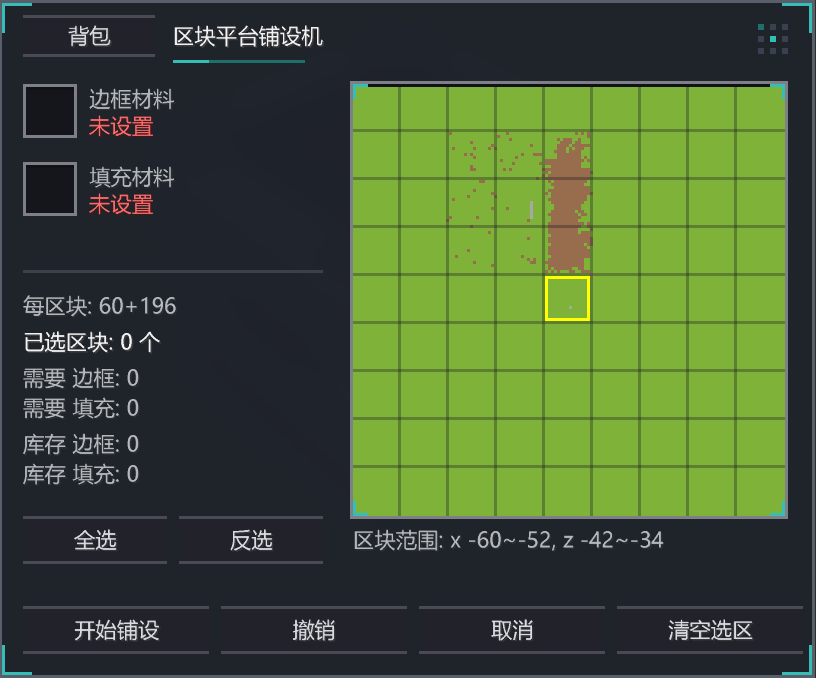
Open the machine, then click the backpack in the upper-left corner of the GUI to select materials. Left-click to select border materials, right-click to select fill materials.
-
After selecting, choose the chunk to be laid on the right side of the GUI. The machine will automatically calculate the materials and display them in the lower-left area of the GUI.
-
Before laying, place a container in any direction of the machine to store the materials used for laying.
-
Once everything is ready, click "Start Laying" to complete the laying (if you are not satisfied with the result, you can undo the operation, and the materials will be returned to the container).
-
The material interface can directly read items from AE. Therefore, when you have the "Material Interface", you can place the "Chunk Platform Layer" and the "Material Interface" adjacent to each other.
==========================================================================================
本模组为科技玩家提供了,更加便捷的平台铺设,只要有材料就可以在机器周围9*9的区块内进行一键铺设
目前只支持1.12.2版本,高版本正在开中............
tip:本模组由作者用AI开发,有任何问题和意见可以私聊作者
本模组无任何前置可以直接安装
使用说明
1.安装模组并获取“区块平台铺设机”,注意该机器需要在铺设的平台上方放置(大白话就是铺设平台Y轴+1)
2.打开机器再点击gui左上角的背包进行材料选取,左键选择边框材料,右键选择填充材料
3.选取完以后在gui右侧选择要铺设的区块,机器会自动计算材料,并在gui左下方位置显示
4.在铺设前请在该机器任意方向放置容器用来存放铺设用的材料,
5.一切准备完成以后就可以点击开始铺设就可以完成铺设(如果对铺设不满意可以进行撤回操作,材料会返回容器内)
6.材料接口可以直接读取AE内的物品,因此当你拥有"材料接口"时就可以让“区块平台铺设机”和“材料接口”进行相邻放置
Chunk Platform Builder Team
