Chronicles of Kings - Legions
- By
Tame mobs with a Tame Staff, bind them to your Command Horn and lead squads with orders, stances, formations and War Banner patrols. Raise the horde.

Raise the Horde. March to War.
📜 About the Mod
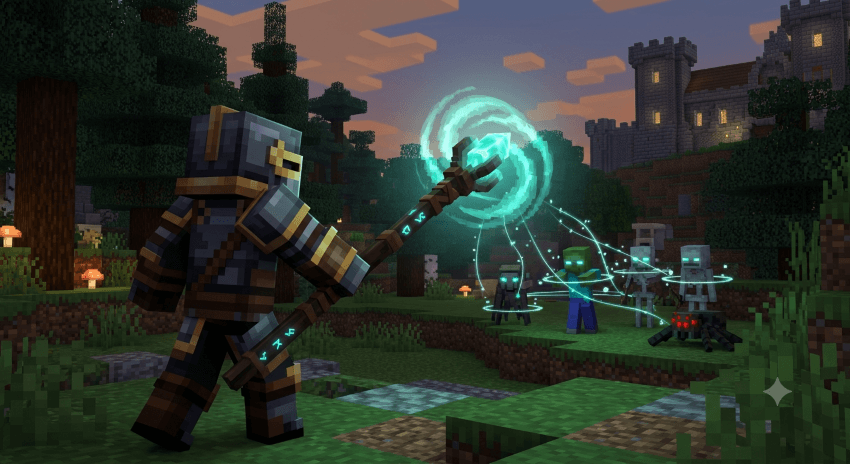
CoK Legions: Chronicles of Kings puts an army in your hands. Tame the monsters of the world with a Tame Staff, bind them to your Command Horn and lead whole squads into battle with commands, stances and formations. Zombies to Wardens, Blazes to the Ender Dragon, all will answer your horn.
✨ Key Features
🪄 Tame Staff
Right-click a mob in range and hold still while the taming bar fills. Six tiers decide how powerful a creature you can bring to heel.
📯 Command Horn
Each horn is its own squad. Right-click a tamed mob to add it, then issue orders to the whole squad from anywhere. Higher tiers command stronger creatures.
🎖️ Orders & Stances
Follow, Move, Attack-Move, Attack, Hold, Patrol and Stop. Aggressive, Defensive, Stand Ground or Passive stances decide how units fight.
📐 Formations
Row, Column, Double Row, Double Column, Diamond and Box. Units hold their exact slots as they march.
🚩 War Banners
Plant banners as rally points, and mark two of them to define a patrol route your squad walks until told otherwise.
🧠 Smart Troops
Units navigate multi-floor buildings, open doors and keep their signature abilities — witches heal wounded allies, blazes shoot fire and endermen blink into the fray.
⚙️ How It Works
1. Tame a Creature
Hold a Tame Staff and right-click a mob. Stand still while it channels — moving cancels it. Higher staff tiers tame stronger mobs, from Zombies and Spiders up to Wardens and the Wither.
2. Raise a Squad
- Right-click your tamed mob with a Command Horn to join that horn's squad
- Crouch + right-click to send a unit back to reserve
- Only one boss may serve in a squad at a time
- If a horn is destroyed, its units are released to reserve
3. Give Orders
Right-click a block or entity with the horn to order your squad. Use the horn's pickers to switch command, stance and formation, and the squad menu to manage individual units or call the squad to you.
4. Patrol and Protect
Set the horn to Patrol, then right-click two War Banners. Your squad walks the route between them.
5. Upgrade Your Command
Tame Staves and Command Horns come in six rarities from Uncommon to Exotic, raised one tier at a time with Upgrade Templates.
6. Good to Know
Add a friend from the Friends tab and your units won't attack each other. Peaceful difficulty removes hostile mobs from the world, so claimed monsters can be lost on Peaceful.
👑 Lead the Horde
CoK Legions isn't about owning pets — it's about commanding armies. Bind the beasts of the world to your banner and let the realm learn the weight of your war horn.

© 2026 CoK Team - Chronicles of Kings
A king is only as strong as the army that answers his horn.
Chronicles of Kings - Legions Team