Description
Chest Tracker (NeoForge)
Ever opened the same chest three times looking for that one stack of iron? Chest Tracker remembers what you keep where, and tells you exactly which container has the item you need.
This is an unofficial NeoForge port of Chest Tracker by JackFred, maintained by ponuing, rebuilt for Minecraft 26.3. Everything runs on the client — no server-side installation required, and it works on any server or Realm.

Features
Container memory. Every container you open is recorded with its contents and coordinates, per world or per server. Memories survive relogs and are stored separately for each Memory Bank.
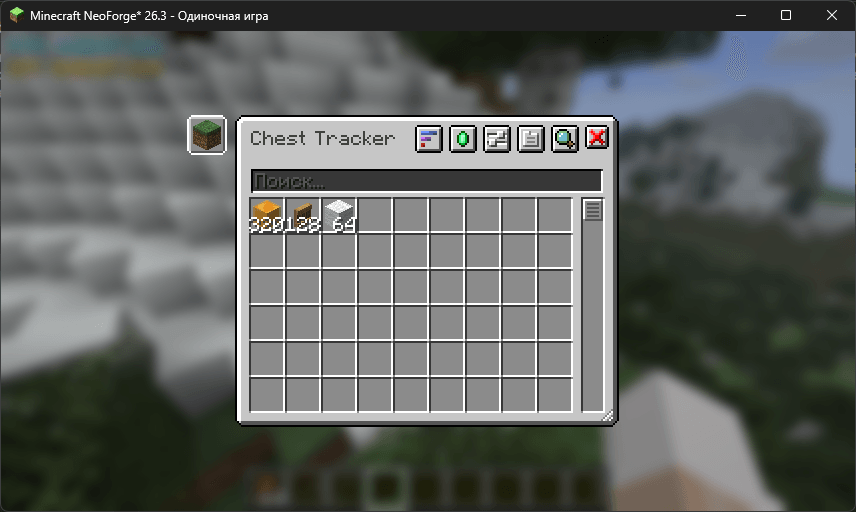
Search GUI. Press the Chest Tracker key (default `, rebindable in Controls) to open a searchable item list built from everything you have stored. Filter by container type, sort by count or name, and see the total amount of each item across all remembered containers.
Find the item under your cursor. Hover any item in any inventory and press T — Chest Tracker searches your memories for it and closes the inventory only when a match exists. Changeable in Minecraft's Controls settings.
World highlights. Matching containers are outlined in the world through walls, with the mod name and distance shown above them. Highlights respect your configured search range and work with Iris shader packs enabled.
Memory Banks. Keep separate sets of memories per world, per server, or per project — for example one bank per base. Each bank can be marked as the default for the current connection. Create, search and edit banks from the Memory Manager, including the key that identifies each one.
Inventory button. A button in container screens lets you rename a container (client-side only), forget it, or mark it to never be remembered.
Integrity and cleanup. Containers that no longer exist get dropped automatically: on block break, with a periodic nearby check, with the optional Enhanced Cleanup pass over every loaded chunk before a search, and with a configurable memory lifetime. Named containers can be exempted from expiry.
Flexible storage. Memory Banks are saved as NBT (compact, default) or readable JSON, or kept in RAM only. The storage folder can be opened straight from the config screen.
Per-bank tuning. Remember all containers or only chests/barrels/shulkers, auto-add containers you place yourself, unpack nested items (shulker boxes, bundles), choose how stacks are merged in the item list, and set the search and item-list ranges independently.
Integrations
All optional and detected at runtime — install only the ones you use. Each one can be turned off under Compatibility in the config screen.
- Jade — what a container held when you last opened it, shown in Jade's tooltip straight from your Memory Bank. The data is client-side, so it also works on Realms and on servers without Jade.
- Shulker Box Tooltip — the ender chest preview is built client-side from your Memory Bank instead of asking the server, so it keeps working on Realms and on servers without Shulker Box Tooltip installed.
- JEI — hover an ingredient in JEI (ingredient list, bookmarks or a recipe slot) and press
Tto search your memories for it. - Xaero's Minimap / World Map — every search result becomes a temporary waypoint labelled with the amount and the item name, for example
34x Block of Honey. The waypoints disappear again when the in-world highlight fades.
Requirements
- Minecraft 26.3
- NeoForge 26.3.0.102 or newer
- Java 25
- YetAnotherConfigLib (YACL) 3.9.7+26.3 - required
How to use
- Open a few containers so Chest Tracker learns their contents.
- Press the Chest Tracker key to open the item list and type what you're looking for.
- Click a result, or hover an item and press
T, to highlight the containers that hold it. - Tune ranges, storage format and per-bank behaviour in the config screen.
Port status
Ported: container memory, storage backends, search, inventory controls, configuration, world highlights.
Not included in this build:
- World labels (container names rendered in the world) are disabled.
- Optional integrations with Litematica, WTHIT and Searchables are not included..
Credits
Chest Tracker was created by JackFred and is maintained by ponuing. This repository is an unofficial NeoForge port for 26.3; the original mod, its source and its assets remain their work. If an official build for your Minecraft version exists, prefer it.
Original project: https://github.com/ponuing/ChestTracker
License
Chest Tracker's source and assets are licensed under LGPL-3.0.
Chest Tracker (New NeoForge port) Team