Quick Chat Wheel
Hold a key. Flick. Release. Done. A radial chat wheel for Minecraft with 40 customizable messages, hundreds of built-in presets, and a look you can fully restyle with a resource pack.
Client-side only. Works on Fabric (needs Fabric API) and NeoForge for Minecraft 26.3. Nothing is needed on the server, so it works on vanilla and modded servers alike.

Why you'll like it
Typing "gg", "thanks", "creeper behind you" or your coordinates over and over gets old. Quick Chat Wheel puts the messages you actually send under one key, so you can answer in half a second without opening chat or taking your hand off the mouse.
Features
The wheel
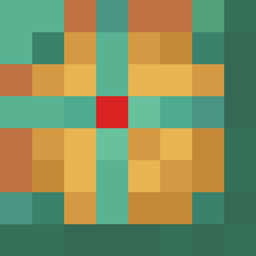
- Hold V, flick the mouse toward one of 8 sectors, release to send
- 5 pages of 8 slots (40 messages), switch by scrolling or clicking the page name
- Every slot has its own label and color: pick from 32 swatches or type any custom hex color
- Keep moving: WASD, jump, sneak and sprint keep working while the wheel is open
- Smooth fade-in, hover highlight and sounds (all optional)
- Tap the key quickly to leave the wheel open and click instead, so you never send by accident
Customization
- Built-in editor (press K or run
/quickchat) with a live slot list - 800+ ready-made presets in 28 categories (greetings, combat, trading, building, roleplay, kaomoji and more) with search
- Messages starting with
/run as commands, so a slot can be/homeor/tpa Friend - Add your own preset list in a simple JSON file
Quick commands (great for operators)
- Any slot can run a command: just start the message with
/. If you're an op (or you have cheats on in singleplayer), one flick can switch to creative, set the time, clear the weather or teleport you - A full commands preset section is built in: 125 ready-made commands in 9 categories (time & weather, gamemode, effects, locate, world & difficulty, items, mobs & cleanup, chat & social, server plugins). Pick All Commands to browse them all at once
- Page 5 of the default wheel comes pre-filled with handy op shortcuts like
/time set day,/weather clear,/gamemode creativeand night vision - Commands can use variables too, e.g.
/setworldspawn {coords}or/spawnpoint @s {coords} - Commands run with your own permissions, exactly as if you typed them. If you aren't allowed to use one, the server answers with its usual "no permission" message, so nothing can be bypassed
Smart messages
- Variables fill in live values when you send:
{coords}{x}{y}{z}{health}{name}Example:Found diamonds at {coords}!sends your real position. - Shortcodes while typing in normal chat:
:shrug::lenny::tableflip::gg::afk:and more (add your own) - Mention ping: a sound plays when someone says your name or any extra words you choose

Made to be restyled
- Every part of the wheel is a real texture in the mod's assets, and all sizes and colors are in one JSON file
- Make a resource pack to change the look completely. No code needed. The mod ships a guide listing every file
- Tinting can be turned off if your textures have their own colors
Safe by default
- Built-in send cooldown so a stuck key can't spam you into a kick
- Deliberately slow scrolling, with the speed adjustable in the config
How to use
| Action | Key |
|---|---|
| Open the wheel | Hold V (you can keep walking) |
| Send | Release over a sector, click it, or press 1-8 (clockwise from the top) |
| Change page | Scroll, or click the page name |
| Cancel | Esc |
| Edit the wheel | K or /quickchat |
| Reload config | /quickchat reload |
All keys can be rebound under Options > Controls > Quick Chat Wheel.
Config
config/quickchatwheel.json holds your pages and slots plus a few switches:
cooldownMs- minimum time between wheel sendswheelScrollNotches- how many scroll notches flip a pagelistScrollSpeed- scroll speed of the editor's preset listmoveWhileWheelOpen- keep WASD working while the wheel is openshortcodes,extraPingWords, and on/off toggles for sounds, ping, shortcodes and variables
Your own presets go in config/quickchatwheel_custom_presets.json as a plain list of messages and appear under Custom.
Compatibility
- Minecraft: 26.3
- Loaders: Fabric (requires Fabric API)
- Side: client only. Do not install on a server.
- Doesn't change gameplay, chat signing or any server data. It just sends normal chat messages and commands for you.
FAQ
Can I use it on multiplayer servers? Yes. It only sends ordinary chat messages and commands, exactly as if you typed them.
Will my server think I'm spamming? The send cooldown (350 ms by default) helps. Check your server's rules if you plan to bind commands.
Can I use it for admin commands?
Yes. Put commands like /time set day or /gamemode creative in any slot, or pick them from the Cmd: preset categories. They only work if you have permission to run them (op on a server, cheats enabled in singleplayer).
How do I change the look?
Enable one of the example resource packs, or make your own that replaces the textures in assets/quickchatwheel/textures/gui/wheel/ and optionally wheel_theme.json. The included CUSTOMIZING.md lists every file and setting.
The key doesn't open the wheel. Check Options > Controls for a conflict, and rebind it if needed.
Does it work in singleplayer? Yes.
Chat Wheel Team