


Chat_AI_Assistant
- By
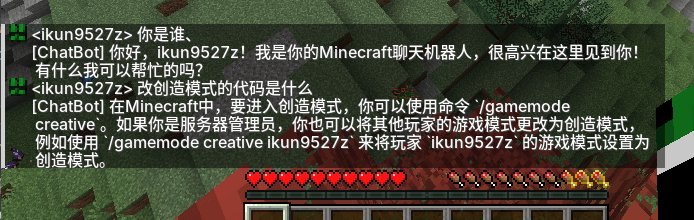
å±å¹æªå¾ 2026-07-19 130142.png
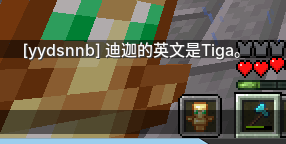
å±å¹æªå¾ 2026-07-19 173246.png
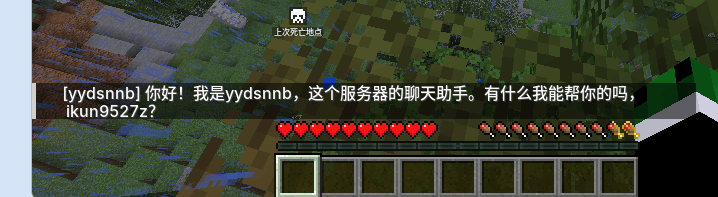
å±å¹æªå¾ 2026-07-19 172657.png
Description
# ChatBot Mod
An AI chatbot mod designed for Minecraft 1.21.1 NeoForge.
It transforms NPCs from simply reciting template lines into truly intelligent assistants capable of conversation and executing server commands.
## Features
- ✅ **Multiple AI Service Support**: Built-in support for 6 APIs including Zhipu GLM, Volcano Ark, OpenAI, DeepSeek, and MiniMax, with automatic recognition and adaptation.
- ✅ **Real-time Dialogue**: Players can trigger dialogue by tagging the AI in the chat box; the AI processes asynchronously without blocking the main thread.
- ✅ **AI Command Execution**: Players can have the AI execute server commands (tp, weather, time, give, etc.). The AI outputs commands via the `<cmd>` tag protocol.
- ✅ **Hierarchical Permissions**: Separate permission models for OPs and regular players, with blacklist/whitelist dual protection to prevent prompt injection bypass.
- ✅ **Frequency Limits**: Configurable number of commands per player per minute to prevent AI abuse.
- ✅ **Two-Turn Dialogue**: AI first outputs intent and command → system executes the command → AI then summarizes the execution result for the player.
- ✅ **Flexible Configuration**: All functions are configured via `config/chatbot.toml`, allowing adjustments without restarting the code.
## Supported AI Services
| API Type | Service Name | Official Website |
|---------|----------|----------|
| `ZHIPU` | Zhipu GLM | https://open.bigmodel.cn/ |
| `VOLC` | Volcano Ark (Doubao) | https://console.volcengine.com/ark/ |
| `OPENAI` | OpenAI | https://platform.openai.com/ |
| `DEEPSEEK` | DeepSeek | https://platform.deepseek.com/ |
| `MINIMAX` | MiniMax | https://api.minimax.chat/ |
| `CUSTOM` | Custom API | Custom Endpoint (compatible with OpenAI protocol) |
## Installation Steps
1. Download the module file `chatbot-1.0.0.jar`
2. Place the file in the server's `mods/` folder
3. Start the server; the configuration file will be automatically generated. `config/chatbot.toml`
4. Stop the server, edit the configuration file and fill in the API Key & model.
5. Restart the server to use it.
## Configuration File Description
Configuration file path: `config/chatbot.toml`
```toml
# ===== AI Service Configuration =====
# API Key (Required)
api_key = "your-api-key-here"
# Model Name (Required, select according to API type)
model = "GLM-4-Flash-250414"
# API Type: ZHIPU, VOLC, OPENAI, DEEPSEEK, MINIMAX, CUSTOM
api_type = "ZHIPU"
# Custom API Address (Only required when api_type=CUSTOM)
custom_url = ""
# Enable AI Reply
ai_enabled = true
# Reply Delay (milliseconds)
reply_delay_ms = 0
# AI Display Name
ai_name = "ChatBot"
# Trigger Prefix (AI will only be triggered if player chat starts with this)
ai_trigger = "@AI"
# ===== AI Command Execution =====
# Enable AI command execution
cmd_enabled = true
# Global Blacklist (AI cannot execute commands from anyone, including OPs, comma-separated)
cmd_blacklist = "stop,setblock"
# Normal Player Whitelist (Only these commands can be executed by AI from non-OP players, comma-separated)
cmd_normal_whitelist = "list,seed,spawn,home,help,me,tell,msg,w"
# Maximum number of commands per player per minute (0 = Unlimited)
cmd_max_per_minute = 10
```
### Examples of AI Service Configurations
#### Zhipu GLM
```toml
api_key = "Your Zhipu API Key"
model = "GLM-4-Flash-250414"
api_type = "ZHIPU"
```
#### Volcano Ark (Doubao)
```toml
api_key = "Your Volcano Ark API Key"
model = "doubao-seed-2-0-lite"
api_type = "VOLC"
```
#### OpenAI
```toml
api_key = "sk-Your OpenAI Key"
model = "gpt-3.5-turbo"
api_type = "OPENAI"
```
#### DeepSeek
```toml
api_key = "Your DeepSeek Key"
model = "deepseek-chat"
api_type = "DEEPSEEK"
```
#### MiniMax
```toml
api_key = "Your MiniMax Key"
model = "abab5.5-chat"
api_type = "MINIMAX"
```
#### Custom API
```toml
api_key = "Your API key"
model = "Your model name"
api_type = "CUSTOM"
custom_url = "https://your-api-endpoint.com/v1/chat/completions"
```
## How to Use
### Basic Dialogue
1. Press `T` in the game to open the chat window.
2. Type `@AI Your question` and send.
3. The AI will reply to your message asynchronously.
### AI Command Execution
As long as `cmd_enabled = true`, players can have the AI execute server commands. The AI will embed `<cmd>command parameters</cmd>` tags in its reply, which the system will automatically parse and execute with the highest privileges (level 4).
#### Example Dialogue
```
<Player> @AI Hello
[ChatBot] Hello! Nice to meet you! How can I help you?
<Player> @AI How many people are online?
[ChatBot] Let me check the online players...
[ChatBot] There are currently 3 players online on the server: Steve, Alex, and PanKa.
<Player> @AI Teleport me to Steve.
[ChatBot] Okay, teleporting you to Steve.
[ChatBot] You have been teleported to Steve.
<Player> @AI Give me a diamond (regular player)
[ChatBot] Sorry, you do not have permission for me to execute the `give` command. Please contact the OP for assistance.
<Player> @AI Give me a diamond (OP player)
[ChatBot] has given you 1 diamond
```
## Frequently Asked Questions
### Q: AI is not responding
**A:** Check the server logs for information related to `[ChatBot]`:
- `AI service not enabled`: Check if the configuration file `ai_enabled` is `true`
- `API request failed`: Check if the API Key and model name are correct
- `Unable to connect`: Check if the server network is working properly
### Q: Where is the configuration file?
**A:** `config/chatbot.toml` in the server root directory
### Q: Do I need to restart the server after modifying the configuration?
**A:** Yes, you need to restart the server for the changes to take effect.
### Q: How do I view detailed logs?
**A:** Search for the keyword `[ChatBot]` in the server logs.
## Version Information
- **Mod Version**: 1.0.0
- **Minecraft Version**: 1.21.1
- **NeoForge Version**: 21.1.236
## License
MIT License
The Chat_AI_Assistant Team
