ChainMiner
- By
Screenshot 2026-08-15 153545.png
Screenshot 2026-08-15 153551.png
Screenshot 2026-08-15 153558.png
Screenshot 2026-08-15 153821.png
Description
ChainMiner
ChainMiner is a configurable mining and excavation utility for Minecraft 1.7.10, developed primarily for GT New Horizons 2.8.4.
It expands normal block breaking with area mining, connected-block mining, ore-vein excavation, operation queues, Undo, tool safety, configurable limits, and an in-world preview that shows what ChainMiner is going to affect before the operation starts.
The mod is designed to make large mining tasks faster while keeping them visible, controllable, and compatible with normal block-breaking mechanics.
Mining Modes
Plane
Mine a flat area based on the face of the selected block.
Available sizes:
- 3×3×1
- 5×5×1
- 9×9×1
- 16×16×1
Cube
Mine a three-dimensional volume extending inward from the selected face.
Available sizes:
- 3×3×3
- 5×5×5
- 9×9×9
- 16×16×16
Connected Blocks
Find and mine a connected group of matching blocks.
ChainMiner can use exact block-state matching and configurable search limits.
This mode is useful for structures, building blocks, and connected GregTech blocks.
Ore Vein
Designed specifically for connected ore deposits.
Ore matching can be configured to use:
- mixed connected ores;
- the same ore block;
- ores made from the same material.
This is especially useful for GT New Horizons, where a generated vein may contain several different GregTech ores.
Tunnel
Mines a configurable tunnel section in the selected direction.
Line
Mines blocks in a straight configurable line.
Chunk Slice
Mines a limited 16×16 slice aligned to the selected block face.
Chunk Slice supports horizontal and vertical orientations and only mines the configured thickness — it does not automatically continue to bedrock.
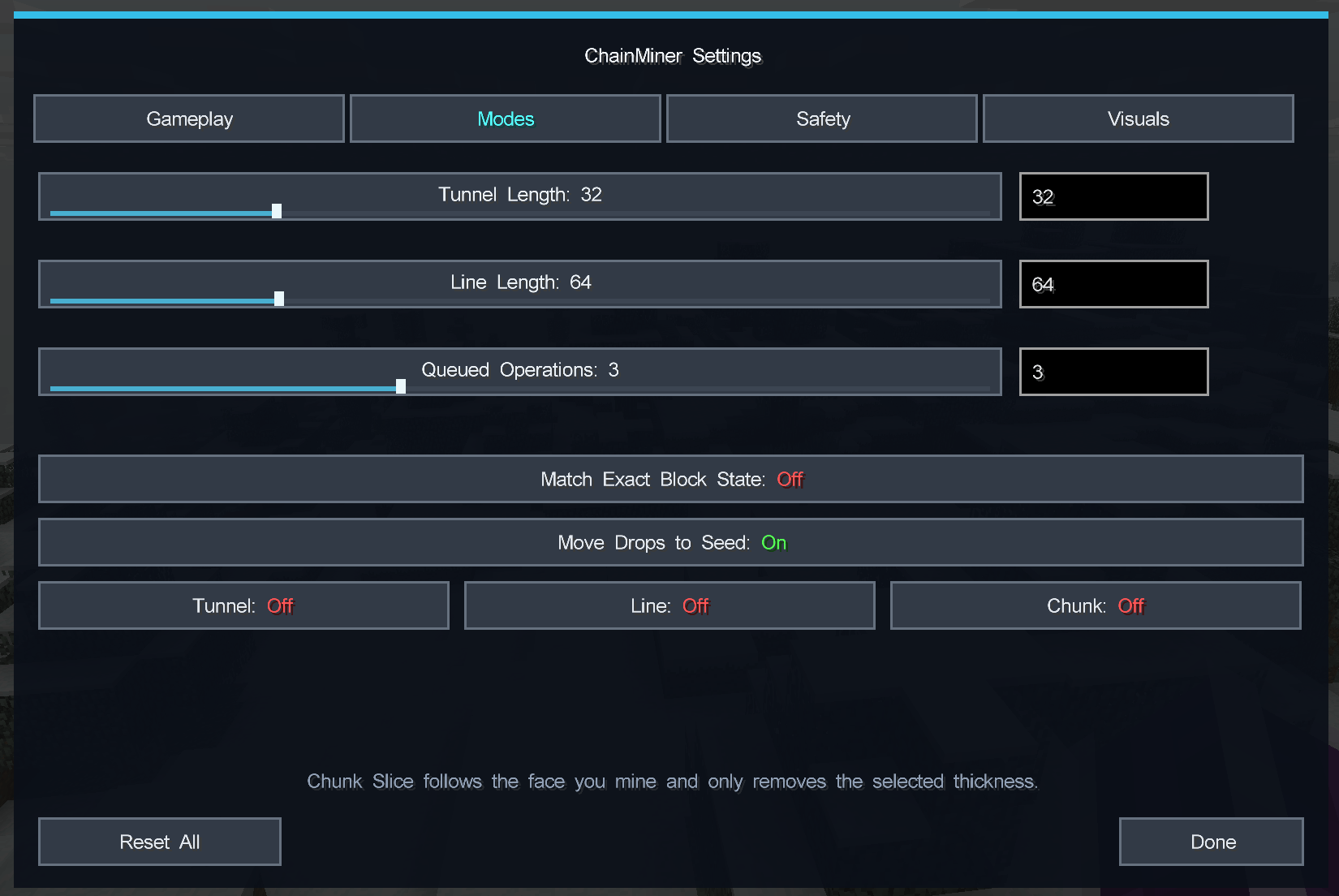
Tunnel, Line, and Chunk Slice are optional and are disabled by default. They can be enabled from the Modes settings page.
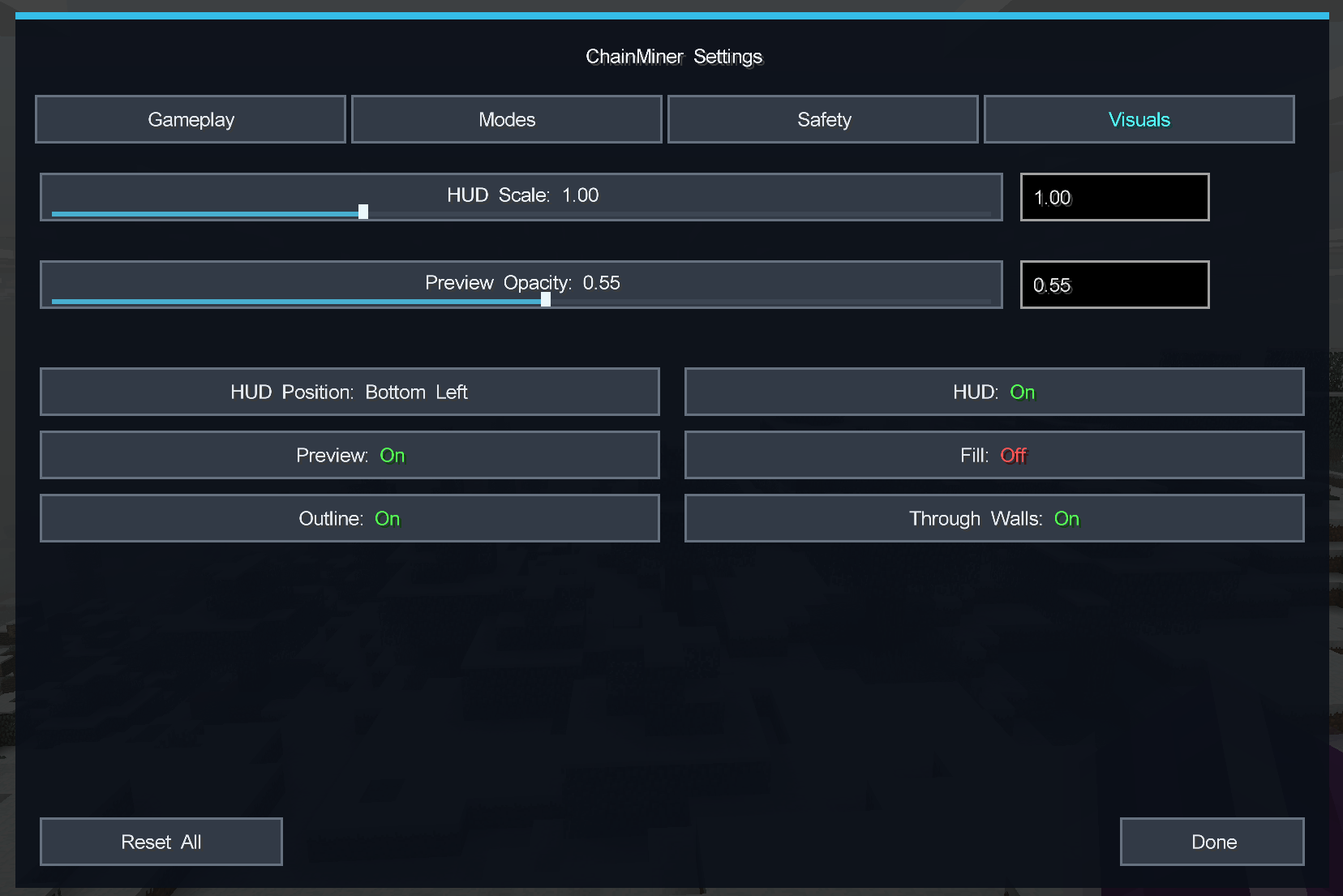
3D Preview
ChainMiner displays the affected targets directly in the world before or during an operation.
The preview supports:
- outlines;
- translucent fill;
- configurable opacity;
- rendering through walls;
- real target shapes for connected searches;
- chunk-alignment indication.
Connected Blocks and Ore Vein previews follow the detected structure instead of simply drawing one large bounding box around it.
The preview and actual mining operation use shared geometry and target calculations so the blocks being mined match what is displayed as closely as possible.
HUD
The configurable HUD can display:
- selected mode;
- selected variant;
- found block count;
- search progress;
- mining progress;
- mined blocks;
- skipped blocks;
- estimated completion time;
- cancellation hint.
HUD position and scale can be changed from the settings menu.
Operation Queue
Multiple ChainMiner operations can be queued.
A new operation can be registered while another one is still running, and queued operations are processed in the order they were created.
The maximum queue size is configurable.
Cancel and Undo
The current operation can be cancelled with a dedicated key.
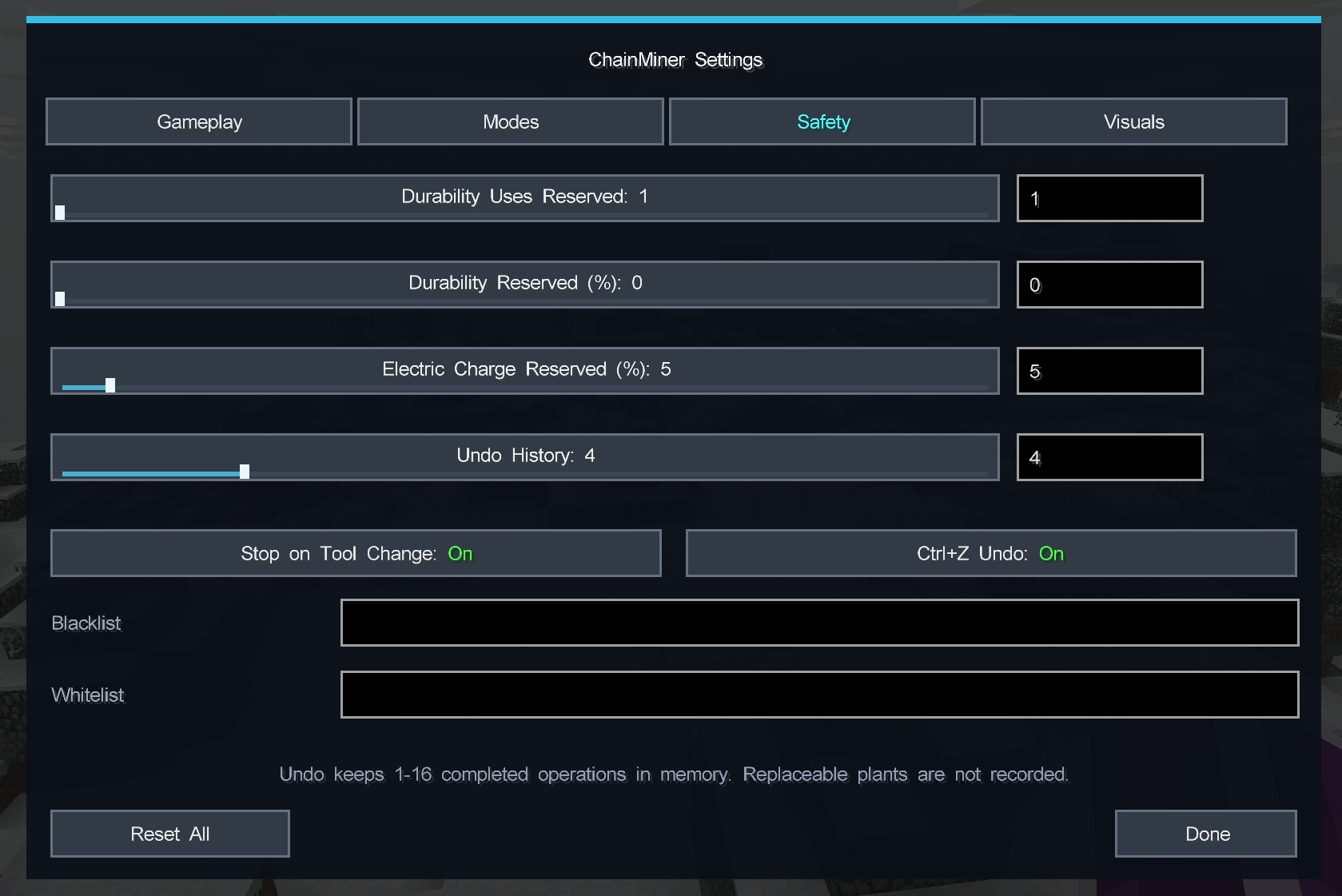
ChainMiner also provides Ctrl+Z Undo.
Undo keeps a configurable history of completed operations:
- minimum: 1 operation;
- default: 4 operations;
- maximum: 16 operations.
Multiple Ctrl+Z presses can restore multiple previous operations in reverse order.
Ctrl+Z can also be used while ChainMiner is still mining. In that case the active operation is cancelled and the blocks already mined by it are restored when possible.
Undo history is stored in memory and is cleared when the game or server restarts.
For safety, blocks with Tile Entities and unsupported replaceable blocks are excluded from restoration.
Tool Safety
ChainMiner includes several options for protecting the currently used tool:
- require the correct harvesting tool;
- minimum durability reserve;
- percentage-based durability protection;
- electric tool charge protection where supported;
- stop when the held tool changes.
This allows large operations to stop before a valuable tool is completely depleted.
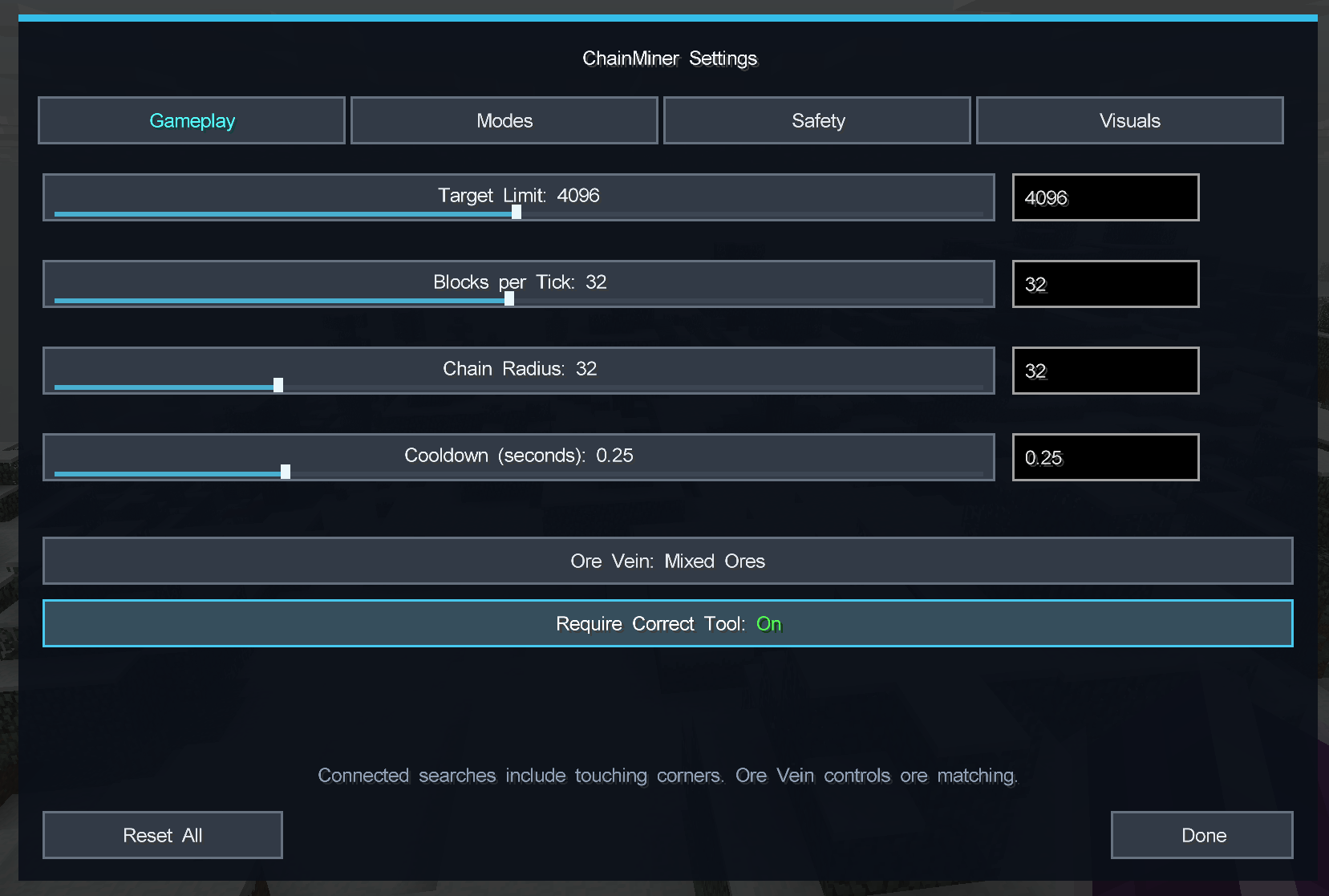
Operation Limits
Large operations can be controlled with separate limits for:
- maximum target count;
- blocks processed per tick;
- chain radius;
- tunnel length;
- line length;
- operation cooldown;
- queue size.
ChainMiner processes large operations over multiple game ticks instead of trying to destroy everything instantly.
Block Filtering
Optional blacklist and whitelist filters are supported.
Registry names and wildcard patterns can be used, for example:
gregtech:**:chest*machine*
Exact block-state matching is also available.
Centralized Drops
ChainMiner can collect item and experience drops generated by an operation and release them at the original mined block.
This keeps large excavations cleaner without teleporting the drops directly into the player's inventory.
Settings
The settings interface is divided into four pages:
- Gameplay
- Modes
- Safety
- Visuals
Sliders support direct numeric input, and configuration is saved when the menu is closed.
A Reset All option restores the current default configuration.
The entire in-game ChainMiner interface is written in English.
Compatibility and Safety
ChainMiner respects normal block-breaking events and does not intentionally bypass protection or cancellation events.
It also:
- does not force-load unloaded chunks;
- excludes liquids from unsafe bulk operations;
- uses normal server-side block-breaking mechanics;
- limits unsafe Undo restoration;
- provides a small external API for compatibility with other mods.
Primary Target
ChainMiner is developed primarily for:
- Minecraft 1.7.10
- Forge 10.13.4.1614
- GT New Horizons 2.8.4
Special attention is given to GregTech blocks, GTNH ore generation, large mining operations, and compatibility with heavily modded gameplay.
Русский
ChainMiner — настраиваемый мод для массовой добычи и работы с блоками в Minecraft 1.7.10, разработанный в первую очередь под GT New Horizons 2.8.4.
Он расширяет обычную добычу блоков режимами Плоскости, Куба, связанных блоков, рудных жил, тоннелей, линий и Chunk Slice, а также добавляет очередь операций, Undo, защиту инструмента, ограничения производительности, HUD и 3D-preview.
Главная идея ChainMiner — ускорить крупные операции, при этом заранее показывая игроку, что именно будет затронуто.
Режимы добычи
Plane
Добыча плоской области относительно выбранной грани блока:
- 3×3×1
- 5×5×1
- 9×9×1
- 16×16×1
Cube
Добыча трёхмерного объёма:
- 3×3×3
- 5×5×5
- 9×9×9
- 16×16×16
Объём продолжается внутрь от выбранной поверхности.
Connected Blocks
Поиск и добыча связанной группы подходящих блоков.
Подходит для одинаковых строительных блоков, различных конструкций и блоков GregTech.
При необходимости можно включить точное совпадение состояния блока и ограничить радиус поиска.
Ore Vein
Отдельный режим для рудных жил.
Для определения руды можно выбрать:
- любые связанные руды;
- только тот же рудный блок;
- руды из одного материала.
Это особенно полезно в GT New Horizons, где одна жила может состоять из нескольких разных GregTech-руд.
Tunnel
Добыча настраиваемого участка тоннеля.
Line
Добыча блоков по прямой линии.
Chunk Slice
Добыча ограниченного слоя размером 16×16.
Ориентация зависит от выбранной грани блока: слой может быть горизонтальным или вертикальным.
Chunk Slice добывает только указанную толщину и не продолжает автоматически копать до бедрока.
Tunnel, Line и Chunk Slice по умолчанию отключены и включаются отдельно в разделе Modes.
3D Preview
ChainMiner заранее показывает цели непосредственно в мире.
Поддерживаются:
- контур;
- полупрозрачная заливка;
- изменение прозрачности;
- отображение сквозь стены;
- отображение реальной формы связанных блоков и рудной жилы;
- индикация совпадения с границами чанка.
Connected Blocks и Ore Vein отображают реальную форму найденной структуры вместо одного большого прямоугольника вокруг неё.
Preview и реальная операция используют общие расчёты геометрии и целей.
HUD
HUD может показывать:
- текущий режим;
- выбранный вариант;
- количество найденных блоков;
- прогресс поиска;
- прогресс добычи;
- количество добытых блоков;
- количество пропущенных блоков;
- примерное оставшееся время;
- подсказку отмены операции.
Положение и масштаб HUD настраиваются.
Очередь операций
Можно добавить несколько операций ChainMiner в очередь.
Новая операция может быть зарегистрирована, пока предыдущая ещё выполняется.
Операции выполняются последовательно, а максимальный размер очереди настраивается.
Cancel и Ctrl+Z Undo
Текущую операцию можно отменить отдельной клавишей.
Также добавлен Ctrl+Z Undo.
Undo хранит историю последних операций:
- минимум — 1;
- по умолчанию — 4;
- максимум — 16.
Несколько нажатий Ctrl+Z позволяют последовательно восстановить несколько предыдущих операций.
Ctrl+Z также работает прямо во время добычи: текущая операция отменяется, после чего ChainMiner пытается восстановить уже разрушенные ею блоки.
История хранится в памяти и очищается после перезапуска игры или сервера.
Tile Entity и некоторые небезопасные для восстановления блоки намеренно исключены из Undo.
Защита инструмента
ChainMiner может:
- проверять подходящий инструмент;
- оставлять минимальный запас прочности;
- использовать процентный порог прочности;
- контролировать заряд поддерживаемых электрических инструментов;
- останавливать операцию при смене предмета в руке.
Это позволяет не уничтожить ценный инструмент во время крупной операции.
Ограничения операций
Настраиваются:
- максимальное количество целей;
- блоков за тик;
- радиус связанного поиска;
- длина тоннеля;
- длина линии;
- задержка между операциями;
- максимальный размер очереди.
Большие операции распределяются по игровым тикам и не выполняются целиком мгновенно.
Blacklist и Whitelist
Можно ограничивать блоки через blacklist или whitelist.
Поддерживаются registry names и wildcard-шаблоны, например:
gregtech:**:chest*machine*
Также доступно точное совпадение состояния блока.
Drops
При желании все предметы и опыт от операции можно собрать в исходной точке добычи.
Они не телепортируются напрямую в инвентарь игрока, а появляются в мире возле первоначального блока.
Настройки
Меню разделено на:
- Gameplay
- Modes
- Safety
- Visuals
Слайдеры поддерживают ручной ввод чисел.
Настройки сохраняются при закрытии меню.
Reset All возвращает значения по умолчанию.
Весь внутриигровой интерфейс ChainMiner используется на английском языке.
Совместимость
ChainMiner работает через обычную серверную механику разрушения блоков и учитывает стандартные события Forge.
Мод:
- не загружает принудительно незагруженные чанки;
- исключает жидкости из небезопасных массовых операций;
- не пытается намеренно обходить защитные события;
- ограничивает небезопасное восстановление через Undo;
- имеет небольшой API для совместимости с другими модами.
Основная целевая среда
- Minecraft 1.7.10
- Forge 10.13.4.1614
- GT New Horizons 2.8.4
Основной приоритет ChainMiner — корректная работа с GregTech, крупными рудными жилами и большими операциями внутри GT New Horizons 2.8.4.
The ChainMiner Team