CBD - Cross-platform Browser Display
- By
CBD streams Java Edition to any phone or tablet browser with as little setup possible, delivering true multi-touch touchscreen controls for couch play
Description
CBD - Cross-platform Browser Display
CBD is a lightweight Minecraft Java Edition mod that turns a phone, tablet, or other browser-enabled device into a wireless touchscreen controller and display for Minecraft.
Instead of requiring a dedicated mobile app or external streaming program, CBD hosts its own local web interface directly from Minecraft. Connect through Safari, Chrome, Firefox, or another modern browser and control your Minecraft client with mobile-style touchscreen controls.
No app store downloads, sideloading, or external streaming software required.
[!WARNING]
CBD is currently in the early stages of development.Bugs, performance issues, browser-specific problems, missing features, control issues, and breaking changes should be expected between versions.
Features
- Browser-based Minecraft streaming
- Phone and tablet support
- No dedicated mobile application required
- Built-in local web server
- QR code connection
- Multi-touch input support
- Mobile-style virtual controls
- Local network streaming
- Fabric support
- NeoForge support
- Singleplayer support
- Multiplayer support
- Designed to remain lightweight
- No external remote desktop or streaming software required
How It Works
CBD runs an embedded streaming server directly inside the Minecraft client.
Minecraft continues running normally on your PC and handles:
- Rendering
- Mods
- Shaders
- Worlds
- Multiplayer connections
- Game logic
CBD provides a web interface that another device on your local network can connect to.
Your phone or tablet acts as the remote display and touchscreen controller while Minecraft Java Edition continues running on the PC.
Installation
- Download the correct CBD
.jarfor your Minecraft version and mod loader. - Place the file inside your Minecraft
modsfolder.
.minecraft/mods- Launch Minecraft normally.
CBD is designed for supported Fabric and NeoForge installations.
How to Connect
1. Launch Minecraft
Start Minecraft with CBD installed.
2. Open a World or Server
Join a singleplayer world or multiplayer server normally.
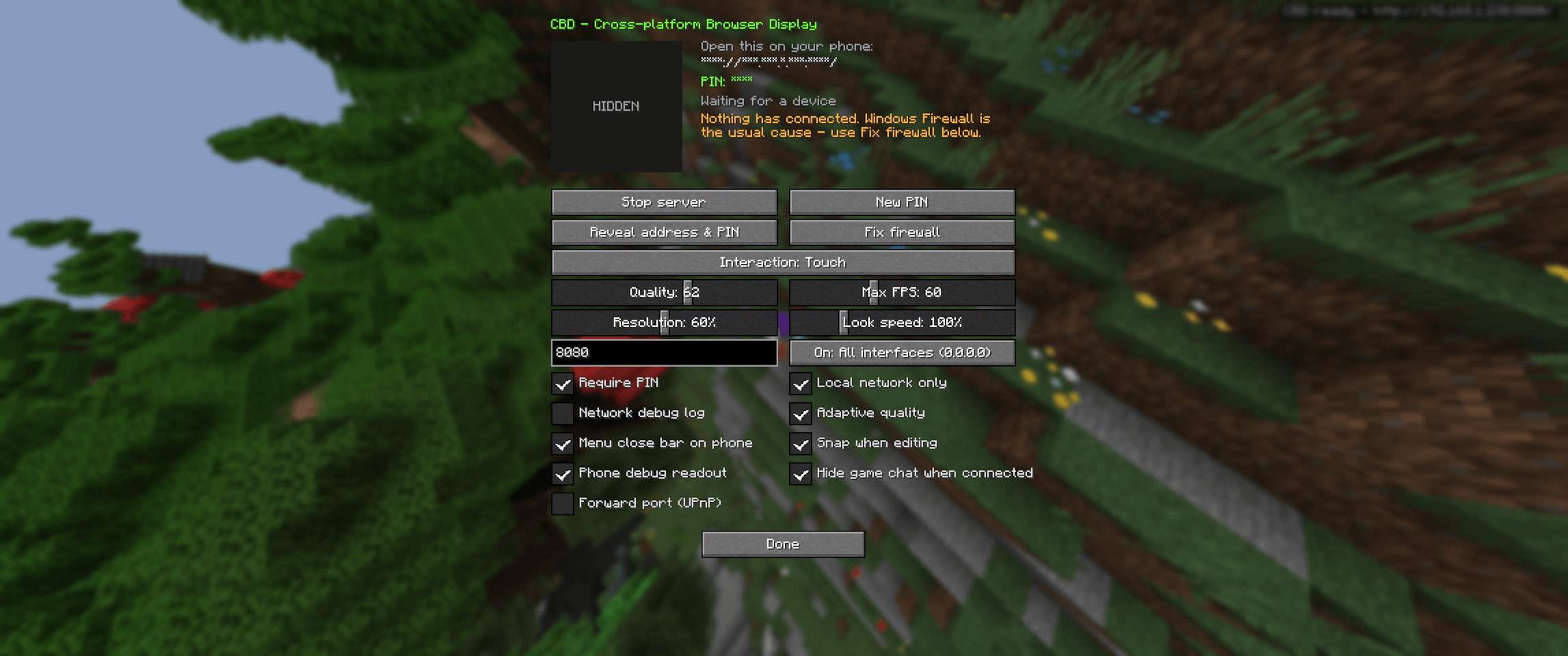
3. Open the CBD GUI
Open the CBD configuration GUI using the configured CBD keybind.
4. Enable CBD
CBD's streaming server must be manually enabled through the GUI before another device can connect.
Turn the server on inside the CBD GUI.
Once enabled, CBD will start its local web server and display:
- A local connection address
- A QR code
If CBD is disabled in the GUI, other devices will not be able to connect.
5. Connect Your Device
On your phone or tablet:
- Connect to the same local network as your PC.
- Open Safari, Chrome, Firefox, or another modern browser.
- Scan the QR code or enter the provided address.
- Open the CBD web interface.
- Begin controlling Minecraft through the touchscreen interface.
No CBD application needs to be installed on the mobile device.
Touch Controls
CBD is designed around mobile-style controls rather than simply treating the touchscreen as a desktop mouse.
The interface is being developed to support actions such as:
- Movement
- Looking around
- Jumping
- Sneaking
- Sprinting
- Attacking
- Using items
- Interacting with blocks
- Hotbar selection
- Inventory access
- Other common Minecraft controls
Multi-touch support allows multiple inputs at once, such as moving while looking around.
The touch control system is still under active development and may change significantly between versions.
Supported Devices
CBD is intended to work with modern browser-enabled devices, including:
- Android phones
- Android tablets
- iPhones
- iPads
- Laptops
- Chromebooks
- Other devices with modern browsers
Target browsers include:
- Chrome
- Chromium-based browsers
- Safari
- Firefox
Browser behavior can vary between operating systems and devices.
Multiplayer
CBD operates on the Minecraft client.
This means the Minecraft server you are connecting to normally does not need CBD installed just because you are controlling your game remotely.
Your PC remains connected to the multiplayer server normally while CBD handles the browser connection separately.
Server rules, permissions, and restrictions still apply.
Performance
Streaming Minecraft to another device requires additional processing and network activity.
Performance may depend on:
- PC hardware
- Minecraft resolution
- Game FPS
- Wi-Fi signal strength
- Network congestion
- Mobile device performance
- Browser performance
- Installed mods
- Shaders
- Resource packs
- Render distance
- CBD stream settings
CBD is still being optimized, so performance may change between versions.
For the best experience, use a stable local network.
Security
CBD creates a local web server that allows other devices to communicate with your Minecraft client.
Only enable CBD on networks that you trust.
CBD is currently intended primarily for use on a trusted local network, such as your home Wi-Fi.
Avoid exposing the CBD server directly to the public internet unless you understand the networking and security risks involved.
Development Status
CBD is currently early-development software.
The core streaming and touchscreen systems are still being developed, tested, and optimized.
You should expect:
- Bugs
- Crashes
- UI changes
- Touch control changes
- Network issues
- Performance issues
- Browser-specific problems
- Compatibility issues
- Features changing between versions
- Occasional regressions after updates
Some systems may be rewritten or replaced as development continues.
If you are looking for a completely polished remote-play experience, it may be better to wait for a later release.
If you are interested in testing CBD while it develops, bug reports and feedback are greatly appreciated.
Reporting Bugs
When reporting an issue, please include as much information as possible.
Useful information includes:
- CBD version
- Minecraft version
- Mod loader
- Mod loader version
- Operating system
- Phone or tablet model
- Mobile operating system
- Browser and browser version
- Other installed mods
- What you were doing when the issue occurred
- Steps to reproduce the issue
- Screenshots or videos
- Minecraft logs when available
Detailed reports make bugs much easier to reproduce and fix.
Planned Improvements
Possible future improvements include:
- Better touchscreen controls
- Custom control layouts
- Custom button positioning
- Custom button sizing
- Better multi-touch handling
- Improved inventory controls
- Better support for Minecraft GUIs
- Better modded GUI compatibility
- Improved streaming quality
- Lower latency
- Stream quality presets
- Better phone layouts
- Better tablet layouts
- Improved landscape support
- Improved portrait support
- Better browser compatibility
- Improved QR code connection flow
- Additional configuration options
- Connection security improvements
- Better connection management
- Performance improvements
- Stability improvements
Planned features may change as development continues.
FAQ
Do I need an app on my phone?
No.
CBD runs inside your web browser.
Do I need Minecraft installed on my phone?
No.
Minecraft Java Edition continues running on your PC.
Is this Minecraft Bedrock Edition?
No.
CBD controls a Minecraft Java Edition client running on your computer.
Does the Minecraft server need CBD installed?
Normally, no.
CBD operates on your client and handles the browser connection separately from the Minecraft multiplayer server.
Can I use an iPhone or iPad?
CBD is designed to support modern Safari-based devices, although browser-specific bugs may still occur during development.
Can I use Android?
Yes.
Modern Android browsers are one of CBD's intended platforms.
Why is the mod closed source?
CBD is currently closed source mainly because it is still in the early stages of development.
A large part of the project involves networking, browser connections, input handling, and remote control of the Minecraft client. While those systems are still being designed and tested, I want to reduce the chance of unfinished security-sensitive code being reused, modified, or distributed in ways that could create unsafe builds.
This is especially important because CBD allows another device to send inputs back to the Minecraft client. Poorly modified or intentionally malicious versions could potentially create risks such as unauthorized control, rogue connections, or hijacking attempts.
Keeping the project closed source for now gives me more control over how those systems are implemented and distributed while I work on authentication, connection security, permissions, and other protections.
This does not mean closed source automatically makes the mod secure. The goal is simply to keep the attack surface and number of unofficial builds lower while CBD is still changing quickly.
Once the project is more stable and the security model is better established, I may reconsider making parts of CBD, an API, or the full project open source.
Why can my phone not connect?
Make sure:
- CBD is enabled inside the CBD GUI.
- Your phone and PC are connected to the same network.
- You are using the address provided by CBD.
- Your firewall is not blocking the connection.
- The CBD server is currently running.
Why is the stream lagging?
Latency can be affected by your PC, Minecraft settings, Wi-Fi connection, device hardware, browser, shaders, installed mods, and CBD's current optimization.
Why are some controls not working correctly?
Touch controls are still actively being developed.
Certain Minecraft screens, modded interfaces, custom keybinds, browsers, and devices may behave differently.
Disclaimer
CBD is an independent Minecraft mod and is not affiliated with or endorsed by Mojang Studios or Microsoft.
CBD is provided "as is", without warranties of any kind.
Streaming performance, device compatibility, browser compatibility, network reliability, and mod compatibility cannot be guaranteed, especially during early development.
Users are responsible for configuring their own networks safely.
Credits
Credits
Created by incold. Visit the official site here.
CBD is inspired by remote-play systems, browser-based streaming, mobile game interfaces, and the idea of making Minecraft Java Edition accessible from devices that cannot normally run the Java client.
CBD - Cross-platform Browser Display Team