
Carbon for Fabric
- By
Unofficial Fabric port. The original Carbons by First_sight supports NeoForge and Forge. Please report problems with this port on our issue tracker, not to the original author. Carbon 的非官方 Fabric 移植,中文介绍在下方。
Carbon
Carbon is a client-side performance mod. It caches item model geometry on the GPU and draws matching items together with instanced rendering, which removes a lot of repeated rendering work, most of all in scenes with many dropped items.
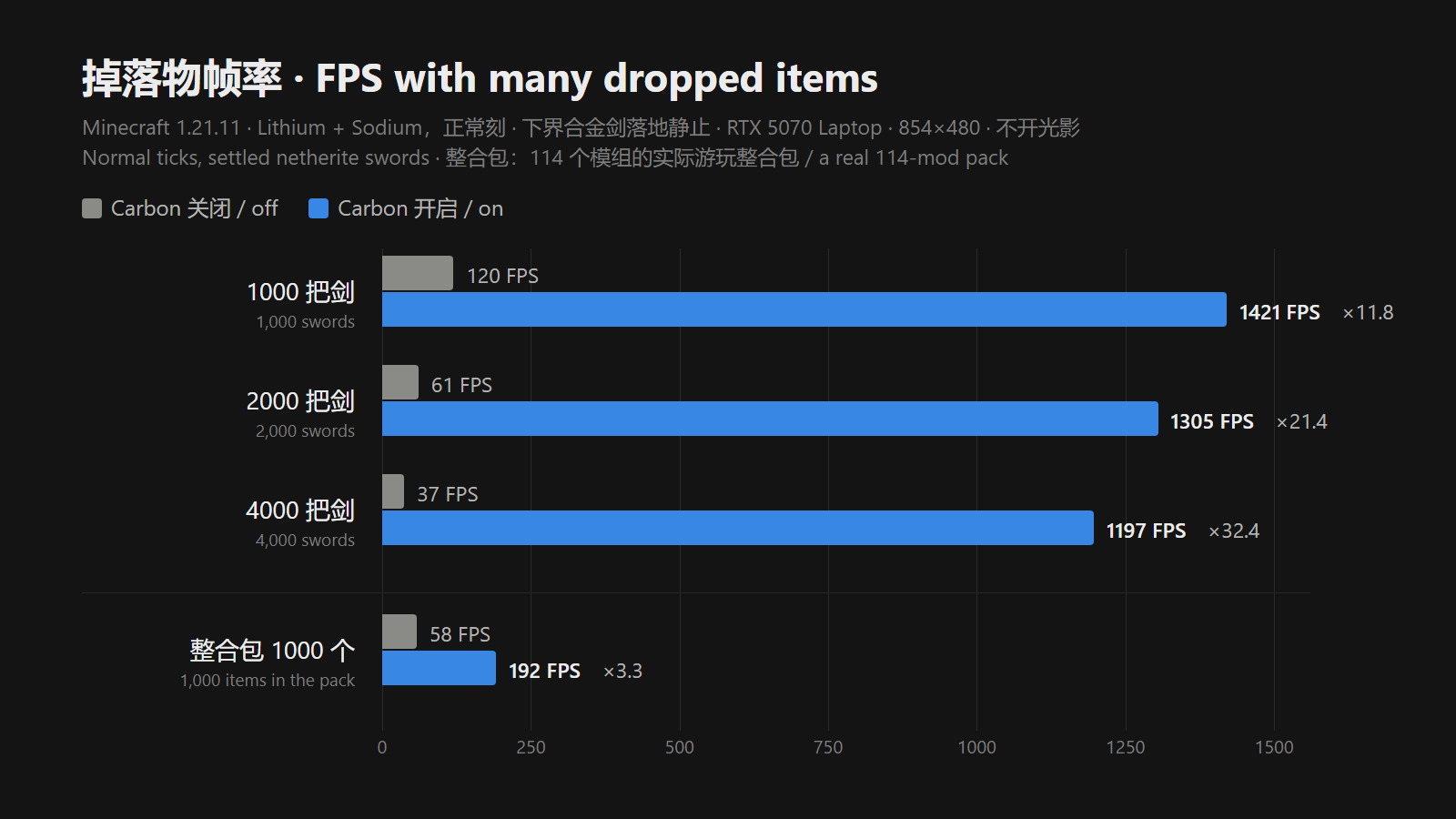
The chart above was measured on 1.21.11 (RTX 5070 Laptop, 854×480, no shaders, normal ticks). With only Lithium and Sodium installed, 1,000, 2,000 and 4,000 settled netherite swords went from 120, 61 and 37 FPS to 1,421, 1,305 and 1,197 FPS, so frame rate barely drops as items pile up. In a real 114-mod pack, 1,000 dropped items went from 58 to 192 FPS. There is no loss when there are no dropped items.
Features
- Dropped items: rotation, bobbing and scale are computed on the GPU, and unchanged scenes reuse their existing data.
- Every display context: compatible standard item models are batched in your hand, in GUIs and anywhere else that uses Minecraft's standard item rendering.
- Glint and shadows: ordinary enchantment glint and the vanilla round item shadows are batched along with the items.
- Optional visual physics: dropped items tumble while moving and settle flat when they land. Only the visuals change; movement, collisions and pickup stay the same.
- Rendering fallback: models or effects that cannot be batched safely (translucent items that need sorting, special materials, custom shaders) keep the vanilla renderer.
- Steps aside for other mods (new in the Fabric port): while Meteor Client's ItemPhysics, antideath-survival-assistant's item rotation toggle or TweakerMore's precise item model is on, dropped items go back to the vanilla renderer so those effects keep working (1.21.11, 26.2 and 26.3).
Shader compatibility
On 26.2, tested with Iris 1.11.4 and Photon v1.4, including shader shadows. 1.21.11, 1.21.1 and 1.20.1 are instanced with Iris as well. 1.17.1 is tested with Iris 1.2.7 and BSL v10.1.8: items in the world are instanced, while held items, GUI icons and enchanted items keep vanilla rendering. On 26.3, Carbon keeps vanilla item rendering while a shader pack is on. Other shader packs may behave differently.
Configuration
Configure Carbon in its in-game settings screen (/carbon config or Mod Menu) or in config/carbon-client.toml: enabled, optimizeDroppedItems, physicalDroppedItems, skipVisibilityChecks and cacheUpdateBudgetMs. Visual physics is off by default. /carbon stats shows rendering and cache statistics, and /carbon enabled false turns the optimization off. If another mod changes how dropped items look and Carbon does not step aside, turn off optimizeDroppedItems.
Supported versions
| Minecraft | Fabric Loader | Java | Shader packs (Iris) | License |
|---|---|---|---|---|
| 26.3 | 0.19.3+ | 25 | Vanilla rendering | MIT |
| 26.2 | 0.19.3+ | 25 | Instanced | MIT |
| 1.21.11 | 0.18+ | 21 | Instanced | MIT |
| 1.21.1 | 0.16+ | 21 | Instanced | MIT |
| 1.20.1 | 0.15+ | 17 | Instanced | GPL-3.0 |
| 1.17.1 | 0.15+ | 16+ | Instanced in the world | GPL-3.0 |
Fabric API is required; Mod Menu, Sodium and Iris are optional. On 26.2 and 26.3 both the OpenGL and Vulkan backends are supported; Iris shaders need OpenGL. Client-side only: servers do not need it.
Credits and licenses
- Thanks to the original author, First_sight. The original Carbon is Carbons on CurseForge (NeoForge and Forge), with source on GitHub, under MIT.
- The 1.20.1 and 1.17.1 builds are based on Colin_101's Carbon-for-Fabric and licensed under GPL-3.0 (the original MIT notice is kept in
LICENSE-MIT); 26.x and 1.21.x are MIT. - Please report problems with this port on our issue tracker, not to the original author. Source and all releases: GitHub · Releases.
Carbon(碳)· 中文
Carbon 是一款客户端性能模组:它把物品模型的几何数据缓存在 GPU 上,再用实例化渲染把相同的物品合并绘制,减少大量重复的渲染工作,掉落物越多的场景效果越明显。
上图在 1.21.11 测得(RTX 5070 Laptop,854×480,不开光影,正常刻):仅装 Lithium 与 Sodium 时,地上静止的 1000、2000、4000 把下界合金剑分别从 120、61、37 FPS 提升到 1421、1305、1197 FPS,帧率几乎不随掉落物数量下降;在 114 个模组的实际整合包里,1000 个掉落物从 58 FPS 提升到 192 FPS。没有掉落物时不损失帧率。
特性
- 掉落物优化:旋转、浮动与缩放在 GPU 上计算,场景没有变化时直接复用已有数据。
- 覆盖各种显示场景:手持、物品栏等界面,以及其他走原版标准物品渲染流程的地方,兼容的物品模型都会被合批。
- 附魔光效与阴影:普通附魔光效和原版掉落物的圆形阴影与物品一起合批。
- 可选视觉物理:掉落物移动时翻滚,落地后自然平放。只改变画面,移动、碰撞与拾取不受影响。
- 渲染回退:无法安全合批的模型或效果(需要排序的半透明物品、特殊材质、自定义着色器等)沿用原版渲染。
- 为其他模组让位(Fabric 移植新增):Meteor Client 的物品物理、antideath-survival-assistant 的禁止掉落物旋转、TweakerMore 的精确物品模型开启时,掉落物自动交还原版渲染,这些效果照常生效(1.21.11、26.2 与 26.3)。
光影兼容
26.2 已用 Iris 1.11.4 与 Photon v1.4 测试,主画面与光影阴影都会实例化;1.21.11、1.21.1、1.20.1 安装 Iris 时同样实例化;1.17.1 已用 Iris 1.2.7 与 BSL v10.1.8 测试,世界中的物品实例化,手持物品、界面图标与附魔物品保持原版绘制。26.3 启用光影包时保持原版物品渲染。其他光影包的兼容性可能有所不同。
配置
通过游戏内配置界面(/carbon config 或 Mod Menu,中英文)或 config/carbon-client.toml 配置 Carbon。可选视觉物理默认关闭。
| 选项 | 默认 | 说明 |
|---|---|---|
enabled |
true |
优化总开关 |
optimizeDroppedItems |
true |
掉落物专用 GPU 管线;关闭后保留其他模组对掉落物的改动,仍走通用实例化 |
physicalDroppedItems |
false |
视觉物理:翻滚、落地平放(需要开启专用管线) |
skipVisibilityChecks |
true |
专用管线跳过视锥与遮挡检查,距离限制始终有效 |
cacheUpdateBudgetMs |
2.0 |
每帧缓存更新预算,0–20 毫秒,0 表示立即完成 |
/carbon stats 查看渲染与缓存统计,/carbon enabled false 临时关闭优化。其他模组改写掉落物外观而 Carbon 没有自动让位时,请关闭 optimizeDroppedItems。
支持版本
| Minecraft | Fabric Loader | Java | 光影(Iris) | 许可证 |
|---|---|---|---|---|
| 26.3 | 0.19.3+ | 25 | 保持原版渲染 | MIT |
| 26.2 | 0.19.3+ | 25 | 实例化 | MIT |
| 1.21.11 | 0.18+ | 21 | 实例化 | MIT |
| 1.21.1 | 0.16+ | 21 | 实例化 | MIT |
| 1.20.1 | 0.15+ | 17 | 实例化 | GPL-3.0 |
| 1.17.1 | 0.15+ | 16+ | 世界中的物品实例化 | GPL-3.0 |
均需要 Fabric API;Mod Menu、Sodium、Iris 为可选。26.2 与 26.3 支持 OpenGL 与 Vulkan 后端,Iris 光影只能在 OpenGL 下使用。纯客户端模组,服务器无需安装。
致谢与许可
- 感谢原作者 First_sight:Carbon 原版见 CurseForge 上的 Carbons,源码见 GitHub,MIT 许可。
- 1.20.1 与 1.17.1 基于 Colin_101 的 Carbon-for-Fabric,沿用 GPL-3.0(原作的 MIT 声明保留在
LICENSE-MIT);26.x 与 1.21.x 为 MIT。 - 图标沿用原作的碳六元环,右下角的织布表示 Fabric 版本。
- 移植版的问题请反馈到 本项目的 Issues,不要打扰原作者。
- 移植版源码与全部版本:GitHub · Releases
Carbon for Fabric Team
