Cape 3D Layers
- By
Turn your flat cape and elytra into real 3D voxel models — with wrapped edges and optional physics.
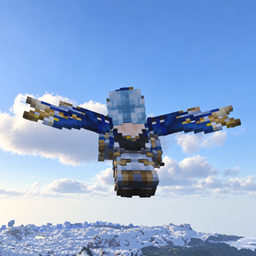
3D Cape is a lightweight client-side mod that renders your Minecraft cape and elytra as genuine 3D geometry instead of flat textures. The cape design is extruded into voxels with properly wrapped edges, and the elytra wings get a solid 3D shell that follows the wing outline.
Features
- 🧊 True 3D capes — the cape is rebuilt as 16 stacked voxel strips, with the front, back and side edges all wrapped from the actual cape texture.
- 🪽 3D elytra — the elytra wing design is extruded into a stiff 3D shell that follows the outline of the wing, not a flat rectangle.
- 🌊 WaveyCapes physics (optional) — install WaveyCapes and the 3D cape inherits its full waving simulation.
- 🎒 elytraslot support (optional) — the 3D elytra works in elytraslot's dedicated elytra slot, so you can fly and wear chest armor at the same time.
- 🛫 Elytra Physics compatible — the 3D wings follow Elytra Physics' flight pose automatically.
- ⚙️ Configurable — adjust cape thickness, voxel size, wave style and render distance LOD.
How it works
The mod reads the vanilla cape / elytra texture and hands it to the public 3D Skin Layers API (create3DMesh), which builds a real voxel mesh. The cape is split into 16 horizontal segments so each one can wave independently (with WaveyCapes). The elytra wings are built as a single rigid shell and positioned using the vanilla wing transform, so flight / flapping / gliding poses all match vanilla.
Everything runs on the client. Only players who install the mod will see the effect.
Dependencies
Required
- 3D Skin Layers — provides the voxel mesh API.
Optional (install for extra features)
- WaveyCapes — cape waving physics.
- elytraslot — dedicated elytra slot support.
- Elytra Physics — realistic elytra flight (auto-compatible).
Installation
- Install Fabric Loader for Minecraft 1.21.1.
- Install 3D Skin Layers (required).
- Drop
3D-Cape-*.jarinto yourmodsfolder. - (Optional) add WaveyCapes, elytraslot and/or Elytra Physics.
Configuration
Edit config/cape3d.json:
| Key | Default | Description |
|---|---|---|
enabled |
true |
Master switch. |
thickness |
1 |
Cape/elytra thickness in pixels (1 = vanilla, 2+ = chunkier). |
voxelSize |
1.0 |
Overall scale of the 3D mesh. |
chainWave |
true |
true = connected-chain wave (no overlap); false = overlapping segments + z-offset. |
renderDistanceLOD |
14 |
Beyond this distance (blocks) the cape falls back to flat rendering. |
FAQ
Does this work on servers? Yes — it's client-side. Install it on the client; the server doesn't need it (and installing it on the server does nothing).
Will other players see my 3D cape? Only players who have the mod installed will see it.
Why is my cape still thin?
Delete/update config/cape3d.json — the persisted config file is not overwritten by new defaults.
The Cape 3D Layers Team