Builder's Materials HUD
- By
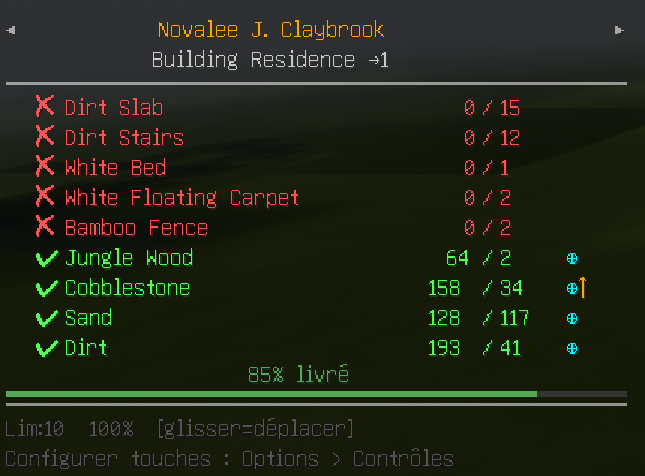
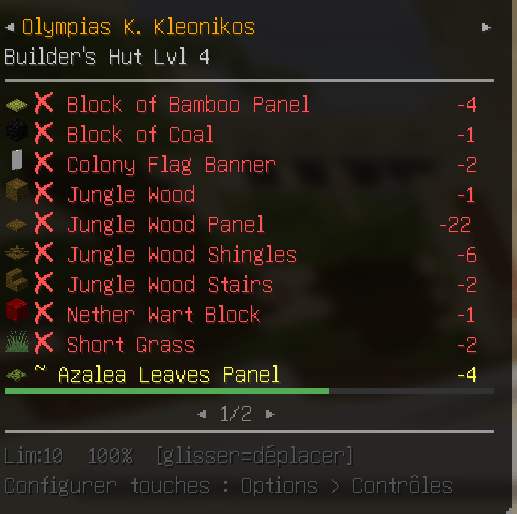
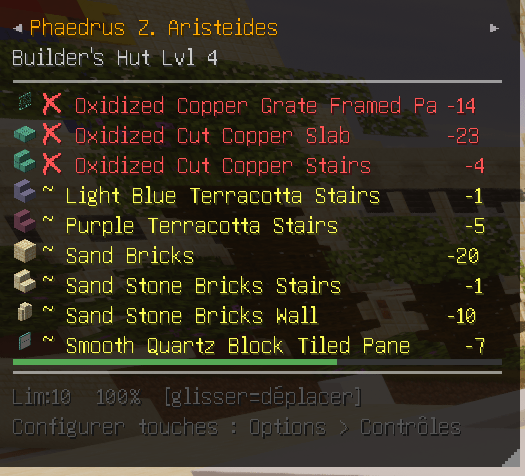
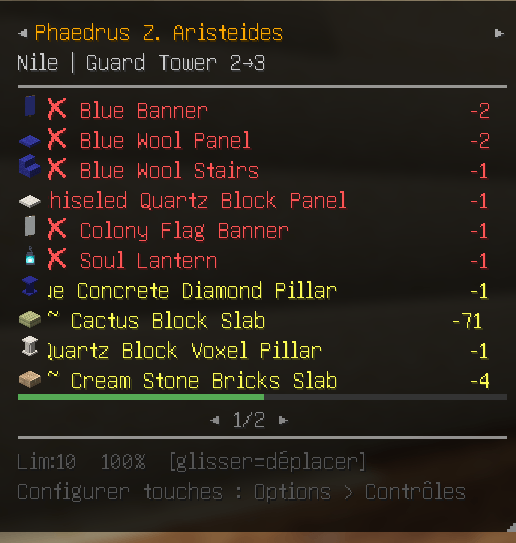
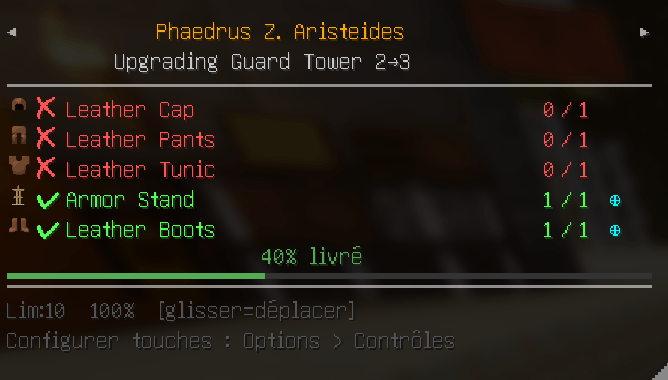
A MineColonies addon that displays the builder's required materials directly on screen without opening the resource scroll.
Sans titre.png
Sans titre.png
Sans titre.png
Sans titre.png
Sans titre.png
Description
👷♂️ ResourceHUD — Builder's Materials HUD
FRANÇAIS
Le compagnon indispensable pour MineColonies. La liste de courses de votre bâtisseur, directement à l'écran — sans rouvrir le Parchemin de Ressources toutes les 30 secondes.
🧐 COMMENT ÇA MARCHE
Ouvrez le Parchemin de Ressources d'un bâtisseur une seule fois : ResourceHUD capture la liste. Un overlay compact apparaît alors avec chaque matériau requis, vos stocks réels (inventaire, entrepôt, livreurs, cabane) et l'avancement réel du chantier. Tout se met à jour automatiquement.
📌 FONCTIONNALITÉS
• 📦 Suivi des matériaux — quantités possédées / requises (ex. 8 / 20), avec un code couleur : rouge (manquant), orange (partiel), vert (complet). • 🗂️ 5 onglets — Builder (la liste), Recipe (le livre de recettes de la colonie), Storage (l'entrepôt, avec recherche), Missing (tout ce qui manque, tous chantiers confondus), Research (l'Université). • 🎓 Recherches — consultez les recherches disponibles, leur coût en ressources affiché directement, et lancez-les sans ouvrir l'Université. • 📊 Progression réelle — une barre bleue montre l'avancement bloc par bloc, distincte de la barre verte de livraison des ressources (nécessite le mod côté serveur). • 🏗️ Multi-bâtisseurs — suivez plusieurs chantiers, basculez d'un clic sur les flèches. Excluez ceux qui ne vous intéressent pas. • 🛠️ Masquage intelligent — cachez les ressources déjà livrées pour ne garder que l'essentiel. • 🔍 Intégration JEI — clic droit sur une ligne pour ouvrir sa recette. La recherche du HUD peut aussi être répercutée dans le filtre JEI.
🔍 TOOLTIPS DÉTAILLÉS
Survolez une ligne pour voir d'où vient chaque unité :
• ⊕ Entrepôt • ⊙ Cabane du bâtisseur • ↑ En transit (chez un livreur) • ✋ Votre inventaire
⚙️ ÉCRAN D'OPTIONS
Cliquez le bouton ⚙ dans l'en-tête du HUD (présent sur les 5 onglets) :
• Affichage du HUD, masquage des ressources livrées, synchronisation JEI • Échelle 0,5 → 2,0 • Opacité 7 → 100 % • Largeur 120 → 400 px • Lignes max 0 → 30 (0 = illimité) • Réinitialisation de la position, purge de la liste des chantiers exclus • Raccourci direct vers l'écran des touches
Réglages sauvegardés dans config/resourcehud.json.
⌨️ RACCOURCIS PAR DÉFAUT
Tous modifiables dans Options > Contrôles.
| Touche | Action |
|---|---|
| H | Afficher / masquer le HUD |
| U | Ouvrir le HUD sur l'onglet Recherche |
| K | Limite de lignes visibles |
| L | Échelle du HUD |
| C | Masquer / afficher les ressources complétées |
| O | Opacité du fond |
🖱️ SOURIS (lorsqu'un menu est ouvert)
• Clic gauche + glisser — déplacer le HUD • Coin ◢ — redimensionner la largeur • Molette — changer de page • ◄ / ► — page suivante ou bâtisseur suivant • Clic droit sur une ligne — recette JEI
💾 INSTALLATION
💻 Côté client seul — fonctionne sur n'importe quel serveur, même sans le mod en face. Le HUD se limite alors au parchemin et à votre inventaire.
🔌 Côté serveur (recommandé) — débloque le scan en direct des racks de l'entrepôt, des livreurs, de la cabane, et la progression réelle des ouvriers.
⚠️ Installez la même version des deux côtés. Client et serveur échangent un protocole versionné : en cas d'écart, chacun se comporte comme si l'autre n'avait pas le mod, et les stocks restent vides.
📌 DÉPENDANCES
• NeoForge 1.21.1 • MineColonies — le HUD lit ses données ; sans lui il reste vide • JEI — optionnel, mais recommandé (recettes et synchronisation de recherche)
ENGLISH
The essential MineColonies companion. Your builder's shopping list, right on screen — no more reopening the Resource Scroll every 30 seconds.
🧐 HOW IT WORKS
Open a builder's Resource Scroll once and ResourceHUD captures the list. A compact overlay then shows every required material, what you actually have (inventory, warehouse, transit, builder hut), and the real construction progress — all updated automatically.
📌 FEATURES
• 📦 Material tracking — have / need quantities (e.g. 8 / 20), colour-coded: red (missing), orange (partial), green (complete). • 🗂️ 5 tabs — Builder (the list), Recipe (your colony's recipe book), Storage (warehouse browser with search), Missing (everything still needed, across all builders), Research (University). • 🎓 Research — browse available research with its resource cost shown inline, and start it without opening the University screen. • 📊 Real construction progress — a blue bar tracks actual block-by-block building, separate from the green resource delivery bar (requires the mod server-side). • 🏗️ Multi-builder — track several builds and switch with the header arrows. Exclude the ones you don't care about. • 🛠️ Smart toggle — hide already-delivered resources to keep only what's left. • 🔍 JEI integration — right-click a row for its recipe. The HUD search box can also mirror into the JEI filter.
🔍 DETAILED TOOLTIPS
Hover any row to see where each unit comes from:
• ⊕ Warehouse • ⊙ Builder hut • ↑ In transit (carried by a courier) • ✋ Your inventory
⚙️ OPTIONS SCREEN
Click the ⚙ button in the HUD header (on all 5 tabs):
• HUD visibility, hide delivered resources, JEI sync • Scale 0.5 → 2.0 • Opacity 7 → 100% • Width 120 → 400 px • Max rows 0 → 30 (0 = unlimited) • Reset position, clear the excluded-builder list • Direct shortcut to the keybind screen
Settings are saved to config/resourcehud.json.
⌨️ DEFAULT KEYBINDS
All rebindable in Options > Controls.
| Key | Action |
|---|---|
| H | Toggle HUD |
| U | Open HUD on the Research tab |
| K | Cycle row limit |
| L | Cycle HUD scale |
| C | Toggle hide-complete |
| O | Cycle background opacity |
🖱️ MOUSE (while any menu is open)
• Left-click + drag — move the HUD • ◢ corner — resize width • Scroll — change page • ◄ / ► — next page or next builder • Right-click a row — open JEI recipe
💾 INSTALLATION
💻 Client-only — works on any server, even without the mod installed there. The HUD then falls back to the scroll data and your own inventory.
🔌 Server-side (recommended) — unlocks live scanning of warehouse racks, couriers, builder hut contents, and real worker progress.
⚠️ Install the same version on both sides. Client and server speak a versioned protocol: if they differ, each behaves as though the other doesn't have the mod, and stocks stay empty.
📌 DEPENDENCIES
• NeoForge 1.21.1 • MineColonies — the HUD reads its data; without it the HUD stays empty • JEI — optional but recommended (recipe lookup and search sync)
The Builder's Materials HUD Team