BSP TELEPORT
- By
A teleport, home, warp mod to be used with the BSP Modpack offical server allowing teleporting between all servers within the network.
BSP-Teleport
Homes, warps, portals, team teleports and server access across the Build Secure Protect network. Every player gets a Teleport Band on their hotbar that takes them home, to a warp, to a friend, to a teammate or to a random spot on any server in the network. Admins build walk-through portals with hangar doors, and sell access to servers, regions, portals and warps with Access Tokens. Built around BSP-Core's Shatter Totem: your totem travels with you, and nothing here can take you into a raid for free.
- Minecraft 1.20.1, Forge 47 or newer, Java 17. Needed on the client and the server.
- Requires BSP-Core 1.3.0 or newer. BSP-Region Guard, BSP-RankUp and BSP-InventorySync are optional and switch more on. Made to sit behind BSP-Velocity Additions on the proxy.
- Made for a Velocity network of Mohist backends with Proxy Compatible Forge, one MySQL database and one Redis. Plain Forge backends work too, using the MySQL driver in BSP-Core's full jar. Runs on a single server with no database too.
- MIT licence, source on GitHub.
1. Setting it up (admins first)
- Put the jar in
mods/on every backend and on every client, next to BSP-Core 1.3.0 or newer. - Start each server once. The config appears at
<world>/serverconfig/bsp_teleport-server.toml. - On a network:
storage.mode = "mysql"with your database (BSP-Core's can be shared, the tables are prefixed),redis.enabled = truewith your Redis, andnetwork.serverNameset to this server's Velocity name on every backend. Without a database the mod keeps everything in the world save and works on one server. - Behind BSP-Velocity Additions, set
network.suppressJoinLeaveMessages = trueon every backend so the proxy's one join line is the only one (more below). - Set
access.enabled = trueif you want the server access system, andaccess.lobbyServerto the network's main spawn server. /bsptp statusshows the storage and Redis state and whether Redis is listening;/bsptp reloadre-reads the file. The values admins change often are also on the panel's SETTINGS tab.
Players get a client config at config/bsp_teleport-client.toml with the screen scale and the HUD layout.
2. What a player sees: the Teleport Band
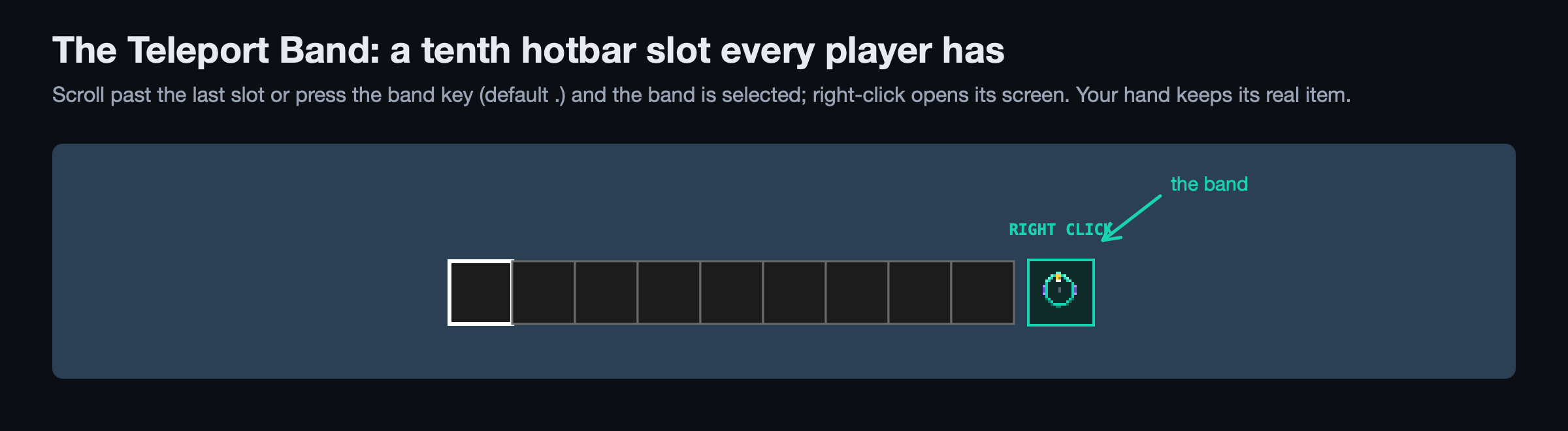
The first thing you see: a tenth hotbar slot after the nine, drawn for every player. Scroll past the last slot, or press the band key (. by default, rebindable), and the band is selected; right-click opens its screen. Your hand keeps whatever it was holding. Nothing to craft, nothing to lose on death.
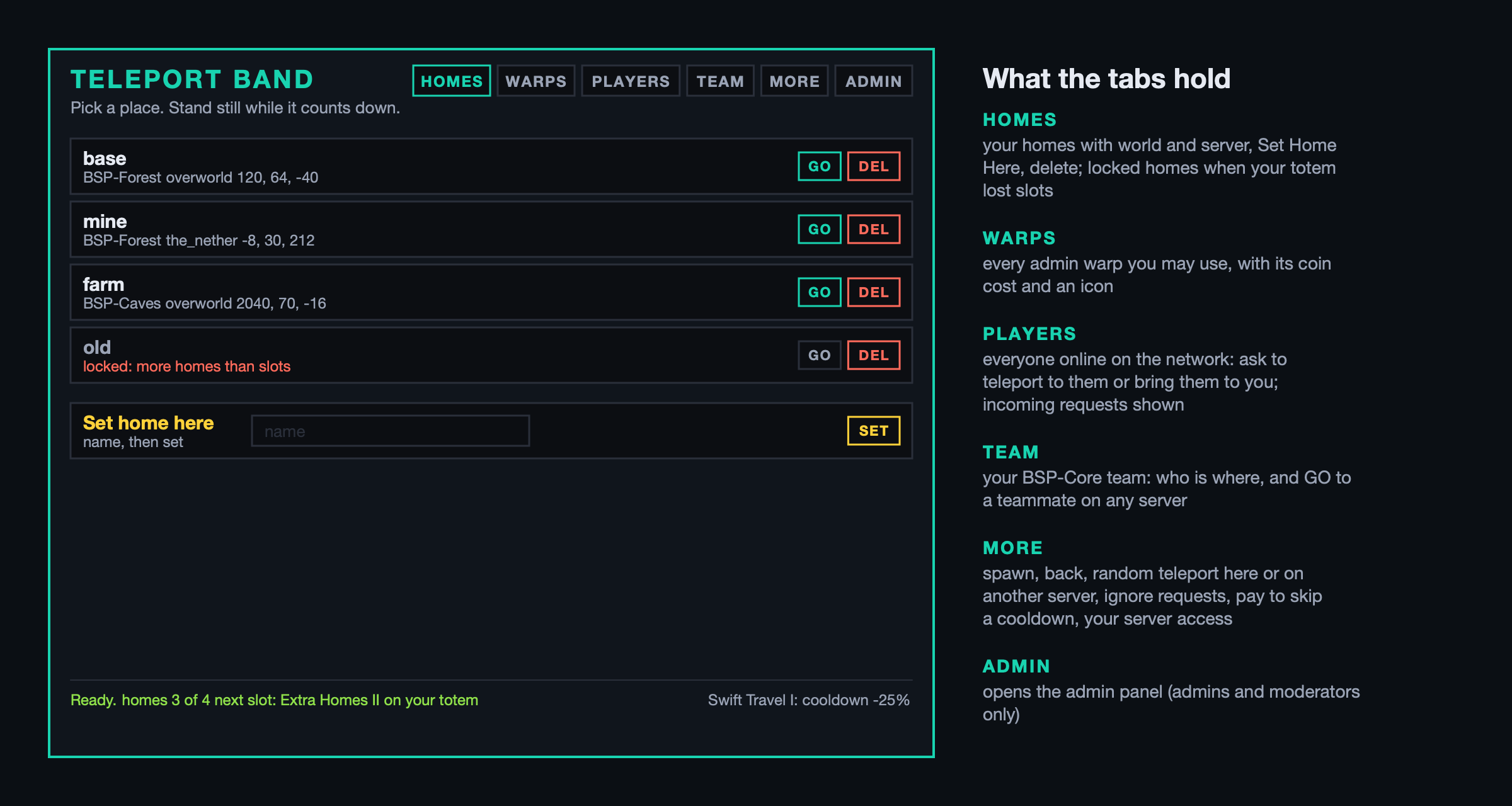
Homes. Set one where you stand, on any server, and go there from anywhere on the network. You start with three slots; the Extra Homes power on your Shatter Totem adds more. Lose the totem and the extra homes are not deleted, only locked until you earn the slots back. Homes can be public (/phome <player>), carry a description and show an icon you pick by clicking with an item in hand.
Warps. Admin-set places with a coin cost and, if the admin says so, a permission node or a list of rules. Players. Everyone online across the network: ask to teleport to them, ask them to come to you, answer requests.
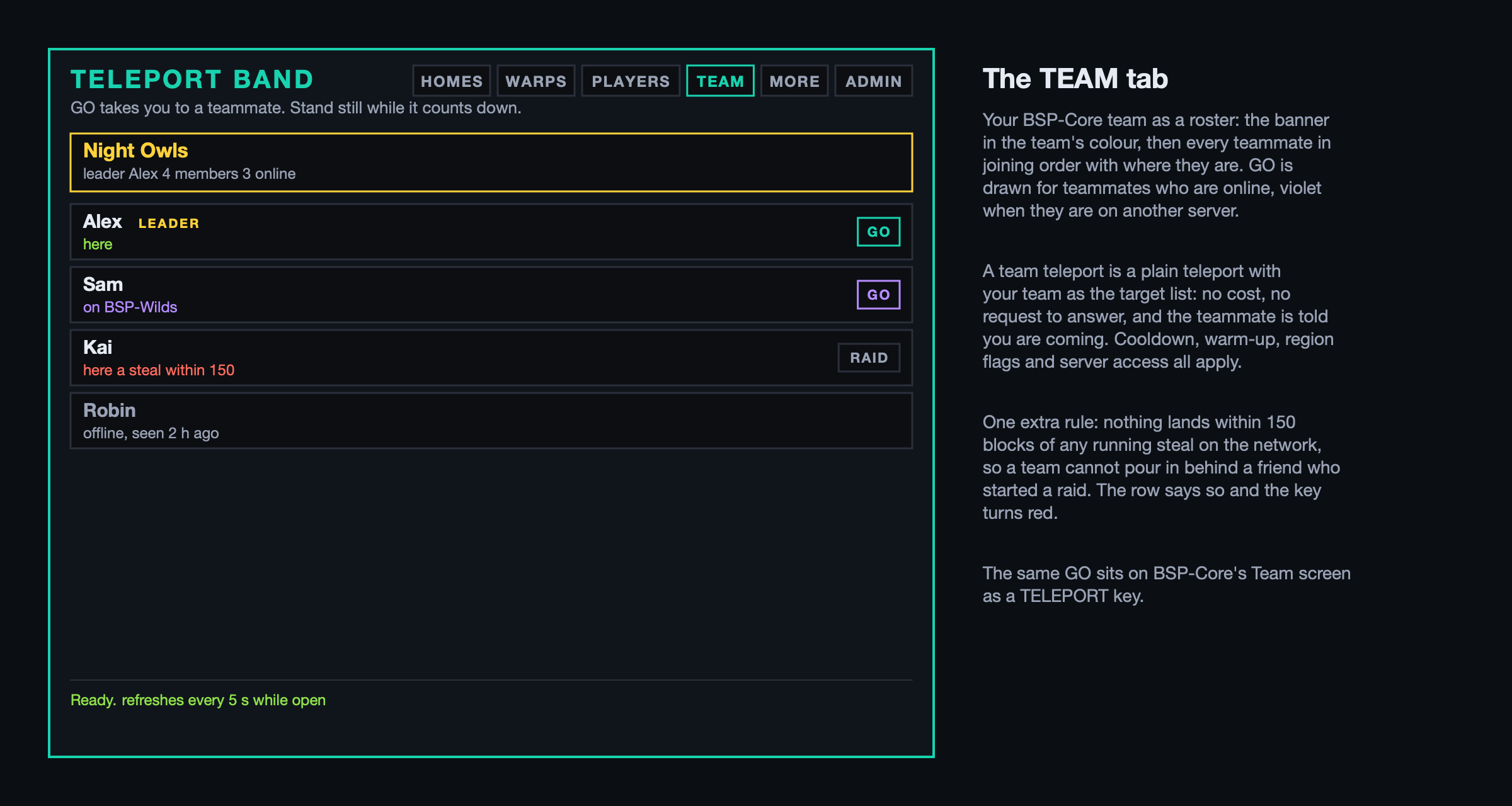
Team. Your BSP-Core team as a roster: who is here, who is on another server, who is offline and when they were last seen. GO takes you to a teammate on any server, no request to answer, no cost; the teammate is told you are coming. The same key sits on BSP-Core's Team screen as TELEPORT. One extra rule for team teleports: nothing lands within 150 blocks of any running steal on the network, whoever owns the totem, so a team cannot pour in behind a friend who started a raid.
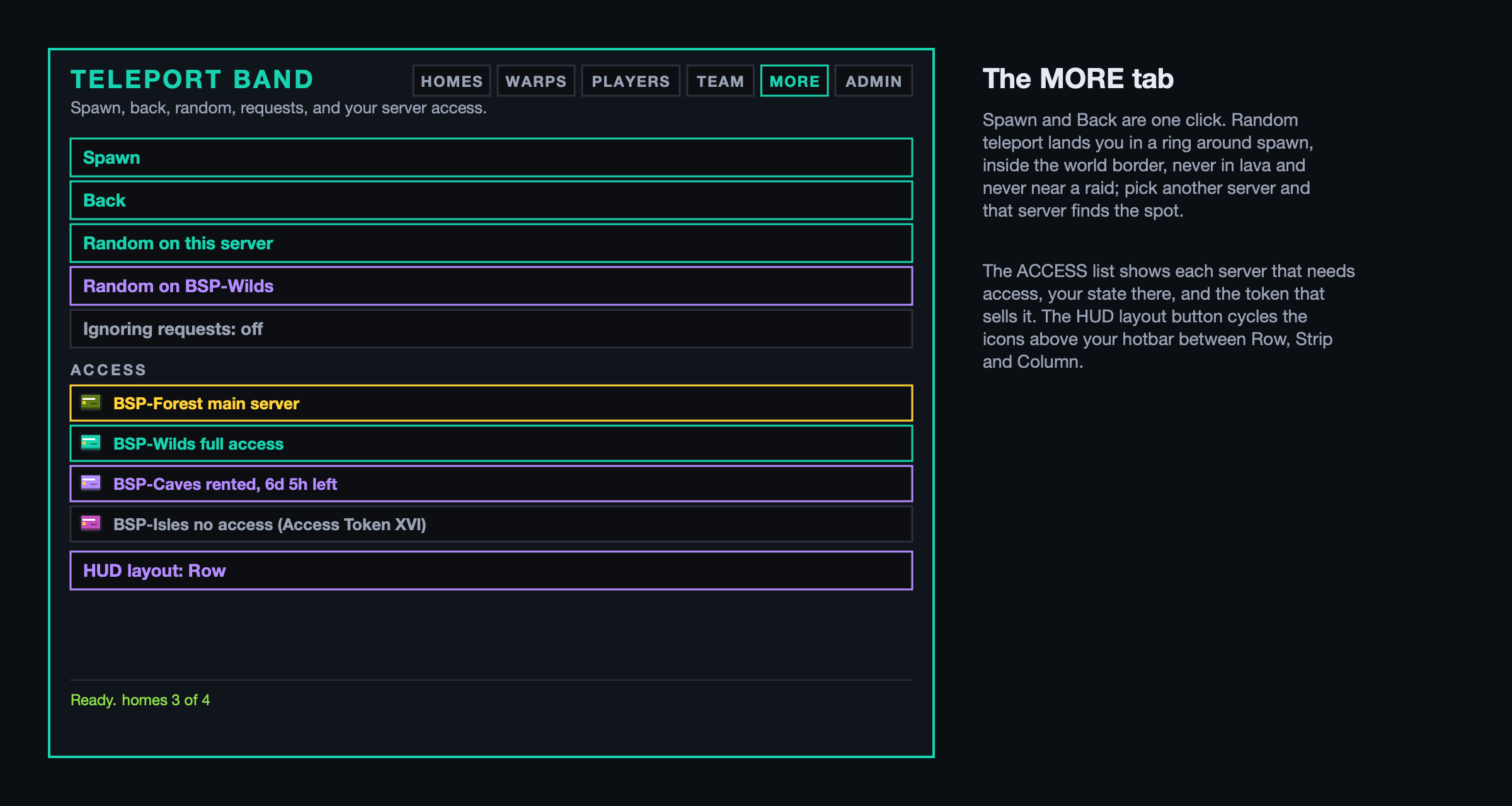
More. Spawn and Back are one click. Random teleport lands you in a ring around spawn, inside the world border, never in lava or on a cactus, never near a raid; pick another server and that server finds the spot. Pay Shatter Coins to skip a cooldown, switch request ignoring on, pick your HUD layout, and see your server access. Admin opens the panel, for admins and moderators.
Every move has a warm-up with a countdown and sounds, cancelled if you move or get hit, and a cooldown that the Swift Travel power shortens. Cross-server moves go through the proxy and land you exactly where you asked; a landing waits for you in the shared database, so even a dropped connection during the switch puts you where you were going once you are back. /back is saved on every move, even the forced ones, so after a restart evacuation one command brings you home.
Commands do the same as the screen: /home, /sethome, /warp, /spawn, /back, /rtp [server], /tpa, /tpahere, /tpaall, /tpaccept, /tpdeny, /tpignore, /tpnow, /edithome, /phome.
3. The rules that keep raids honest
The whole pack is built on one promise: nobody can make a Shatter Totem impossible to steal. So:
- A teleport is not a logout. BSP-Core takes your carried totem the moment you leave a server and hands it back when you arrive, so it is never left behind and never sits somewhere nobody can reach.
- Nothing lands within 150 blocks of a totem of yours while it is being stolen, on any server in the network. The Recall power is the quick way back to a raid, and the only one. Random teleports keep 200 blocks away.
- A thief who just took a totem cannot teleport for the invincibility window.
- Region Guard's regions and BSP-Core's Anti Totem zones can forbid teleporting in, teleporting out, or setting a home.
4. The admin panel
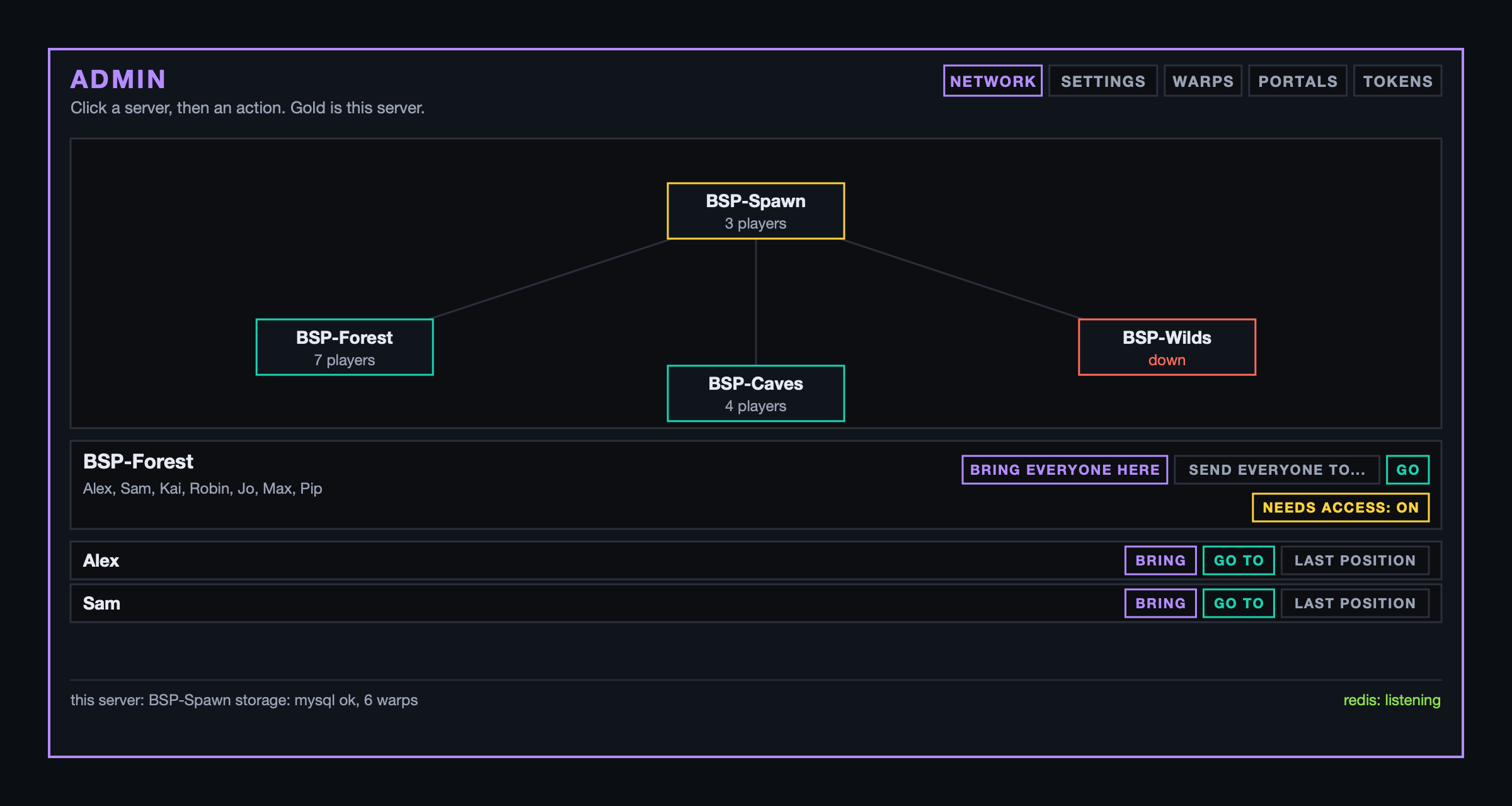
/bsptp admin, or the ADMIN tab on the band. Moderators see everything and can press nothing. NETWORK draws the servers as a map with their players: bring everyone here before a restart, send everyone to another server, go there, bring one player or go to them, and switch "needs access" on for a server (section 6). SETTINGS edits the config values you change often and saves them to the file at once. WARPS sets a warp where you stand, moves it, prices it, restricts it, gives it an icon, turns it into a portal warp, or opens its rules. PORTALS and TOKENS are below.
Admin commands cover the same ground: /tpall, /tpall all and /tpall from <server> for restart evacuations; /tphere, /tpto, /tppos, /tpoffline; /setwarp, /delwarp, /setspawn; /bsptp status|players|send|reload.
5. Portals
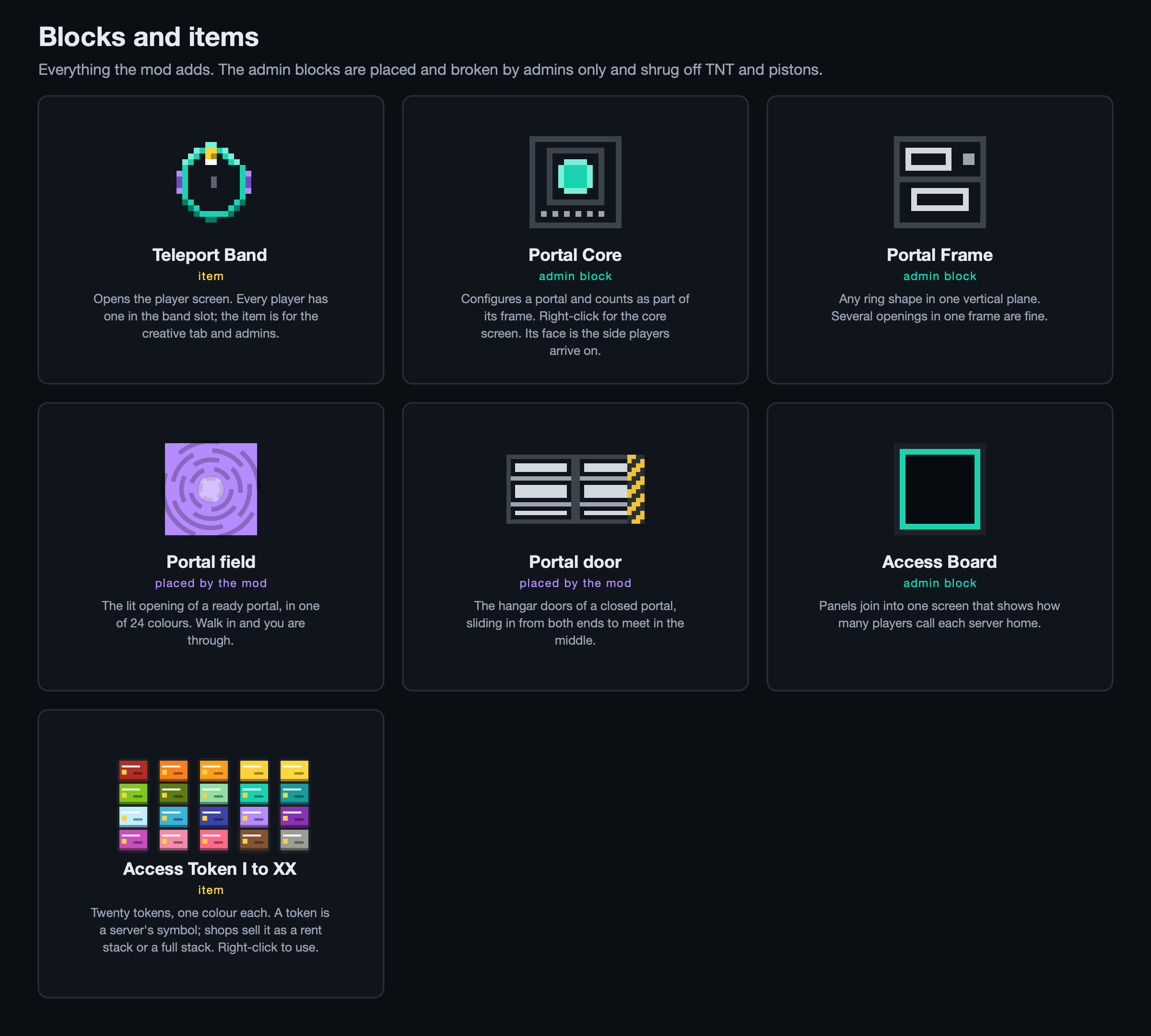
Two admin blocks make a portal: Portal Frame and Portal Core. Build a ring of frame blocks in one vertical plane, any shape you like, even with several openings, up to 24 by 24, and put the core in the ring (or against it). Only admins can place or break them, and TNT, pistons and endermen leave them alone. The core's face is the side players arrive on; flip it from the screen.
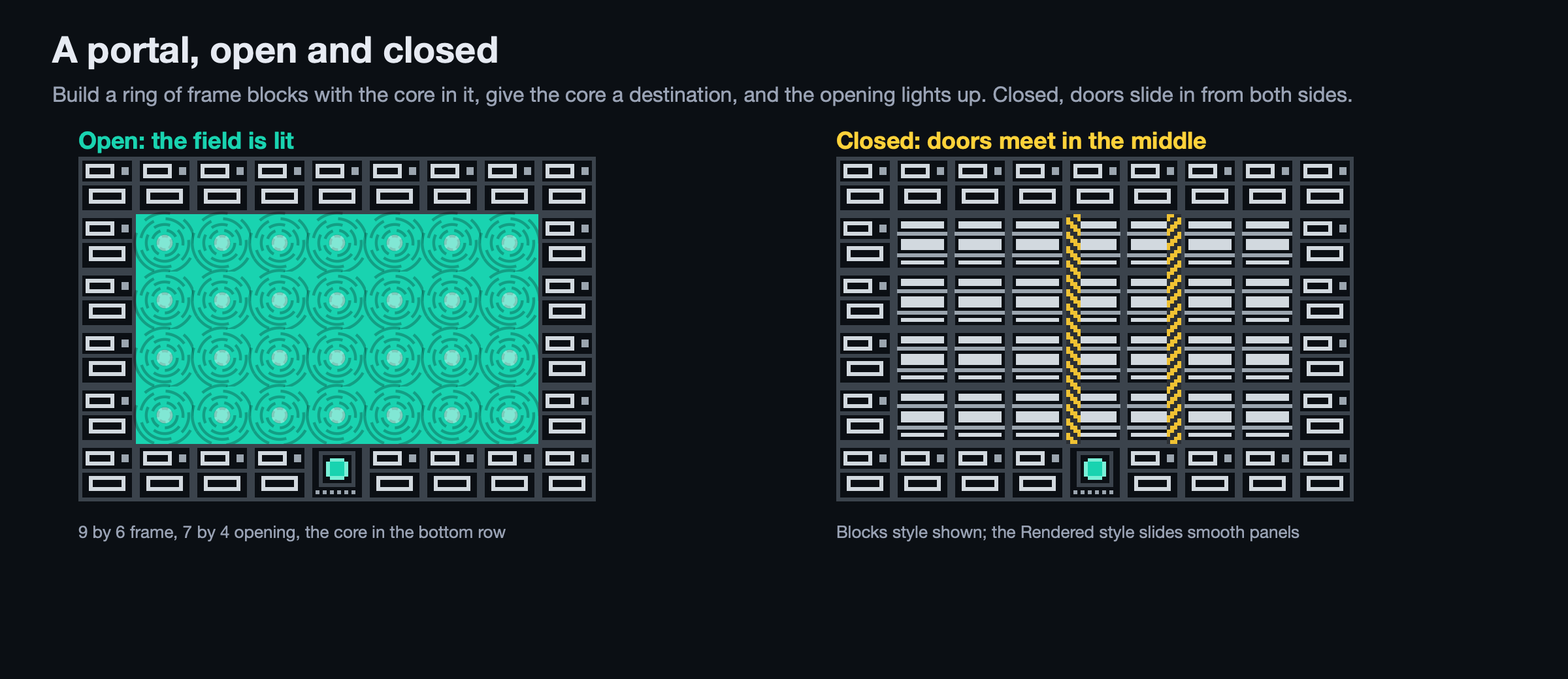
Give the core a destination and the opening fills with a lit field in one of 24 colours. Walk in and you are through: no warm-up unless the admin sets one, no band cooldown, and the portal you land beside will not fire again until you walk away. Five seconds before the same player may use the same portal twice, so nobody bounces back and forth. The raid rules above still apply.
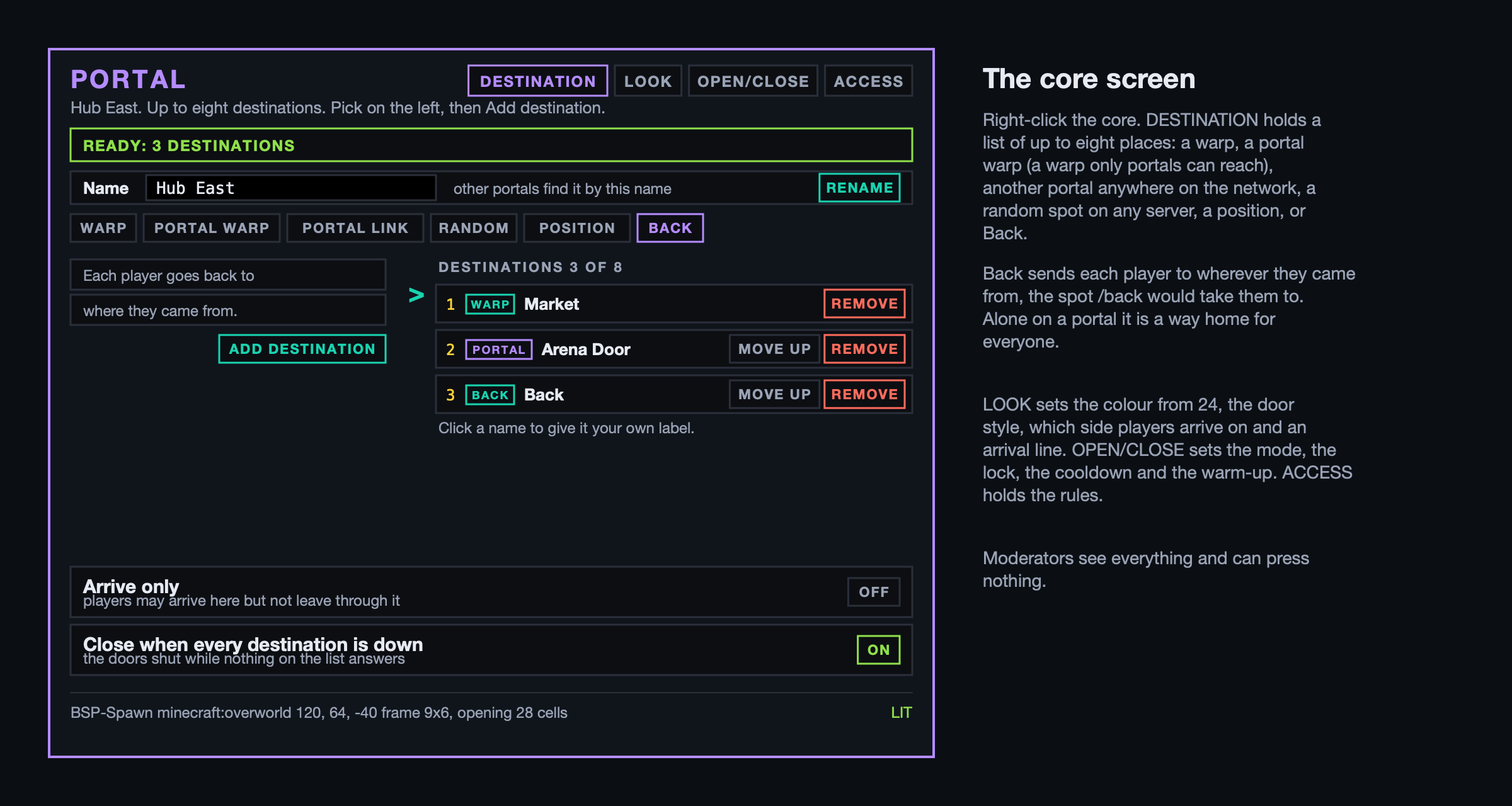
Right-click the core for its screen. Destination holds a list of up to eight places; pick on the left and press ADD, and give any entry a label of your own:
- Warp: any existing warp.
- Portal warp: a warp only portals can reach. The band never shows it and
/warprefuses it, so a portal can lead somewhere a bracelet cannot. - Portal: another portal anywhere on the network, one way. Two portals that list each other are a two-way pair.
- Random: a random spot on this or any other server, with that server's rules.
- Position: where you stand.
- Back: wherever each player came from, the same spot
/backwould take them to. A portal with only Back on it is a way home for everyone.
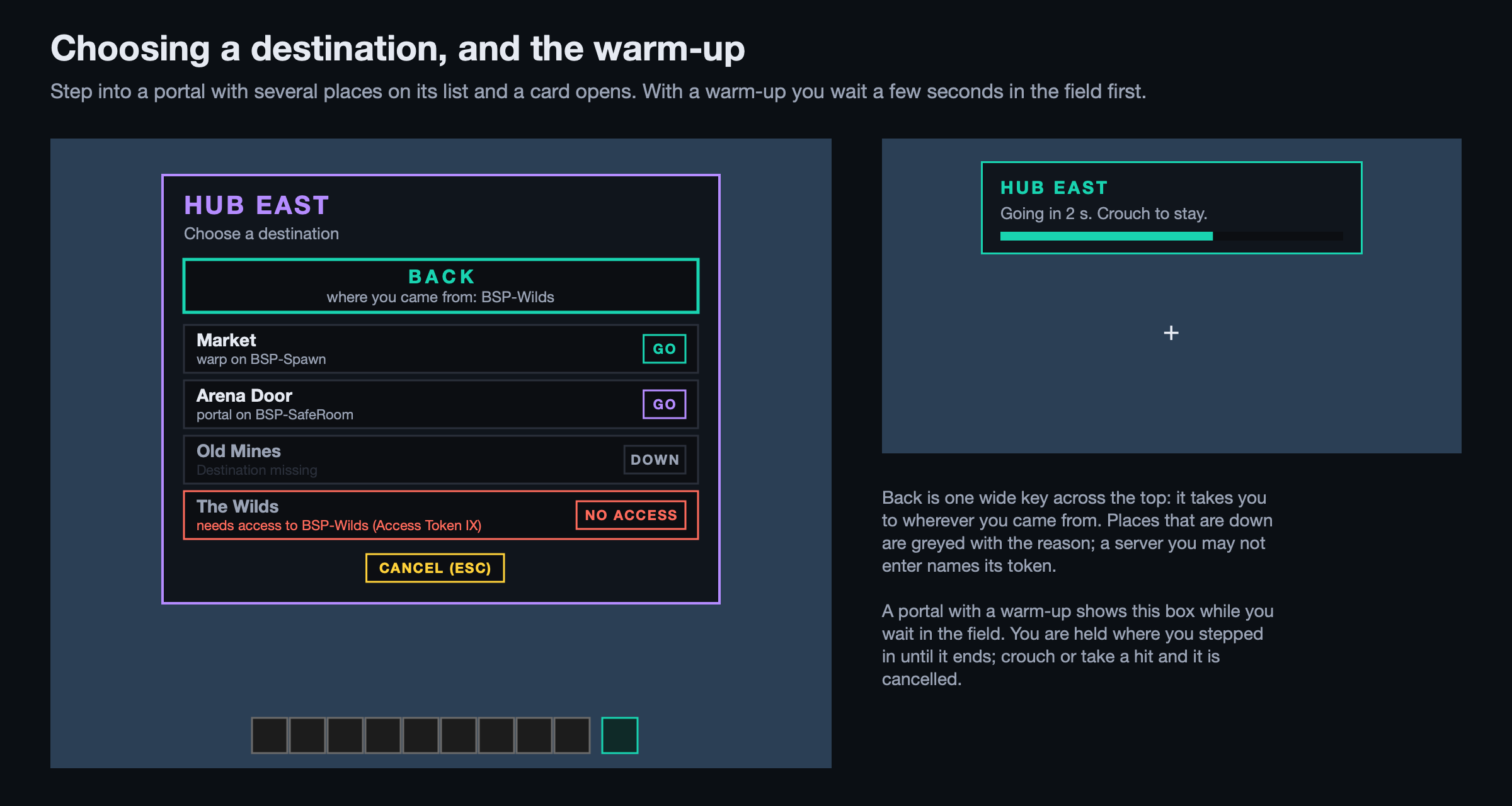
One destination sends a player straight through. With several, a card opens the moment they step in, naming the portal and its destinations: they pick one and go, or cancel and step back out. Back sits across the top of the card as one wide key. While the card shows they are held still and cannot open the inventory or act; a hit or 30 seconds of silence ends it. Destinations that are down, or on a server the player may not enter, are listed greyed with the reason.
Look sets the colour, the door style, the arrival side, the name and an optional arrival line.
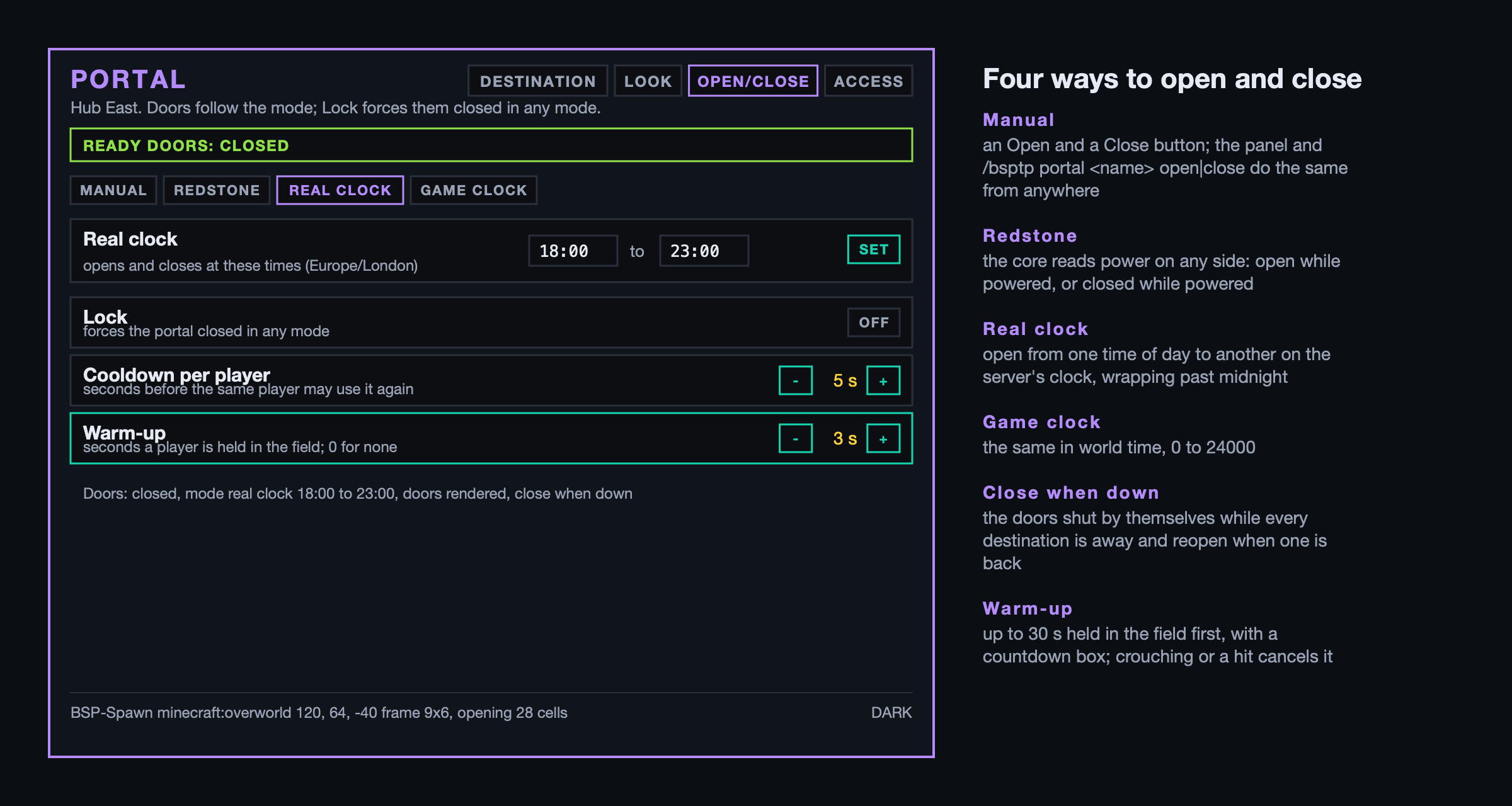
Open/close picks how the portal opens: by hand, by a redstone signal into the core, on a real-time clock in the server's time zone, or on the game clock. A Lock forces it closed in any mode. With "close when every destination is down" on, the doors shut by themselves while nothing on the list answers, and reopen when something does. A warm-up of up to 30 seconds makes players wait in the field first, with a countdown box at the top of the screen; stepping out or being hurt cancels it.
Closed portals grow hangar doors that slide in from both ends of every row and meet in the middle, hazard stripes facing each other. Two styles: solid blocks that fill in cell by cell, or smooth rendered panels. Either way the wall is real.
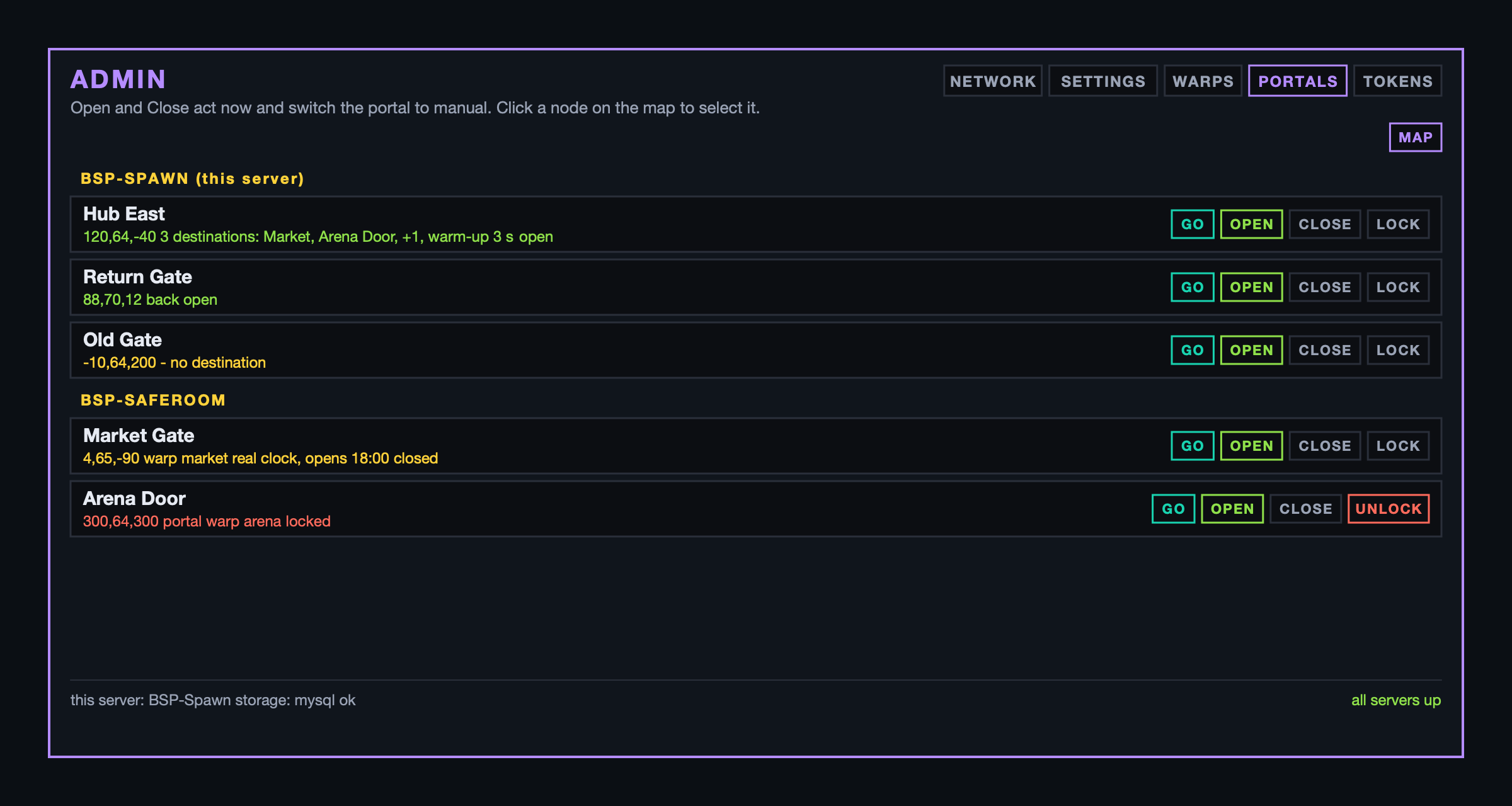
The panel's PORTALS tab lists every portal on the network under its server, or draws them as a map with the links between them. Go to any of them, open, close, lock or unlock it, even on another server. /bsptp portal <name> open|close|lock|unlock|tp|info does the same from a command block, and /bsptp portal dest add|del|label|clear|list edits the looked-at core's destinations (dest add back adds Back); /bsptp portal warmup <seconds> sets its warm-up.
6. Server access
Off by default (access.enabled in the config), because it is made for the BSP network: four servers to build on, and a player must choose one.
How it works for a player. The first time you try to enter a server that needs access, you are asked to choose your main server. One choice, free, for ever: your base goes there and you always have access. Every other server you rent for a while or buy outright, with Access Tokens from the shop.
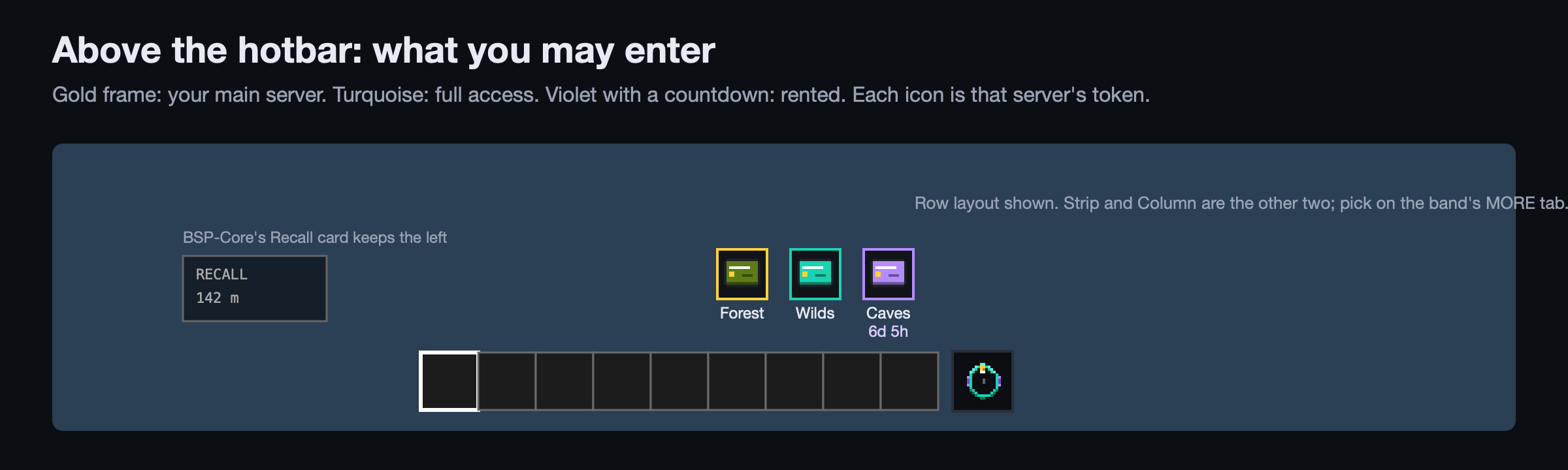
What you may enter sits above your hotbar: a gold frame for your main server, turquoise for full access, violet with a countdown for rented. Three layouts, Row, Strip or Column, picked on the band's MORE tab. Rent warns you an hour, ten minutes and a minute before it runs out; at the end you are moved to your main server.
Access Tokens. Twenty items, Access Token I to XX, one colour each. An admin makes a token stand for a server; a shop sells it as a rent stack (so many hours) or a full stack. Buy one, keep it until you want it, give it to a team mate, right-click it to use it. Rent adds up; full access replaces rent. They sell in BSP-Core's shops like any other item.
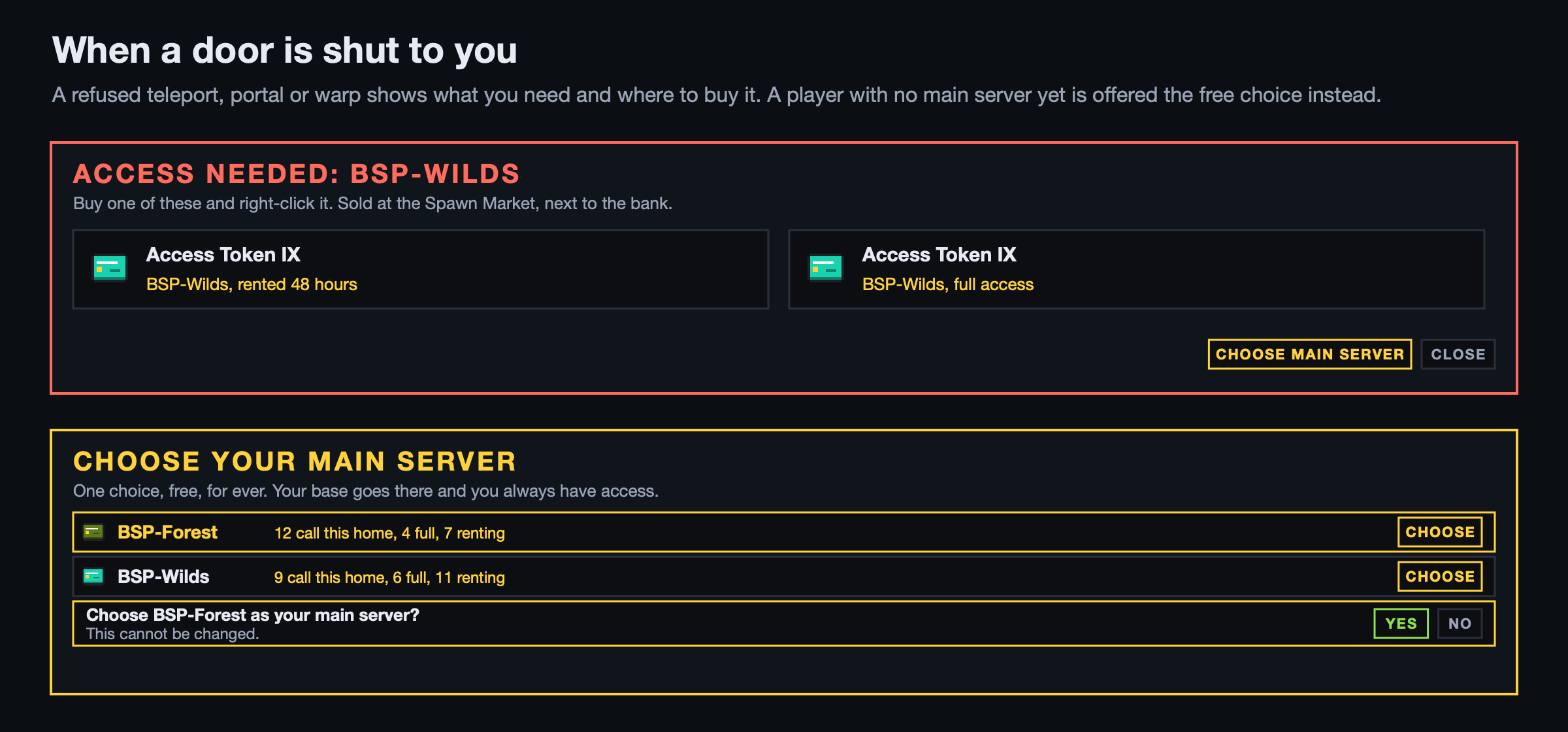
A refused teleport, portal or warp tells you what you need: the server, the token that sells it, and where the admin says it is sold. A player who arrives on a restricted server by any other route, or whose rent ran out while they were away, is sent to the network's main spawn.
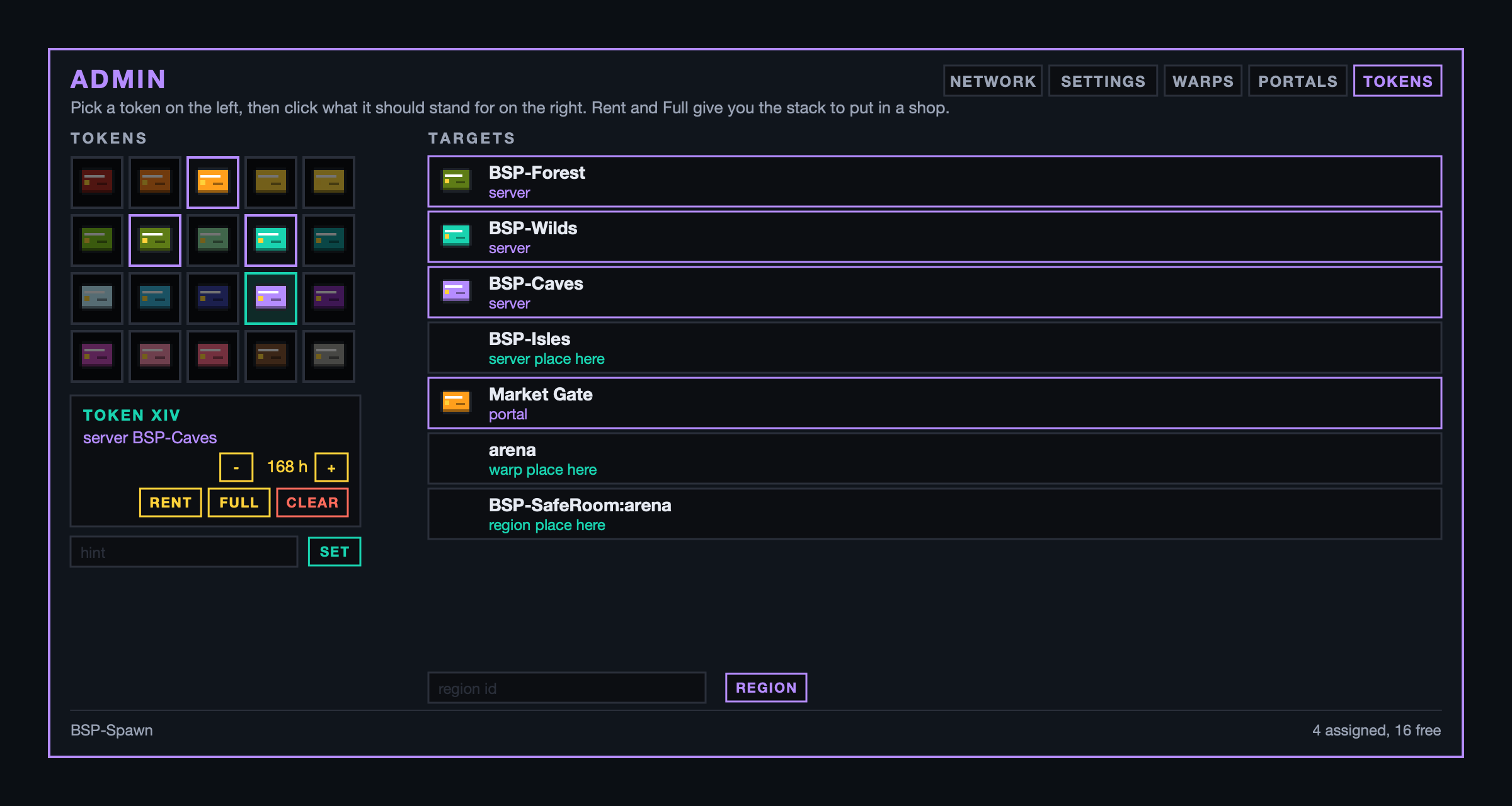
Setting it up. On the panel's NETWORK tab switch "needs access" on for each server that needs it. On the TOKENS tab pick a token and click the server it stands for, set the rent length and a shop hint, and press Rent or Full to get the stack for your shop. The same tab puts tokens on admin regions, portals and warps, so a token can sell access to a single arena, a single portal or a single warp. Everything is shared through the database, so every server agrees.
Rules on portals and warps
Any portal or warp can carry rules an admin sets on the portal's ACCESS tab or the warp's Rules button on the panel: a rank (a LuckPerms group, this or better), a held item with a count, used up or not, a permission node, coins per pass, and token, meaning bought access through an Access Token. Every rule must pass; admins always pass. Coins are charged and items taken only when the move actually happens.
7. Boards: helping new players choose
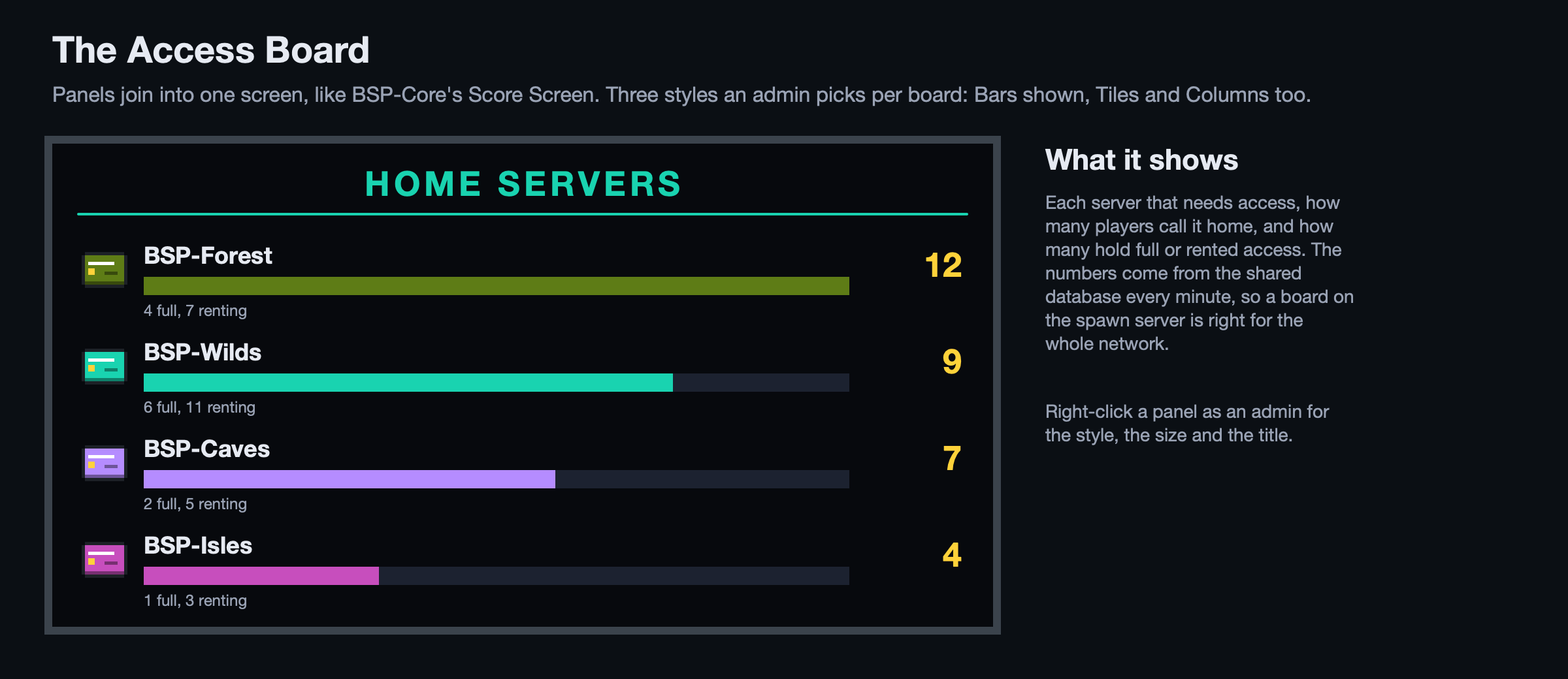
The Access Board is an admin block whose panels join into one screen, like BSP-Core's Score Screen, showing how many players call each server home and how many hold full or rented access. Three styles per board: Bars, Tiles or Columns. Right-click a panel as an admin for the style, the size and the title.
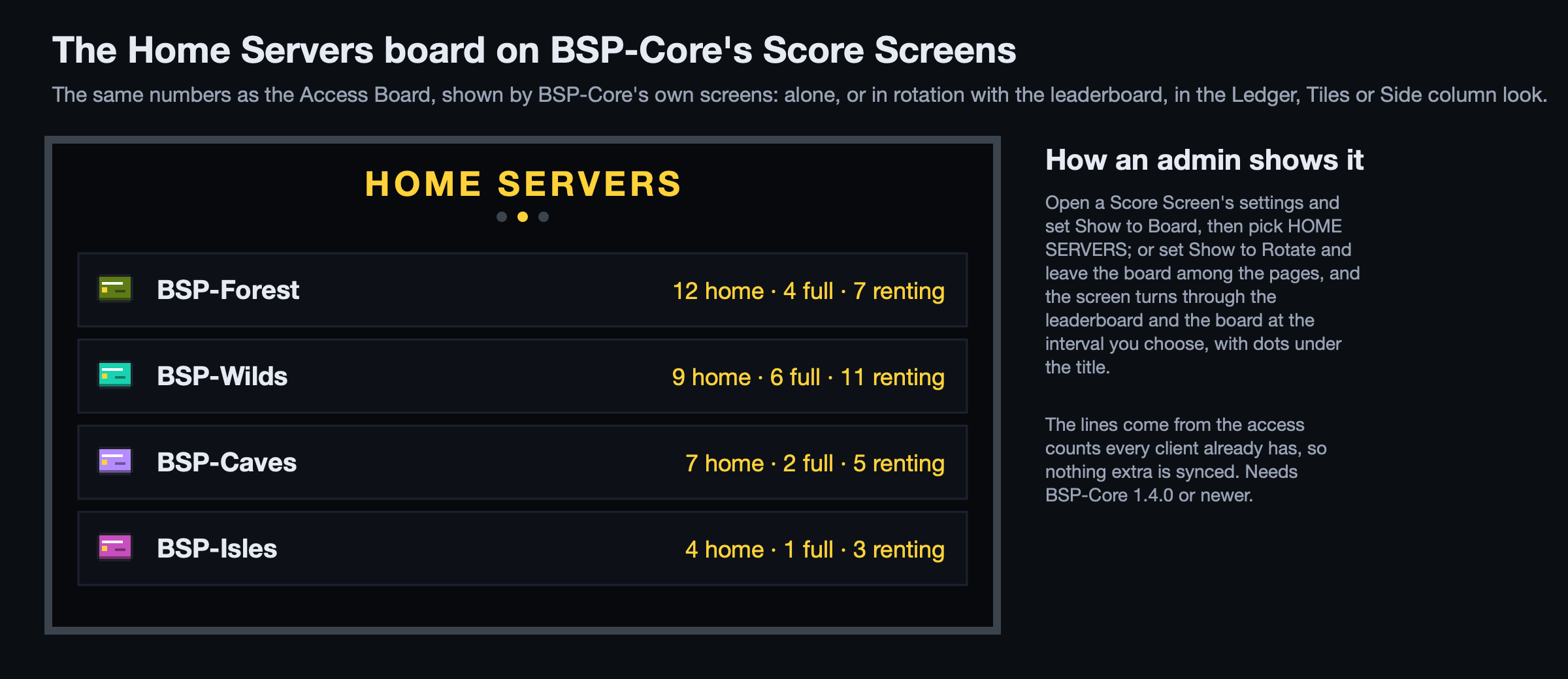
On BSP-Core's Score Screens. The same numbers are offered to BSP-Core as a board called HOME SERVERS. In a Score Screen's settings set Show to Board and pick it, or set Show to Rotate and the screen turns through the leaderboard and the board at the interval you choose, in BSP-Core's Ledger, Tiles or Side column look. Needs BSP-Core 1.4.0 or newer.
8. One voice on the network
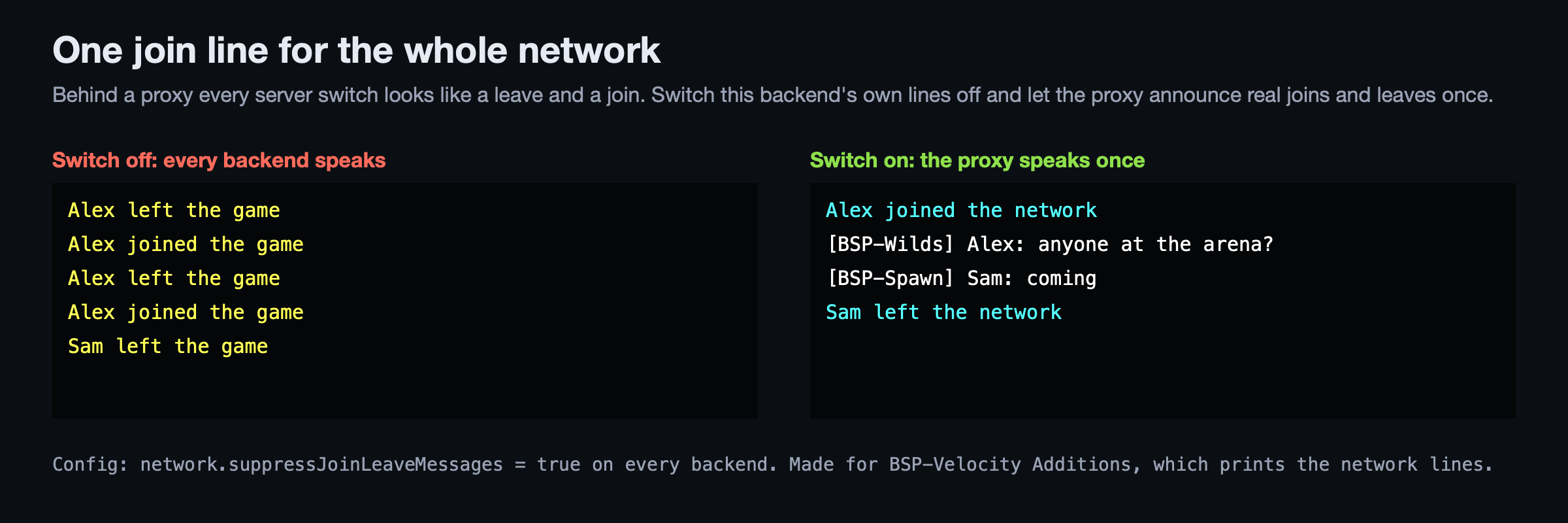
Behind a proxy, every server switch looks to a backend like a leave and a join, so chat fills with "X left the game, X joined the game" on every warp. With network.suppressJoinLeaveMessages = true this backend prints neither line for any login or logout, and the proxy plugin (BSP-Velocity Additions) announces real joins and leaves once for the whole network. Other mods' lines during login still show; nothing else about login changes.
9. With the other BSP mods
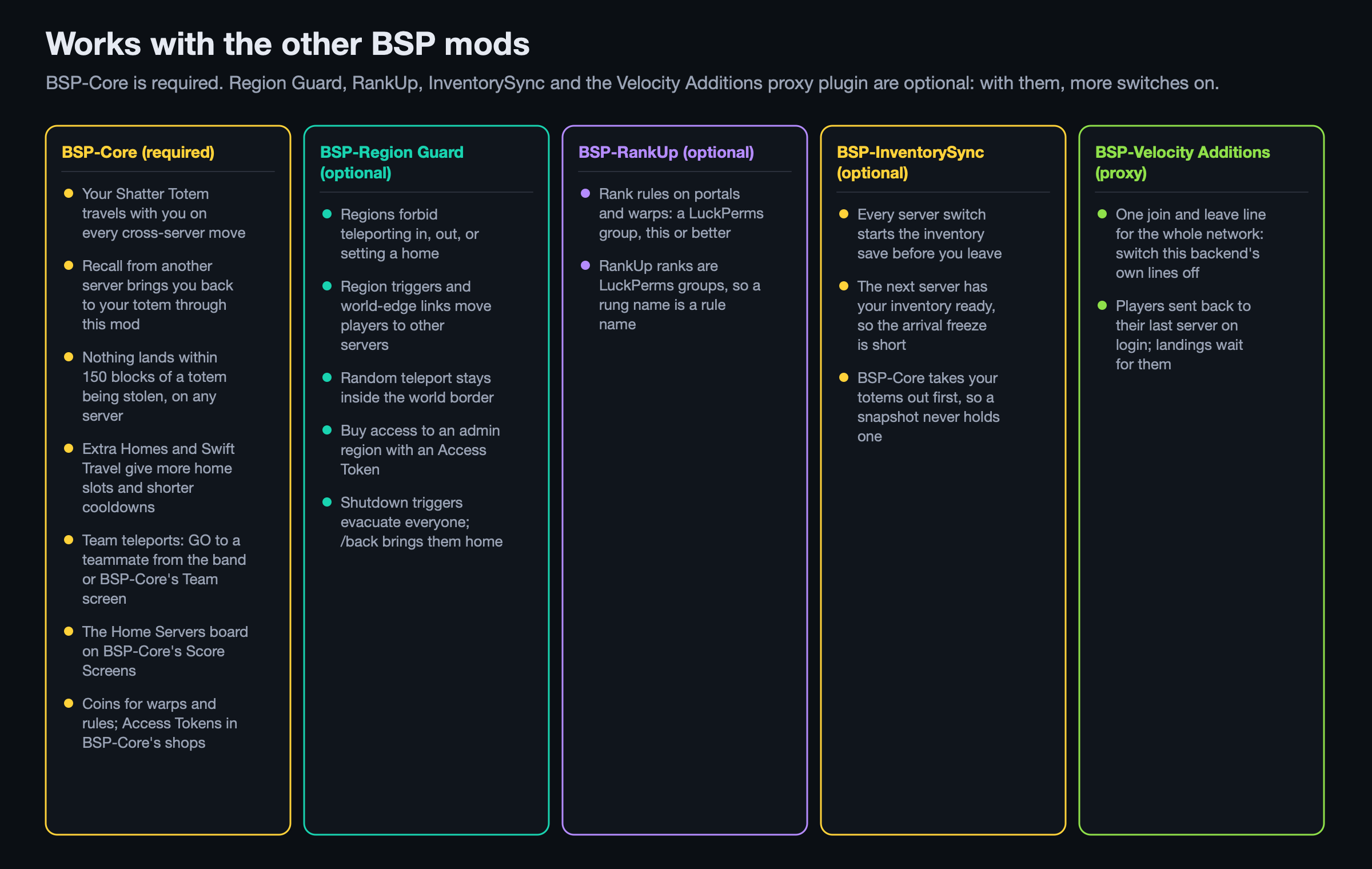
BSP-Core (required). Totems travel with you on every cross-server move. When your totem is being stolen on another server, BSP-Core's Recall offer brings you back through this mod and lands you beside it. The raid distances, the thief's block and the Anti Totem zones' teleport rules come from BSP-Core's events and API. Extra Homes and Swift Travel on the totem tree give more home slots and shorter cooldowns. Team teleports run on BSP-Core's teams, from the band and from the Team screen. The Home Servers board shows on BSP-Core's Score Screens. Warps and rules charge Shatter Coins; Access Tokens sell in BSP-Core's shops; a full season reset wipes homes.
BSP-Region Guard (optional). Regions forbid teleporting in or out and setting homes with their flags. Region triggers (enter, exit, timer, shutdown) and world-edge links that lead to another server are carried out by this mod, with the landing exactly where the trigger says. Random teleport stays inside the world border. Set a region's entry flag to deny and assign a token to it: players who bought access walk in, everyone else is kept out. Shutdown triggers evacuate everyone to a holding server; /back brings them home.
BSP-RankUp (optional). RankUp's ranks are LuckPerms groups, so a rung's name is a rank rule on any portal or warp: "Warden or better" gates the portal to the arena.
BSP-InventorySync (optional). On every server switch this mod tells BSP-InventorySync to start saving the inventory just before the player leaves, after BSP-Core has taken the totems, so the next server has it ready and the arrival freeze is shorter.
BSP-Velocity Additions (on the proxy). Prints the network's one join and leave line, and sends a player back to the server they were last on; this mod's landings wait for them there.
Commands
| For players | What |
|---|---|
/home [name], /sethome [name], /delhome <name>, /homes, /edithome <name> rename|relocate|description|public|icon, /phome <player> [home] |
homes |
/warp <name>, /warps, /spawn, /back, /rtp [server], /tpcancel, /tpnow |
moving |
/tpa, /tpahere, /tpaall, /tpaccept, /tpdeny, /tpignore |
requests |
/mainserver <server> |
the one free main-server choice |
| For admins | What |
|---|---|
/bsptp admin, /bsptp status, /bsptp players, /bsptp reload, /bsptp send <player> <server> |
the panel and the network |
/setwarp <name> [cost] [restricted], /delwarp, /setspawn |
warps and spawn |
/tpall [all|from <server>], /tphere, /tpto, /tppos, /tpoffline |
forced moves and evacuation |
/bsptp portal ..., /bsptp portal <name> ..., /bsptp portalwarp set|del|list |
portals |
/bsptp access servers|server|list|grant|revoke|main|token|tokens|stack |
access |
Permission nodes bsp_teleport.admin, bsp_teleport.bypass.cooldown, bsp_teleport.bypass.warmup and bsp_teleport.warp.<name> are answered by LuckPerms on Mohist. Other mods can move players and talk over the mod's Redis link through BspTeleportApi; see docs/API.md in the repository.
BSP TELEPORT Team