BSMP TRANSLATOR (Bsmp Bubbles Chat)
- By
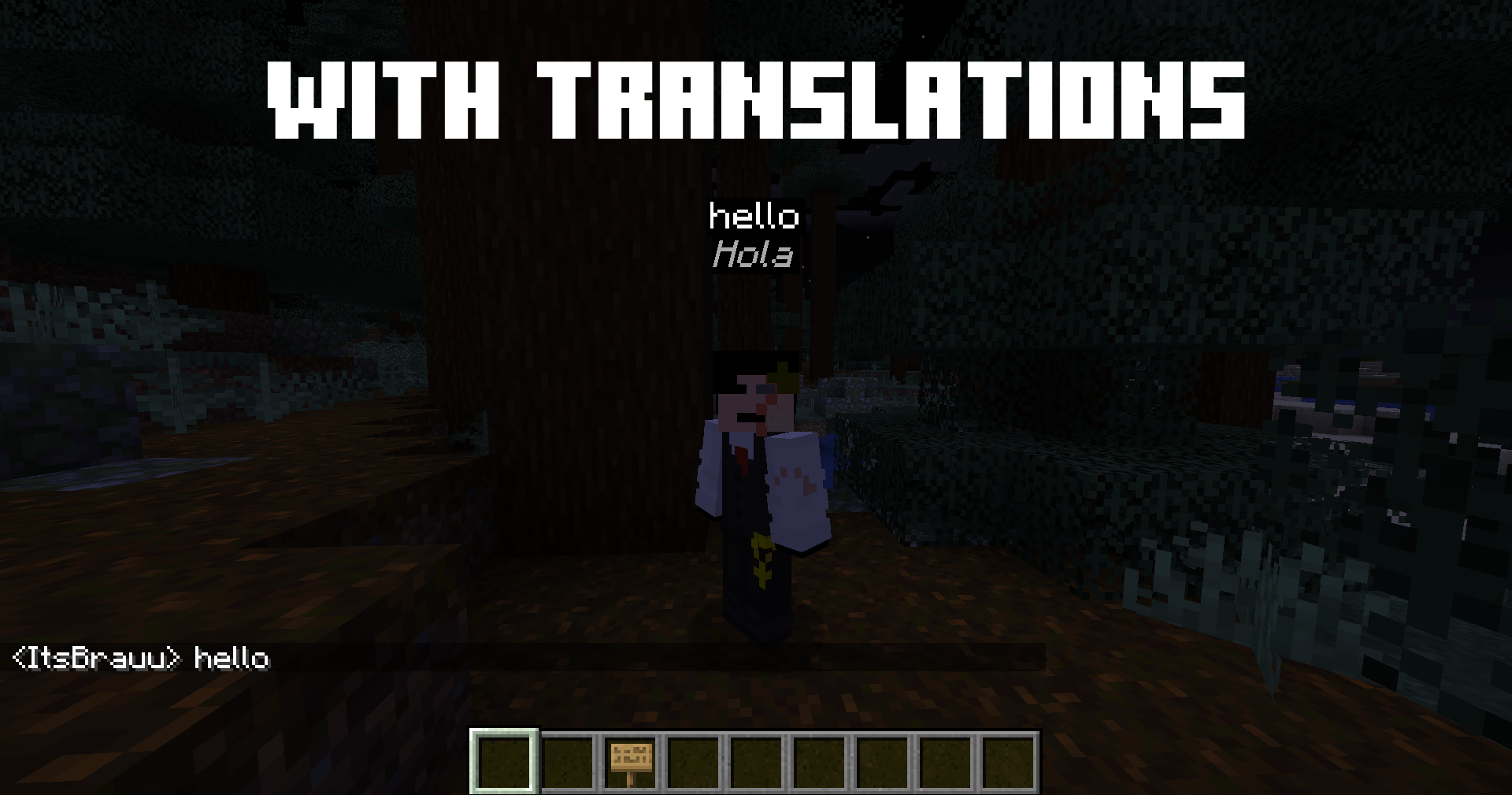
Shows chat messages as floating bubbles above players' heads with real-time translation support and voice-to-text transcription support with simple voice chat using the essential mod.
2026-09-19_21.20.14 (2).png
Description
BSMP Bubbles Chat
See chat — and now voice — as floating bubbles above each player's head, with real-time translation.
Tired of missing chat messages while playing? BSMP Bubbles Chat turns every chat message into a floating speech bubble above the player who sent it, so you always know who said what — and in your own language.
✨ Features
💬 Floating Chat Bubbles
Every chat message appears as a bubble above the sender's head. No more scrolling through chat logs to know who's talking.
🎙️ Real-Time Voice-to-Text Translation (new)
With Simple Voice Chat installed, BSMP Bubbles Chat listens to nearby players, transcribes what they say, and translates it live — shown as a floating subtitle bubble above their head and/or logged in the chat history panel. No offline models to download, works with any of the supported languages.
🌐 Automatic Translation
Messages are translated in real time to your preferred language using the BSMP Stream Translator web API. Supports:
- 🇪🇸 Spanish · 🇬🇧 English · 🇫🇷 French · 🇩🇪 German · 🇮🇹 Italian · 🇵🇹 Portuguese · 🇷🇺 Russian · 🇯🇵 Japanese
🎨 5 Bubble Styles
Classic, Pixel, Rounded, Minimal, Retro — pick the look that fits your setup.
🌈 4 Color Themes
Dark, Neon, Retro, Light — instantly recolors bubbles and the menu.
📜 Movable Chat History Panel
An optional on-screen log ("TRANSLATIONS CHAT") of recent messages and voice subtitles — drag it anywhere and resize it directly with your mouse.
🔊 Pop Sound
A soft "pop" plays whenever a new bubble appears. Toggleable, with adjustable volume.
🎯 Per-Player Colors
Each player gets a unique bubble color based on their UUID, so you can tell them apart at a glance.
👁️ See Through Walls
Toggle whether bubbles stay visible through walls — handy on crowded servers.
⚙️ Fully Configurable In-Game
Press O to open the config menu. Everything updates live: bubble duration, max bubbles per player, max distance, background opacity, sound, style/theme, translation language, spoken language for voice recognition, and more.
💾 Auto-Saved Config
All settings save automatically to .minecraft/config/chatbubbles.json — no manual file editing needed.
⚙️ How to Use
- Install Fabric Loader and Fabric API for Minecraft 1.20.1.
- (Optional, for voice subtitles) Install Simple Voice Chat.
- Drop the mod
.jarinto yourmodsfolder. - Launch the game and join any world or server.
- Chat (or talk, with Simple Voice Chat) normally — bubbles appear automatically.
- Press O to open the config menu and customize everything.
🔧 Requirements
| Requirement | Version |
|---|---|
| Minecraft | 1.20.1 |
| Fabric Loader | 0.15 or higher |
| Fabric API | Latest for 1.20.1 |
| Java | 17+ |
| Simple Voice Chat | Optional — enables voice-to-text subtitles |
⚠️ Important Notes
- Client-side only. Server owners don't need to install anything — works on any server, vanilla or modded.
- Requires internet. Both text translation and voice-to-text need a connection to the translator API; if it's offline, messages show in their original language.
- No API key required.
🎮 Default Keybinds
| Key | Action |
|---|---|
| B | Toggle bubbles on/off |
| O | Open config menu |
You can rebind these in Options → Controls → Key Binds → Bubbles de Chat.
🌐 Links — Translator web: https://bsmptranslator.web.app/
📜 License — All Rights Reserved.
💡 Planned Features
- More bubble styles · Custom font support · Message filtering (ignore commands, mentions only, etc.) · Sound profiles per message type · Mod Menu integration
❤️ Credits
Developed by ItsBrauu. Inspired by QSMP. Special thanks to everyone who tested early versions and gave feedback — if you enjoy the mod, leave a comment or share it with your friends!
The BSMP TRANSLATOR (Bsmp Bubbles Chat) Team