


IMG_20260902_134138.png
Description
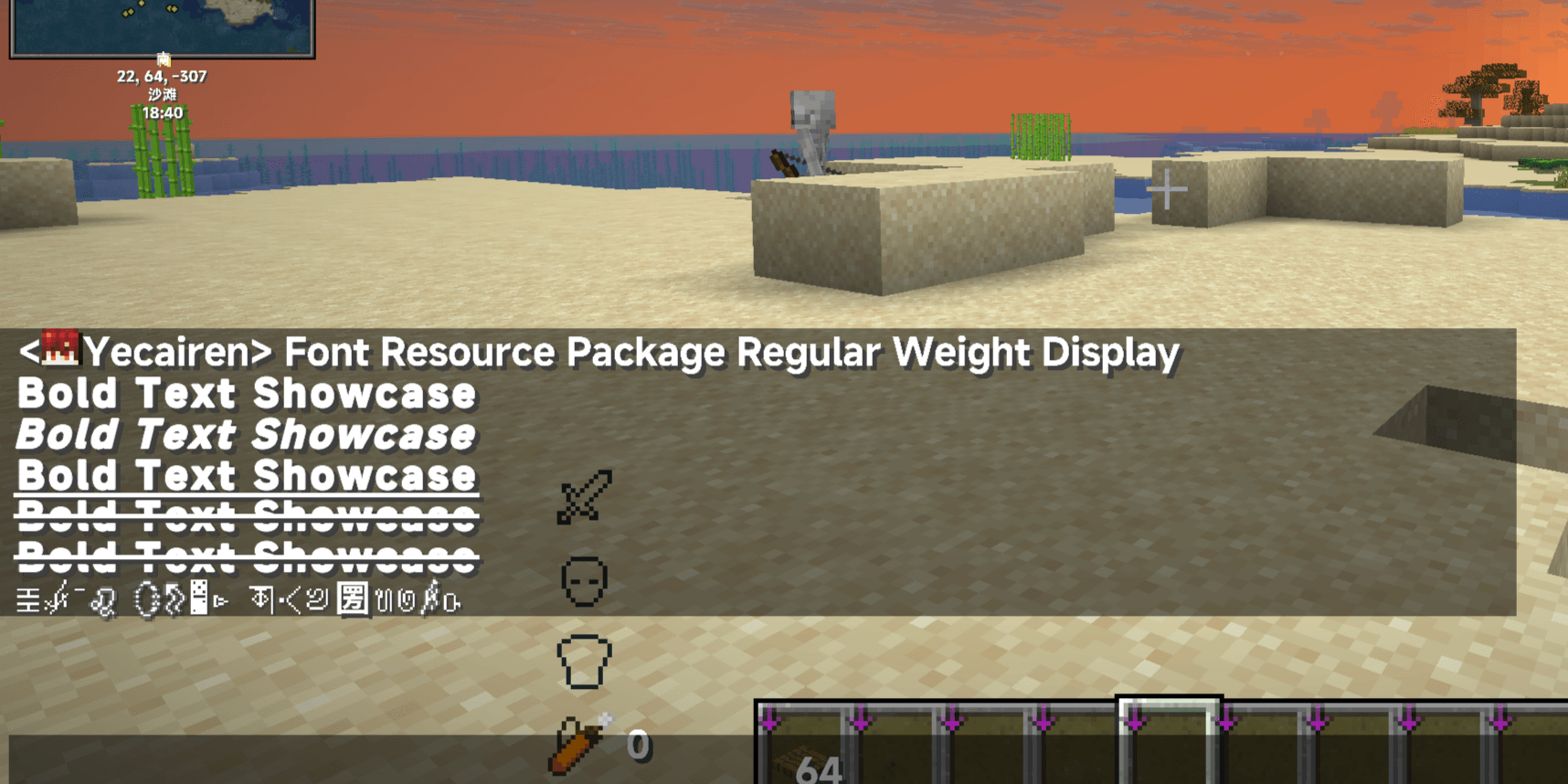
BoldTextFix is a client-side Fabric mod for Minecraft that improves the appearance of bold text. Keep the design of your font resource pack while adjusting its bold effect, or choose a separate local font for bold text.
Compare bold and regular text with the same editable preview, and choose the method that suits your font. Regular text keeps its existing font.
Three ways to render bold text
Mask dilation (default) — keep your font's character
Mask dilation expands the pixel contours of your font pack's glyphs evenly outward. Generated bold glyphs do not receive vanilla's second offset bold pass, reducing the ghosting and duplicated edges that can appear with custom fonts.
- Adjustable strength: 0–0.5 px, with a default of 0.26 px.
- No separate bold font needed: works from the glyphs provided by your font pack.
- Reusable results: generated masks are cached in memory and on disk.
Start with the default and use the preview to tune it for your font. Excessive strength can close up small spaces inside letters.
Vanilla offset — fine-tune the familiar effect
Prefer offset-based bold rendering? This method keeps the second draw and lets you adjust the distance for non-vanilla glyphs.
- Adjustable strength: 0–1 px, with a default of 0.5 px.
- Lower values produce a subtler effect; larger offsets make the doubling more noticeable.
- At 0 px, affected glyphs display their original font weight. The same applies to Mask dilation at 0 px.
Mask dilation and Vanilla offset remember their own strength settings, so you can switch between them without readjusting the strength each time.
Vanilla glyphs keep Minecraft's own bold rendering.
The strength sliders in Mask dilation and Vanilla offset do not change Minecraft's built-in glyphs or glyphs that fall back to the vanilla font.
Custom bold font — choose the shapes you want
Use a local TTF or OTF file for bold text while leaving regular text unchanged. No font resource pack is needed. Choose the Bold weight of the same font family, or give highlighted text a different typeface.
- Font size: 4–16 px; default 10 px.
- Font clarity: 2–16×; default 8×.
- Drag-and-drop import, a font list, file information, and a folder shortcut.
Clarity changes the sampling resolution without directly enlarging the text. Higher settings use more resources; very large font sizes can overlap nearby text or extend outside interface elements.
Choose a Bold font file if you want a designed bold weight.
This method uses the glyphs in the selected file. A regular-weight file does not automatically become a professionally designed bold face.
See the difference in game
Type your own sample into the preview and compare it in bold and regular styles. Switch methods, adjust their settings, and select a font from one screen.
- Open the screen through Mod Menu, or assign “Open bold text debug” in Minecraft's controls settings. The keybind is unassigned by default.
- View font file sizes, character counts, and glyph counts. Files with detected problems are marked with a warning.
- Use the master toggle to enable or disable the mod.
- View Mask dilation generation counts and elapsed time in a panel that can appear in any screen corner or be hidden. Hiding the panel does not stop generation.
- Preview text is temporary and is not saved to the configuration file.
Get started
Install on the client only. The server does not need BoldTextFix.
- Install Fabric Loader for your Minecraft version.
- Put the matching BoldTextFix JAR in your game instance's
modsfolder. - Launch the game and open the settings through Mod Menu or your assigned keybind.
- Enable your font resource pack and try Mask dilation or Vanilla offset. To use a local font, switch to Custom bold font, import a file, and select it.
Choose the right download
Check the Minecraft version, mod loader, and Java requirements listed on the download page or in the notes for the file you choose. Use the build that matches your game instance. When updating, replace the old JAR rather than keeping multiple versions of BoldTextFix installed.
The Fabric API modules BoldTextFix needs are bundled. You do not need the full Fabric API solely for this mod. Keep it installed if another mod requires it. Mod Menu is optional and provides a convenient settings entry.
Bring your own font
Drag a .ttf or .otf file into the settings screen, or place it in:
config/boldtextfix/boldfonts/
Then select it from the font list. Importing a file does not automatically change your current selection. If a file is already in the folder but is missing from the list, click Refresh. Click the selected font again to deselect it.
- Supports TTF/OTF files with a usable Unicode character map, up to 128 MiB per file.
- TTC/OTC font collections and WOFF/WOFF2 web fonts are not supported.
- Duplicate filenames are saved separately, without overwriting existing font files.
- Fonts are not bundled or downloaded by BoldTextFix. Choose a font that covers the language and characters you use.
Generate when needed, reuse from cache
Mask dilation generates glyphs only when bold text needs them, rather than processing an entire font at startup. Normal use and the preview share memory and local disk caches. Valid disk cache entries can be reused after restarting the game.
A 0.05-second cooldown follows each newly generated glyph, spreading out the processing load during continuous generation to help reduce stuttering and keep gameplay smooth. Reading existing cached masks is not affected by this cooldown.
New glyphs still need processing and texture uploads. Changing fonts or dilation strength, invalid cache entries, or clearing the cache may also require generation again. For custom fonts, higher clarity settings increase initial generation cost, memory usage, and VRAM usage.
| What | Location in your game instance |
|---|---|
| Settings | config/boldtextfix.json |
| Custom fonts | config/boldtextfix/boldfonts/ |
| Mask cache | config/boldtextfix/cache/v2/ |
Frequently asked questions
Why does the strength slider leave the vanilla font unchanged?
That is expected. Mask dilation and Vanilla offset adjust non-vanilla glyphs. Vanilla glyphs and vanilla fallback glyphs retain Minecraft's native bold rendering.
Custom bold font can supply different glyphs for bold text. Any glyphs that still fall back to vanilla keep the game's own bold rendering.
Why do some characters still use the vanilla font?
Check whether the font file or resource pack contains those characters, is enabled or selected, and has loaded successfully.
In Custom bold font mode, ordinary characters missing from the chosen file fall back directly to Minecraft's built-in fonts and native bold rendering. Emoji, symbols, and private-use icons first look for third-party glyphs in the active font chain, then use the selected font or vanilla fallback when needed. Third-party glyphs do not receive an additional offset bold pass.
Does it make all text bold?
No. BoldTextFix changes how text that already has the bold style is rendered. It does not force regular text to become bold or replace its font.
Can I use it with shaders or other font mods?
BoldTextFix includes compatibility handling for TTF/OTF text while Iris shaders are active. Iris is optional.
Mods or resource packs that replace font rendering, glyph providers, or text shaders can affect the result. Compatibility with every combination is not guaranteed; please include the exact versions and resource packs when reporting a problem.
Languages, feedback, and source
The settings screen includes seven localizations: Simplified Chinese, Traditional Chinese (Taiwan, China), Traditional Chinese (Hong Kong, China), Classical Chinese, English, Japanese, and Korean.
For a useful bug report, include your Minecraft, Fabric Loader, and BoldTextFix versions, the selected rendering method and settings, the font or resource pack name, and text or steps that reproduce the issue. Add screenshots where helpful, and relevant logs for loading errors or crashes.
BoldTextFix is open source under the MIT License. Third-party components retain their respective licenses.
BoldTextFix Team
