BLZYの自定义进度
- By
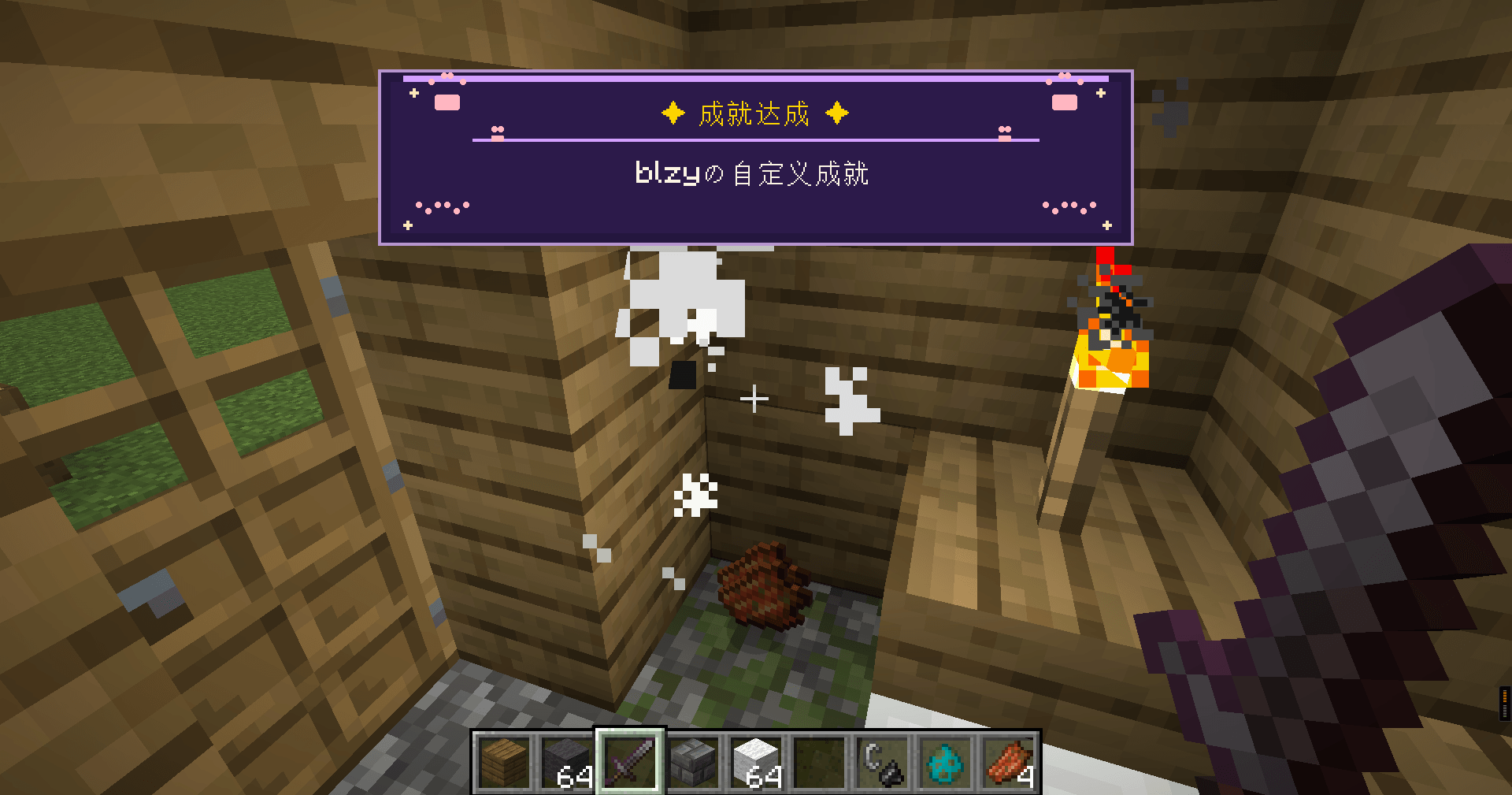
新成就牌匾,
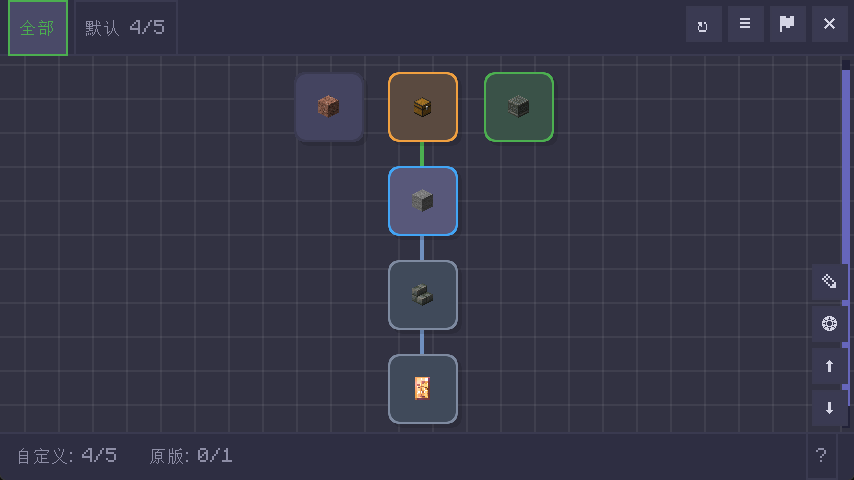
自定义成就主画布。
Description
Advancement Overhaul is a comprehensive rework of the Minecraft advancement system for version 1.21.1 (NeoForge). It completely replaces the vanilla advancement screen and backend logic with a feature-rich **infinite canvas UI** supporting free zoom, pan, and drag-and-drop editing, **10 condition types**, **prerequisite dependency chains**, **dimension locking**, **vanilla advancement management**, a complete `/adv` command tree, and deep **KubeJS** and **FTB Quests** compatibility. The mod serves both survival players and modpack/map creators, enabling real-time in-game creation, editing, import, and export of custom advancements.
---
### I. Main Features
#### 1.1 Vanilla Advancement Disabling & Management
The mod provides **fine-grained control** over vanilla (and other mods') advancements:
- **Default disabled**: Config option `vanilla.defaultEnabled` defaults to `false` — all vanilla advancements are disabled on first install and must be explicitly enabled.
- **Namespace whitelist**: Use `mods.enabledMods` to auto-enable advancements from specific mod namespaces (e.g. `["minecraft", "create"]`), with auto-generated tabs.
- **Per-advancement toggle**: `/adv vanilla enable <id>` / `/adv vanilla disable <id>` for individual control.
- **Batch operations**: `/adv vanilla enableall` / `/adv vanilla disableall` for one-click enable/disable all.
- **Runtime filtering**: Via `AdvancementManagerMixin`, disabled vanilla advancements are removed from the runtime map during loading — they are completely invisible and untriggerable.
- **Login check**: On player login, all disabled-but-completed advancements are automatically revoked to clean up residual completion state.
- **Server-side interception**: Even if a disabled advancement is somehow triggered (e.g. via command), `ServerEventHandler` immediately revokes it.
**Workflow**:
```
Server startup / reload
└── AdvancementManager.apply()
├── [Mixin HEAD] Cache vanilla JSON → Inject custom advancements
└── [Mixin RETURN] Filter disabled vanilla → Keep only enabled
└── filterDisabledVanillaFromMap()
├── defaultEnabled = false → Remove all not in enabled list
└── defaultEnabled = true → Remove only explicitly disabled
```
#### 1.2 Custom Canvas UI & Tree-Style Parent-Child Display
A brand-new infinite canvas UI completely replaces the vanilla advancement screen:
- **Infinite canvas**: Mouse-wheel zoom (cursor-centered), middle-click/drag panning with smooth inertia.
- **Advancement cards**: Each advancement rendered as a card with icon, name, completion indicator, and condition progress bar.
- **Tree-style dependency lines**:
- **Right-angle tree layout** for prerequisite relationships: parent vertical line → horizontal segment → child vertical line, with rounded connection points at corners.
- Auto-detects three dependency sources: custom advancement prerequisites, vanilla parent relationships, and vanilla advancement linked custom prerequisites (VanillaAdvMeta).
- Color-coded lines by state: normal, completed (green highlight), selected item's prerequisites/successors.
- Selecting an advancement highlights its **direct prerequisites** and **direct children** with distinct card background colors.
- **Tree layout**: BFS traversal of the vanilla advancement parent map computes each advancement's tree depth, grouping them into layers.
- **Auto layout** (`AutoLayout`): Three-phase DAG topological sort algorithm — Phase 1: top-down barycenter heuristic → Phase 2: bottom-up parent centering → Phase 3: final overlap correction. Supports simultaneous layout of custom and vanilla advancements.
- **Tab system**: Multi-tab switching, drag-to-reorder, rename, create/delete custom tabs for organizing advancements.
- **Spatial grid index**: Cards are bucketed into 480px grid cells by world coordinates; rendering only processes cells within the viewport, supporting thousands of cards at high frame rates.
#### 1.3 Cat Paw Achievement Plaque
When a player completes an advancement, an elegant **cat-themed** plaque HUD animation appears at the top of the screen:
- **Visual design**:
- Deep purple background (`#24163E` / `#362058`) with lavender border (`#E8C0FF`)
- Gold title text "✦ Achievement Unlocked ✦"
- Symmetrical **full cat paw prints** (1 main pad + 4 toe pads in fan arrangement, light pink `#FFB6C1`)
- Mini paw decorations flanking the divider line
- Paw trail footprints at the bottom (pairs of tiny paw prints)
- Sparkle stars at the corners
- **Animation**:
- **Slide-in** (400ms): `easeOutBack` overshoot easing, gracefully drops from above
- **Hold** (2400ms): Fully displayed
- **Fade-out** (300ms): `easeInQuad` fade
- **Queue system**: Multiple achievements completed simultaneously are queued and displayed sequentially without overlap.
- **FTB Quest completion**: Also triggers the plaque when an FTB Quests task is completed.
- Implemented as a HUD Overlay, visible regardless of what screen is currently open.
---
### II. Dimension Management
The dimension locking system prevents players from entering specific dimensions until they complete designated advancements:
- **Lock a dimension**: `/adv dimension lock <dim>` — prevents entry
- **Unlock a dimension**: `/adv dimension unlock <dim>` — removes the lock
- **Set unlock condition**: `/adv dimension setcondition <dim> <advId>` — binds an advancement as the unlock requirement
- **Remove unlock condition**: `/adv dimension removecondition <dim>` — removes condition (dimension stays locked but requires no advancement)
**How it works**:
1. When a player attempts to travel to a locked dimension, `ServerEventHandler.onEntityTravelToDimension()` intercepts the teleport event
2. Checks the target dimension's `DimensionLock`: if `disabled = true` and the player hasn't completed the `unlockAdvancementId` advancement
3. Cancels the teleport event, teleports the player to a safe location in the current dimension (prioritizes respawn point, then safe ground near the portal)
4. Sends a notification message to the player
5. 1-second cooldown prevents duplicate messages within the same tick
**Data persistence**: Dimension lock configuration is persisted in `ServerDataStore` as JSON.
---
### III. Custom Images
Add PNG images freely on the infinite canvas for decoration or backgrounds:
- **Image directory**: `config/advancement_overhaul/images/` (manually place PNG files here)
- **Persistence file**: `config/advancement_overhaul/image_elements.json` (stores image positions and properties)
- **Format**: PNG only, max 16MB
- **Operations**:
- Right-click empty canvas → context menu → "Create Image" → select file from images/ directory
- Images can be **dragged** to reposition
- Images can be **scaled** (zoom in 1.25x / zoom out 0.8x), range 0.1x ~ 5.0x
- Images can be **locked** to prevent accidental dragging
- Right-click image to delete
- **Rendering**: Uses `DynamicTexture` + `NativeImage` loaded as Minecraft textures, registered with TextureManager
---
### IV. Config Settings
Config file: `config/advancementoverhaul-common.toml` (NeoForge COMMON type, shared between server and client)
| Setting | Type | Default | Description |
|--------|------|--------|-------------|
| `interface.hideVanilla` | boolean | `false` | Replace vanilla advancements screen with custom Canvas UI |
| `permission.editPermissionLevel` | int (0-4) | `2` | Minimum permission level for edit commands (2 = OP level) |
| `toast.duration` | int (ms) | `3000` | Toast notification display duration (500-30000ms) |
| `performance.playerDataSaveInterval` | int (ticks) | `6000` | Periodic player data save interval (~5 minutes) |
| `vanilla.defaultEnabled` | boolean | `false` | Default state for vanilla/mod advancements (false = disabled by default) |
| `mods.enabledMods` | List\<String\> | `[]` | Namespace whitelist for auto-enabled mods (e.g. `["minecraft", "create"]`) |
---
### V. Command System
Main command is `/adv`, with tiered permissions and tab-completion.
#### Player Operations
| Command | Description |
|------|-------------|
| `/adv complete <id> [player]` | Force-complete an advancement (skips prerequisite checks) |
| `/adv reset <player> <id\|all>` | Reset a player's advancement(s) |
| `/adv give <id> [player]` | Grant an advancement |
| `/adv revoke <id> [player]` | Revoke an advancement |
| `/adv check <id>` | Check advancement status (completed/pending/progress %) |
#### CRUD Operations
| Command | Description |
|------|-------------|
| `/adv delete <id>` | Delete a custom advancement |
| `/adv batchdelete <ids,...>` | Batch delete |
| `/adv setname <id> <name>` | Set display name |
| `/adv setdescription <id> <desc>` | Set description |
| `/adv seticon <id> <icon>` | Set icon (item/entity/block ID) |
| `/adv togglehidden <id>` | Toggle hidden state |
| `/adv setprereq <id> <ids,...>` | Set prerequisites (with circular dependency BFS check) |
| `/adv createjson <json>` | Create advancement from JSON |
| `/adv updatejson <json>` | Update advancement from JSON |
#### Utility Commands
| Command | Description |
|------|-------------|
| `/adv import` | Import data by scanning JSON files from `import/` folder |
| `/adv export` | Export all data to `export/` folder |
| `/adv autolayout` | Run auto-layout on the current tab |
| `/adv reload` | Reload all data and re-sync |
#### Dimension Management
| Command | Description |
|------|-------------|
| `/adv dimension lock <dim>` | Lock a dimension |
| `/adv dimension unlock <dim>` | Unlock a dimension |
| `/adv dimension setcondition <dim> <advId>` | Set unlock condition |
| `/adv dimension removecondition <dim>` | Remove unlock condition |
#### Tab Management
| Command | Description |
|------|-------------|
| `/adv tab add <name>` | Create a new tab |
| `/adv tab delete <name>` | Delete a tab |
| `/adv tab order <name1,name2,...>` | Set tab ordering |
#### Vanilla Advancement Management
| Command | Description |
|------|-------------|
| `/adv vanilla enable <id>` | Enable a single vanilla advancement |
| `/adv vanilla disable <id>` | Disable a single vanilla advancement |
| `/adv vanilla enableall` | Enable all vanilla advancements |
| `/adv vanilla disableall` | Disable all vanilla advancements |
| `/adv vanilla setpos <id> <x> <y>` | Set the advancement's position on canvas |
| `/adv vanilla settab <id> <tab>` | Assign vanilla advancement to a tab |
| `/adv vanilla cleartab <id>` | Clear a vanilla advancement's tab assignment |
| `/adv vanilla save <id>` | Save current configuration for a vanilla advancement |
---
### VI. KubeJS Compatibility
The mod auto-registers as a KubeJS plugin via `kubejs.plugins.txt`, providing two types of integration:
#### 6.1 Script API (Bindings)
Call directly through the `AdvancementOverhaul` object in KubeJS scripts:
```javascript
// Query
AdvancementOverhaul.getAllIds() // Get all custom advancement IDs
AdvancementOverhaul.getName("my_adv") // Get advancement display name
AdvancementOverhaul.isCompleted(event.player, "my_adv") // Check if completed
AdvancementOverhaul.getProgress(event.player, "my_adv") // Progress percentage (0-100)
// Actions
AdvancementOverhaul.complete(event.player, "my_adv") // Force-complete
AdvancementOverhaul.reset(event.player, "my_adv") // Reset
// Creation (fluent builder)
AdvancementOverhaul.builder("my_adv")
.name("My Achievement")
.description("Description")
.tab("Default")
.pos(100, 200)
.hidden(false)
.condition("kill_entity", "minecraft:zombie", 10)
.conditionNbt("kill_entity", "minecraft:skeleton", 20, "{}")
.prerequisite("other_adv_id")
.register()
```
#### 6.2 Event Listening
Listen to mod events in KubeJS scripts:
```javascript
// Advancement completed event
AdvancementOverhaul.completed(event => {
console.log(`Player ${event.player.name} completed ${event.advancementId}`)
console.log(`Achievement name: ${event.advancementName}`)
})
// Progress update event
AdvancementOverhaul.progress(event => {
console.log(`${event.advancementId}: ${event.progress}/${event.total}`)
if (event.completed) {
// completed when progress >= total
}
})
// Advancement reset event
AdvancementOverhaul.reset(event => {
console.log(`${event.advancementId} was reset for ${event.player.name}`)
})
```
---
### VII. FTB Quests Compatibility
The mod implements **deep bidirectional integration** with FTB Quests:
#### 7.1 FTB Quests as Advancement Conditions
- The `FTB_QUEST_COMPLETE` condition type allows FTB quest completion to serve as a prerequisite for custom advancements
- Detects completions via both **Architectury event listening** (real-time) and **Tick polling** (every 20 ticks, as fallback)
- Automatically triggers condition evaluation and cascade release on quest completion
#### 7.2 FTB Advancement Reward Condition Check
- When an FTB quest rewards a custom advancement, `AdvancementRewardMixin` intercepts the `claim()` method **before** `award()` executes
- If the advancement is custom and conditions are not met, the `claim()` call is directly cancelled — **no grant-then-revoke race condition**
- If conditions are met, the call proceeds normally; subsequent events sync to the custom system
#### 7.3 KnownServerRegistries Sync
- Automatically registers custom advancement IDs into FTB's `KnownServerRegistries`, ensuring the FTB team UI correctly displays advancement completion status
- Syncs automatically on client connection; gracefully degrades when FTB Quests is not loaded
- Retrieves FTB Quests version via reflection and logs it
#### 7.4 Attribute Change Notification
- When advancement properties (name, icon, description, hidden state, prerequisites) change, automatically calls `ServerQuestFile.markDirty()` to notify FTB to save
---
### VIII. Technical Details
| Item | Description |
|------|-------------|
| MC Version | 1.21.1 |
| Mod Loader | NeoForge |
| Java Version | 21 |
| Config Type | COMMON (shared server + client) |
| Data Format | JSON (stored in `advancements/`, `players/`, `tabs/`, `vanilla/` directories) |
| Condition Types | 10 (KILL_ENTITY / CRAFT_ITEM / GET_ITEM / BREAK_BLOCK / PLACE_BLOCK / CHANGE_DIMENSION / DEAL_DAMAGE / TAKE_DAMAGE / FISH_ITEM / FTB_QUEST_COMPLETE) |
| Condition Logic | AND (all conditions must be met) |
| Evaluation Modes | Instant (one-shot) / Progress (cumulative) / Stack-aware (GET_ITEM inventory tracking) |
| NBT Match Modes | IGNORE / CONTAINS / EXACT / NONE_EMPTY |
| Cascade Completion | BFS stack traversal, 64-layer limit, circular dependency safe |
| Network Sync | Full sync (GZIP compressed) + Incremental sync (real-time progress) |
| C2S Security | Command whitelist + rate limiting (5/sec) + server-side permission re-verification |
New custom resource replacement system
Resource folder
When starting up, automatically create the folder and README.txt description file in config/advancementoverhaul/resources/.
Replaceable Resources
Resource FileName Format Description
Plaque Texture plaque.png PNG (Recommended size: 240×56) Replace the background of the plaque, with text superimposed on top
Completion Sound Effect chime.wav mp3 PCM Completely replace the default amethyst melody
-----------------------------------------------------------------------------------------------------------------------
dvancement Overhaul 是一款面向 Minecraft 1.21.1(NeoForge)的进度系统全面重构模组。它完全替换原版进度界面与底层逻辑,提供可自由缩放、拖拽、编辑的**无限画布 UI**、**10 种条件类型**、**前置依赖链**、**维度锁定**、**原版进度管理**、完整的 `/adv` 命令树以及 **KubeJS** 和 **FTB Quests** 深度兼容。模组同时面向生存玩家和整合包/地图作者,支持在游戏中实时创建、编辑、导入导出自定义进度。
---
### 一、主要功能
#### 1.1 原版成就的禁用与管理
本模组允许对原版(及其他模组)的成就是进行**精细控制**:
- **默认禁用**:配置项 `vanilla.defaultEnabled` 默认为 `false`,所有原版成就在首次安装时默认禁用,需要手动启用。
- **按命名空间白名单**:通过 `mods.enabledMods` 配置自动启用的模组命名空间列表(如 `["minecraft", "create"]`),该模组下所有成就自动创建分类并启用。
- **单个启用/禁用**:`/adv vanilla enable <id>` / `/adv vanilla disable <id>` 对单个原版成就进行开关。
- **批量操作**:`/adv vanilla enableall` / `/adv vanilla disableall` 一键启用或禁用所有原版成就。
- **运行时过滤**:通过 `AdvancementManagerMixin` 在进度加载阶段将禁用的原版进度从运行时 Map 中移除,禁用进度完全不可见、不可触发。
- **玩家登录检查**:玩家登录时自动撤销所有已被禁用的原版进度,防止残留完成状态。
- **服务端拦截**:即使某些途径(如命令)触发了被禁用的原版进度,`ServerEventHandler` 也会立即撤销。
**工作流程**:
```
服务器启动 / reload
└── AdvancementManager.apply()
├── [Mixin HEAD] 缓存原版 JSON → 注入自定义进度
└── [Mixin RETURN] 过滤禁用的原版进度 → 仅保留启用的
└── filterDisabledVanillaFromMap()
├── defaultEnabled = false → 移除所有不在启用列表中的
└── defaultEnabled = true → 仅移除明确禁用的
```
#### 1.2 自定义画布 UI 与父子成就树形显示
模组提供全新的无限画布 UI,完全取代原版进度界面:
- **无限画布**:支持鼠标滚轮缩放(以光标为中心)、中键/拖拽平移,带平滑惯性动画。
- **成就卡片**:每个进度以卡片形式在画布上展示,包含图标、名称、完成状态指示和条件进度条。
- **树形依赖连线**:
- 采用**直角树状图**风格绘制成就之间的前置依赖关系:父级竖线 → 水平线段 → 子级竖线,拐点处有圆角连接点。
- 自动识别三种依赖来源:自定义进度前置条件、原版 parent 关系、原版进度关联的自定义前置条件(VanillaAdvMeta)。
- 连线颜色区分状态:普通连线、已完成连线(绿色高亮)、选中项的前置/后继连线。
- 选中某个成就时,其**直系前置**和**直系后继**卡片分别以不同背景色高亮显示。
- **树形布局**:通过 BFS 遍历原版进度的 parent 关系计算每个进度的树深度,按层分组排列。
- **自动布局**(`AutoLayout`):基于 DAG 拓扑排序的三阶段布局算法——Phase 1 自顶向下重心启发式 → Phase 2 自底向上父节点居中 → Phase 3 最终重叠修正,支持同时布局自定义和原版进度。
- **标签页系统**:支持多标签页切换、拖拽排序、重命名、创建/删除,可将不同进度分类组织。
- **空间网格索引**:将卡片按世界坐标分桶到 480px 的网格单元,渲染时仅处理视口范围内的单元格,支持千级卡片流畅渲染。
#### 1.3 猫爪成就牌匾
当玩家完成一个成就时,屏幕顶部会出现一个带有**猫咪元素**的精美牌匾 HUD 动画:
- **视觉设计**:
- 深紫色背景(`#24163E` / `#362058`)搭配薰衣草色边框(`#E8C0FF`)
- 金色标题文字 "✦ 成就达成 ✦"
- 左右对称的**完整小猫爪印**(1 个主肉垫 + 4 个趾垫扇形排列,浅粉色 `#FFB6C1`)
- 分隔线两侧各有迷你猫爪装饰
- 底部脚印轨迹(成对的迷你爪印)
- 四角星星闪烁点缀
- **动画效果**:
- **滑入阶段**(400ms):`easeOutBack` 回弹缓出曲线,从屏幕上方优雅落位
- **停留阶段**(2400ms):完全显示
- **淡出阶段**(300ms):`easeInQuad` 渐隐
- **队列系统**:同时完成多个成就时自动排队依次展示,不会重叠
- **FTB 任务完成**:FTB Quests 任务完成时也会触发牌匾显示
- 通过 HUD Overlay 实现,无论当前打开什么界面都能显示
---
### 二、维度管理
通过维度锁定系统,可以在玩家完成指定成就之前阻止其进入特定维度:
- **锁定维度**:`/adv dimension lock <dim>` 阻止玩家进入指定维度
- **解锁维度**:`/adv dimension unlock <dim>` 解除锁定
- **设置解锁条件**:`/adv dimension setcondition <dim> <advId>` 绑定一个成就作为解锁条件
- **移除解锁条件**:`/adv dimension removecondition <dim>` 移除条件(维度保持锁定但无需成就解锁)
**工作机制**:
1. 玩家尝试传送至被锁定的维度时,`ServerEventHandler.onEntityTravelToDimension()` 拦截传送事件
2. 检查目标维度的 `DimensionLock`:如果 `disabled = true` 且玩家未完成 `unlockAdvancementId` 指定的成就
3. 取消传送事件,将玩家传送到当前维度的安全位置(优先重生点,其次传送门周围地面)
4. 向玩家发送提示消息
5. 1 秒冷却防止同一 tick 内多次弹出消息
**数据存储**:维度锁配置持久化在 `ServerDataStore` 中,以 JSON 格式存储。
---
### 三、自定义图片
在无限画布上可以自由添加 PNG 图片作为装饰或背景:
- **图片存放目录**:`config/advancement_overhaul/images/`(手动放入 PNG 文件)
- **持久化文件**:`config/advancement_overhaul/image_elements.json`(保存图片位置和属性)
- **格式限制**:仅支持 `.png`,最大 16MB
- **操作方式**:
- 右键空白画布 → 上下文菜单 → "创建图片" → 从 images/ 目录选择文件
- 图片可**拖动**移动位置
- 图片可**缩放**(放大 1.25x / 缩小 0.8x),缩放范围 0.1x ~ 5.0x
- 图片可**锁定**防止误拖动
- 右键图片可删除
- **渲染**:使用 `DynamicTexture` + `NativeImage` 加载为 Minecraft 纹理,注册到 TextureManager
---
### 四、Config 设置
配置文件路径:`config/advancementoverhaul-common.toml`(NeoForge COMMON 类型,服务端+客户端共享)
| 配置项 | 类型 | 默认值 | 说明 |
|--------|------|--------|------|
| `interface.hideVanilla` | boolean | `false` | 是否用自定义 Canvas UI 替换原版进度界面 |
| `permission.editPermissionLevel` | int (0-4) | `2` | 编辑命令所需的最低权限等级(2 = OP 级别) |
| `toast.duration` | int (ms) | `3000` | Toast 通知显示时长(500-30000ms) |
| `performance.playerDataSaveInterval` | int (ticks) | `6000` | 玩家数据定期保存间隔(约 5 分钟) |
| `vanilla.defaultEnabled` | boolean | `false` | 原版/模组进度的默认启用状态(false = 默认禁用) |
| `mods.enabledMods` | List\<String\> | `[]` | 自动启用的模组命名空间白名单(如 `["minecraft", "create"]`) |
---
### 五、指令系统
主命令为 `/adv`,支持权限分级和 Tab 补全。
#### 玩家操作
| 命令 | 说明 |
|------|------|
| `/adv complete <id> [player]` | 强制完成成就(跳过前置条件检查) |
| `/adv reset <player> <id\|all>` | 重置玩家单个或全部进度 |
| `/adv give <id> [player]` | 授予成就 |
| `/adv revoke <id> [player]` | 撤销成就 |
| `/adv check <id>` | 查看进度状态(完成/待定/进度百分比) |
#### CRUD 操作
| 命令 | 说明 |
|------|------|
| `/adv delete <id>` | 删除自定义成就 |
| `/adv batchdelete <ids,...>` | 批量删除 |
| `/adv setname <id> <name>` | 设置名称 |
| `/adv setdescription <id> <desc>` | 设置描述 |
| `/adv seticon <id> <icon>` | 设置图标(物品/实体/方块 ID) |
| `/adv togglehidden <id>` | 切换隐藏状态 |
| `/adv setprereq <id> <ids,...>` | 设置前置条件(含循环依赖 BFS 检测) |
| `/adv createjson <json>` | 通过 JSON 创建成就 |
| `/adv updatejson <json>` | 通过 JSON 更新成就 |
#### 工具命令
| 命令 | 说明 |
|------|------|
| `/adv import` | 从 `import/` 文件夹扫描 JSON 文件导入数据 |
| `/adv export` | 导出所有数据到 `export/` 文件夹 |
| `/adv autolayout` | 对当前标签页执行自动布局 |
| `/adv reload` | 重载所有数据并重新同步 |
#### 维度管理
| 命令 | 说明 |
|------|------|
| `/adv dimension lock <dim>` | 锁定维度 |
| `/adv dimension unlock <dim>` | 解锁维度 |
| `/adv dimension setcondition <dim> <advId>` | 设置解锁条件 |
| `/adv dimension removecondition <dim>` | 移除解锁条件 |
#### 标签页管理
| 命令 | 说明 |
|------|------|
| `/adv tab add <name>` | 创建新标签页 |
| `/adv tab delete <name>` | 删除标签页 |
| `/adv tab order <name1,name2,...>` | 设置标签页排序 |
#### 原版成就管理
| 命令 | 说明 |
|------|------|
| `/adv vanilla enable <id>` | 启用单个原版成就 |
| `/adv vanilla disable <id>` | 禁用单个原版成就 |
| `/adv vanilla enableall` | 启用所有原版成就 |
| `/adv vanilla disableall` | 禁用所有原版成就 |
| `/adv vanilla setpos <id> <x> <y>` | 设置原版成就在画布上的位置 |
| `/adv vanilla settab <id> <tab>` | 将原版成就分配到指定标签页 |
| `/adv vanilla cleartab <id>` | 清除原版成就的标签页分配 |
| `/adv vanilla save <id>` | 保存原版成就的当前配置 |
---
### 六、KubeJS 兼容
模组通过 `kubejs.plugins.txt` 自动注册为 KubeJS 插件,提供两类集成:
#### 6.1 脚本 API(Bindings)
在 KubeJS 脚本中通过 `AdvancementOverhaul` 对象直接调用:
```javascript
// 查询
AdvancementOverhaul.getAllIds() // 获取所有自定义成就 ID
AdvancementOverhaul.getName("my_adv") // 获取成就显示名称
AdvancementOverhaul.isCompleted(event.player, "my_adv") // 是否已完成
AdvancementOverhaul.getProgress(event.player, "my_adv") // 进度百分比 (0-100)
// 操作
AdvancementOverhaul.complete(event.player, "my_adv") // 强制完成
AdvancementOverhaul.reset(event.player, "my_adv") // 重置
// 创建(链式构建器)
AdvancementOverhaul.builder("my_adv")
.name("我的成就")
.description("描述")
.tab("默认")
.pos(100, 200)
.hidden(false)
.condition("kill_entity", "minecraft:zombie", 10)
.conditionNbt("kill_entity", "minecraft:skeleton", 20, "{}")
.prerequisite("other_adv_id")
.register()
```
#### 6.2 事件监听
在 KubeJS 脚本中监听模组事件:
```javascript
// 成就完成事件
AdvancementOverhaul.completed(event => {
console.log(`Player ${event.player.name} completed ${event.advancementId}`)
console.log(`Achievement name: ${event.advancementName}`)
})
// 进度更新事件
AdvancementOverhaul.progress(event => {
console.log(`${event.advancementId}: ${event.progress}/${event.total}`)
if (event.completed) {
// 完成时 progress >= total
}
})
// 成就重置事件
AdvancementOverhaul.reset(event => {
console.log(`${event.advancementId} was reset for ${event.player.name}`)
})
```
---
### 七、FTB Quests 兼容
模组与 FTB Quests 实现**深度双向集成**:
#### 7.1 FTB 任务作为成就条件
- 条件类型 `FTB_QUEST_COMPLETE` 允许将 FTB 任务完成作为自定义成就的前置条件
- 通过 **Architectury 事件监听**(实时)和 **Tick 轮询**(每 20 tick 兜底)两种方式检测任务完成
- 任务完成时自动触发条件评估和级联释放
#### 7.2 FTB 成就奖励的条件检查
- 当 FTB 任务将自定义成就作为奖励时,`AdvancementRewardMixin` 在 `claim()` 方法执行**之前**拦截检查
- 如果成就是自定义成就且条件未满足,直接取消 `claim()` 调用——**不会先授予后撤销**
- 条件满足才放行,让 FTB 正常授予,后续事件同步到自定义系统
#### 7.3 KnownServerRegistries 同步
- 自动将自定义成就 ID 注册到 FTB 的 `KnownServerRegistries`,确保 FTB 团队界面能正确显示成就完成状态
- 客户端连接时自动同步,FTB 模组未加载时静默降级
- 通过反射获取 FTB Quests 版本号并输出日志
#### 7.4 属性变更通知
- 当成就的名称、图标、描述、隐藏状态等属性变更时,自动调用 `ServerQuestFile.markDirty()` 通知 FTB 存盘
---
### 八、技术信息
| 项目 | 说明 |
|------|------|
| MC 版本 | 1.21.1 |
| 模组加载器 | NeoForge |
| Java 版本 | 21 |
| 配置类型 | COMMON(服务端 + 客户端共享) |
| 数据存储格式 | JSON(分别存储在 `advancements/`、`players/`、`tabs/`、`vanilla/` 目录下) |
| 条件类型 | 10 种(KILL_ENTITY / CRAFT_ITEM / GET_ITEM / BREAK_BLOCK / PLACE_BLOCK / CHANGE_DIMENSION / DEAL_DAMAGE / TAKE_DAMAGE / FISH_ITEM / FTB_QUEST_COMPLETE) |
| 条件逻辑 | AND(所有条件均满足才算完成) |
| 评估模式 | Instant(一次性检测)/ Progress(累积进度追踪)/ Stack-aware(GET_ITEM 背包追踪) |
| NBT 匹配模式 | IGNORE / CONTAINS / EXACT / NONE_EMPTY |
| 级联完成 | BFS 栈遍历,64 层上限,防循环依赖 |
| 网络同步 | 全量同步(GZIP 压缩)+ 增量同步(实时进度更新) |
| C2S 安全 | 命令白名单 + 频率限制(5条/秒)+ 服务端权限二次校验 |
新增自定义资源替换系统
资源文件夹
启动时自动在 config/advancementoverhaul/resources/ 创建文件夹和 README.txt 说明文件。
可替换资源
资源 文件名 格式 说明
牌匾纹理 plaque.png PNG,推荐 240×56 替换牌匾背景,文字叠在上面
完成音效 chime.wav mp3 PCM 完全替换默认紫水晶旋律
The BLZYの自定义进度 Team