Blueprint Manager
- By
Blueprint Manager brings your blueprints out of the folder and into the game, so you can manage and preview them in seconds.
- Overview A blueprint manager that lives inside Minecraft. Open it from the pause menu or the title screen and handle every .nbt in your schematics folder without leaving the game. - The left pane lists all blueprints, subfolders included, with search and sorting by name, date or size. - Click any blueprint and the right pane renders a 3D preview instantly. Drag to rotate, scroll to zoom, double-click to reset. - Left-click a block in the preview to select it, right-click to hide it and look inside the shell. Hiding only affects the preview, the file is never touched, and switching blueprints or pressing reset brings everything back. - The badge in the preview corner switches between orthographic and perspective. Perspective runs in its own off-screen render pass, so the foreshortening and the top and side faces are real. - Rename, duplicate, delete and open-folder are all available in the interface. - Keyboard: F5 refreshes, Delete removes the selected file, B opens the panel, double-click a list entry to rename it. - Client side only, no dependencies. The mod never touches Create's API, it just treats schematics as a plain folder.
- Gallery
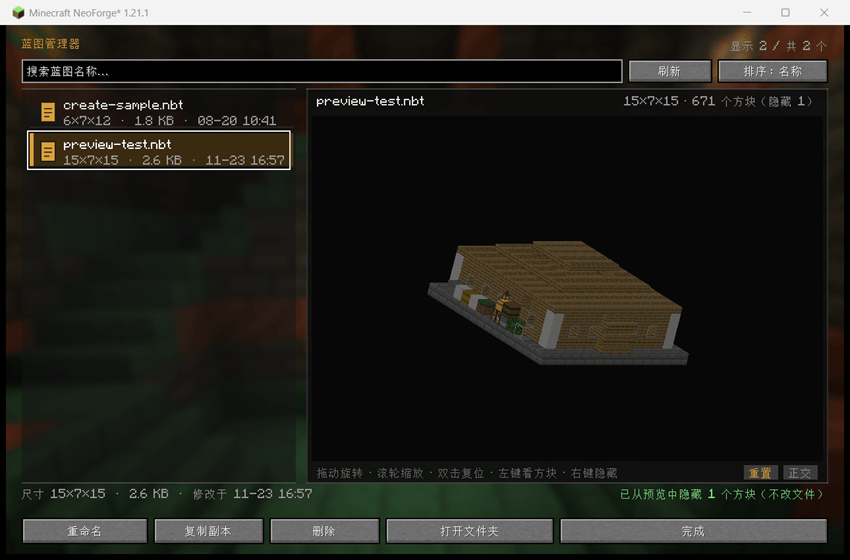
- Usage Press Esc to stay in the pause menu. A blueprint file icon appears to the right of the button column, click it. The title screen works the same way, the icon sits right under Create's icon row. Select a blueprint on the left to preview it and check its size, block count and modified time. Use rename, duplicate, delete or open-folder from the bottom bar. Compatibility - NeoForge 1.21.1 - Client side only, no server install needed Notes - The 3D preview parses .nbt only. .litematic files sitting in the same folder are listed but not rendered. - Large builds take a second or two on first open. Parsing runs on a background thread, so the interface stays responsive. - Perspective has a built-in fallback: if the off-screen pass fails on a particular graphics driver, the panel switches back to the orthographic view instead of going black.