


BlockScope
- By
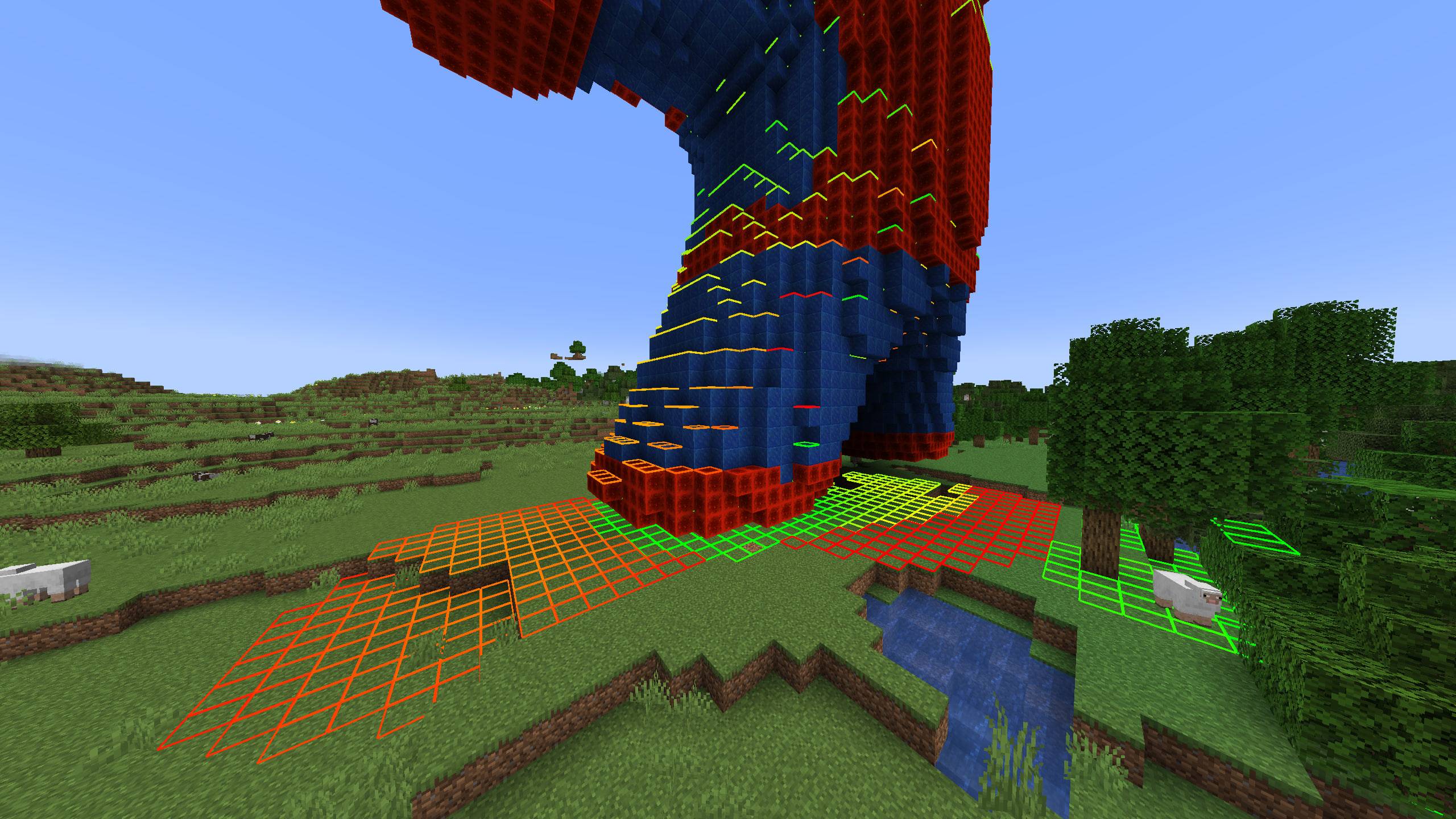
Highlights blocks that have another block directly above them.
Description
BlockScope
BlockScope is a client-side building inspection tool for Minecraft 1.20.1. It highlights blocks beneath a cover or open sky, shows the space above covered blocks as a color gradient, and projects your player's hitbox onto nearby floors and ceilings. Install it on your client; a server-side installation is not required.
Controls
- H: Highlight covered blocks; press again to turn off
- J: Highlight the top visible block in each open-sky column; press again to turn off
- K: Project your hitbox onto the nearest solid or liquid surface below
- L: Project your hitbox onto the nearest solid ceiling above
H and J switch between each other. K and L work independently, including while flying. You can change all four keys under Options → Controls → BlockScope.
Commands
- /blockscope help — Shows the full list of available commands and controls.
- /blockscope radius <value> — Sets the horizontal block scanning radius. Default: 32.
- /blockscope vertical <value> — Sets the vertical scanning range. Default: 64 blocks above and below.
- /blockscope heatmap <on|off> — Enables or disables the clearance heatmap.
- /blockscope scale <value> — Changes the visualization scale.
- /blockscope color <hex> — Sets the primary highlight color using a HEX color value.
- /blockscope inversecolor <hex> — Sets the secondary/inverse highlight color using a HEX color value.
- /blockscope footprint <on|off> — Enables or disables the footprint indicator below the player.
- /blockscope overhead <on|off> — Enables or disables the overhead indicator above the player.
- /blockscope refresh — Forces BlockScope to refresh its current visualization.
- /blockscope reset — Restores all BlockScope settings to their default values.
- /blockscope credits — Shows the mod credits.
Info
In covered-block mode, the clearance heatmap runs from green for a small gap through yellow to red for a larger gap. The default scan radius is 32 blocks horizontally and ±64 blocks vertically. Highlights respect depth and do not show through walls. Larger scan ranges may affect FPS, and distant blocks can appear gradually.
Type /blockscope help for the full command list. Use /blockscope radius 64, /blockscope vertical 96, /blockscope heatmap off, /blockscope scale 32, or /blockscope refresh to adjust or refresh the display. Settings are saved per game instance.
Installation: Download the JAR marked for your loader and place it in the mods folder of a Minecraft 1.20.1 instance. The Fabric build requires Fabric API. On Fabric, Mod Menu is optional and adds a configuration screen. Forge has a configuration screen in the mod list. The commands and keybinds work without Mod Menu.
Interface translations: English, Russian, German, French, Italian, Spanish, Brazilian Portuguese, and European Portuguese. The translations have not been reviewed by native speakers.
Created by _suprastin_ with substantial assistance from GPT-6 Sol. The source code is licensed under MIT. Generative AI contributed to the code, translations, and this description.
BlockScope Team
