


BlockPrint Link
- By
screenshot.png
Description
BlockPrint Link
Browse, download, and upload Minecraft schematics from any device.
BlockPrint Link is a client-side mod that exposes a local WebSocket bridge and UDP discovery beacon on the Minecraft client (the player instance, not the dedicated server). Pair it with the BlockPrint Cat mobile app to browse your schematic library, preview files, and push new blueprints straight into your world — without leaving your phone.
✨ Features
- Schematic library browser — lists all Litematica, vanilla structure exports, and WorldEdit schematics on the host.
- Two-way transfer — download blueprints to your device or upload
.litematic/.schematicfiles back into the game. - Auto-discovery via UDP — the mod broadcasts its presence on port
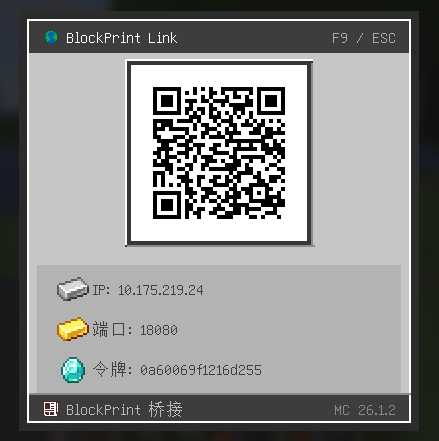
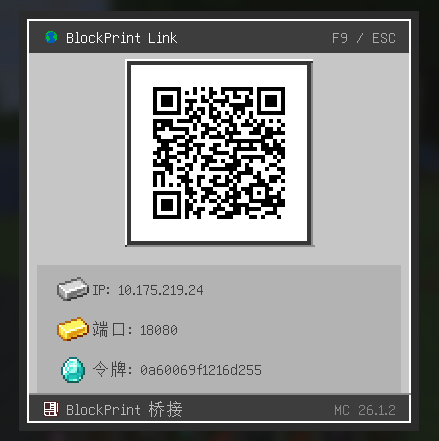
18081, so the mobile app finds it on the same network automatically. No IP typing required. - QR-code pairing — press F7 in-game to open a QR-code overlay that the mobile app scans to connect instantly.
- Configurable — token, port, and chat notifications live in
config/blockprintlink-bridge.toml. Changes reload via/blockprint-reload. - Optional mod integrations — auto-detects WorldEdit (for its schematic directory) and Building Gadgets 2 (click-to-copy uploaded template JSON in chat).
- Live file watching — schematic list updates in real time when files are added or removed.
- SHA-256 verified uploads — every transfer is checksummed end-to-end.
📦 Schematic Sources
| Source | Path | When enabled |
|---|---|---|
| Litematica schematics | <gameDir>/schematics/ |
Always |
| Vanilla structure exports | <gameDir>/saves/*/generated/minecraft/structures/ |
Always |
| WorldEdit schematics | <gameDir>/config/worldedit/schematics/ |
When WorldEdit is on the classpath (auto-detected) |
WorldEdit integration requires no Gradle dependency — it's read at runtime from the default directory, detected via classpath probing.
🚀 Quick Start
- Drop the mod jar into your
mods/folder. - Launch Minecraft. The mod's WebSocket server starts on port 18080; UDP beacon on 18081.
- Open the BlockPrint Cat app on your phone (same Wi-Fi). It discovers the server automatically.
- If auto-discovery fails, press F7 in-game to display a QR code, then scan it in the app.
⚙️ Configuration
Config file: config/blockprintlink-bridge.toml
[bridge]
token = ""               # Leave empty to auto-generate; persisted to blockprintlink-token.txt
showChatMessages = true  # Show bridge status in chat on join
wsPort = 18080           # WebSocket port
discoveryPort = 18081 # UDP discovery port- The token is shown in chat on join. It can be any non-empty string.
- The persisted token lives in
<gameDir>/blockprintlink-token.txtand survives restarts. - Reload with
/blockprint-reload.
📋 Requirements
- NeoForge / Forge: Kotlin for Forge (
[5,)) — bundled as a loader-side dependency. - Fabric: Fabric Loader
>=0.16.9and Fabric API>=0.116.12+1.21.1(or the version listed in the matchinggradle/libs.versions.tomlrow). - Java: 21 (or 17 for Forge 1.20.1).
🧩 Protocol (for app developers)
The bridge speaks a tiny JSON-over-WebSocket protocol on port 18080 with
binary frame support for file transfer. Full specification, message types,
and error codes:
Highlights:
list— request schematic listdownload/upload— two-phase file transfer with SHA-256list/changed— server push when files change on diskerror— structured error responses with codes (AUTH_FAILED,FILE_TOO_LARGE,SHA_MISMATCH, …)
The BlockPrint Link Team
