


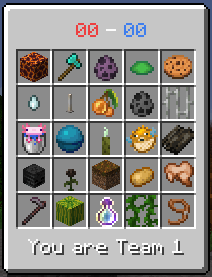
A example of what the GUI might look like
Description
Blockout
Blockout is an open-source forge mod that provides a lockout minigame for servers.
Please contact vincor_#7498 on Discord if you have any inquiries.
IMPORTANT: This mod must be played on a server with the mod. It is not possible to play Blockout on a singleplayer world.
What is Blockout?
An open source version of Smallant's lockout mod.
The game will randomly generate 25 tasks, a full list of these tasks can be found here on the wiki.
The goal of the game is complete tasks before the opposing team does. A team wins when it completes 13 goals.
How to Play?
To play, you must have at least 2 players.
To assign a player to a team, type in the command /lockoutTeam <player> <team>. A player must be assigned to team 1 or 2, or 0 if you wish to remove them from play.
Once teams are assigned, you can start the game with /lockoutStart
To view the tasks, open the GUI with \, but this keybind can be changed anytime in the settings
Tasks can only be completed by one team, and the game ends once a team completes 13 tasks
Commands
- /lockoutStart - Starts the game and generates new tasks
- /lockoutTeam <player> <team> - Assigns player to team (<team> must be 0, 1, 2 | team 0 means the player has no team)
- /lockoutDifficulty <easy> <medium> <hard> <expert> - Assigns the probability of each difficulty being generated. The default probabilities are 35% easy, 40% medium, 25% hard and 10% expert
Custom Tasks
Since this project is open source, you can add your own tasks.
The documentation to add tasks can be found here.
Prerequisites:
1. A basic understanding of Java
2. An IDE such as IntelliJ or Eclipse
3. The Java JDK
4. Gradle (gradle may also come packaged with your IDE if you are using IntelliJ/Eclipse)
5. A cloned version of the repository.
Steps:
- Open the repository with your IDE.
- Ensure that gradle is setup.
- src/main/io/github/vincorqc/lockout is the source of the code.
- The list of Tasks can be found in the /data folder, which has a .java file for each type of task.
- You can add or remove tasks, but ensure that they have a matching icon and title if required.
- To compile the mod, run gradleBuild through the gradle window (or gradlew build in the command line if your IDE doesnt not have gradle integration).
- The compiled mod can be found in root/build/libs
A more extensive guide can be found in the CONTRIBUTING.md on the github. Good luck!
The Blockout Minigame Team
