


Blockkino – Your Own Cinema in Minecraft
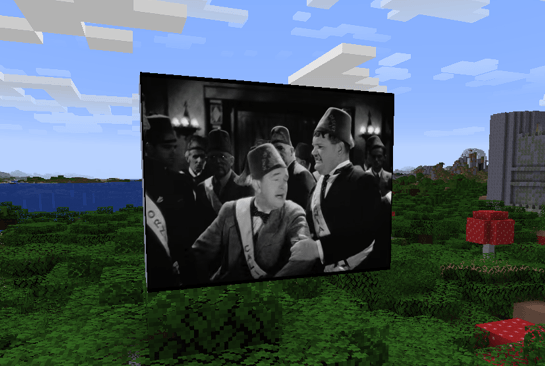
Build a screen out of blocks, paste a YouTube link, and watch together with your friends! Blockkino synchronizes playback through the server, turning your Minecraft world into a Cinema
Features
-
Custom-sized screens: Choose the width and height of your rectangular screen. The size limit can be adjusted in the server configuration.
-
Watch together: Play, pause, and seek controls manage shared playback. Viewers who join later receive the current playback position.
-
Dedicated remote control: A craftable item with a custom 3D model opens the cinema controls.
-
YouTube support: Load videos using YouTube, Shorts, Live, or youtu.be links. Timestamps included in links are supported.
-
Automatic player switching: If YouTube blocks a video from being embedded, Blockkino automatically switches to the YouTube webpage view.
-
Built-in ad filter: Toggle it locally using the remote control.
-
Distance-based audio: Volume decreases as you move away from the screen.
-
Persistent screens: Your cinemas remain saved across world and server restarts.
-
Automatic language selection: The menu follows each player’s Minecraft language setting.
Supported languages: German, English, French, Spanish, Italian, Brazilian Portuguese, Polish, and Dutch.
How It Works
-
Build a complete, vertical, rectangular wall using Cinema Screen Blocks.
-
Use the Cinema Remote to click two diagonally opposite corners on the same front face.
-
Paste a YouTube link into the menu and start the video.
-
Sit back and watch with other players!
You can reopen an existing screen’s controls by interacting with its front face using the remote or an empty hand.
Crafting
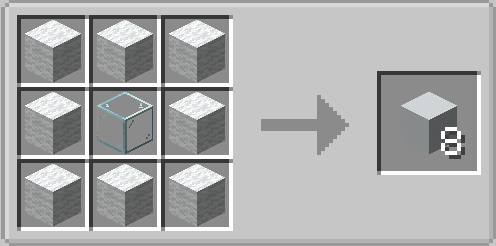
Screen Blocks: Eight white wool blocks surrounding one glass block produce eight Screen Blocks.
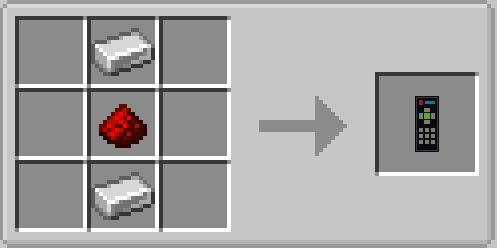
Remote Control: Place an iron ingot, redstone dust, and another iron ingot in a vertical column.
BlockKino Team


