BlockEditorMod
- By
BlockEditor is a Minecraft 1.20.1 Forge mod that adds a GUI-based color picker for creating custom colored blocks that work with WorldEdit commands. Would love to hear from some of the users (if possible), leave a comment!
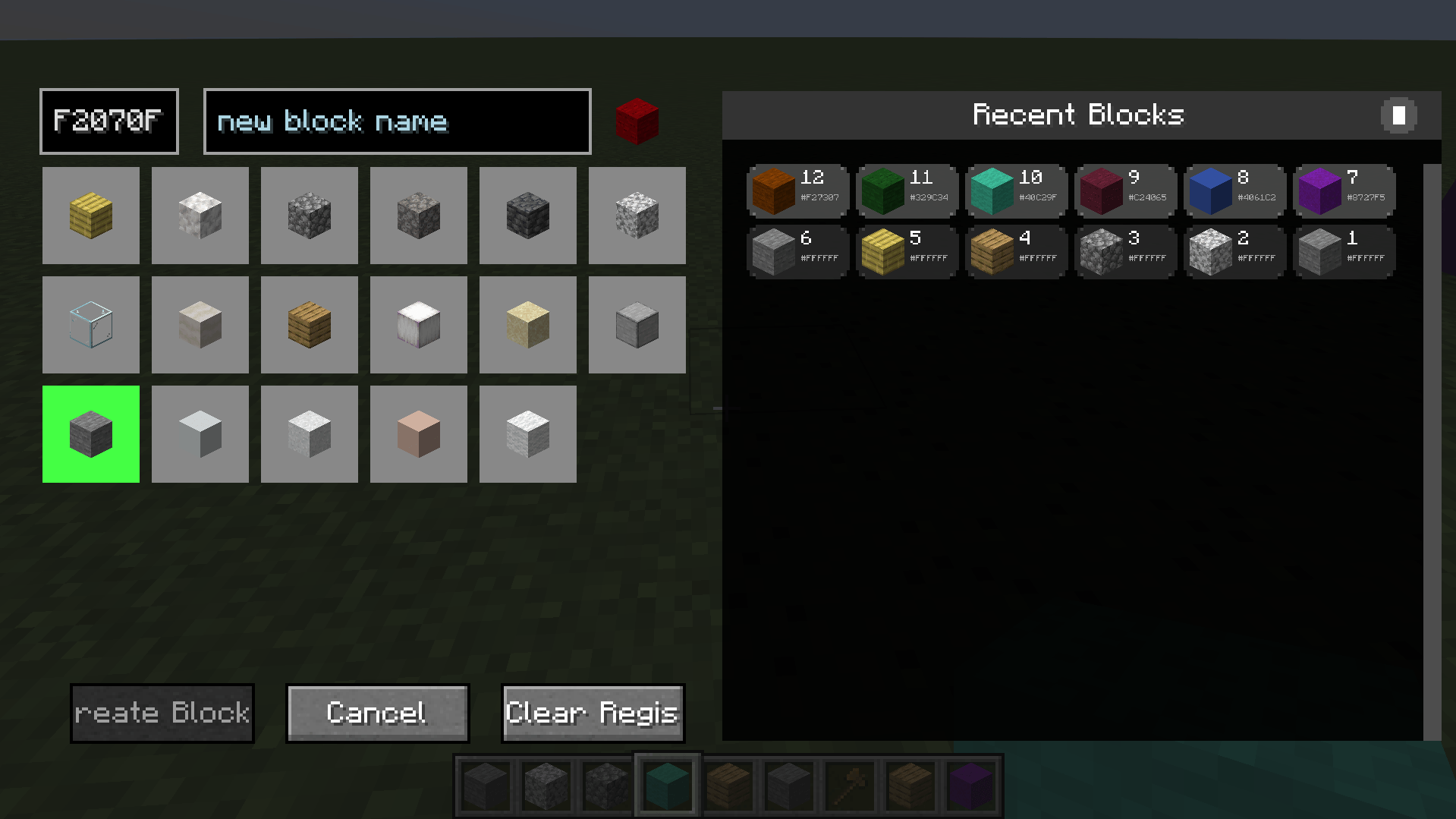
Screenshot 2025-10-24 235709.png
Description
BlockEditor — Custom Block Creator & Color Picker
Create, name, and use custom-colored blocks with an intuitive editor and seamless WorldEdit support. Built for builders, server admins, and map makers who want unlimited creative control in Minecraft 1.20.1.
What’s New in v1.0.3
- World-based pick block: middle-click any BlockEditor block in the world to equip it
- Smart matching: finds the exact block in your inventory (Color + OriginalBlock [+ CustomName])
- Server fallback: requests the exact item from the server if not found locally
- Clean distribution: installs with no pre-saved history or blocks
- Quality: small internal fixes and better messages
Core Features
Custom Block Creation
- Open the editor (default key: G) and pick from multiple base textures
- Enter any hex color (e.g., FF0000) with real-time validation
- Optional custom names for pro workflows and WorldEdit usage
- Blocks persist across world saves and servers
World-Based Pick Block (Middle-Click)
- Middle-click custom blocks in the world to instantly equip
- Exact inventory match on Color + OriginalBlock (and CustomName, if used)
- Fallback to server-side give when needed, with clear feedback
Recent Blocks & Quick Equip
- Visual history panel with your latest blocks
- Middle-click a history item to equip instantly
- Left-click to use as a template (pre-fills color/name)
WorldEdit Integration
- Use your custom names directly in commands
- Examples:
/bset be:wall/breplace stone be:roof- Great for large builds, palettes, and repeatable designs
Performance & Compatibility
- Minecraft: 1.20.1
- Mod Loader: Forge 47.3.0+
- Works in single-player and multiplayer (client + server compatible)
- Efficient NBT and rendering—no noticeable performance cost
- No bundled user data; clean install every time
Simple Workflow
- Press G to open the Block Editor
- Choose a base block type
- Enter a hex color (e.g., FF0000)
- Optionally give it a custom name (e.g., wall, roof, accent)
- Click Create Block and start building
Pro tip: Middle-click a custom block in the world to equip it instantly.
Commands
/be clear— clears all custom user blocks/be refresh— fixes any local color display issues nearby
Perfect For
- Creative builders and architects
- Server administrators and build teams
- WorldEdit power users
- Map makers and content creators
Technical Info
- Side: Client & Server
- License: MIT (open source)
- No external dependencies (WorldEdit optional but recommended)
Installation
- Place the JAR in your mods folder (CurseForge instance or manual install)
- Launch Minecraft with Forge 47.3.0+
- Keybind G is configurable in Controls
BlockEditorMod Team