

Block Variant Swapper
- By
swapper_list.png
Description
Block Variant Swapper
A lightweight mod that lets you swap a held block between its variants - planks to stairs, slabs, fences, doors, etc. - on the fly, without opening a crafting table or stonecutter.
What it does
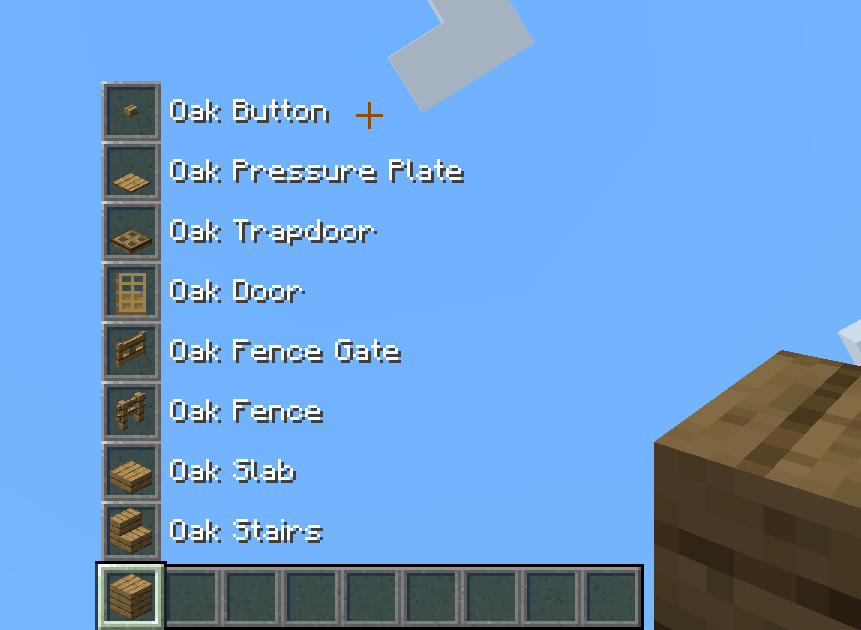
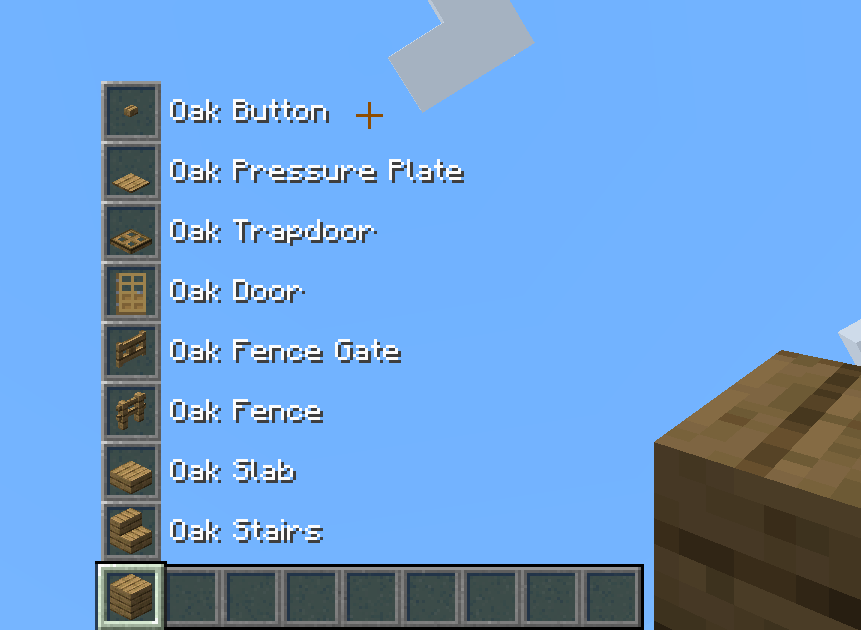
Select a block on your hotbar, hold the swap key (Left Alt by default), and scroll. The block in your hand cycles through its configured variant group. A preview appears above your hotbar showing the other variants and their names, so you can see what you're switching to before you place it.
The core idea is that a whole "family" of blocks (for example every oak building block) behaves like a single item you carry around and reshape as needed. For example you keep just one stack of oak planks in your inventory, but you have 9 stacks of oak variants instantly available (full block, stair, slab, fence, fence gate, door, trapdoor, pressure plate and button).
Purpose
It's no secret inventory management is a huge problem in this game. One of the biggest contributors to this problem are all the block variants that have to be added to the game for all the building blocks, and then managing your inventory and storage of all of these blocks. With this mod block variants only exist in the hotbar, and nowhere else; they always revert just to their original base block. This simplifies inventory management, storage, and filtering, and eliminates the need for constantly swapping between stacks of block variants, and crafting them in the crafting table or stonecutter.
How it works
- Swap: Hold the swap key (Left Alt by default, rebindable) and scroll the mouse wheel while holding a block that belongs to a variant group. The held item changes to the next/previous variant. Scrolling wraps around the group.
- Preview: While the swap key is held, a column of "ghost" slots above your hotbar shows the other variants in the group, labelled by name. Distracting HUD elements are hidden while previewing.
- Non-destructive drops: Breaking a placed variant drops its base block, not the variant. This keeps the whole family as one interchangeable resource - place stairs, break them, get planks back.
- Variants stay in the hotbar: Variants only exist in your hotbar and offhand. Move one into your main inventory, a chest, a shulker, or drop it on the ground and it automatically reverts to its base block. This prevents variant items from cluttering storage.
- Smart pickup: When you pick up a base block while holding one of its variants, it merges into that stack instead of taking up a new slot. The stack keeps showing the variant; the count just goes up. (Renamed or otherwise customised stacks are kept separate.)

Concerns and FAQs
This causes more blocks being needed for building!
Not really. On average block variant crafting operations are lossy and really only with slabs you get
more blocks than original:
| Variant | Crafting ratio | Block loss in vanilla |
|---|---|---|
| Stairs | 6 for 4 | 33% |
| Slab | 3 for 6 | 0% (you get double) |
| Fence * | 5 for 3 | 40% |
| Fence gate * | 4 for 1 | 75% |
| Wall | 6 for 6 | 0% |
| Door | 6 for 3 | 50% |
| Trapdoor | 6 for 2 | 67% |
| Pressure plate | 2 for 1 | 50% |
| Button | 1 for 1 | 0% |
| Grate | 4 for 4 | 0% |
* Fence and fence gate also cost sticks, counted here as plank-equivalents (2 planks = 4 sticks).
This mod is always 1 block in, 1 block out, and fully reversible. So compared to vanilla crafting, every variant except the slab actually costs fewer base blocks - the slab is the only case where vanilla's 2-for-1 yield comes out ahead. For stone families you can also use the stonecutter, which is 1:1 for most shapes, so there the two are roughly even and the mod just saves you the step.
The idea is to change the thinking about block ratios when making variants, and to stop thinking about variants as separate blocks entirely. With this mod, variants don't exist outside of the hotbar, it's always just the base block you're swapping to your desired shape.
Why isn't block X in a variant family?
Usually for a good reason - technical issues, game balance (vast difference in number of input blocks in the normal crafting
recipe, or uses other items in the crafting recipe than just the source block), or block categorisation (the mod tries to
family up only blocks in the Creative menu Building Blocks tab). Here are some examples of vanilla items and reasons:
- Wood signs: basic signs are only made with planks and sticks, which would make them fit as we also allow fences and fence gates. However, signs carry extra component data and only stack to 16 and not 64, which made them inconsistent with the other swappable blocks and caused stacking issues. I didn't want to get into complicated item stack component comparisons or changing max item stack sizes, that's not the purpose of this mod.
- Functional blocks (chests, composters, barrels, furnaces...): game balance, even if they are made only from one type of material, they're significantly more expensive than just one plank/cobblestone.
- Ladders: only made from sticks, so if assigned to the oak planks family for example, it would disallow crafting from other wood types.
- Glass block/pane and carpet/layers: game balance again, crafting outputs significantly more items than the base block.
- Coloured blocks, copper bulbs, hanging signs: game balance, require other crafting items (dyes, blaze rods, chains...)
- Iron/gold blocks (doors, trapdoors, weighted pressure plates): made from ingots, not blocks; if made from blocks they would be significantly more expensive.
Why aren't full block variants swappable?
This mod aims to allow swapping between different block shape variants, not different full blocks entirely. That's why you
can't swap between stone and cobblestone, deepslate and cobbled deepslate, or the chiseled/pillar variants. In addition,
many such blocks tend to have a lot of their own shape variants (e.g. all the deepslate blocks, cobbled/polished/bricks/tiles
all have their own stairs, slabs and walls) so putting them all in one variant family would be impractical. The only sort
of deviation from this rule are copper grates, which are kinda a full block but not really in my opinion, you can waterlog
them like stairs or slabs for example.
Is this client-side or server-side?
Both. The swap, drop-revert, and confinement all run through server-side mixins and networking,
while the swap-key + scroll trigger and ghost preview are client-side. So it needs to be installed both
on the server and the client for full function.
Is it safe to add/remove from an existing world?
Very safe. The mod doesn't touch blocks placed in the world, just items in inventories.
Installing/uninstalling never corrupts a world. After installing, any block variants that are not in the player's
hotbar/offhand (but stored in storage blocks like chests, or in the internal player inventory) are reverted to the
base block. After uninstalling, every block stays where it is in the inventory - base blocks stay as base blocks,
variants in your hotbar stay as the vanilla block variants.
The mod doesn't add or remove any item stacks or changes item stack counts, nor does it overwrite blocks placed
in the world. The only thing it does is revert block variant item stacks outside the player hotbar/offhand into the
base block item stacks. That's it.
What about crafting recipes that use block variants?
Thankfully there's only a small amount of them (mainly chiseled/pillar blocks from slabs, but also things like the composter
or armour stand), and all were addressed while trying to keep crafting material balance (e.g. chiseled/pillar blocks are made
from two full blocks instead of two slabs but produce two blocks instead of one, consistent with the vanilla quartz pillar
recipe).
How does Creative pick-block / creative inventory work?
Middle-clicking a placed variant gives you the variant item (drops logic doesn't apply to creative pick), which then
works normally in the hotbar.
How does Survival pick-block work?
Pick block is fully variant-aware. Middle-clicking a block will give you the item stack no matter what if it's in your
inventory and from the same block variant family. So if you pick a full block and you have a stairs variant currently
sitting on your hotbar, it will pick that item stack and auto-swap it for you. If you pick a variant block and you have
a stack of the base block in your hotbar or even inside your player inventory, it will pull it and auto-swap it as well.
How are edge case item holders (item frames, decorated pots) handled?
Item frames can still display block variants if you place them into one, so no change from vanilla. The item will revert
to the base block only when punched out of the item frame. Decorated pots can also hold the variant but it will revert
when the pot is broken or removed with a hopper. Any hopper/dropper movement reverts to base block.
Do tool enchantments still work correctly?
Yes, with no changes. The block reversal is handled after the game computes drops, so Silk Touch/Fortune still apply,
and then the drop results are converted to base blocks if applicable.
Does this cause any lag or performance issues?
No. Block reversal check is tick-based but the scan is a cheap hashmap lookup, and only runs when an inventory UI is opened.
Impact is negligible. Game loading is microscopically faster because hundreds of crafting and stonecutting recipes for block
variants were removed.
What about the stonecutter?
The stonecutter was not removed; only the recipes for block variants were removed. The block is still in the game,
retains the full block recipes (not block shape variants) and can be used for decoration or other recipes in modded
scenarios that this mod doesn't cover.
Does/will this support mod X?
The list of supported mods is below. New ones can be requested by opening a GitHub issue, or added
yourself with a custom JSON config file (explanation below).
Supported mods
The goal is to integrate variant swapper support for as many popular mods as possible, if there is interest. The mod ships with built-in compatibility for a specific group of mods already, depending on the version and modloader combination.
You can find the current list of supported mods across versions here.
Don't see your favorite mod with block shape variants? Open a GitHub issue to request it, or drop in your own config (instructions below) into your game.
Configuration
The mod ships with built-in defaults for every supported mod above, and they stay current with each update automatically - there are no config files to maintain unless you want to customize things.
These defaults live inside the mod and are never written to disk, so mod updates always bring the latest set without you having to delete or regenerate anything. Families for a mod you don't have installed are simply skipped.
Customizing
To change or add variant groups, drop your own JSON file into config/blockvariantswapper/ (the
folder is created empty for you). Any file ending in _block_variants.json (e.g. minecraft_block_variants.json) is loaded on top of the
defaults. Each file maps a base block to the list of blocks it cycles through:
{
  "minecraft:oak_planks": [
    "minecraft:oak_planks",
    "minecraft:oak_stairs",
    "minecraft:oak_slab",
    "minecraft:oak_fence",
    "minecraft:oak_fence_gate",
    "minecraft:oak_door",
    "minecraft:oak_trapdoor",
    "minecraft:oak_pressure_plate",
    "minecraft:oak_button"
  ]
}
Things to keep in mind:
- Custom configs are your responsibility to maintain and make sure they work correctly.
- The mod fully supports only regular building blocks in its block family configs. Other block types, especially blocks that contain component data (e.g. functional blocks like signs, furnaces, etc.), or don't stack to standard 64 item stacks, will not work properly and may cause unintended behaviour. I will not accept issues raised on these.
How your files interact with the defaults:
- Override: if you define a base block that already exists in the built-in defaults (e.g.
minecraft:oak_planks), your group replaces the default one entirely, so list every variant you want to keep, since the default group is discarded for that block. (This is how you remove a variant you don't like: redefine the family without it.) - Add: define a base block that isn't in the defaults to add a brand-new family; this way you can add support for a mod that isn't bundled yet.
- The first entry in a group is the base block that everything reverts to.
- Each base block must appear only once per file - a JSON file with the same key twice won't load.
- Item IDs that don't exist in the current game instance are skipped silently, so a file that references an optional mod is safe to keep even when that mod isn't installed.
- If two of your files define the same base block, the last one (by filename order) wins.
- Run
/reloadin-game to apply config changes without restarting.
License
Licensed under the LGPL-3.0-only license.
The Block Variant Swapper Team
