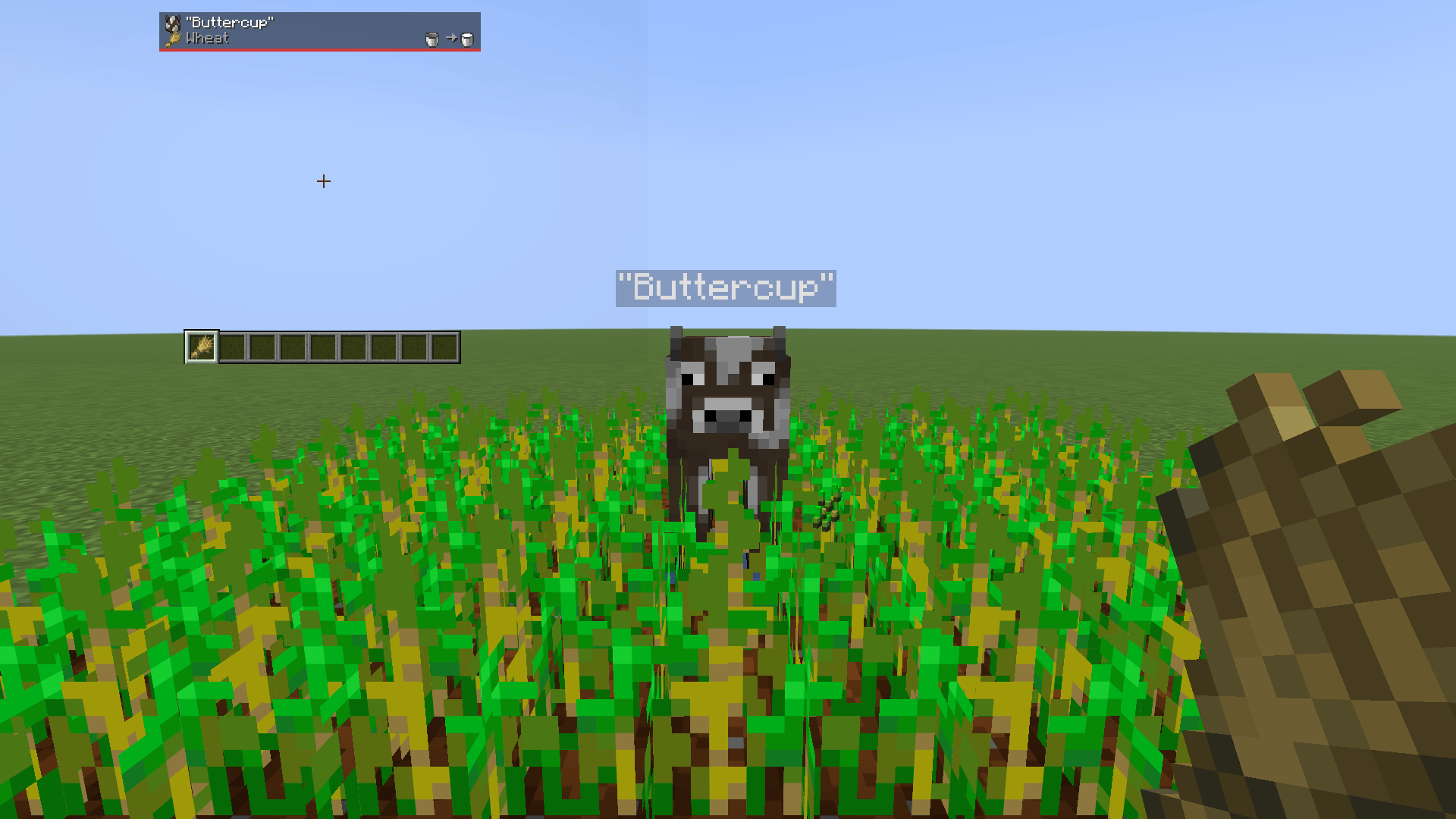
creature-card.png
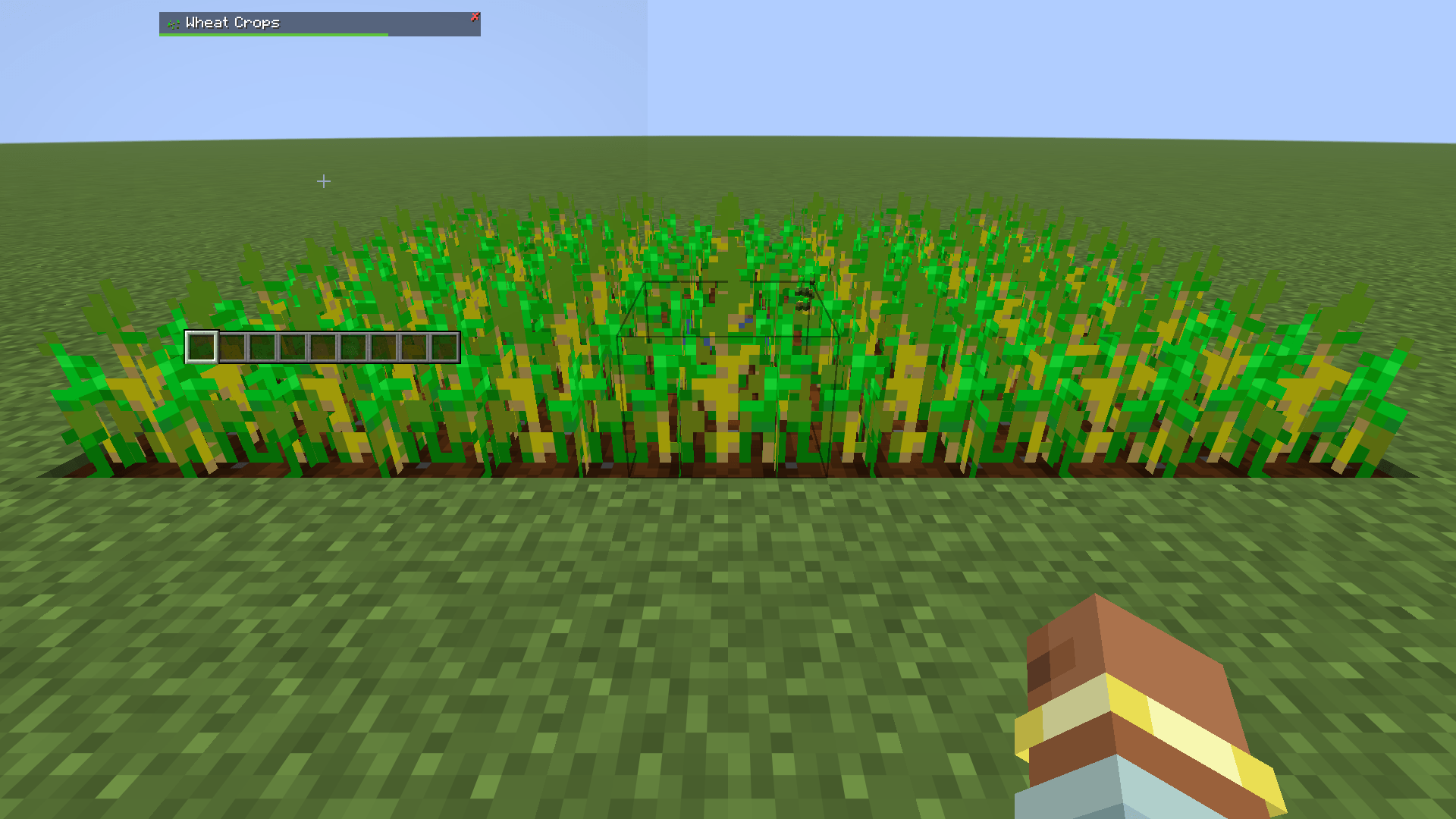
crop-card.png
Description
Look at anything. Its picture and its name appear in a small card at the top of the screen, clear of the effect icons and under any boss bar that happens to be up.
Blocks and creatures both. A creature is named by its display name, so a villager who has been given one is introduced by it.
The name is the answer. Everything else on the card is one of two things: a mark you can ignore at a glance, or a fact that would otherwise cost you something to not know.
What Keeps It Small
The suite it belongs to is forty mods deep and most of that content is unlabelled: the game will happily show you a block it has never mentioned by name. "What is that" is a question everybody asks, whether the answer is a word they have not read before or a block they have not seen before.
The card began as a picture and a word and nothing else, and that was the right shape until the mods around it started having things to say that no name could carry. What replaced the rule is not a longer card - it is a smaller budget, spent in a fixed order:
- One card, two rows. The second row exists only when something is on it.
- One line, shared. Facts are ranked, packed onto that line while they fit, and cut from the least important end when they do not. A mod that wants a paragraph wants a book.
- Marks, not sentences. What is true of half the world - it is dark enough to spawn things here, that tool will not do - is a glyph in a reserved slot, not words. Glyphs are read at a glance and ignored just as fast; a sentence has to be read every time.
- Nothing that repeats the game. No health under a health bar, no name under a boss bar, no progress bar for a furnace whose flame you can see from across the room.
The limits are in the code rather than in this paragraph: the line is packed against a measured width and the collection stops at six facts, so the card physically cannot grow into a panel however many mods have opinions about a block.
Turning It Off
| Command | Effect |
|---|---|
/blocktip |
Flip it, whichever way it currently is |
/blocktip on |
On, definitely |
/blocktip off |
Off, definitely |
/blocktip sneak |
Only while sneaking, which is already the gesture for paying attention to one block |
/blocktip marks |
What the glyphs on the card mean, said in chat |
Bare toggle first, because that is what someone types when the tips are in the way and they want them gone now. The explicit forms exist so that telling a child "type slash blocktip on" cannot end with it off.
Anyone can use them, and each changes only your own card.
The same choice is on Block Tip's page in the Pandorical mods menu, as Show tips: Always, When sneaking, or Off. It reads and writes the same stored preference as the command, so the two never disagree.
It is on by default and the preference is stored per player, as the list of people who opted out. A feature you have to switch on is a feature for people who already knew about it, which is the opposite of the point here.
The bare toggle gives back whatever you had: turning tips off and on again returns you to sneak mode if that is where you were, rather than quietly costing you the setting.
Upgrading from a version before sneak mode and hidden blocks starts this list empty - the old preferences are stored in a different shape under a different name, and are left alone on disk rather than half-read. Anyone who had turned tips off turns them off once more.
Blocks You Already Know
All of it or none of it is a blunt choice. The player who is tired of being told what stone is still wants to be told what the thing a mod just added is, so the list is per block and per player.
| Command | Effect |
|---|---|
/blocktip hide |
Never name the block you are looking at again |
/blocktip hide <block> [<block>...] |
The same, for up to five named blocks |
/blocktip show |
Name the block you are looking at again |
/blocktip show <block> [<block>...] |
The same, for up to five named blocks |
/blocktip show all |
Forget the whole list |
/blocktip hidden |
Read the list back |
The no-argument forms are the ones anybody uses: the block that has just told you what it is for the hundredth time is already on your screen, and pointing at it beats typing its id. show works on a hidden block even though nothing is on screen for it, which is the whole reason it has to be a look and not a card.
Stored per player in the world's saved data, as ids rather than blocks, so uninstalling a mod for a week does not quietly empty the list.
The mods menu page lists the same blocks under Hidden blocks, each with a button to bring it back. Adding one stays a look and a command, since the block to hide is the one on screen.
Details Worth Knowing
- Names arrive in your own language. The server sends a translation key, not words, so the client says it in whatever language that client is set to. The facts under the name are the server's own words, and a mod's translation key only survives while it is the only fact on the line - two facts joined by a dot are no longer a key anything can look up.
- Blocks with no item still get named. Fire, portals, the top half of a door: those show the name with no picture, which beats a picture of the wrong thing.
- Creatures show their pick item. A spawn egg for a mob, the boat for a boat: whatever middle-click would hand you, which is the picture of the thing by definition. People get a plain head, middle-click having nothing to offer for them.
- A player's head is named for its player, the way the item in your hand is.
- Modded things say whose they are. The mod's name sits small at the far end of the name's line. Vanilla says nothing, since that is what everybody assumes already, and a mod the loader cannot name is given its namespace instead.
- Whichever is nearer wins. A cow standing in front of a wall names the cow, the same rule your eyes are using.
- The bottom edge is a gauge. It fills as the block in front of you gives way. On a creature it is a red bar of the health it has left, and on a crop a green bar of how far it has grown, full when it is ready to pick.
- It costs almost nothing. One raycast per player four times a second, and a packet only when the answer changes. Standing still and staring at a wall sends nothing at all. The break bar is the one thing sent every tick, and only while you are mining.
- Spectators get no card. Looking through walls would name whatever is behind them.
- Reach is six blocks, a little past arm's length, so it answers before you arrive.
What It Says About Vanilla
A handful of facts the game tracks and never shows, chosen because not knowing each one costs you something:
| Looking at | It says |
|---|---|
| A spawner | Spawns Zombie |
| A furnace | Smelting, Out of fuel, or Idle |
| A chest | 50% full · 7/15 |
| Redstone dust | 12/15 |
| Waxed copper | Waxed |
| A note block | harp, F#3 |
| A hive | 3 bees, honey 4/5 |
| Farmland | Watered or Dry |
These are ranked, most specific first, and as many as fit share the line: a furnace is also a container, so a lit furnace with something in it says both, and the machine that knows what it is doing is the one that survives a line with no room left.
A number of redstone power, from a wire or from what a comparator would read, carries a lightning mark in front of it rather than a word saying which kind of number it is. A container's fill is said in quarters, or Empty, or Full. A loot chest nobody has opened says nothing about its inside at all: counting its slots would roll its loot on the spot, for whoever happened to open it first.
How far a crop has grown is drawn rather than said, as the green fill along the card's bottom edge: wheat and the other crops, and also stems, nether wart, cocoa and sweet berries.
Animals
An animal's line starts with what it breeds on, the food's own picture in front of its name. One that takes several foods shows them in turn, a second and a half each and up to eight of them, and every animal of a kind shows the same food at the same moment, so a pen reads as one answer.
What it gives you sits at the far end of the same line, as two pictures and an arrow: bucket to milk for a grown cow or goat, bowl to stew for a grown mooshroom, shears to wool of its own colour for a grown sheep that has not been sheared.
The corner
A skull in the card's top-left corner means mobs can appear on top of that block. Since the light rewrite they need block light of exactly zero, which nobody can check by eye: a torch two blocks too far leaves a square that looks lit and spawns creepers all night.
It has a corner to itself rather than a line, because it is the one thing here that is true of half the world. As a line it was the tip you read most and needed least, and it lost every argument with a tip that had something particular to say - a dark chest reported how full it was and never mentioned what could appear on top of it. In the corner it is checkable at a glance, ignorable just as fast, and true at the same time as everything else on the card.
It sits on the corner of the block's own picture rather than in a column of its own, so it costs the card no width and cannot drag the name sideways as it comes and goes from block to block.
What To Hold
The end of the name line answers one question: will what is in my hand do? A glyph says the verdict, and a picture says what would be better, and neither appears when the answer is "anything will". /blocktip marks says the same table in chat, for anyone who is in the game rather than in this file.
| At the end of the name | Means |
|---|---|
| Green tick | The drop is safe with what you are holding, or the crop is ripe |
| Red plus, with a tool | Right kind of tool, not hard enough. The errand is a furnace, not your hotbar |
| Red cross | Wrong tool, and swinging now loses the block. On a crop, that it is not ready yet |
| Yellow star, with a tool | Nothing is at stake. That tool would be quicker, or would hand you the block instead of what it breaks into |
| An enchanted book | This block drops nothing without silk touch |
| Shears | Shears give you the block itself: the leaves, the cobweb, the grass |
Red means swinging costs you something; yellow and green mean it does not. Each meaning has its own glyph as well as its own colour, because red against yellow is the one distinction a good share of players cannot make, and a screenshot in grey makes it for nobody.
Both of those last two are read from the block's own loot table rather than from a list kept here, so they stay right for whatever a data pack retunes or a mod adds. The question asked is "does the block itself come back", never "does silk touch change the drop" - the second is true of stone and of every ore in the game, and answering it would put a book on half the world.
Each kind of block is asked once and remembered until data packs reload.
Boss Bars
A boss bar and this card live in the same corner of the screen. Left alone, a dragon gets named twice in the same place by two things that have clearly never met.
So whenever a bar is up, the card moves to the next row of that stack and takes the bar's width, which reads as one more line of the same thing rather than somebody else's window over the top of it. That is two questions, not one, and the answers differ:
- Is a bar on screen at all? Decides where the card sits. True far more often than you would think - a village, a raid, a timer somebody set - and this was the case that went wrong first: a card that only checked whether it was looking at a boss sat squarely across the bar every other time.
- Does the bar belong to what I am looking at? Decides what the card says. The health goes, because the bar is a health bar drawn larger and more precisely than a card could. And where that leaves nothing to add - a vanilla dragon, whose name and health are the whole card - it does not appear at all. A modded boss still gets one, because which mod a boss came from is a thing the bar never says.
Neither question is answerable in general. A boss bar is a field inside whatever owns it, with no tag and no central list; only the ones made by /bossbar can be found from outside. So mods say so themselves:
// this creature draws its own bar
BlockTipApi.bossBar("your-mod:your_boss");

// this player has a bar of mine up right now, whatever they are looking at
BlockTipApi.bossBarCheck(player -> myBars.isShowing(player));
Adding A Line
A card names a thing. Some things also have a fact that cannot be seen by looking at them, and those are exactly the ones nobody learns: a crafter that keeps a template looks like a crafter, a piston set to push three looks like a piston.
Any mod can add one line, compiled against Block Tip and guarded on it being present:
// true wherever the block stands
BlockTipApi.line("minecraft:crafter", "Keeps one of each - the pattern stays");

// or worked out from the block in front of you
BlockTipApi.describe((level, pos, state, player) -> ...);

// The card's title, for a block whose registered name is a category: return null to keep it
BlockTipApi.name((level, pos, state, player) -> ...);

// or about whatever is walking around
BlockTipApi.describeEntity((entity, player) -> ...);

// or as a picture, where a picture says it better
BlockTipApi.illustrate((level, pos, state, player) -> new BlockTipApi.Tip("Keeps a template", "minecraft:bread"));

// the picture for a block that has no item of its own
BlockTipApi.icon("your-mod:worldgen_only_block", "minecraft:oak_leaves");

// the card's title for a creature whose own name is wrong: return null to keep it
BlockTipApi.nameEntity((entity, player) -> ...);
An entity that is really a block drawing itself - a hidden mob borrowing a renderer, a display entity - can carry the scoreboard tag block_tip:stand_in (BlockTipApi.STAND_IN). Looking at it then names the block it stands in, so the costume never shows through on the card.
The illustrated form draws an item at the head of the detail line, in the same column as the block's own picture. Crafter Template uses it to show what a crafter is loaded to make: a picture of the loaf beats nine ingredients the player has to solve in their head, and it is the same width whatever the recipe. The picture belongs to the line that starts the row: it is read off the winning tip rather than kept in a field of its own, so it cannot be drawn at the head of somebody else's sentence.
The entity form is for the same silence in a thing that moves. Player Trade uses it to say "Sneak-click to trade" while you are looking at somebody: the gesture is that mod's only front door, and nothing else in the game hints at it. An entity line joins whatever the card already says about the creature - an animal's food, what it gives - rather than replacing it, since they answer different questions and there is only ever the one row. Where several mods have a line for the same creature, the first registered is the one shown.
A mod compiling against this should declare the version it needs as breaks, not only suggests:
"breaks": { "block-tip": "<1.0.0" }suggests is advisory and Fabric does not act on it, and FabricLoader.isModLoaded answers whether Block Tip is present, not which one. Without breaks, a mod calling a method an older Block Tip does not have fails at registration with a NoSuchMethodError the loader turns into a refusal to start, naming your mod rather than the mismatch.
One line each, deliberately. The card stays readable because it is small; a mod that wants a paragraph wants a book.
Several mods can have something to say about the same block, and the card shows as many of their lines as its width will hold, separated by a dot. Priority decides the order, so what falls off the end of a full line is the least important thing on it. Keep a line short enough to share.
What It Will Not Say
The card reads block entities: how full a chest is, the number a comparator would give, whether a furnace has run dry, what a spawner makes. Every switch above belongs to the person looking, and none to the person looked at - so on a server where somebody else's chest is not your business, a claim or protection mod can close that:
BlockTipApi.inspection((level, pos, state, player) -> claims.mayOpen(player, pos));Refusing leaves the block named, because a name is what anybody standing there can already see. What it withholds is everything the card would otherwise have read out of the inside of it.
Pandorical
Block Tip runs server-side, and Pandorical is required: the server will not load this mod without it. The card is a Pandorical HUD, which is the reason there is nothing to install on a client that already has Pandorical.
No Block Tip jar is needed on a client. A vanilla client sees no card, and /blocktip still works for it.
Block Tip Team