Biome Editor
- By
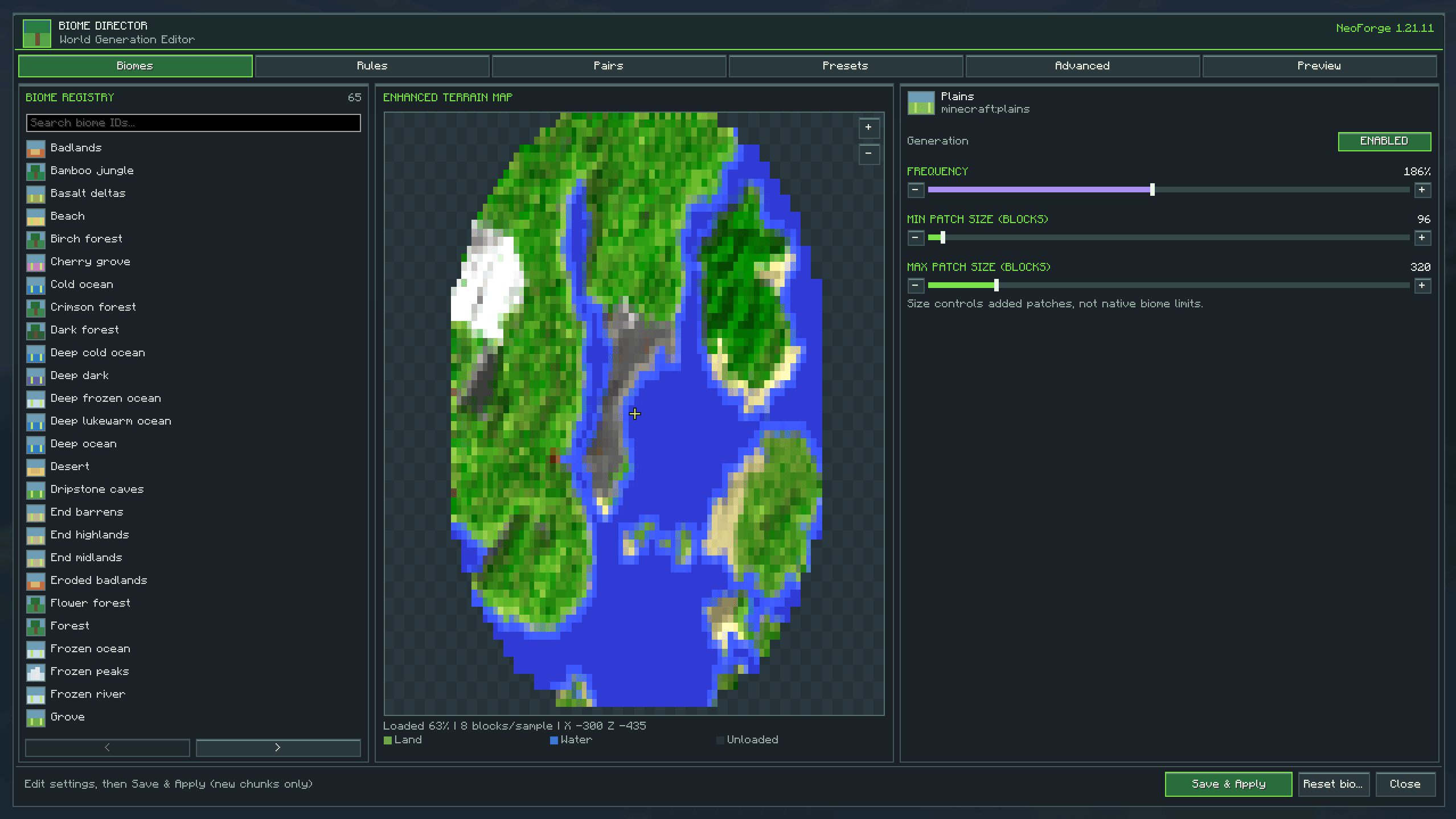
Take control of Minecraft's biome generation! Customize biome frequency, size, and placement rules. Disable unwanted biomes, explore an interactive terrain map, and edit vanilla or modded biomes with an easy-to-use in-game editor.
Screenshot 2026-11-20 120458.png
Description
🌍 Biome Director — Your World, Your Rules!
Minecraft Java 1.21.11 | NeoForge
Tired of Minecraft generating too many deserts, tiny forests, or biomes you don't want?
Biome Director gives you greater control over how biomes generate, with an easy-to-use in-game editor and an interactive terrain map.
Whether you're creating a massive survival world, designing a custom modpack, or experimenting with world generation, Biome Director lets you shape how your world develops.
🌲 Customizable Biome Generation
Control Biome Frequency
-
Increase or decrease individual biome generation rates from 0% to 400%.
-
Disable unwanted biomes.
-
Make your favourite environments more common.
-
Customize compatible vanilla and modded biome entries.
Adjust Biome Patch Sizes
-
Configure minimum and maximum additional patch sizes.
-
Create larger stretches of forest or smaller scattered regions.
-
Adjust patch sizes between 32 and 2,048 blocks.
Configure Biome Separation
-
Add rules for biomes you don't want generating beside each other.
-
Create approximate transition areas.
-
Customize biome combinations to suit your world.
🗺️ Interactive Terrain Map
Explore your surroundings through a built-in top-down map!
-
Displays actual terrain from loaded Minecraft chunks.
-
Shows land, water, and elevation shading.
-
Features enhanced map colours and terrain lighting.
-
Zoom in and out using your mouse wheel or on-screen controls.
-
Switch between Terrain, Biomes, and Simulated preview modes.
-
View nearby terrain without forcing distant chunks to load.
🖥️ In-Game Biome Editor
Press B in single-player to open the editor.
Features include:
-
Searchable biome registry.
-
Individual biome settings and sliders.
-
Enable and disable controls.
-
Separation rule management.
-
Custom configuration presets.
-
JSON-based settings.
-
Save and Apply functionality.
🧩 Modded Biome Compatibility
Biome Director discovers registered biomes from installed mods and supports biome placement adjustments for compatible world generators.
Compatibility varies by mod and world-generation system.
⚙️ Important Information
-
Changes apply to newly generated chunks, not existing terrain.
-
Biome size settings affect modified patches, not exact vanilla biome boundaries.
-
Biome separation rules are approximate.
-
The terrain map displays loaded terrain, not a prediction of unexplored areas.
-
The current implementation targets compatible multi-noise biome generators.
🌎 Build the World You Want
More forests. Fewer deserts. Larger biome regions. Customized biome combinations.
Biome Director puts world-generation control in your hands.
Development status: Experimental. Version 1.2.1 has passed offline testing but still requires full build and in-game verification before a public release.
Biome Editor Team