



Curse Maven Snippet
What's new
1.2.0
Versions
- Mod: 1.2.0
- Minecraft: 26.1.2
- NeoForge: 26.1.2.60-beta
Changelog
- AE2 compatibility (#10) (381cecc)
Pull Requests
README

Auxilio
Means help or assist in Latin.
Focuses on mouse/item interaction quality-of-life in inventory and crafting screens.
Features
All options can be toggled on/off via in-game mod config menu, or root Minecraft directory config file
Esc > Mods > Auxilio config
minecraft_root/config/auxilio-common.toml
Middle click sort in crafting grid:
Middle click on any crafting slot (2x2 or 3x3) and it will sort the grid.
Single-item-type grids are spread as evenly as possible across all valid crafting slots.

Mixed-item grids use type-local balancing: each type is equalized within the slots that already contain that type.


Shift + double left-click bulk transfer:
Shift + double left-click on a player-inventory slot quick-moves all matching items from player inventory into the currently open container (for example chest or crafting table inventory), as allowed by slot rules.
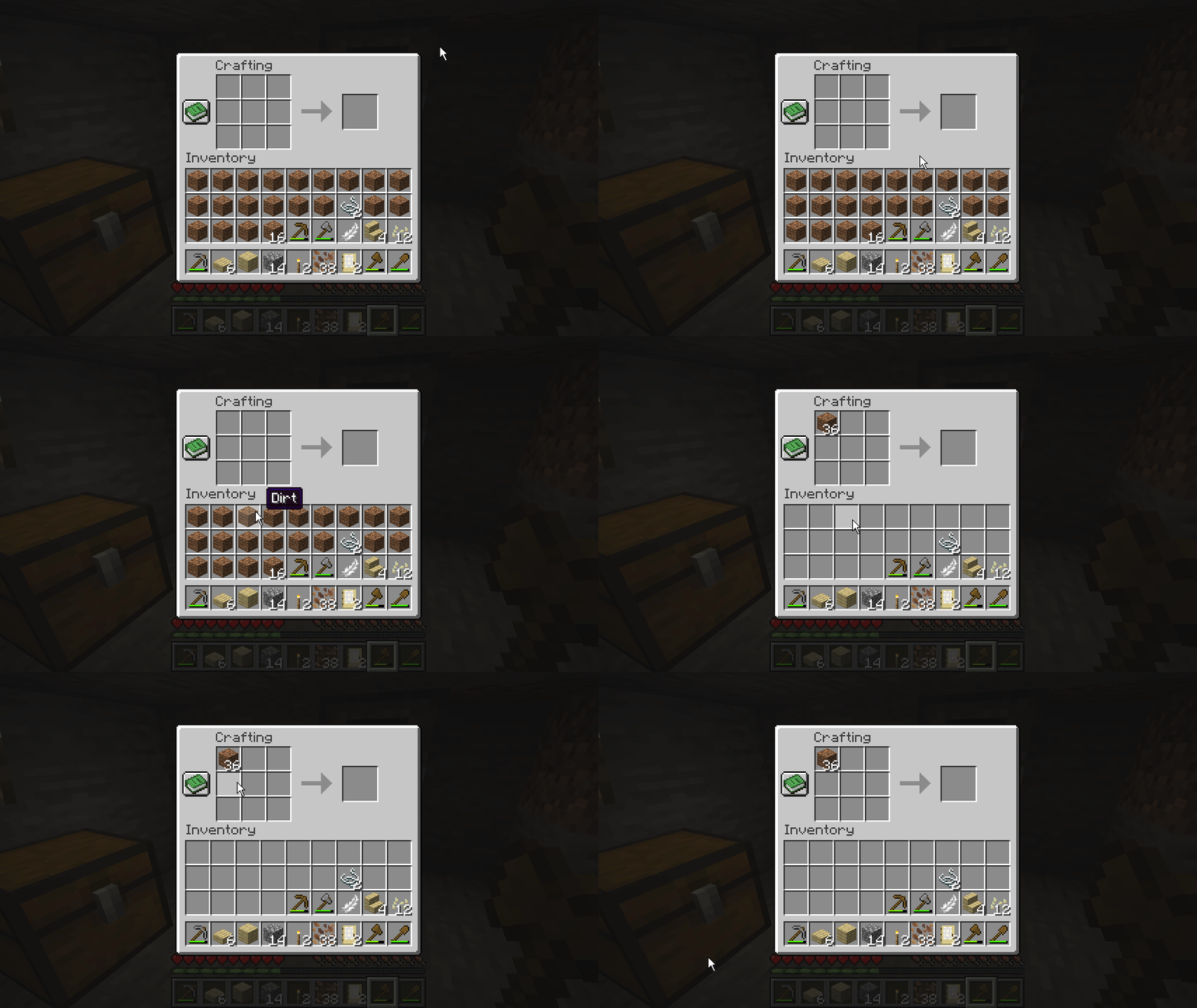
Shift + drag quick move:
Hold Shift and drag left-click across slots to quick-move hovered stacks. Each hovered slot is clicked at most once per drag stroke to avoid repeated click spam.

Scroll transfer:
Scroll up: move 1 item from hovered slot toward the opposite inventory side.
Scroll down: move 1 item from hovered non-player slot into player inventory.

Furnace fuel scroll
Scrolling items into furnaces will deposit almost anything into the top slot. Shift scroll up will scroll items into the fuel slot instead

Repeat right-drag:
Config option: enableRepeatRightDrag (default true).
When enabled, RMB drag replaces vanilla drag behavior.
Re-entering a slot during the same drag places another item there.

Debug logging:
- Config option:
debugMouseTweaks. - When enabled, detailed mouse tweak traces are logged with
[MouseTweaks]inrun/logs/latest.log.
[15:52:22] [FileWatcher-1-thread-1/DEBUG] [ne.ne.fm.co.ConfigWatcher/CONFIG]: Config file auxilio-common.toml changed, re-loading
[15:52:25] [Render thread/INFO] [co.ja.au.Auxilio/]: [MouseTweaks] scrollUp moved one item from slot 30 to slot 0
[15:52:25] [Render thread/INFO] [co.ja.au.Auxilio/]: [MouseTweaks] scrollUp moved one item from slot 30 to slot 0
[15:52:25] [Render thread/INFO] [co.ja.au.Auxilio/]: [MouseTweaks] scrollUp moved one item from slot 30 to slot 0
[15:52:25] [Render thread/INFO] [co.ja.au.Auxilio/]: [MouseTweaks] scrollUp moved one item from slot 30 to slot 0
Release Checklist
- Bump version in
settings.gradle(ext.release_version). - Keep
gradle.propertiesmod_versionaligned with the same value. - Commit and tag (for example
v1.0.0). - The
Release Jarworkflow will build and attachbuild/jar/*.jarto the release.
Additional Resources:
Community Documentation: https://docs.neoforged.net/
NeoForged Discord: https://discord.neoforged.net/
This mod has no additional files