


Automatic Door
- By
Build custom-shaped doors and castle gates from any block, with redstone control and opening animations.
Automatic Door
Build doors of any size and shape, from garage doors to castle gates, with a single item. Draw the shape on a grid, pick the look of every cell from your blocks, and open it with redstone, a pressure plate or a simple click.
Features
- One item, any shape. Place the Automatic Door and edit it on a 10x10 grid: rectangles, L shapes, arches, X shapes, portcullis-style gates. Cells only need to be connected, and diagonal neighbors count.
- A block for every cell. Choose the look of each cell from hundreds of blocks: full blocks, glass, glass panes, fences, walls, slabs, stairs, iron bars and more. A gold block here, a diamond block there, planks next to it. The blocks come from your inventory and are returned when you change or remove them.
- Open it your way. Right click it, power any cell with redstone, or put a pressure plate next to the door. The door waits to close while someone is standing in the doorway.
- 8 opening styles. Instant, bottom to top, top to bottom, left to right, right to left, center outward, alternating rows (each row slides the opposite way) and split sideways (opens from the middle, left half to the left, right half to the right). Cells open in sequence and close in reverse.
- Big doors made easy. The block menu shows up to 8 rows at a time and scrolls with the mouse wheel or a scrollbar.
- Piston sounds when the door opens and closes.
How to use
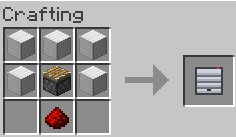
- Craft the Automatic Door and place it on the ground. It starts as a 2x2 door.
- Shift + right click the door to open its menu.
- Put blocks in the slots to change how each cell looks.
- Click Edit shape to draw the door on the grid. Click or drag to paint cells, then press Apply. The placement point of the door is at the bottom center of the grid; the door can grow left, right and up from there.
- Click the Open: button at the bottom of the menu to choose an opening animation.
- Open the door with a right click (without Shift), redstone or a pressure plate.
Breaking any cell removes the whole door and gives you the door item and all blocks you put inside.
Automatic Door Team
