


Auto Torch Item
- By
Automatically places a torch at the player's feet in low light when an enabled Automatic Torch is in the inventory.
English|简体中文
Auto Torch Item
Automatically places a torch at the player's feet when the light level is low and an enabled Automatic Torch is in the inventory.
Crafting
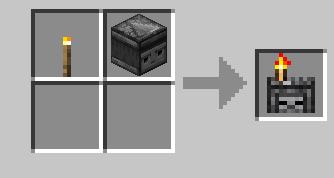
Torch + Observer (shapeless recipe).
Usage
1. Put an Automatic Torch in your inventory.
2. Right-click it to enable or disable automatic placement.
3. The item glints while enabled.
Configuration
- Do not consume torches: automatic placement does not require or consume normal torches. Placed torches become Temporary Torches and do not drop when broken.
- Maximum placement light level: controls the light threshold for automatic placement.
Auto Torch Item Team
