
Auto Simple Voice Distance
- By
2026-11-14_02.22.08.png
Description
Auto Simple Voice Distance
Minecraft: 1.21.1 | Loader: NeoForge | Requires: Simple Voice Chat | License: MIT
An immersion add-on for Simple Voice Chat that dynamically adjusts the distance other players can hear you based on your real-time microphone volume. Whisper quietly to nearby teammates or shout across the valley without pressing any extra hotkeys!
(Russian version below)
---
FEATURES
- Dynamic Voice Radius: Smoothly scales your voice distance from a quiet whisper (~5 blocks) to normal speech (~24 blocks) and loud shouting (up to 64–100 blocks).
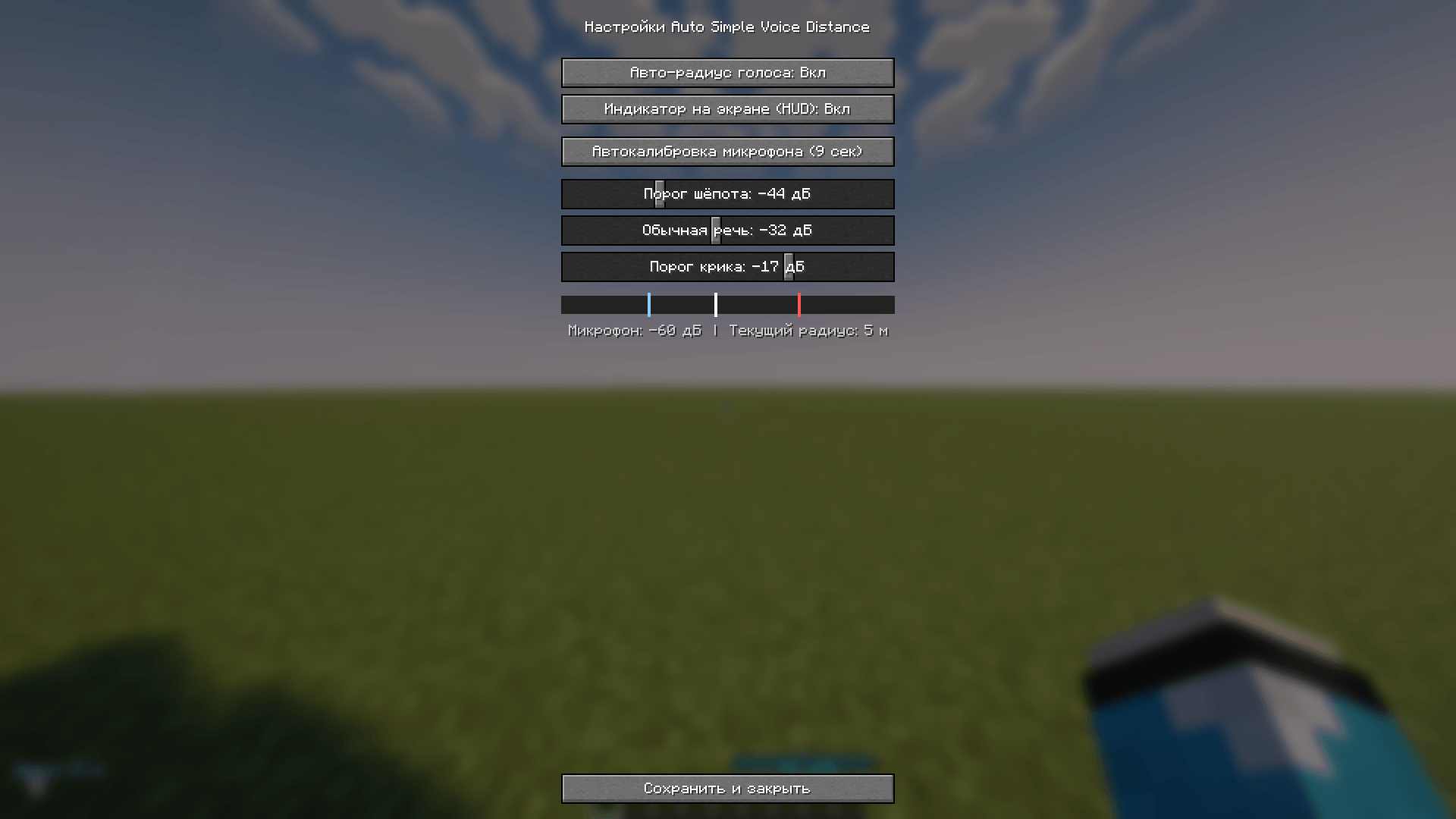
- 9-Second Auto-Calibration: Don't want to guess decibel numbers? Click one button in the mod's config menu, whisper, talk, and shout for 3 seconds each, and the mod calibrates itself to your microphone.
- Manual Fine-Tuning: Adjust exact dB thresholds using built-in sliders with a live microphone level bar and color-coded threshold markers.
- Smooth Attack & Release: Expands your hearing range instantly when you start shouting and holds it briefly after you stop speaking so the ends of your sentences are never cut off.
- Clean HUD Indicator: Displays your current voice mode (Whisper, Normal, Shout) and active radius in blocks in the corner of your screen (can be toggled off).
INSTALLATION & SERVER SETUP
1. Install Minecraft 1.21.1 with NeoForge (21.1+) and Simple Voice Chat (2.5.0+).
2. Download the latest autosimplevoicedistance-x.x.x.jar from the Files tab.
3. Place the .jar file into the mods folder on both the client and the server.
4. (Important for Shouting) Open config/voicechat/voicechat-server.properties on your server and increase max_voice_distance (for example, to 100.0). Otherwise, Simple Voice Chat will cap your shouting radius at the default 48.0 blocks.
CONFIGURATION
1. In Minecraft, open Mods -> Auto Simple Voice Distance -> Config.
2. Click Auto-Calibrate Microphone (9 sec) and follow the on-screen prompts (3 seconds of whispering, 3 seconds of normal talking, 3 seconds of shouting).
3. Optionally, tweak the decibel sliders manually while watching the green live microphone bar.
SOURCE CODE & AI DISCLOSURE
Source code on GitHub: https://github.com/uganda3000/Auto-Simple-Voice-Distance
The Java source code for this project was generated with the assistance of an AI tool, then assembled, configured, and tested by the repository author.
---
РУССКАЯ ВЕРСИЯ
Auto Simple Voice Distance — это аддон для мода Simple Voice Chat, который в реальном времени измеряет громкость вашего микрофона и автоматически меняет радиус слышимости вашего голоса для других игроков.
ОСНОВНЫЕ ВОЗМОЖНОСТИ
- Живой радиус слышимости: плавно меняет дистанцию звука от тихого шёпота (~5 блоков) и обычного разговора (~24 блока) до громкого крика (64–100 блоков).
- Автокалибровка микрофона за 9 секунд: нажмите одну кнопку в настройках мода, пошепчите, поговорите и крикните по 3 секунды — мод сам подберёт пороги под ваш микрофон.
- Ручная подстройка: удобные ползунки децибел с живой шкалой микрофона и цветными отметками порогов.
- Плавность без обрывов: радиус мгновенно расширяется при начале крика и удерживается доли секунды после фразы, чтобы окончания слов не пропадали.
- Аккуратный HUD: показывает текущий режим голоса и радиус в метрах в углу экрана (можно отключить в настройках).
УСТАНОВКА И НАСТРОЙКА СЕРВЕРА
1. Установите Minecraft 1.21.1 с загрузчиком NeoForge (21.1+) и мод Simple Voice Chat (2.5.0+).
2. Скачайте актуальный файл autosimplevoicedistance-x.x.x.jar во вкладке Files.
3. Поместите .jar файл в папку mods и на клиент, и на сервер.
4. (Важно для крика) В файле настроек сервера config/voicechat/voicechat-server.properties увеличьте параметр max_voice_distance (например, до 100.0), иначе базовый мод обрежет дальность крика на стандартных 48.0 блоках.
НАСТРОЙКА В ИГРЕ
1. Зайдите в Моды -> Auto Simple Voice Distance -> Настройки.
2. Нажмите кнопку Автокалибровка микрофона (9 сек) и следуйте подсказкам на экране.
3. При необходимости подправьте ползунки децибел вручную, ориентируясь на зелёную полоску громкости.
Auto Simple Voice Distance Team
