


Auto Name Tag
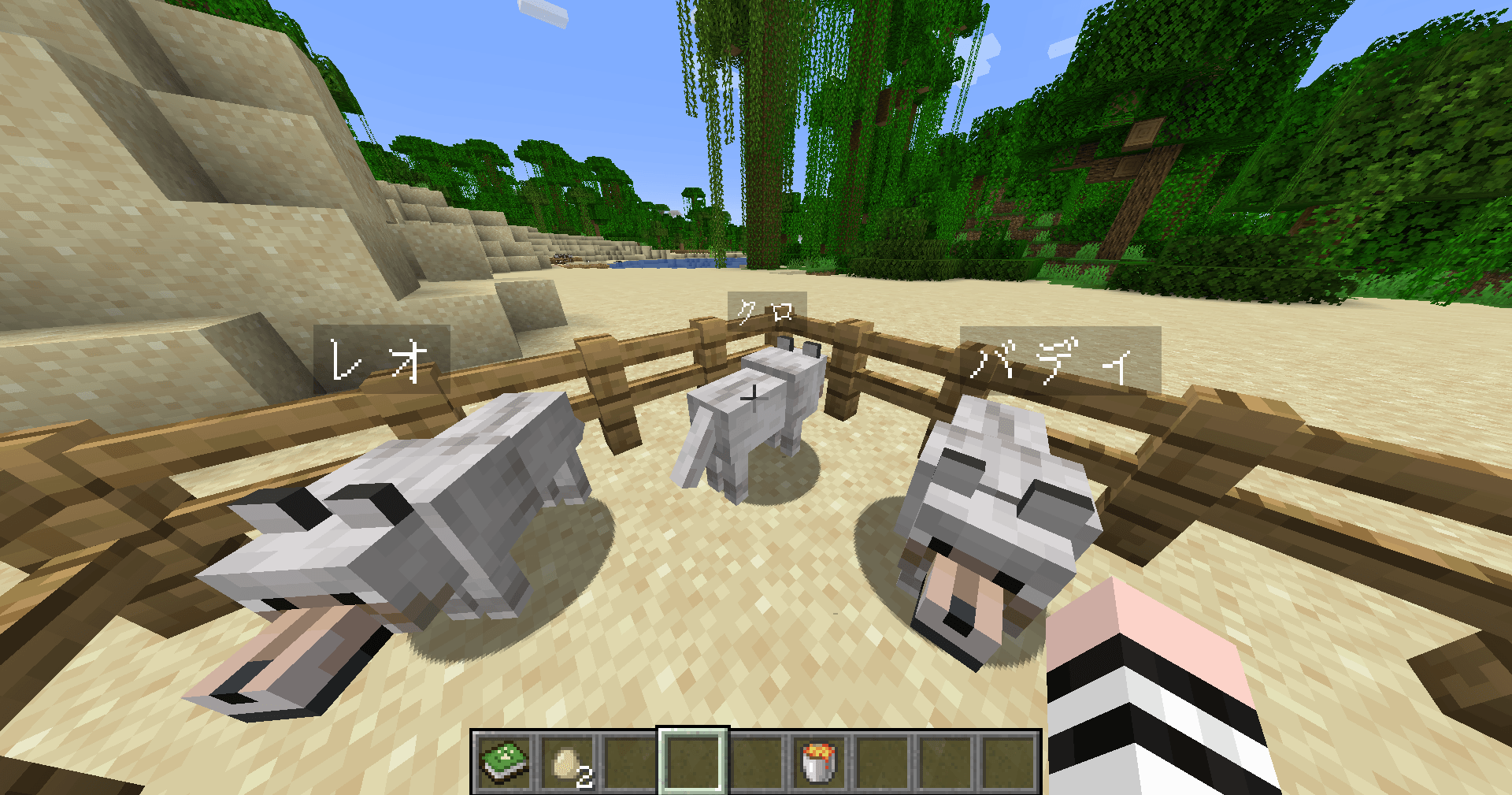
Wolves get names from your own list when they spawn.
Description
Auto Name Tag
No name tags needed. Every mob in your world, named the way you want.
Auto Name Tag gives a name to mobs the moment they spawn or are bred, picked at random from a name list you write for each kind of mob. No more hunting for name tags and renaming animals one by one at an anvil.
What makes it different
🐑 Your own name list for every mob type
This mod doesn't hand out names from a fixed built-in list. You decide which mobs get names and what those names are. Add as many names as you like for sheep, cows, creepers and so on. Any language works, including Japanese. Mobs without a list stay unnamed, so you only name what you want.
📖 The Animal Guide: edit names while looking at the mob
Open the Animal Guide book and each spread shows the mob on the left and its names on the right. Add and remove names, and add or delete whole pages, right inside the book. You never have to open a config file.
- You receive one copy the first time you join a world (or craft it from a book and wheat)
- Add a page with one click from the list of mobs that have no names yet
- Change settings on the last page
🍼 Babies get names too
Besides natural spawns, world generation and spawn eggs, babies born from breeding are named as well.
✨ Easter-egg names, on your terms
Optionally give vanilla's special names such as Dinnerbone (upside down), jeb_ (rainbow sheep) and Toast (special rabbit) to any mob, at a chance you choose. The toggle and the chance (0–100%) can both be changed in game.
🧩 Works with mobs from other mods
Mobs added by other mods are detected automatically and get their own entry in the name list, so you can name them from the guide without looking up IDs.
⚡ No restart required
Name edits and setting changes apply immediately while the game is running.
How to use
- Install the mod and join a world. An Animal Guide appears in your inventory.
- Right-click the guide, open the page of a mob, and add names.
- Mobs that spawn or are bred from then on receive a name.
To name mobs that already exist, run /animalnamer nameall.
Config files
You can also edit the text files directly.
mods/names.txt— the name listsconfig/animalnamer.properties— settings
[sheep]
Fluffy
Woolly

[cow]
Bessie
Commands
All commands require operator permission.
| Command | Description |
|---|---|
/animalnamer add <mob> <name> |
Add a name |
/animalnamer remove <mob> <name> |
Remove a name |
/animalnamer list [mob] |
Show registered names |
/animalnamer nameall |
Name every unnamed mob in loaded chunks |
/animalnamer showname on|off |
Always show names above mobs |
/animalnamer special on|off |
Give special names to all mobs |
/animalnamer special chance <0-100> |
Chance of a special name |
/animalnamer reload |
Reload the config files |
Requirements
- Minecraft 1.21 / 1.21.1
- Fabric Loader 0.15.0 or newer
- Fabric API (required)
- In multiplayer, the mod is required on both the server and every client
Notes
- Available in English and Japanese. The guide and chat messages follow your game language, and the starting name list is English unless your system language is Japanese.
- Editing names in the guide and changing settings is limited to operators and the world owner.
- Names given by this mod do not stop mobs from despawning (unlike a name tag).
- A vindicator named
Johnnyattacks other mobs.
License
MIT
Auto Name Tag
名札いらず。あなたの世界のMOBみんなに、あなたが決めた名前を。
ヒツジには「もふもふ」、ウシには「もーちゃん」。 Auto Name Tag は、MOBがスポーンしたり繁殖で生まれたりした瞬間に、MOBの種類ごとに用意した名前リストからランダムで名前を付けるMODです。名札を集めて金床で1匹ずつ名付ける必要はもうありません。
このMODならではの特徴
🐑 MOBの種類ごとに、自分だけの名前リスト
決まった名前が勝手に付くのではありません。どのMOBにどんな名前を付けるかは、すべてあなたが決めます。 ヒツジ用、ウシ用、クリーパー用……と種類ごとに好きなだけ名前を登録でき、日本語の名前もそのまま使えます。名前を登録していないMOBには何も付かないので、名付けたいMOBだけを選べます。
📖 MOBの姿を見ながら編集できる「どうぶつ名鑑」
専用アイテム「どうぶつ名鑑」を開くと、見開きの左にMOBの姿、右にそのMOBに付く名前の一覧が表示されます。 設定ファイルを開かなくても、本の中で名前の追加・削除、ページの追加・削除ができます。
- 初めてワールドに入ったときに1冊もらえます(本 + 小麦でも作れます)
- 「まだ名前のないMOB」の一覧から、ワンクリックでページを追加
- 最後のページで各種設定を切り替え
🍼 繁殖で生まれた子どもにも
自然スポーン、チャンク生成、スポーンエッグに加えて、繁殖で生まれた子どもにも名前が付きます。牧場がにぎやかになります。
✨ 特別な名前で遊べる
Dinnerbone(逆さま)、jeb_(虹色のヒツジ)、Toast(特別なウサギ)など、バニラの隠し要素になっている名前を、確率を決めて全MOBに付ける設定があります。オン/オフも確率(0〜100%)も、ゲーム中に変更できます。
🧩 他のMODのMOBにも対応
他のMODが追加したMOBを自動で見つけて、名前リストに項目を用意します。IDを調べる手間なく、名鑑からそのまま名前を付けられます。
⚡ 再起動なしで反映
名前の追加・削除も設定の変更も、ゲームを起動したまますぐに反映されます。
使い方
- MODを入れてワールドに入ると、「どうぶつ名鑑」が1冊届きます。
- 名鑑を右クリックで開き、名前を付けたいMOBのページで名前を追加します。
- それ以降にスポーン・繁殖したMOBに、名前が付きます。
すでにいるMOBにまとめて名前を付けたいときは、/animalnamer nameall を使います。
設定ファイル
名鑑を使わず、テキストファイルを直接編集することもできます。
mods/names.txt… 名前リストconfig/animalnamer.properties… 動作設定
[sheep] # ヒツジ
もふもふ
めぇちゃん

[cow] # ウシ
もーちゃん
メモ帳で保存したファイル(Shift_JIS や BOM 付き UTF-8)もそのまま読み込めます。
コマンド
すべてOP権限が必要です。
| コマンド | 内容 |
|---|---|
/animalnamer add <MOB> <名前> |
名前を追加 |
/animalnamer remove <MOB> <名前> |
名前を削除 |
/animalnamer list [MOB] |
登録されている名前を表示 |
/animalnamer nameall |
読み込まれている範囲の、名前のないMOBにまとめて名前を付ける |
/animalnamer showname on|off |
名前の常時表示を切り替え |
/animalnamer special on|off |
特別な名前を全MOBに付けるか切り替え |
/animalnamer special chance <0-100> |
特別な名前が付く確率 |
/animalnamer reload |
設定ファイルを読み直す |
動作環境
- Minecraft 1.21 / 1.21.1
- Fabric Loader 0.15.0 以上
- Fabric API(必須)
- マルチプレイでは、サーバーと参加者全員に導入が必要です
注意
- 名鑑での編集と設定の変更ができるのは、OP権限のある人とワールドの持ち主です。
- 名前が付いても、MOBのデスポーンの仕組みは変わりません(名札と違い、デスポーンを防ぐ効果はありません)。
- 特別な名前
Johnnyが付いたヴィンディケーターは、他のMOBを襲うようになります。 - 日本語と英語に対応しています。名鑑とチャットのメッセージは、ゲームの言語設定に合わせて切り替わります。
ライセンス
MIT
Auto Name Tag Team
