Description
AtomChat
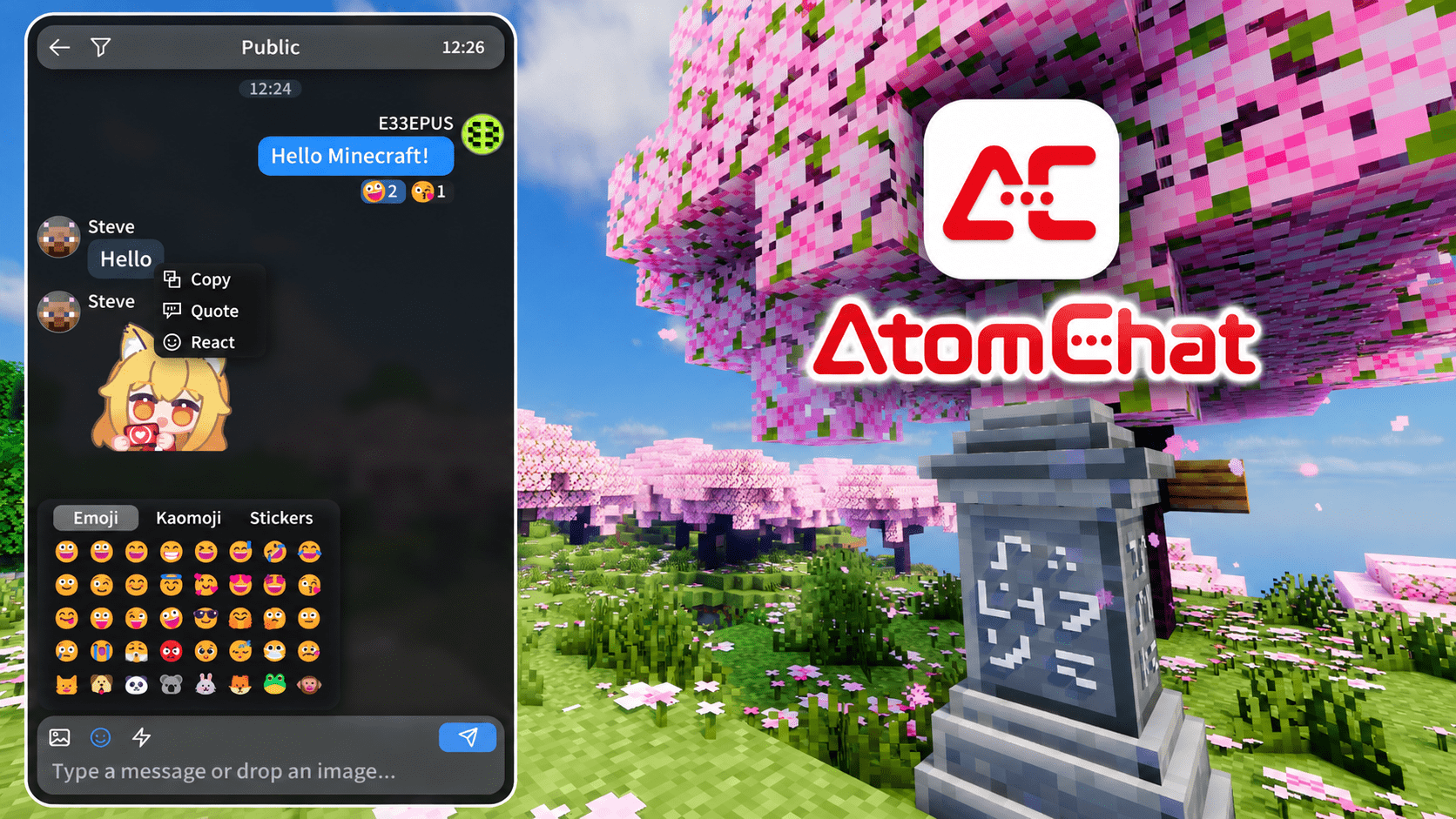
A phone-app style chat experience for Minecraft, powered by Skija.






AtomChat replaces the vanilla chat screen with a phone-style panel for public chat, private conversations and rich media. Its interface is vector-drawn with Skija and does not depend on vanilla chat textures.
Client required · Server optional. A server install adds hosted media, shared reactions, profile sync and server-provided content.
💬 Chat & Private Conversations
|
 |
🖼️ Media & Reactions
|
 |
👤 Profiles & Personalization
|
 |
✨ Effects & Sounds
|
✅ Compatibility
| Mod / protocol | Compatibility |
|---|---|
[[CICode]] — E33Chat / ChatImage |
Image-message protocol interoperability |
| ChatHeads | Compatibility with Hud |
| Chat Animation | Compatibility with Hud |
| Nickname / display-name plugins | Best effort; unrecognized formats may appear as system messages |
| EasyBot-MCDR | Common QQ relay formats are recognized |
| Quark | Known issue: the emote menu may not appear |
⚙️ Configuration & Storage
Expand for the client and server configuration paths and data locations.
The atomchat/ folder sits beside config/.
📁 Client Configuration & Local Content
| Path | Contents |
|---|---|
config/atomchat/atomchat-client.json |
Client settings; created on first launch. |
atomchat/client/avatar/avatar.* |
Custom profile avatar (png, jpg, jpeg or webp). |
atomchat/client/banner/banner.* |
Custom profile banner (png, jpg, jpeg or webp); stored directly in config/atomchat/. |
| atomchat/client/wallpaper/wallpaper.* | Custom panel wallpaper (png, jpg, jpeg or webp). |
atomchat/client/emotes/ |
Your own stickers (png, jpg, jpeg or gif); unlimited by default, with an optional emoteMax cap. |
atomchat/client/history/ |
Optional JSONL chat history, saved per server or world; off by default. |
| atomchat/client/presets/ | Saved appearance presets and their wallpaper copies. |
📦 Client Runtime Data
| Path | Contents |
|---|---|
atomchat/cache/images/ |
Chat image cache, capped at 500 files / 100 MB; files unused for 7 days are removed. View or clear it under Settings → About. |
atomchat/cache/packs/<server-key>/ |
Sticker packs downloaded from servers. |
atomchat/cache/debug/ |
Avatar sampling images written in debug mode. |
🖥️ Server Configuration & Data
| Path (relative to the server game directory) | Contents |
|---|---|
config/atomchat/atomchat-server.json |
Server hosting, capacity and server-pack settings. |
atomchat/server/emotes/ |
Sticker source offered to players; separate from a player's own emotes/ folder. |
atomchat/server/media/ |
Chat images and GIFs hosted by the server. |
atomchat/server/avatars/ |
Player avatars uploaded to the server. |
<world save>/atomchat/profiles/documents/ |
Synced profile records, one per player UUID. |
<world save>/atomchat/profiles/images/ |
World-scoped copies of synced profile images. |
🖥️ For Server
A server install enables hosted media and profiles, shared message reactions, and server-provided stickers and quick phrases.
⚙️ Configuration
The server creates config/atomchat/atomchat-server.json on first launch. Edit it directly or use /atomchat gui in-game (permission level 2).
🗂️ Media & Profile Hosting
hostingEnabledis on by default.- Defaults: 2 MB per file, 512 MB media storage, and 7-day media retention. Set
retentionDaysto0to keep hosted media indefinitely. - Custom profile images have a separate 64 MB per-world limit and are not removed by temporary media cleanup.
- Hosted files travel over the Minecraft connection; AtomChat opens no HTTP port.
🎁 Server Packs
packEnabledis on by default.- The server can offer up to 32 sticker files / 8 MB and up to 20 quick phrases of 200 characters each.
- Put server stickers in
config/atomchat/server-emotes/. The server icon and MOTD can provide the server identity shown in the client.
❓ FAQ
Is the server mod required?
No. The client mod works on its own. A server install enables hosted media, profile sync, shared reactions and server packs.
Where do images go?
With server hosting enabled, images are stored on that server and kept according to its retention settings. Otherwise uploads use uguu.se; those links expire after roughly three hours. Images upload only when you choose, paste or drag a file, but recipients may save or forward them. Chat history may also be saved locally by players who enable it. Do not send sensitive content.
Can I include AtomChat in a modpack?
Yes, under the MIT license. Keep the third-party notices with the distributed files.
📱 Feedback
AtomChat Team