Astral Dragon Pickaxe
- By
An evolving all-in-one tool with scalable AoE mining, smart tunneling, automation, enchantments, combat upgrades, loot filtering, and powerful mining utilities.
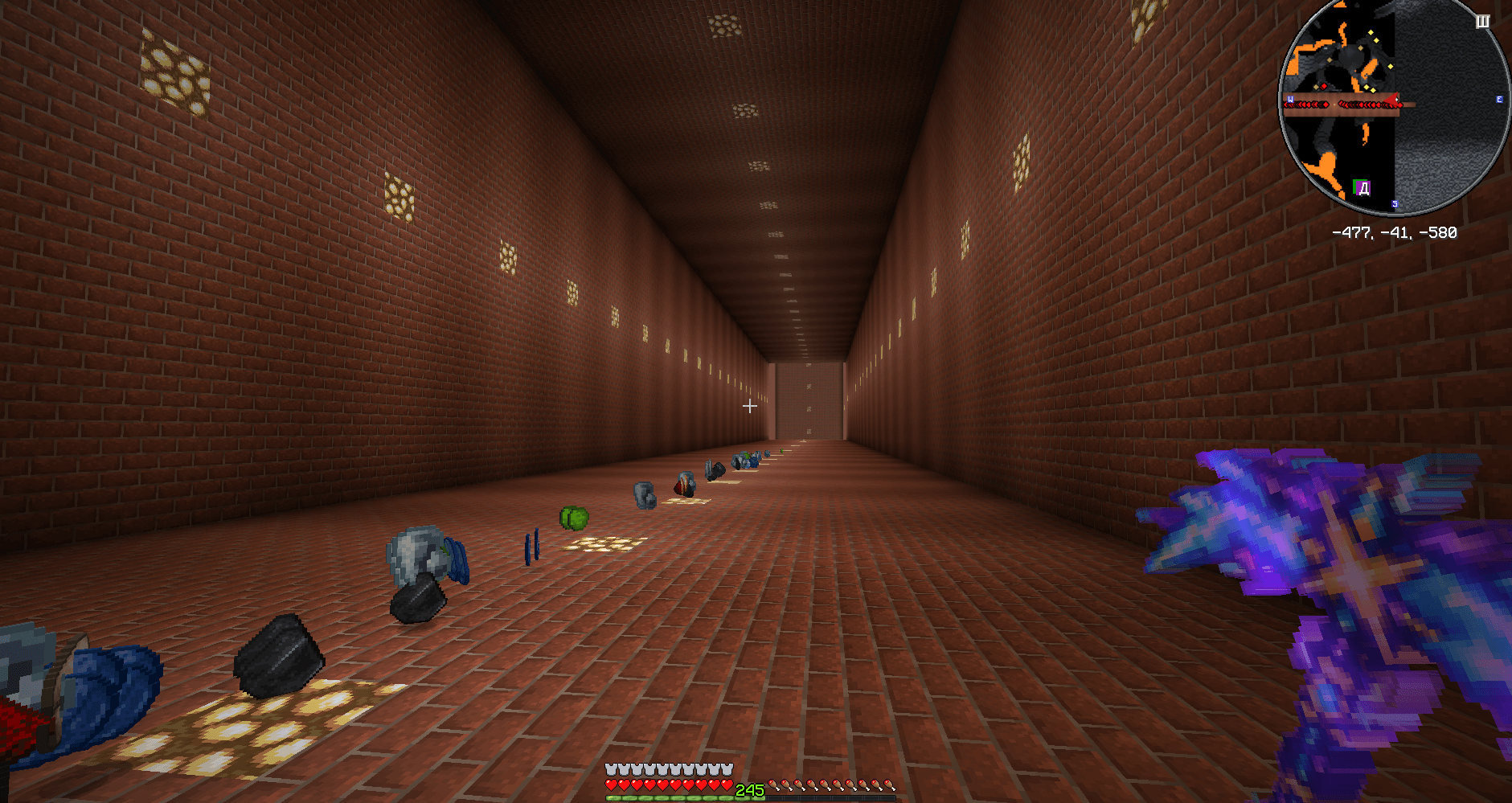
Tonnel.png
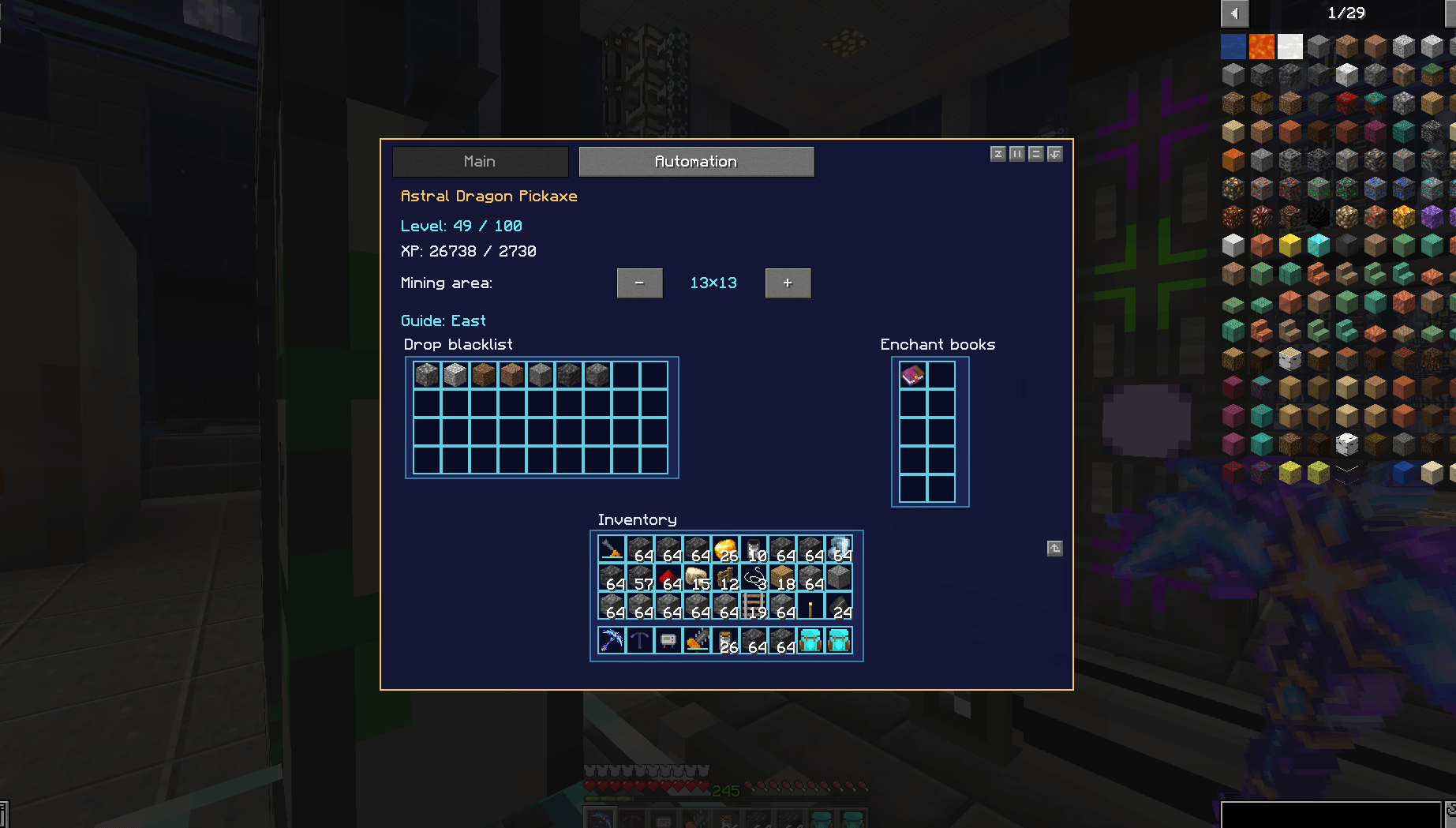
pickaxe_gui.png
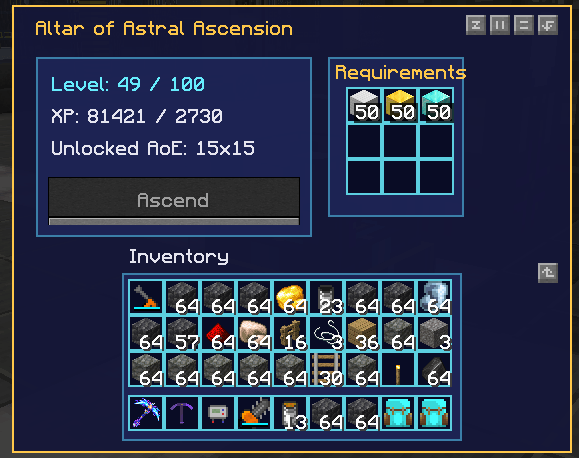
Altar_GUI.png

Craft.png
Description
Astral Dragon Pickaxe
Astral Dragon Pickaxe is a highly configurable, upgradeable endgame mining tool built around one idea: make large-scale mining powerful, comfortable, precise, and fun instead of turning it into repetitive inventory management and tunnel maintenance.
Starting as a relatively modest tool, the Astral Dragon Pickaxe can be evolved through 100 levels, gradually becoming a powerful all-in-one mining, combat, excavation, and tunnel-building tool with infinite durability.
Rather than simply increasing mining speed, the mod adds an entire set of quality-of-life systems designed around real mining problems: crooked tunnels, lava lakes, oceans, gravel collapses, full inventories, dark caves, giant natural caverns, repetitive vein mining, and the difficulty of keeping massive tunnels clean and symmetrical.
⭐ Key Features
Upgradeable Through 100 Levels
The pickaxe earns its own experience while mining blocks.
Experience requirements, resource costs, growth curves, and many other progression values are configurable.
Upgrading is performed at the Altar of Astral Ascension, where experience stored inside the pickaxe and configurable resources are consumed to increase its level.
Higher levels can improve:
- Mining speed
- Mining area
- Attack damage
- Overall mining efficiency
The progression can be tuned from relatively casual to extremely expensive depending on the modpack.
⛏️ Configurable AoE Mining
The Astral Dragon Pickaxe can mine increasingly large areas as it levels up.
Available mining sizes are automatically distributed across the configured maximum level and always use odd dimensions so the targeted block remains properly centered.
For example:
1×1 → 3×3 → 5×5 → ... → 25×25 → 31×31
The maximum mining area is configurable.
Unlocking a larger area does not force you to use it. You can freely reduce the active AoE whenever precision is more important than raw mining power.
Dedicated keybinds allow the mining area to be increased or decreased without opening the GUI.
✦ Astral Guide
One of the signature features of the mod.
The Astral Guide locks your tunnel to a fixed axis, helping you create perfectly straight horizontal or vertical shafts even if your camera moves slightly while mining.
A subtle astral marker shows the current target so you can turn around, move away, or reposition yourself without losing the direction of the tunnel.
If the next target position contains a normal block, that block becomes the target.
If the target is:
- Air
- Water
- Lava
the Guide can create a temporary solid target using its own configurable Guide block.
The Guide material is completely independent from Tunnel Lining. By default, the Astral Guide uses:
minecraft:cobblestone
This means you can use decorative materials for your tunnel walls without forcing the Guide to generate the same expensive or inventory-cluttering blocks.
The Guide can also be manually repositioned whenever you intentionally want to start a new tunnel axis.
🛡️ Safe Vertical Mining
Mining straight downward is normally one of the most dangerous things you can do in Minecraft.
The Astral Dragon Pickaxe can make it considerably safer.
With Safe Descent enabled, the tool checks the next level before removing the block beneath you.
If there is:
- A cave
- Water
- Lava
- Empty space
the pickaxe creates a temporary support block before allowing you to fall.
Safe Descent uses the same independently configurable block as the Astral Guide.
Instead of unexpectedly dropping through a huge cave or directly into lava, you descend one controlled layer at a time.
Vertical tunnel lining can be enabled or disabled independently.
🧱 Automatic Tunnel Construction
The pickaxe can do far more than remove blocks.
Tunnel Lining
Missing walls, floors, and ceilings can automatically be filled with a configurable block.
The default lining material is:
minecraft:stone
Tunnel Lining is completely independent from the Astral Guide material.
If your tunnel suddenly opens into a cave, the tool can maintain the shape of the tunnel instead of leaving giant holes everywhere.
PATCH Mode
Only missing parts of the tunnel shell are filled.
This is ideal when you want natural stone to remain intact while automatically sealing caves, gaps, and exposed areas.
REPLACE Mode
For players who care about perfectly designed mines, Tunnel Lining can operate in full replacement mode.
Instead of preserving the natural tunnel shell, it can replace it with a chosen building material.
For example:
- Main material:
Stone Bricks - Accent material:
Glowstone - Accent interval: every 5 blocks
This allows the pickaxe to create fully decorated underground corridors while you mine.
Replaced shell blocks do not generate drops by default for better performance, but this behavior can be configured.
🌉 Bridge Ahead
Large caves often interrupt automatic mining because there is no floor in front of the player.
Bridge Ahead solves this by extending a configurable walkway into empty space.
The default configuration creates a three-block-wide path several blocks ahead of the player, allowing continuous movement through ravines and enormous caves without constantly switching to building blocks.
Bridge Ahead uses the configured Tunnel Lining material, not the Astral Guide block.
🪨 Ceiling Stabilization
Gravel and sand above a freshly mined tunnel can collapse into the passage, ruin the clean shape of the tunnel, and sometimes allow water or lava above them to flood the mine.
Ceiling Stabilization detects vulnerable falling blocks before the tunnel is opened and stabilizes the ceiling using the configured Tunnel Lining material.
Instead of cleaning up a collapsed tunnel afterward, the problem is prevented before it happens.
🌊 Smart Fluid Handling
Water and lava are among the biggest problems when digging large tunnels.
Astral Dragon Pickaxe includes a dedicated fluid-processing system with multiple modes, allowing players and server owners to choose between minimal intervention and aggressive connected-fluid cleanup.
OFF
No automatic fluid removal.
BASIC
Designed for normal gameplay and recommended by default.
The tunnel is sealed where possible and liquid inside the immediate tunnel area is removed without searching through an entire connected lake or ocean.
This makes mining beneath oceans and through underground water or lava much more practical without performing an expensive connected-fluid search.
CONNECTED
Searches beyond the immediate tunnel and discovers connected water or lava around the newly opened area.
It is useful for underground lakes, lava systems, flooded caves, and other situations where simply clearing the tunnel interior is not enough.
Search padding, connected-fluid limits, per-tick processing limits, and other performance settings are configurable.
DRAIN
A dedicated aggressive draining mode intended for deliberate removal of large connected fluid regions.
The current optimized implementation uses the same frozen connected-fluid engine as CONNECTED rather than repeatedly waiting for Minecraft to refill the area between cleanup passes.
DRAIN can also be enabled or disabled independently by the server configuration.
Frozen Fluid Processing
CONNECTED and DRAIN temporarily suppress scheduled fluid updates inside the active working area while discovering and removing the connected liquid.
This prevents Minecraft from continuously recreating water sources or spreading liquid back into positions faster than the pickaxe can remove them.
The result is dramatically faster and more predictable cleanup of large bodies of water and lava.
Fluid removal is still distributed across server ticks and respects configured performance budgets.
A separate maximum fluid processing time acts as a safety mechanism. The default limit is:
30 seconds
If a fluid operation exceeds the configured limit, the remaining fluid work is aborted and the task is allowed to finish instead of leaving the Astral Core permanently overheated.
Solid waterlogged blocks are preserved where possible by removing their waterlogged state, while aquatic plants may be removed together with the surrounding liquid.
🔥 Stellar Resonance
Hold Ctrl while mining to activate Stellar Resonance.
Instead of using normal tunnel AoE, the pickaxe searches for connected blocks belonging to a supported resource group.
When used on ore, it mines the connected ore vein.
Ore families are respected:
- Iron Ore and Deepslate Iron Ore can belong to the same vein.
- Iron touching Diamond does not cause the Diamond vein to be mined.
- Properly tagged modded ores are supported.
But Stellar Resonance is no longer limited to ores and basic falling blocks.
The default configuration also supports connected resource groups such as:
- Sand and Red Sand
- Gravel
- Concrete Powder
- Glowstone
- Cobweb
- Clay
- Sculk
- Dripstone
- Nether and Warped Wart Blocks
- Giant Mushroom blocks
- Moss
- Vines
- Ice, Packed Ice and Blue Ice
- Obsidian
- Basalt
- Tuff
- Calcite
- Prismarine
- And more
These groups are data-driven.
Modpack authors can edit:
config/astraldragonpickaxe/resonance_groups.json
Groups can target exact Block IDs or block tags, making it possible to add modded resources without modifying the mod itself.
Each resource group can use the global Stellar Resonance block limit or define its own custom limit.
The global limit defaults to 100 blocks.
Falling-block groups are processed intelligently so large sand, gravel, or Concrete Powder deposits can be cleared more safely.
When Stellar Resonance is used on a normal unsupported block, only that single block is mined.
🎒 Automatic Loot Collection
Blocks mined by the Astral Dragon Pickaxe do not normally scatter drops across the ground.
Drops are processed and inserted directly into the player's inventory.
If the inventory is full, remaining items can fall normally instead of silently disappearing.
Loot calculation still respects compatible enchantments such as:
- Fortune
- Silk Touch
The system aggregates drops before inventory insertion, which becomes increasingly important when enormous AoE operations produce thousands of identical items.
🚫 Drop Blacklist
The pickaxe contains a built-in 36-slot drop blacklist.
Simply place a representative item into the blacklist interface.
The item is not consumed — it acts as a filter.
For example, if Cobblestone is blacklisted:
- Mining Cobblestone produces no Cobblestone.
- Mining Stone that would normally drop Cobblestone also produces no Cobblestone.
The blacklist checks the actual resulting drop, not only the original mined block.
This is especially useful once huge AoE sizes would otherwise fill your inventory with enormous amounts of unwanted common blocks.
🧲 Item Magnet
The pickaxe can function as a configurable item magnet even while it is simply sitting in your inventory.
When enabled, nearby dropped items are rapidly pulled toward the player.
The default radius starts at 10 blocks and can be configured.
The magnet is intentionally strong enough to help rescue drops before they remain in lava for too long.
🔮 Built-In Enchantment System
Shift + Right Click with the pickaxe to open its interface.
The pickaxe contains 10 enchanted-book slots.
Books placed inside the tool act as active enchantment modules.
Compatible mining and combat enchantments are supported, including examples such as:
- Fortune
- Silk Touch
- Efficiency
- Sharpness
- Smite
- Bane of Arthropods
- Looting
- Fire Aspect
- Knockback
- Sweeping Edge
Normal incompatibility rules still apply.
The books remain stored inside the individual pickaxe, allowing different Astral Dragon Pickaxes to have completely different builds.
⚔️ Pickaxe, Shovel, Axe and Sword in One Tool
The Astral Dragon Pickaxe replaces constant tool switching.
It can efficiently perform the roles of:
- Pickaxe
- Shovel
- Axe
- Sword
The tool has infinite durability and does not consume normal vanilla durability while mining or fighting.
Its Astral harvest tier allows it to harvest normally breakable vanilla blocks from the beginning, including high-tier materials such as Obsidian and Ancient Debris, while unbreakable blocks such as Bedrock remain protected.
Wooden structures encountered inside abandoned mineshafts can be handled without switching tools, while AoE behavior for wood can be configured independently.
Attack damage scales with the pickaxe level between configurable minimum and maximum values.
🔥 Astral Core Overheating
Extremely large AoE mining can generate more work than Minecraft can safely process in a single tick.
Instead of silently skipping tunnel sections or unpredictably disabling features, the pickaxe uses an immersive Astral Core overheating system.
Mining operations are processed through an ordered queue.
If the queue becomes too large, the Astral Core overheats and temporarily prevents additional tunnel operations until previous work has completed.
This keeps tunnel sections in the correct order and prevents situations where distant sections are mined while a wall is accidentally left directly in front of the player.
Performance profiles allow players or modpack authors to choose between smoother gameplay and faster processing.
Fluid operations additionally have their own configurable hard timeout, preventing exceptionally large liquid regions from keeping the tool overheated indefinitely.
🔦 Automatic Torches
The pickaxe can automatically place torches from the player's inventory while tunneling.
Torch behavior is configurable, including:
- Placement interval
- Wall placement
- Floor placement
- Multiple vertical rows in extremely large tunnels
Auto Torches are processed as a secondary task so critical mining work remains the priority.
If the feature is enabled and the necessary torches are available, the placement request is retained rather than silently discarded.
🐉 Altar of Astral Ascension
The Altar of Astral Ascension is the dedicated upgrade station for the Astral Dragon Pickaxe.
It displays:
- Current level
- Stored experience
- Unlocked mining area
- Required upgrade materials
Upgrade resource requirements can use arithmetic or geometric progression and can be customized extensively.
Both the pickaxe crafting recipe and altar crafting recipe are configurable.
🔌 Compatibility & Addon Support
Astral Dragon Pickaxe is designed to cooperate with other mods instead of requiring every mining system to be replaced.
Ore Excavation
Dedicated compatibility is included for Ore Excavation on Minecraft 1.19.2.
When Ore Excavation is actively controlling a mining action, Astral Dragon Pickaxe yields that excavation to Ore Excavation instead of attempting to run both bulk-mining systems simultaneously.
Astral progression XP is still awarded for blocks mined through this compatibility path.
During an Ore Excavation-controlled action, Ore Excavation/vanilla handles that operation's bulk drops rather than stacking Astral AoE, Drop Router, and blacklist processing on top of it.
Astral Dragon Pickaxe also registers itself through standard Forge tool tags to improve compatibility with third-party mods that detect pickaxes, shovels, axes, swords, or generic tools through Forge tags.
Drop Router API
Astral Dragon Pickaxe includes a public drop-routing API for high-capacity storage addons and other integrations.
Mining follows a pipeline similar to:
Mining → Loot Processing → Blacklist → Aggregation → External Drop Targets → Player Inventory → World
External storage integrations can therefore receive large aggregated mining outputs before they are split into normal inventory-sized stacks.
This architecture is especially useful for companion mass-storage systems such as Astral Storage, allowing enormous mining operations to feed external storage without rewriting the Astral mining engine.
⚙️ Highly Configurable
Astral Dragon Pickaxe is designed to work both as a standalone progression tool and as part of heavily modified modpacks.
Most gameplay and balance settings are available directly through the localized in-game configuration interface.
The main configuration is stored in:
config/astraldragonpickaxe-common.toml
Additional data-driven configuration files include:
config/astraldragonpickaxe/progression.jsonconfig/astraldragonpickaxe/recipes.jsonconfig/astraldragonpickaxe/resonance_groups.json
Configurable systems include:
- Maximum level
- Mining speed
- Minimum and maximum attack damage
- Starting and maximum AoE
- Experience progression
- XP gained from block groups
- Resource progression
- Per-resource upgrade multipliers
- Custom level requirements
- Tunnel Lining material
- Astral Guide material
- Decorative accent blocks
- Fluid modes and processing limits
- Fluid operation timeout
- Stellar Resonance groups and limits
- Magnet radius
- Torch placement
- Bridge distance and width
- Performance budgets
- And more
The configuration interface is available in both English and Russian, following the selected client language.
⚡ Performance-Focused Large-Scale Mining
Large mining areas can potentially involve hundreds or thousands of block operations.
Astral Dragon Pickaxe includes several systems specifically designed to keep this manageable:
- Ordered tunnel processing
- Per-tick work budgets
- Processing-time budgets
- Aggregated loot insertion
- Primitive connected-resource traversal
- Frozen connected-fluid processing
- Configurable fluid limits and timeout
- Lightweight bridge and guide logic
- Astral Core overheat protection
- Performance presets
- Optional diagnostic logging
Large AoE sizes and enormous connected searches are still inherently more demanding than normal Minecraft mining, but the mod is designed to spread expensive work across server ticks, preserve operation order, and stop runaway tasks instead of performing unlimited work in a single tick.
🎮 Controls
Shift + Right Click Open the Astral Dragon Pickaxe interface.
Ctrl + Left Click Activate Stellar Resonance.
Ctrl + Right Click on a block Manually reposition the Astral Guide.
Increase / Decrease AoE keybinds Change the active mining area without opening the GUI.
All configurable keybinds can be reassigned through Minecraft's Controls menu.
📦 Requirements
- Minecraft: 1.19.2
- Mod Loader: Forge
- Tested Forge Version: 43.4.12
- Java: 17
✨ Designed for Both Small and Ridiculous Mines
You can use Astral Dragon Pickaxe as a convenient upgradeable everyday tool…
…or configure it to carve enormous decorated tunnels, bridge caves automatically, stabilize ceilings, drain liquids, collect and route massive amounts of loot, illuminate passages, mine connected resource deposits, and keep the result perfectly straight.
How powerful it becomes — and how expensive that power is — is largely up to you.
The Astral Dragon Pickaxe Team