
ASCENDERSMC-COBBLEWORLD
A client-side setup and update manager for AscendersMC CobbleWorld, with user-approved mod, configuration and resource pack installation.
Captura.PNG
Description
# VERSION: ENGLISH
ASCENDERSMC CobbleWorld
One mod. One installation. Everything you need for AscendersMC CobbleWorld.
Overview
ASCENDERSMC CobbleWorld is a client-side installation and update management utility developed for the AscendersMC Network.
Its purpose is to simplify the setup and maintenance of the CobbleWorld experience by managing the required Minecraft mods, configuration files, resource pack, and multiplayer server entry through a single installation assistant.
Instead of requiring players to manually download, organize, and update multiple files, this utility provides a guided process with clear information about the changes being made.
All downloads and file modifications require user authorization.
The project does not replace Minecraft, NeoForge, or the player's launcher.
Main Features
1. All-in-One Installation
Players only need to place the ASCENDERSMC CobbleWorld JAR in their Minecraft instance's mods folder.
The installation assistant manages four essential components:
- Mods: Installs and updates the Java mods required by the official CobbleWorld distribution.
- Configurations: Manages the distributed configuration files and default configurations.
- Resource Pack: Installs and enables the official AscendersMC CobbleWorld resource pack.
- Multiplayer Server: Adds the AscendersMC server to the Minecraft multiplayer server list without removing existing servers.
These components form a complete CobbleWorld profile and are managed together.
2. Guided Installation Interface
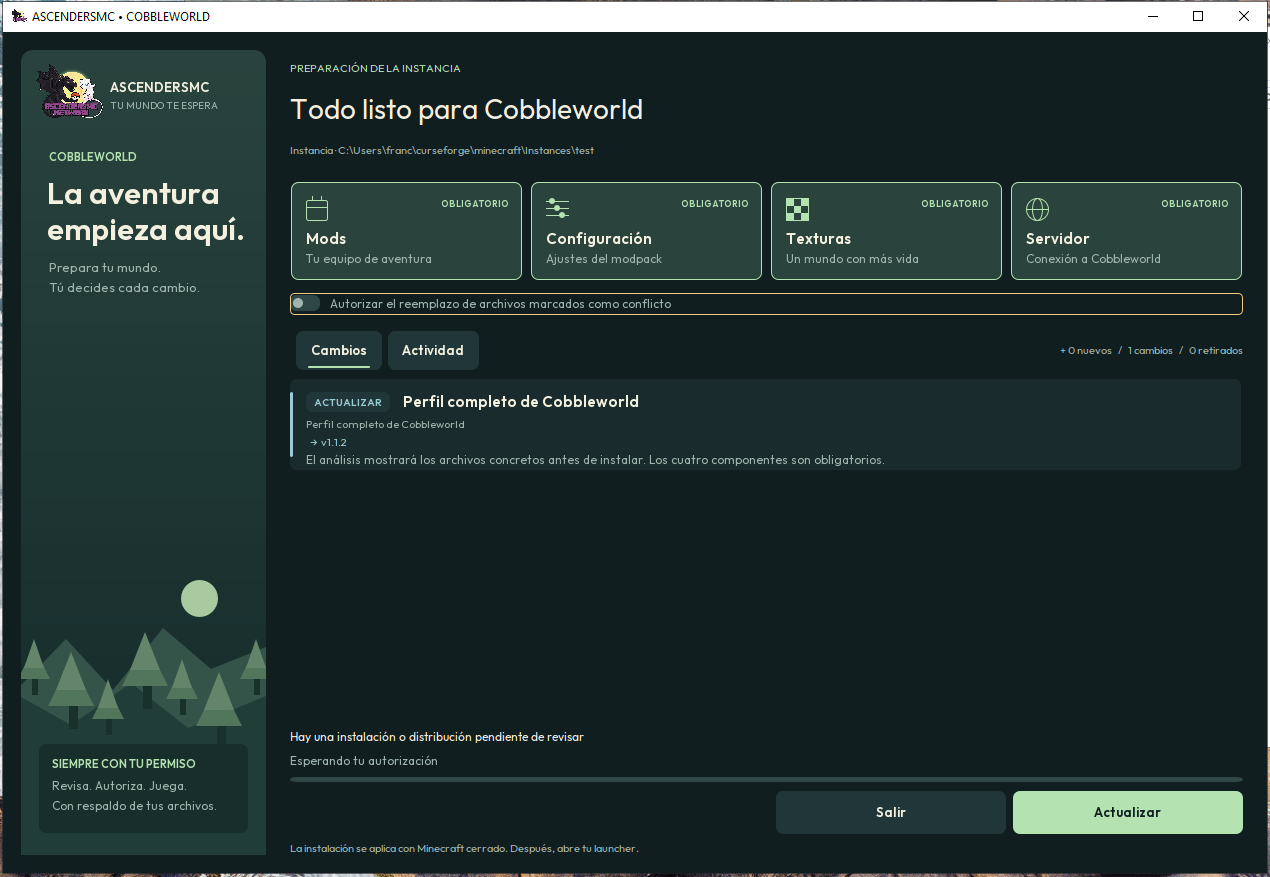
The mod features a custom graphical installer displayed during Minecraft startup when installation or maintenance is required.
The interface provides:
- Install and Update actions.
- A detailed, scrollable list of proposed file changes.
- Installation status and progress indicators.
- Information about files to be added, updated, removed, or preserved.
- Conflict detection and replacement confirmation.
- Clear cancellation and exit options.
- A completion screen summarizing the operation.
No installation is performed simply because the assistant appears. Players must review and approve the required operations.
3. Automatic Update Detection
The utility checks the installed CobbleWorld distribution against the officially published release information, using the player's previously granted permission.
It can identify missing files, outdated components, newly published versions, and changes to managed resources.
If the installation is already complete and current, Minecraft continues loading without showing the installation assistant.
Remote version checks do not automatically authorize downloads or installations.
4. In-Game Resource Pack Updates
The resource pack can be updated while Minecraft is running, without requiring a complete game restart.
When a resource pack update is detected, the mod displays a temporary notification.
Players can open the update manager, review the proposed changes, and approve the installation.
The resource pack is reloaded after the update so that the new resources can become available during the current session.
Changes involving Java mods are handled during startup and require restarting Minecraft.
5. Installation and File Management
The utility compares the published distribution with its previously managed installation.
It can:
- Install missing required files.
- Replace outdated managed files.
- Detect conflicts with local modifications.
- Preserve unrelated user-installed mods.
- Back up managed files before replacement or removal.
- Attempt recovery when a file operation fails.
- Avoid reinstalling unchanged files.
- Restore the official server entry if it has been removed.
The installer does not indiscriminately delete the player's personal mods.
6. Download Integrity and Security Controls
Official distribution files are retrieved through HTTPS from the configured GitHub Releases repositories.
The installer implements safeguards including:
- SHA-256 integrity verification against published release metadata.
- Download size and archive validation.
- Restricted download destinations.
- Path traversal and unsafe file path protection.
- Checks for potentially malformed archives.
- Installation conflict detection.
- File backups and transaction recovery.
- Prevention of overlapping installation operations.
These safeguards reduce common installation risks but do not replace the need to trust the distribution publisher and respect third-party mod licenses.
7. Launcher Independence
The utility operates inside the existing Minecraft game directory and does not require a dedicated AscendersMC launcher.
It is designed to work with supported Java-based Minecraft instances running the required NeoForge version.
It does not modify Minecraft account credentials, replace the launcher, or change launcher memory settings.
8. Loader Compatibility Warnings
CobbleWorld requires NeoForge.
If a supported incorrect mod loader is detected, the JAR includes a warning mechanism explaining the required environment and providing access to the official NeoForge website.
The warning does not make the mod compatible with Forge, Fabric, or Quilt.
9. User-Controlled Updates
The player remains in control of the update process.
The utility requests authorization before downloading distribution archives for installation analysis and before applying changes.
Permission for periodic update checks can be enabled or disabled from the in-game manager.
Declining an operation preserves the existing installation, although required missing or outdated components may prevent the CobbleWorld setup process from continuing.
Controls
- F8: Open the in-game update manager.
- F9: Dismiss the temporary resource pack update notification.
Both keys can be reassigned through Minecraft's Controls menu.
Requirements
- Minecraft: Java Edition 1.21.1
- Mod Loader: NeoForge 21.1.x, version 21.1.248 or newer
- Java: 21, 64-bit
- Environment: Client-side
- Internet: Required for the initial installation and remote updates
NeoForge must be installed separately before using this utility.
How to Install
- Create or select a Minecraft 1.21.1 instance.
- Install the compatible NeoForge loader.
- Download the ASCENDERSMC CobbleWorld mod from CurseForge.
- Place the JAR file inside the instance's
modsfolder. - Start Minecraft using that NeoForge instance.
- Review the installation assistant and authorize the required downloads and changes.
- After installation, close and restart Minecraft from your launcher.
- Connect to AscendersMC through the multiplayer server list.
Subsequent launches automatically verify the managed installation according to the player's update-check preferences.
Distribution and Third-Party Content
ASCENDERSMC CobbleWorld is a dedicated management utility for the AscendersMC Network. The utility JAR does not bundle the complete third-party modpack.
The required content is obtained separately from the distribution repositories configured for the AscendersMC CobbleWorld profile, with user approval.
Third-party mods remain the property of their respective authors and are subject to their individual licenses and distribution terms.
This project is not affiliated with or endorsed by Mojang Studios, Microsoft, or the NeoForge development team.
Important Notes
- This utility is designed for the AscendersMC CobbleWorld distribution, not as a universal modpack installer.
- It does not install NeoForge or Minecraft itself.
- It does not automatically modify files without the required authorization.
- It does not modify player worlds or Minecraft account credentials.
- Mod installation and replacement require Minecraft to restart.
- Resource pack updates can be applied during gameplay.
- Installation requires an internet connection and access to the official distribution sources.
Developed by AscendersMC Network.
# VERSION: ESPAÑOL
ASCENDERSMC COBBLEWORLD
UN SOLO MOD. UNA SOLA INSTALACIÓN. TODO LO QUE NECESITAS PARA ASCENDERSMC COBBLEWORLD.
¿QUÉ ES ASCENDERSMC COBBLEWORLD?
ASCENDERSMC CobbleWorld es un mod de instalación, configuración y actualización desarrollado para facilitar el acceso al servidor CobbleWorld de AscendersMC Network.
Su función principal es permitir que los jugadores preparen su cliente de Minecraft utilizando un único mod, sin tener que descargar, ordenar e instalar manualmente todos los archivos de la distribución.
El sistema administra cuatro componentes fundamentales:
- Mods: Instalación y actualización de los mods requeridos para CobbleWorld.
- Configuraciones: Administración de los archivos de configuración oficiales.
- Texture Pack: Instalación, activación y actualización del paquete de recursos.
- Servidor: Registro automático de AscendersMC en la lista multijugador, previa autorización.
PRINCIPALES CARACTERÍSTICAS
INSTALACIÓN TODO EN UNO
El jugador únicamente necesita colocar el archivo JAR de ASCENDERSMC CobbleWorld en la carpeta mods de una instancia compatible con NeoForge.
Al iniciar Minecraft, el sistema comprueba si existen componentes pendientes de instalación o actualización.
Si encuentra cambios, muestra un asistente que permite revisar y autorizar la operación.
ASISTENTE DE INSTALACIÓN PERSONALIZADO
Incluye una interfaz gráfica propia que informa al jugador sobre las operaciones necesarias.
Permite consultar:
- Mods nuevos que serán instalados.
- Archivos que necesitan actualizarse.
- Componentes retirados de la distribución oficial.
- Archivos que se conservarán.
- Conflictos con modificaciones existentes.
- Progreso de preparación e instalación.
- Resultado final y cambios realizados.
Las instalaciones y modificaciones requieren confirmación del usuario.
DETECCIÓN INTELIGENTE DE ACTUALIZACIONES
Comprueba la información de las versiones publicadas y la compara con los componentes administrados localmente.
Si el perfil está completo y actualizado, Minecraft continúa su inicio normalmente, sin mostrar nuevamente el asistente.
Las comprobaciones remotas requieren un permiso previo que el jugador puede revocar.
ACTUALIZACIÓN DE TEXTURAS EN TIEMPO REAL
Permite recibir avisos sobre nuevas versiones del texture pack mientras el jugador está dentro de Minecraft.
Al autorizar la actualización, el sistema descarga y verifica el paquete, lo reemplaza y recarga los recursos del juego.
Este procedimiento no requiere reiniciar completamente Minecraft cuando solamente cambian las texturas.
ADMINISTRACIÓN DE MODS Y CONFIGURACIONES
El sistema identifica los archivos que pertenecen a la distribución administrada y compara sus versiones y contenidos.
Puede agregar archivos faltantes, reemplazar versiones antiguas y retirar componentes oficiales obsoletos.
También conserva los mods adicionales del jugador y utiliza respaldos para ayudar a restaurar los archivos administrados cuando una operación falla.
CONFIGURACIÓN DEL SERVIDOR
Registra ascendersmc.online en la lista multijugador de Minecraft.
Si el jugador elimina esa entrada, el asistente puede proponer agregarla nuevamente.
Los demás servidores registrados se conservan.
También activa el paquete de recursos oficial, respetando los otros paquetes seleccionados por el jugador, y establece la escala de interfaz recomendada cuando no existe una configuración previa.
SEGURIDAD Y CONSENTIMIENTO
Las descargas se realizan mediante HTTPS desde las publicaciones configuradas de GitHub Releases.
El sistema incluye verificación SHA-256, controles de archivos comprimidos, validación de rutas, detección de conflictos, respaldos y recuperación de operaciones.
El usuario debe autorizar las operaciones que descargan o modifican archivos.
El mod no administra las credenciales de Minecraft, las cuentas del launcher, los mundos del jugador ni la memoria RAM asignada.
COMPATIBILIDAD CON LAUNCHERS
Funciona dentro de la instancia Minecraft y no necesita sustituir el launcher utilizado por el jugador.
Requiere Minecraft Java Edition 1.21.1, Java 21 y NeoForge 21.1.248 o superior dentro de la rama 21.1.x.
Incluye avisos para determinados cargadores incorrectos, orientando al usuario hacia NeoForge.
CONTROLES
- F8: Abre el administrador de actualizaciones dentro del juego.
- F9: Oculta temporalmente la notificación de nuevas texturas.
Las teclas son configurables desde los controles de Minecraft.
INSTRUCCIONES DE INSTALACIÓN
- Instala Minecraft Java Edition 1.21.1.
- Configura NeoForge 21.1.248 o una versión compatible superior.
- Descarga ASCENDERSMC CobbleWorld desde CurseForge.
- Coloca el archivo JAR en la carpeta
mods. - Inicia Minecraft.
- Revisa los archivos que propone instalar el asistente.
- Autoriza la instalación y espera a que finalice.
- Reinicia Minecraft desde tu launcher.
- Accede a AscendersMC desde el menú multijugador.
INFORMACIÓN ADICIONAL
ASCENDERSMC CobbleWorld es una herramienta exclusiva para administrar la distribución de CobbleWorld en AscendersMC Network.
No contiene todos los mods de terceros dentro del JAR y no instala Minecraft ni NeoForge.
El contenido adicional se obtiene desde las publicaciones configuradas, respetando las autorizaciones del usuario. Los mods de terceros pertenecen a sus respectivos desarrolladores y conservan sus licencias.
Desarrollado por AscendersMC Network.
ASCENDERSMC-COBBLEWORLD Team

