Artificial Intelligence (AI)
- By
In-game AI assistant that scans the modpack for installed mod's and answers questions about items, mods and recipes — with animated crafting guides. Works offline in search mode; paste a free API key for smart conversational answers.

# ✦ AURA — AI Modpack Assistant
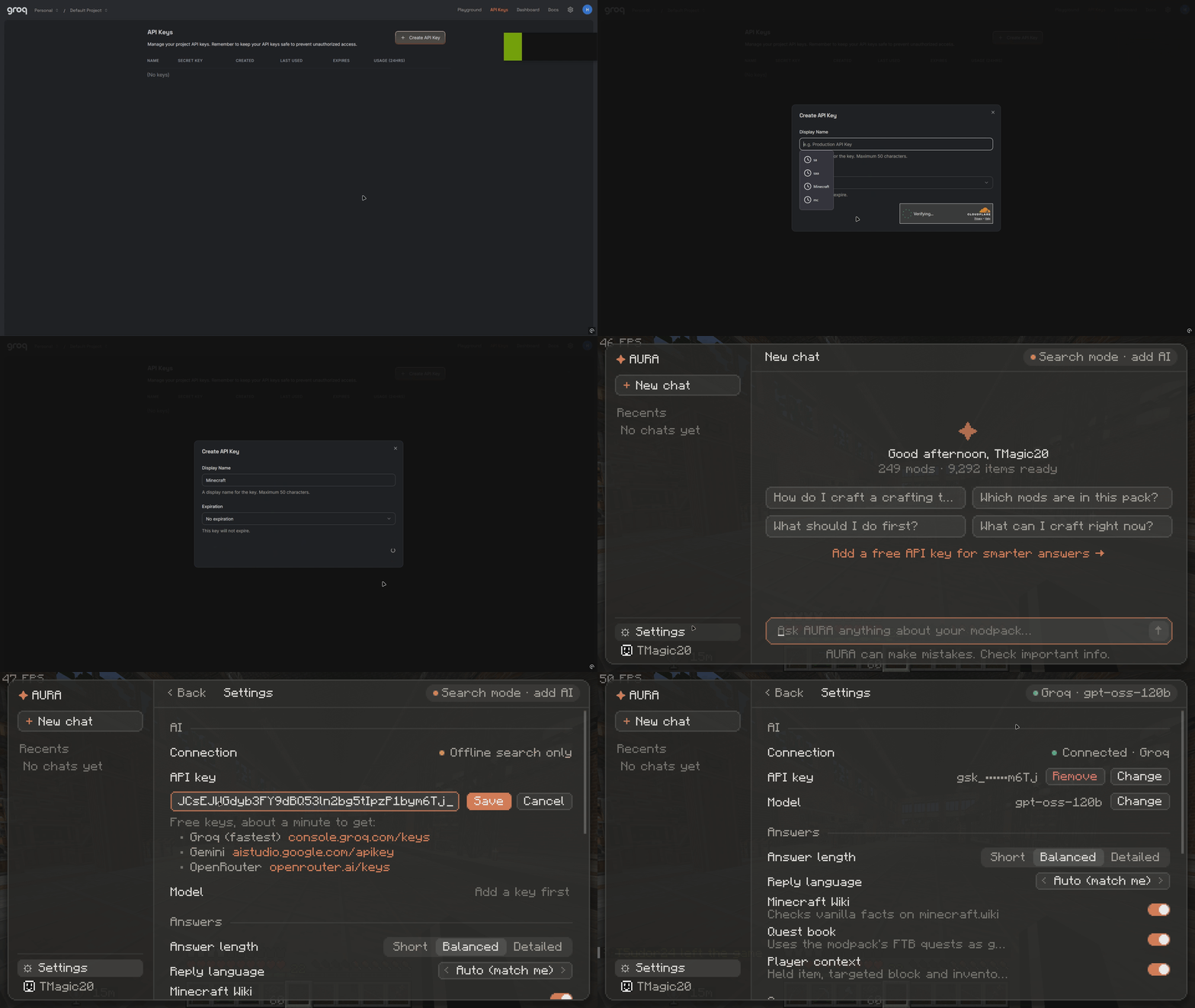
How to add an API key
Press **G** in any modpack or just vanilla and ask questions in English (or your own language)
- *"how to craft a crafting table"* — get the answer **plus an animated crafting grid** with real item icons
- *"does this pack have tech mods?"* — AURA knows every installed mod
- *"how does the bundle work?"* — answers grounded in the Minecraft Wiki
## How it works
On first launch AURA scans your modpack at runtime — **every mod, every item, every recipe**. No data files to download, no per-modpack setup: it adapts to whatever pack you drop it into.
## Two modes
**🔍 Search mode (default, fully offline)**
Instant answers built from the scanned data: item tooltips, source mod, recipes and usage stats. No account, no internet needed.
** AI mode (optional, one paste)**
Click the status line and paste a **free** API key — AURA auto-detects the provider and gives conversational answers with follow-up memory, streaming text and language matching.
Get a free key in about a minute:
- **Groq** (fast) — https://console.groq.com/keys — key starts with `gsk_`
- **OpenRouter** — https://openrouter.ai/keys — key starts with `sk-or-`
You only paste the key; the endpoint and model are set automatically. You can also point it at a local Ollama server if you run one.
## Features
- Space-themed chat UI with a floating recents sidebar
- Conversation history saved between sessions
- Animated 2×2 / 3×3 crafting guides with real item icons
- Minecraft Wiki grounding for accurate vanilla facts (toggleable in config)
- Answers in the language you type in
## Requirements
- Minecraft **1.20.1**, **Forge 47+**, client-side only
- AI mode: a free API key **The mod downloads nothing and starts no background processes.**
## Notes
- Your API key is stored in `config/aiassistant-client.toml`. If you share your modpack, clear it first so each player adds their own.
- Search mode works for everyone; AI mode is an optional bonus.
Artificial Intelligence (AI) Team